Repository navigation
EN lab 05 1
Lab index | Français | Continue to Lab 5 | Foundry IQ prerequisites
Prepare infrastructure for the Search exercises without assuming that a successful Terraform deployment also creates an index, configures a new Foundry project, or grants the interactive user access. Allow 45–90 minutes for review and an approved deployment; quota requests can take longer.
Important
Paid execution was explicitly approved and the 15-instance deployment completed
after correcting the rejected GPT-4o version to 2024-11-20 and preserving
policy-enforced keyless/private-Storage settings in the working copy.
This is not an unchanged-source apply. Actual model and retrieval calls passed.
Cleanup and independently verified resource absence are recorded in the
rerun evidence.
The procedure below remains the complete operator guide. Only the commands identified in the rerun evidence have actually executed; an apply does not certify the full agent integration. Do not execute deployment or deletion commands without the resource owner's approval.
The current reconciliation
restores official checksum-verified Terraform 1.16.6 and checks a private,
byte-identical copy of 23 original files. init and validate exit 0;
validation reports zero errors and warnings. The saved plan exits 2 with
15 proposed instances. AzureRM 4.45.1, AzAPI 1.15.0, AzureAD 2.48.0,
Random 3.6.1 and HTTP 3.6.3 are resolved. Provider auto-registration is disabled.
No apply or destroy occurs, and the plan-only group is independently verified absent.
This closes D5-02 and D5-03, not the whole deployment sequence. The original plan
still selects the historically rejected GPT-4o 2024-05-13, public/local-auth
defaults, no Search identity and no private endpoint or Foundry project.
Historical corrected apply, policy-preserving overrides and separate runtime
identity setup remain distinct evidence; do not reapply merely to repeat them.
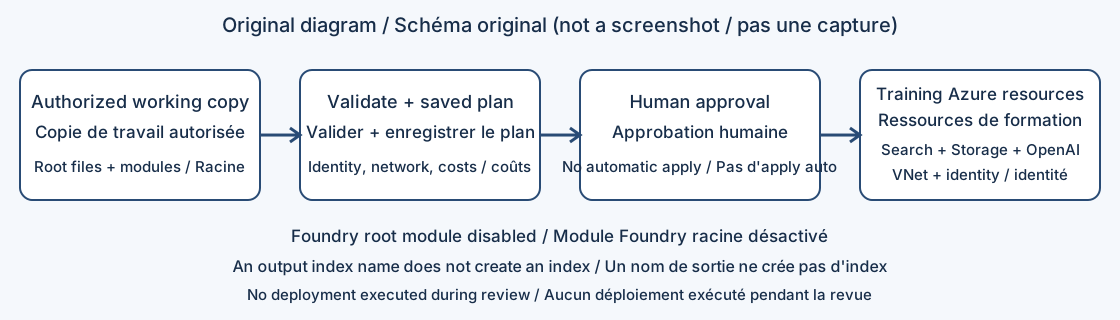
Figure 1. Original explanatory diagram, not a screenshot. The optional Foundry module is disabled in the supplied root configuration.
You need:
- An approved subscription, dedicated training resource group, budget owner, resource location and model location
- Azure CLI and a supported Terraform installation on your workstation
- Permission to create resources and to assign roles; Contributor alone cannot create role assignments
- Adequate Azure OpenAI deployment quota for the selected region, model, deployment type and capacity
- The complete authorized
scriptsdirectory, including its localmodulessubdirectories - Secure storage for Terraform state and any credentials; an administrator-approved network design
The workshop suggests Azure CLI 2.50 or later and Terraform 1.5 or later. The actual root configuration accepts Terraform >= 1.4.6; this is a minimum constraint, not proof that every later release has been tested. Preserve a reviewed toolchain and provider lock file instead of selecting versions by date alone.
- Work from an authorized local copy of the complete
scriptsdirectory. This documentation repository does not redistribute the protected source. - Confirm
main.tf,providers.tf,variables.tf, andoutputs.tfexist at the root. - Confirm local modules
vnet,mi,st,openai, andsearchexist. An additionalai-foundrydirectory is present but its root module call is commented out. - Review provider constraints. The inspected root declares AzureRM
~> 4.45.1, AzAPI~> 1.0, AzureAD2.48.0, and Random3.6.1. - Read each child module, not only the root variables. A variable name does not establish that its value is used.
- Record a source version or an approved file-hash inventory in your private evidence store. Do not publish source paths, tenant details or state.
| Area | Inspected behavior | Consequence before deployment |
|---|---|---|
| Foundry hub/project | Root ai_foundry module call and corresponding project outputs are commented out |
The active deployment does not create the advertised hub/project/Key Vault stack |
| Search SKU | The child module selects standard
|
Budget for Standard; do not describe this as a free Search deployment |
| Semantic ranker |
semantic_search_sku is free
|
This is a semantic-query allowance, not a free Search service |
| Search IP rules | Root passes allowed_ips, but the child resource sets it to null
|
Changing the variable does not implement an IP allowlist |
| Entra toggle |
enable_entra_id_authentication is declared but not referenced in the active configuration |
The toggle is not a working authentication policy |
| Local Search authentication | The resource explicitly enables local authentication | Do not claim keyless-only authentication |
| Managed identities | A user-assigned identity receives Search and OpenAI roles; no Search service identity attachment appears in the active Search resource | Roles assigned to that identity do not automatically authorize the Search indexer or your signed-in user |
| Network | A VNet is created; OpenAI explicitly enables public access; active modules do not declare private endpoints | VNet presence does not imply private connectivity |
| Search index |
ai_search_index_name resolves to a literal default label |
The output does not prove that any data-plane index was created |
| Models | Embedding model is text-embedding-ada-002 version 2; chat deployment is gpt-4o version 2024-05-13
|
Check lifecycle, regional availability, quota and dimensional compatibility |
Microsoft's model retirement schedule currently marks that GPT-4o version deprecated, with retirement listed for 2026-12-09. Recheck before deployment; do not substitute a model name without checking its supported APIs and quality. This review did not resolve provider modules or prove their compatibility with the current Azure control plane.
- Ask the subscription owner to approve the target subscription, resource group, selected regions, maximum spend and cleanup date.
- Distinguish the deployment identity, your interactive lab identity, the Search service identity and the Foundry project identity. They are not interchangeable.
- Ensure the deployment identity can create role assignments at the chosen scope. Use Owner, User Access Administrator, Role Based Access Control Administrator, or an appropriate custom role together with resource-creation rights.
- Have the administrator confirm required provider registrations, including
Microsoft.Search,Microsoft.CognitiveServices,Microsoft.Storage,Microsoft.Network, andMicrosoft.ManagedIdentity. AddMicrosoft.KeyVaultandMicrosoft.MachineLearningServicesonly if the revised design actually needs them. - Estimate costs from resource SKUs, model capacities, storage, embeddings, semantic queries and later agent usage.
terraform planis not a pricing engine. - Select a network policy. If private access is required, stop until the configuration implements private endpoints, DNS and an approved Power Platform connectivity path.
The Search RBAC reference separates object management from document read/write. The Terraform authentication guide describes supported identity paths.
-
Open PowerShell in your authorized working copy of
scripts, not in the read-only source directory. -
Verify tools without changing infrastructure:
az --version terraform version -
Sign in only when required by your organization's process, then select the approved subscription. Keep real identifiers out of shared transcripts.
-
Create a private variable file using the supplied variable names. At minimum, set
subscription_id,resource_group_name,location, andlocation_azopenai. The two location settings are independent. -
Preserve unique resource names or the reviewed random suffix behavior. Global name availability is not guaranteed by a local plan.
-
Check that the working copy excludes
.env, variable secrets, state, state backups,.terraform, and saved plans from publication. Retain the provider lock file under the team's approved versioning policy. -
Review the network and identity findings above with the instructor. Stop here if required controls are absent. Documentation does not silently repair the supplied configuration.
Never print complete terraform output -json, state, debug logs, or environment files into an issue or screenshot. A value marked sensitive can still be present in state.
These commands download modules/providers or query Azure when the operator runs them. They are not offline evidence from this review.
-
Initialize only the approved working copy:
terraform init
-
Validate formatting and configuration:
terraform fmt -check -recursive
terraform validate
-
Resolve missing local modules, unsupported provider arguments and incompatible constraints before continuing. Do not upgrade all providers as an unreviewed workaround.
-
Produce a saved execution plan:
terraform plan -out=training.tfplan
terraform show -no-color training.tfplan
-
Review every create, update and delete with the owner. Check selected subscription, both regions, model versions, capacities, public access, role assignees and any unexpected replacements.
-
Compare the plan with the intended inventory: resource group, VNet, user-assigned identity, role assignments, storage account, Azure OpenAI account/deployments and Search service. Do not expect a Foundry project from the disabled module.
-
Secure the plan file because it can contain sensitive values. Obtain explicit human approval of this exact plan before apply.
A plan that creates zero resources is not automatically correct; it may target the wrong state or existing environment. A nonzero Terraform exit code is a failure requiring investigation. If you intentionally use -detailed-exitcode, distinguish 0 (no changes), 2 (changes), and 1 (error).
-
After approval, apply the reviewed file:
terraform apply training.tfplan
-
Treat applying a saved plan as the approval boundary: it does not provide another interactive confirmation. Never add
-auto-approveto make the exercise unattended. -
Inspect only the required nonsecret outputs:
terraform output -raw resource_group_name
terraform output -raw ai_search_service_name
terraform output -raw ai_search_endpoint
terraform output -raw openai_embedding_deployment_name
-
In Azure portal, confirm that each expected resource exists in the approved group and region. Confirm deployed model versions and actual capacities.
-
On Search, verify effective network and authentication settings. On Storage/OpenAI, verify which identity actually has each role.
-
Grant the interactive lab user the required data-plane roles through the administrator. Configure a Search service identity separately if using identity-based indexer ingestion.
-
Continue with Lab 5 to create data-plane objects and prove ingestion/query behavior.
-
Before Lab 6, create or select a supported new Foundry project through an approved process. The commented hub-based module is not a drop-in new-project provisioner.
The table combines the current original-source tool checks with the historical corrected deployment. The corrected apply and cleanup are not an unchanged-source apply or proof of a currently retained resource's deletion. D5-04, D5-08 and D5-09 still lack complete acceptance evidence for their exact assertions; later scoped Search and Foundry work must not silently close them.
| ID | Check | Required result | Review evidence |
|---|---|---|---|
| D5-01 | Required files and active module directories exist | Four root files and all five active module paths present | Passed by local inspection |
| D5-02 | Terraform installation | A supported version is reported | Current verified portable 1.16.6 |
| D5-03 | terraform validate |
Exit 0; successful validation message |
Current exit 0; zero errors/warnings |
| D5-04 | Owner reviews saved plan | No unapproved deletes, replacement, public exposure or assignees | Not run |
| D5-05 | Apply and inspect actual inventory | Apply exit 0; resources match the approved plan |
Historical corrected apply passed; not unchanged-source apply |
| D5-06 | Use the index-name output as existence proof | Reject this inference; verify an actual index separately | Static mismatch confirmed |
| D5-07 | Change allowed_ips in the supplied root |
Do not expect a firewall change from the current child resource | Static mismatch confirmed |
| D5-08 | Query a Lab 5 test index as the lab user | Authorized request succeeds; unauthorized identity is denied | Not run |
| D5-09 | Check Foundry prerequisite | New Foundry project exists independently of disabled hub module | Not run |
| D5-10 | Post-cleanup inventory | Training-managed resources absent; shared resources retained | Historical corrected-deployment cleanup verified; current retained scope separate |
Retain sanitized plan approval, tool versions, actual deployment status and test results. Do not replace missing execution evidence with expected Terraform messages.
| Symptom | Diagnosis and action |
|---|---|
| Provider or module initialization fails | Confirm the full local module tree, approved registry access and constraints |
| AuthorizationFailed on role assignment | Deployment needs role-assignment rights; do not remove roles merely to make apply succeed |
| Model deployment unavailable | Recheck model lifecycle, selected OpenAI region, deployment type and quota |
| Resource name already exists | Inspect ownership; choose a new training name rather than importing an unknown resource |
| Search query returns 403 | Inspect data-plane roles and local/Entra authentication; resource Contributor is not enough |
allowed_ips seems ineffective |
The reviewed child resource ignores the input; an owner-reviewed code change is required |
| State lock error | Confirm the lock owner and active runs; do not force-unlock a live operation |
| Apply partially fails | Preserve state, inspect actual resources, and review a fresh plan before retrying |
-
Stop agent tests and export only sanitized acceptance evidence.
-
Confirm that the state belongs to this training deployment and contains no shared resources.
-
Prepare and review a destruction plan:
terraform plan -destroy -out=cleanup.tfplan
terraform show -no-color cleanup.tfplan
-
After the owner's explicit deletion approval, run
terraform apply cleanup.tfplan. This permanently deletes resources listed in that plan. -
Verify in Azure that the intended resources are gone. Account for locks, soft-delete retention, and resources created outside Terraform.
-
Do not delete the resource group as a shortcut if it contains resources owned by another exercise. Do not discard state while billable resources remain.
-
Remove local plan files and secrets using your approved retention process; preserve necessary state evidence securely.
The historical corrected deployment and cleanup passed within their recorded scope. The current execution validates the original source and saved plan only; it does not recreate that deployment or certify private networking, a new project, connected query/denial behavior or the complete lab. Keep those remaining gates separate from the now-verified tool and schema checks.