Repository navigation
EN lab 02
Workshop index | Français | Next: monitoring
Use an Azure AI Search index to retrieve passages from an approved licensing guide. Keep retrieval, answer generation, and document provenance separate so you can test each layer. Allow about 90 minutes, excluding resource approval and indexing delays.
Important
Current result: the licensing-only index and formal AccessKey connected-answer checks passed within their recorded scope. External PDF viewer navigation and current connected-source proof remain open; see the validation ledger. Historical checkpoint: Retrieval pipeline tested; complete Copilot integration blocked. On 2026-10-19, sign-in succeeded and the Copilot Studio home shell was visible. Subsequent Agents navigation and reloads returned a blank page, preventing inspection of the licensing agent or a fresh knowledge question. The current original Azure subscription inventory reported no Search or Application Insights. A later explicit-subscription recheck corrected the latter: seven unrelated Application Insights components exist and were left unchanged. A disposable Free Search service was then used for actual indexing and retrieval, but not the integrated vectorizer or Copilot connection at that checkpoint. A later approved paid run verified real embeddings and managed-identity query vectorization. A further private hotel-corpus test passed 25 checks: three original PDFs, nine Search-projected child chunks, integrated embeddings and hybrid retrieval. Licensing-corpus isolation and the Copilot connection were unverified then. See the latest runtime results. The original review was scoped to that subscription, not proof that no connection exists elsewhere. Documentation checks are not runtime passes. The original review created no resources or agent changes.
Latest result: the later formal AccessKey route did connect. Actual licensing answer/edition/quotation/page/source-target checks and final source-aware abstention passed after a recorded initial failure and two native corrections. The nine-question chronology does not certify external PDF viewer navigation. The keyless Cognitive policy remained enforced; Search keys were permitted on this isolated service.
An earlier October 20 attempt created a licensing-only index of 30 source pages, separate from the hotel index, and passed an actual query vectorizer check. The connected Standard-agent test then stopped at the hosting browser's blocked Entra sign-in pop-up: no connection, field mapping, source or question was saved. This supersedes the earlier index-isolation uncertainty, not the connected-agent acceptance boundary. See the actual connection failure.
- Create a private document container and an index containing retrievable text.
- Use integrated vectorization for both ingestion and natural-language queries.
- Connect one vector index through a supported Copilot Studio data connection.
- Prove that answers use the intended source, not a competing uploaded file.
- Record positive, negative, and isolation tests with sanitized evidence.
- Complete Lab 01 and obtain maker access to its agent in a development environment.
- Open the standard-agent experience. From the Copilot Studio home page, use … > Open classic experience, or open your existing standard agent from Agents. The standard harness supports both classic and generative orchestration. Opening the classic experience does not itself select classic orchestration. See harnesses and switching experiences.
- Obtain an approved Azure subscription, region, resource group, budget, and permission to provision resources and assign roles. A maker license alone does not provide Azure permissions. Obtain approval before incurring costs.
- Confirm that tenant data policies permit the Azure AI Search connector and that the environment can reach the resource endpoints.
- Obtain a current, publicly distributable licensing guide from the publisher. Record its title, publication date, download date, and source URL. Do not redistribute the PDF unless its terms permit it. Licensing answers are educational, not a substitute for contractual licensing advice.
- Save a solution export or approved backup of the agent, its knowledge list, instructions, and orchestration setting. Use a disposable copy for isolation tests. Do not remove production knowledge sources.
The original Lab 2 describes storage, embeddings, indexing, and an agent connection. The updated route retains that architecture but changes these assumptions:
- Replace a default Free Search service with Basic or higher for the managed-identity route in the current portal quickstart. Free vector search availability does not mean this complete wizard and identity route is supported.
- Use Import data, Import data (new), or Import and vectorize data as offered by your portal, then the Blob Storage RAG/vectorization workflow.
- Use a supported embedding deployment such as
text-embedding-3-smallortext-embedding-3-large, not a chat model. Availability, quota, dimensions, and model lifecycle must be checked in the selected subscription and region. - Replace broad Contributor grants with the specific identities and data roles below. Do not grant Storage Blob Data Owner for a read-only indexer.
- Prefer the connector's Microsoft Entra ID Integrated connection. Do not paste an endpoint/key into an unsupported knowledge configuration.
- Treat semantic ranking as an optional configured feature, not a synonym for vectorization or a prerequisite for every vector query.
The current knowledge article lists key-based authentication, but also warns that unsupported connections can break the environment-level connection dialog and recommends formal data connections with Entra ID for recovery. The connector reference documents the available authentication types; its managed-identity connection type is restricted to Logic Apps. That restriction does not prevent the Search service using its own identity to read blobs and call the embedding model.
- In Azure portal, open Storage accounts > Create, if no approved lab account exists. Select the approved subscription and lab resource group.
- Choose a unique name and approved region. Use a standard general-purpose v2 account; LRS is a cost-conscious workshop option when policy permits it. Review network, encryption, and public-access settings before deployment.
- Under Data storage > Containers, create a container named
licensing-docswith anonymous access disabled. - Upload the approved PDF. Check that its size is nonzero and that you can open it using an authorized identity. Do not publish a SAS token in your evidence.
- If you need upload rights, request Storage Blob Data Contributor on the narrowest appropriate scope. Azure resource Contributor alone is not a Blob data-plane role.
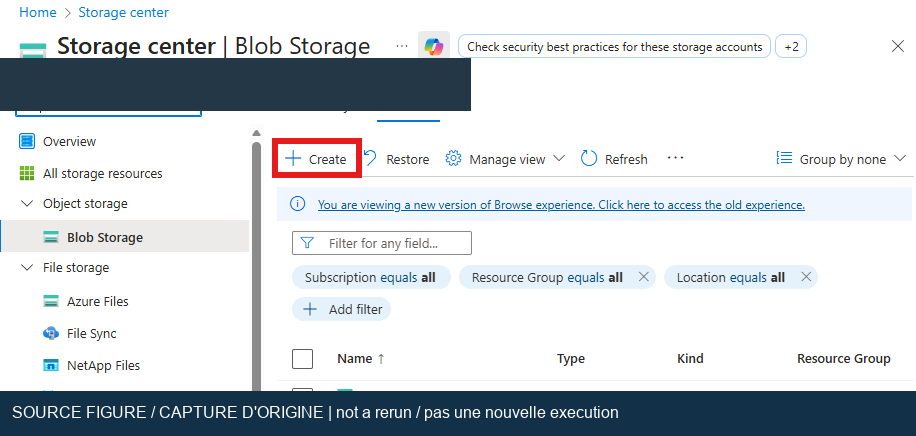
Original workshop screenshot, not a new execution. Use the current approved subscription, region, and security settings rather than copying visible values.
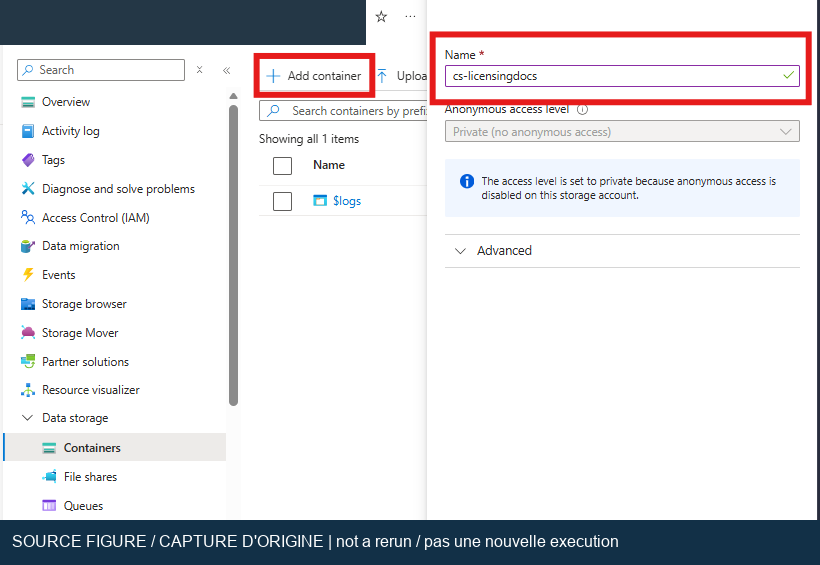
Original workshop screenshot, not a new execution. Keep the container private.
- Ask the resource owner for an approved Azure OpenAI embedding deployment, or obtain approval to create one. The current portal quickstart specifies a compatible Azure OpenAI resource with a custom subdomain, created through Azure portal for this route. A Cognitive Services inventory entry does not prove that a compatible model is deployed.
- In Foundry, inspect the deployment's actual model, version, deployment name, region, and available quota. Record the deployment name without recording keys.
- Create or select a Basic or higher Azure AI Search service. Review cost before creation. Use a region compatible with the selected model and wizard. A preference for colocating resources does not override model availability.
- On Search, enable role-based access and its system-assigned identity.
- On Storage, grant that Search identity Storage Blob Data Reader for the approved container or account scope supported by your indexing configuration.
- On Azure OpenAI, grant that identity Cognitive Services OpenAI User. Do not substitute broad Cognitive Services Contributor by default.
- For the person building and testing the pipeline, follow the quickstart's Search roles: Search Service Contributor, Search Index Data Contributor, and Search Index Data Reader. Keep ingestion/write access separate from subsequent query-only connections.
- For the connector identity, use Search Index Data Reader for querying. If index enumeration/configuration requires Search Service Contributor, have the administrator approve that additional management-plane access. Reevaluate connector permissions after setup.
Warning
The current portal wizard requires public endpoint access during setup. Do not disable an enterprise firewall or private endpoint to complete a lab. If policy prevents this route, stop and request an approved private-network implementation. A successful portal wizard does not prove Copilot Studio can reach the resulting service.
- Open the Search resource and start its import/vectorization wizard.
- Select Azure Blob Storage and the approved storage account and container. For the folder filter, use the intended document folder or leave it empty if the container contains only workshop documents.
- Select managed-identity authentication. Choose the embedding deployment from Exercise 2 and acknowledge its usage charges.
- Keep this exercise text-only. Skip optional image enrichment. Review generated names for the data source, skillset, index, and indexer before creating them.
- Wait for the indexer execution to finish. Open its execution history. Expect a successful run, at least one processed source document, and no failed items. The number of chunks need not equal the number of PDFs.
- Open the index schema. Record the actual text, title, identifier, and vector field names. Verify that text/title fields used by the agent are retrievable.
- Check that the vector field has a vector-search profile associated with an appropriate query vectorizer. Index-time embeddings alone are insufficient for a natural-language vector query.
- In Search explorer, use the text-to-vector/vector query mode offered by the portal to ask a licensing question. Confirm that returned passages contain relevant text from your document. Do not assume that a successful keyword query proves vectorization.
- If enabling semantic ranking, configure it separately and check supported region, tier, and billing. Preserve a baseline vector query for comparison.
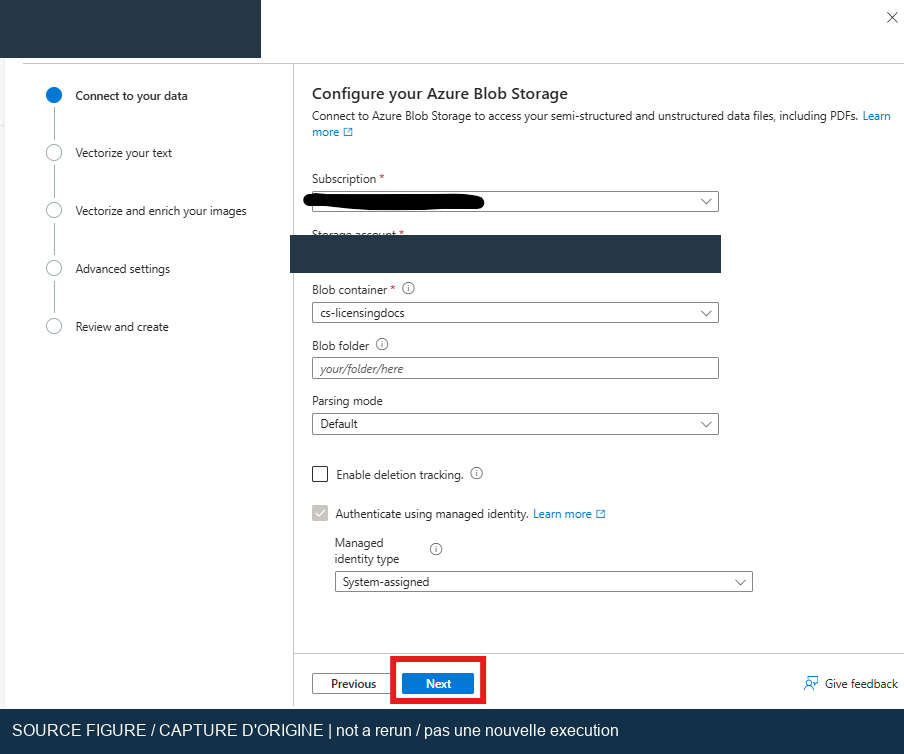
Original workshop screenshot, not a new execution. Wizard labels and generated index fields can differ in the current portal.
- In the standard agent, open Knowledge > Add knowledge > Featured > Azure AI Search. Some navigation surfaces call this Data sources.
- Create a formal data connection. Prefer Microsoft Entra ID Integrated and authenticate with the approved query identity. Use the endpoint format requested by the connection dialog; do not invent a URI scheme.
- Confirm successful connection creation. Select the actual vector index name, then Add to agent. This knowledge connection supports one vector index.
- Wait for the knowledge status to become Ready. Record the index name, connection type, and readiness state, never the key or token.
- In your disposable agent copy, temporarily remove or disable the original uploaded PDF and other overlapping knowledge. Record how to restore them.
- For a strict grounding test, turn off general knowledge and web information where those settings are available. Save the prior values.
- Start a fresh test conversation and open the activity map. Ask the positive question below, inspect the retrieved source, and compare its factual claims with the saved PDF edition.
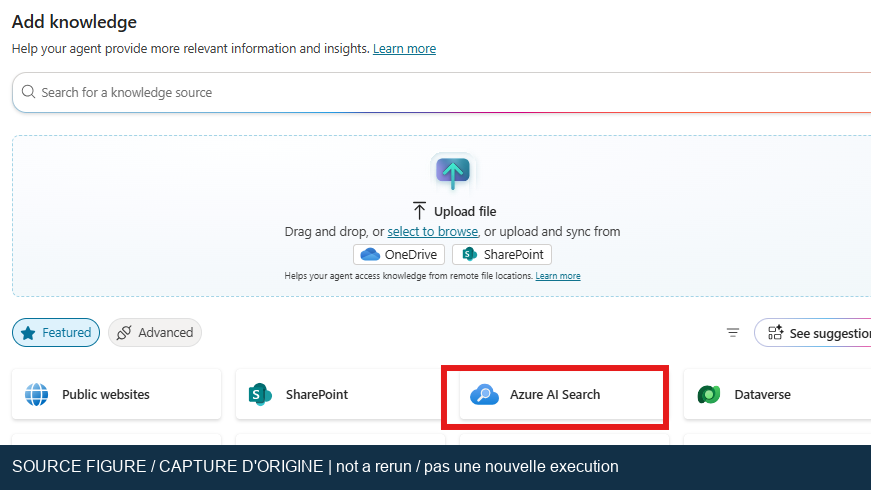
Original workshop screenshot, not a new execution. Use the supported connection dialog and your own index, not any identifier shown in the source image.
Execute these tests only after the prerequisites are available. Generated wording is nondeterministic; the listed observable assertions are the acceptance criteria.
-
SRCH-01: Inspect indexer history. Expect a successful run with at least one processed document and zero failed items. Save the sanitized run summary. -
SRCH-02: Ask, “Which Power Apps licensing options does the indexed guide describe?” Expect at least one relevant retrieved chunk and an answer whose licensing claims can each be traced to that guide edition. Capture the activity map and citation/source information; an answer alone is insufficient. -
SRCH-03: Ask, “What does this guide say about the fictional product WorkshopNebula-999?” Expect no invented product entitlement. The agent must state that the source does not establish the answer or decline to answer. A nearest-neighbor result may still exist; that is not proof of relevance. -
SRCH-04: In the disposable copy, disable the Search knowledge source and restart the conversation with competing sources still disabled. Expect that the activity map cannot report retrieval from that disabled source. Restore Search afterward. If the answer remains grounded, investigate another path. -
SRCH-05: Inspect evidence files. Expect no credentials, SAS URLs, personal identifiers, protected PDF excerpts, or unrelated resource information.
- If the indexer returns 403, check the Search identity's Blob reader and OpenAI user roles, endpoint access, and role propagation. Do not respond by assigning subscription Owner.
- If embeddings fail, inspect deployment availability, quota, selected dimensions, skillset configuration, and index vector dimensions. Recreate only disposable lab artifacts if the schema cannot be corrected safely.
- If natural-language search fails but keyword search works, check the query vectorizer, vector field, profile, and model access rather than the agent prompt.
- If the knowledge source is not Ready, inspect the connection identity, index visibility, connector policies, and metadata processing state.
- If the connection dialog fails immediately, do not create repeated endpoint/key variants. Escalate the environment-level data connection issue to the owner. Microsoft's recovery options include resetting external access or recreating an affected disposable agent; neither is an automatic workshop cleanup step.
- If an answer uses the old file, restart the conversation and inspect all agent-level and topic-level knowledge sources before retesting.
- Restore the original knowledge sources, general-knowledge/web settings, and orchestration mode from the saved configuration. Validate the original Lab 01 question in a fresh conversation before using the agent again.
- Remove only the workshop knowledge connection if no later lab needs it. Preserve the index and embedding deployment for Lab 04 when approved.
- After all dependent labs, delete only specifically approved lab resources: indexer, skillset, data source, index, uploaded document/container, and dedicated deployments/services. Never delete a shared resource group.
- Revoke lab-only role assignments and unused connections. Rotate any exposed key through the owner's process. Deleting a blob alone might not remove its indexed chunks; verify deletion detection or remove the lab index.
- Record date, guide edition, orchestration setting, index schema summary, query assertions, indexer result, sanitized screenshots, and cleanup result. Record each runtime case as Not run until observed.
The original documentary review verified the official routes, authentication distinctions, wizard tier requirement, embedding options and role separation. Its blank-page blocker and unverified index/connection state were historical, not the current result. The later licensing-only index and formal AccessKey connection passed the scoped answer, source and abstention checks described above. External PDF viewer navigation and current connected-source proof remain open. Retain the failed Entra popup attempt separately; it is not a failure of the subsequently tested AccessKey route or proof that Entra sign-in is now repaired. Resume T010 from its retained evidence, not by resetting all SRCH cases or repeating the completed ingestion.
These Microsoft Learn pages were fetched during the 2026-10-19 review.