Repository navigation
Registering Authentication Plugin
This page describes the process to register an authentication plugin.
$ pki-server ca-auth-plugin-add --class <class name> <plugin name>
See also PKI Server CA Authentication Plugin CLI.
Availability: Since PKI 11.10.2
$ pki-server ca-config-set auths.impl.<plugin name>.class <class name>
-
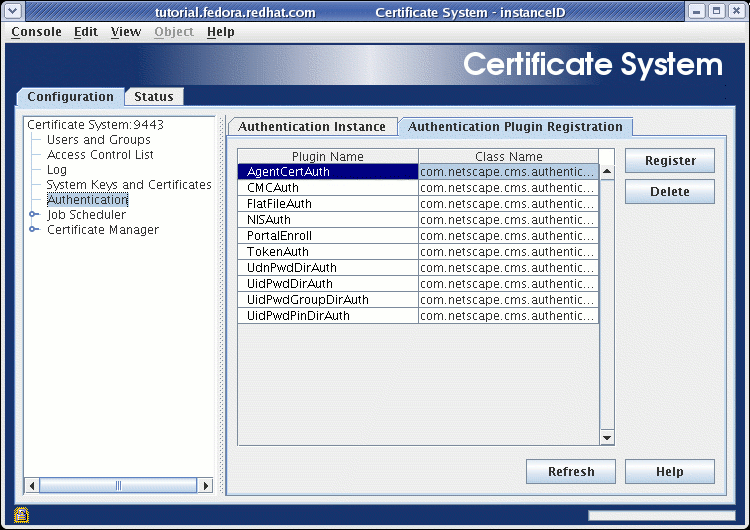
Go to Configuration → Authentication → Authentication Plug-in Registration.
-
Press the Register button, and a dialog box entitled Register Authentication Plug-in Implementation appears:
-
For the Plug-in name: field, type in
SSNAuth. -
For the Class name: field, type in the path to the
SSNAuth.classclass finishing with the nameSSNAuth(do NOT type in the.classextension).
-
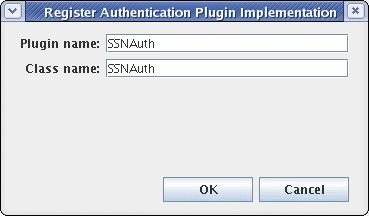
NOTE: For the purposes of this tutorial, it is ONLY necessary to type in a Class Name of SSNAuth. This is due to the fact that the default search path order for plugins ALWAYS searches for plugins in the following order:
-
the
<pki-instance>/webapps/<pki-subsystem>/WEB-INF/classesdirectory (and all subdirectories under this directory for this specific instance) -
a combination of default PKI JAR files and default PKI JRE JAR files
For example, if the SSNAuth.class had been placed in a directory called <pki-instance>/webapps/<pki-subsystem>/WEB-INF/classes/mydir/mysubdir, the java source code would need to contain a package mydir.mysubdir; statement, be rebuilt, and the subsequent SSNAuth.class binary would then need to be placed into this directory. Finally, the user would need to type mydir.mysubdir.SSNAuth within this dialog box to register their plugin.
-
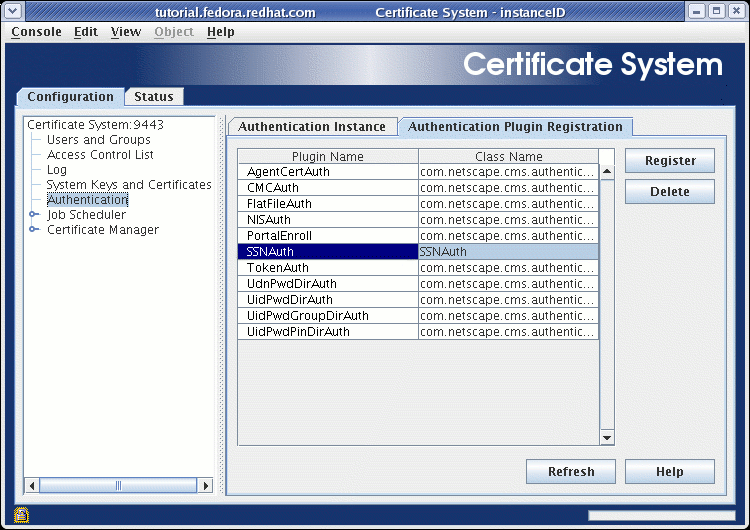
Press the OK button to dismiss the dialog box, and this plugin should now appear in alphabetical order on the list of authentication plugins displayed on this panel. If it does not, try pressing the Refresh button until it does:
The following parameters should be configured in <instance>/conf/CS.cfg:
auths.impl.SSNAuth.class=SSNAuth