Repository navigation
Conversation Branches
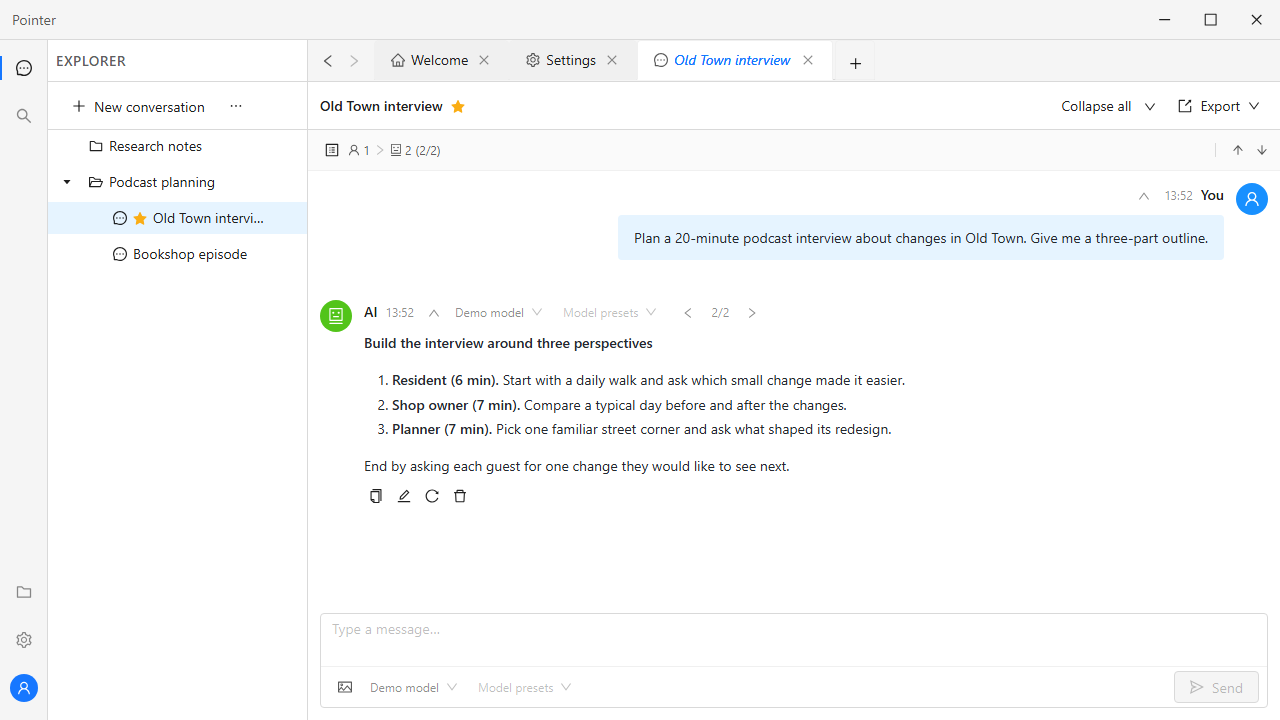
Try two approaches to your Old Town interview while keeping both answers available. The example compares a timeline with an outline built around three guests.
- Find the AI reply you want to revisit and select Retry below it.
- When the new answer is ready, look for the branch counter beside the model controls on the reply. For two choices, the counter shows 1/2 or 2/2.
- Use the arrows beside the counter to switch back and forth. The conversation below that point follows the selected branch.
To try a different model for the same question, open the model selector on the existing AI reply and choose another configured connection. Pointer generates a sibling answer using that connection.
Select the branch you want to develop and write a follow-up in the composer. Try Give me one opening question for the shop owner. The model receives the history along the active path. If you want to revisit the timeline later, return to its branch with the arrows on the earlier answer.
If the active path ends at a user message, choose Continue generating below that message to ask for a reply from that point. You can also find it under Actions in the message’s context menu.