Repository navigation
Import Conversations
Bring earlier research into Podcast planning so you can search it alongside the new interview. Follow the steps with this fictional Old Town notes file. Save it as old-town-notes.json.
- Open Settings → Data → Import from another platform.
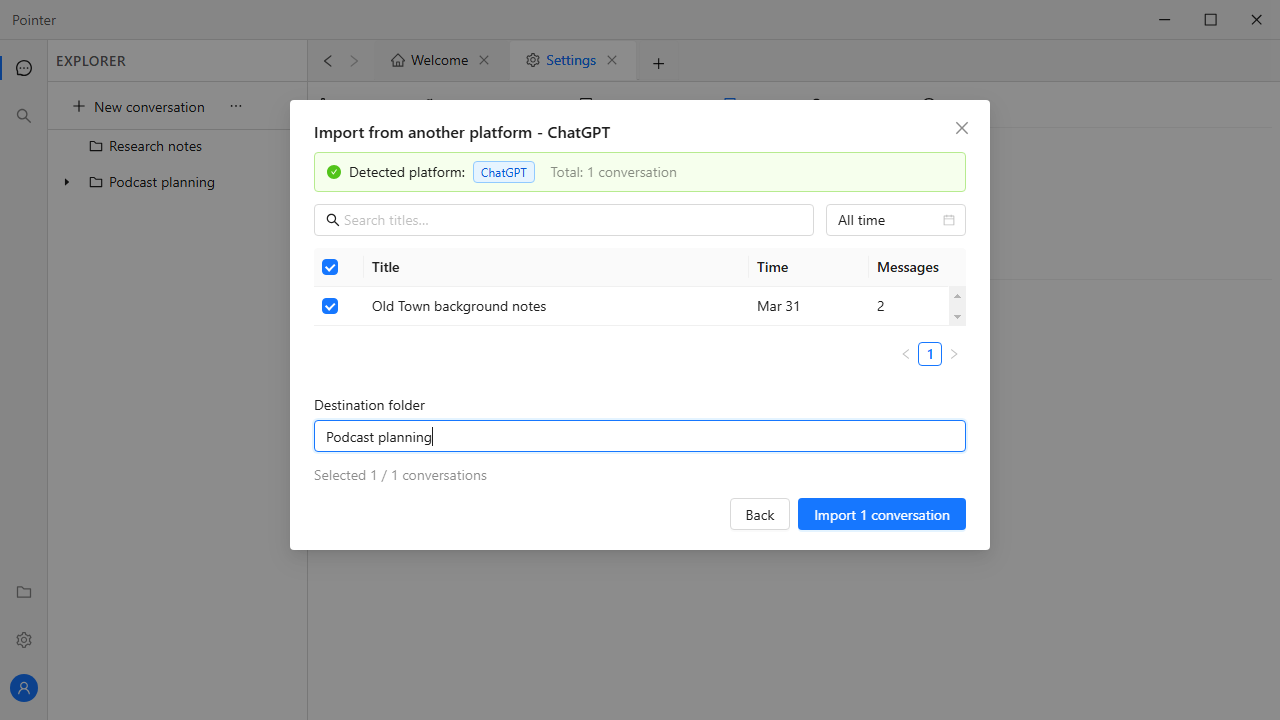
- Pick or drag in the JSON file. Pointer detects the format and shows the available conversations.
- Select Old Town background notes and choose Podcast planning in Destination folder.
- Select Import 1 conversation. Check the result and select Done.
- Return to Explorer and open the notes in your chosen folder. Search for
bus stopto find a detail in the imported research notes.
| Source | File to select |
|---|---|
| ChatGPT | The conversation JSON file from the extracted ChatGPT data export, commonly conversations.json. |
| DeepSeek | A supported conversation JSON file. For the newer export with chat_session_index.json, extract the archive first, keep the sibling chat_sessions folder in place, and select the index file. |
| Older Pointer exports | The legacy conversations-only JSON file. |
For the backup JSON created by the current Export data command, use the Import data restore flow.