Repository navigation
Model Presets
Use a preset to give the Old Town interview a consistent brief across prompts. In Pointer, an LLM connection provides the service and model name. A model preset adds a system prompt and sampling settings to a generation.
-
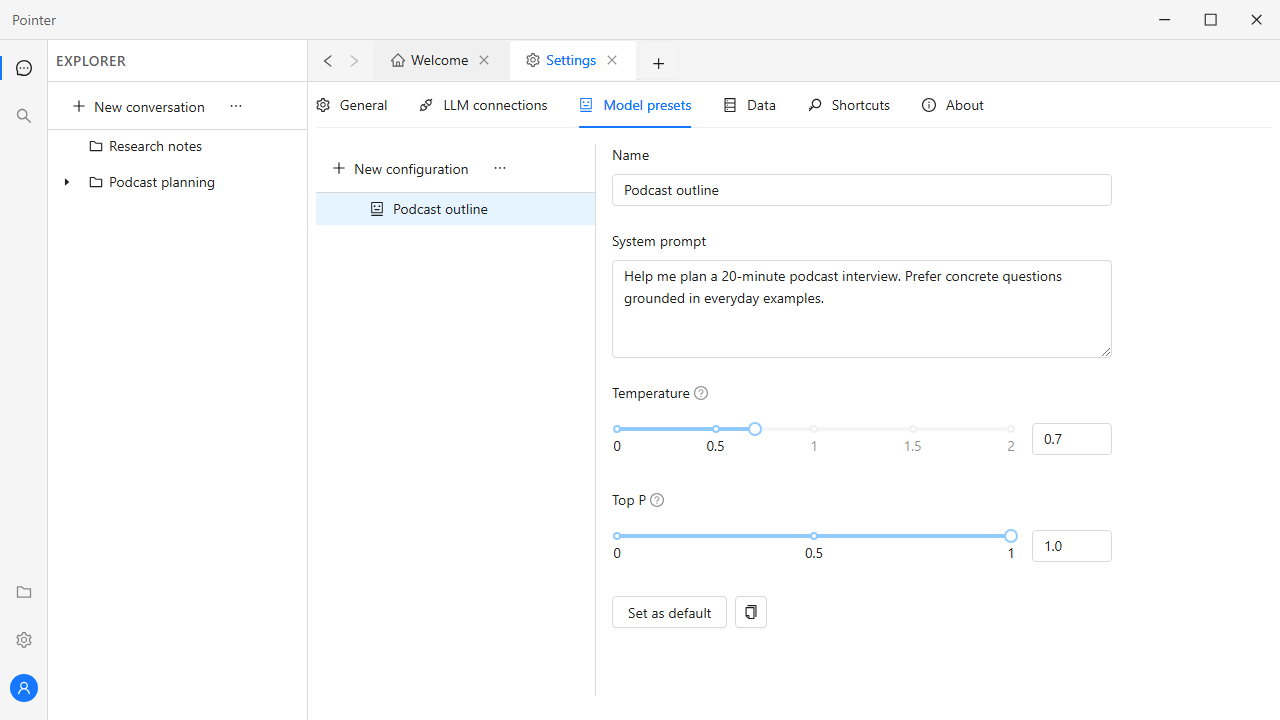
Open Settings → Model presets and select New configuration.
-
Name it Podcast outline. Enter this System prompt.
Help me plan a 20-minute podcast interview. Prefer concrete questions grounded in everyday examples. -
Start with the displayed defaults, Temperature
0.7and Top P1.0. Change a setting as needed for your provider and model. Lower temperature usually reduces variation. Lower Top P narrows the range of likely tokens the model samples from. -
Return to the interview and select Podcast outline in the model preset selector under the message box. You can also use Set as default in Settings to use the preset by default.
To compare the result within your existing branch tree, choose Podcast outline in the preset selector on an AI reply. Pointer generates another answer from the same point with the selected preset. Compare conversation branches
For the initial URL, key, and model setup, follow Connect a model.