Repository navigation
Model Presets
Give the Old Town interview a consistent brief across prompts. Pointer has separate settings for how to reach a model and what instructions and sampling parameters to send.
| Setting | What it controls |
|---|---|
| LLM connection | The provider's API base URL, API key, and exact model name. Its configuration name is the label you choose in a chat. |
| Model preset | The system prompt, Temperature, and Top P. You can reuse one preset with more than one connection. |
Open Settings → LLM connections to create, rename, or organize connections. You can put them in folders and set a default. The dropdown for Model name can query the provider's model catalog. If the list is empty, enter a model ID directly and use Test connection to check that it can answer.
The configuration's copy button includes the API key in the copied text. Keep that text with your credentials.
-
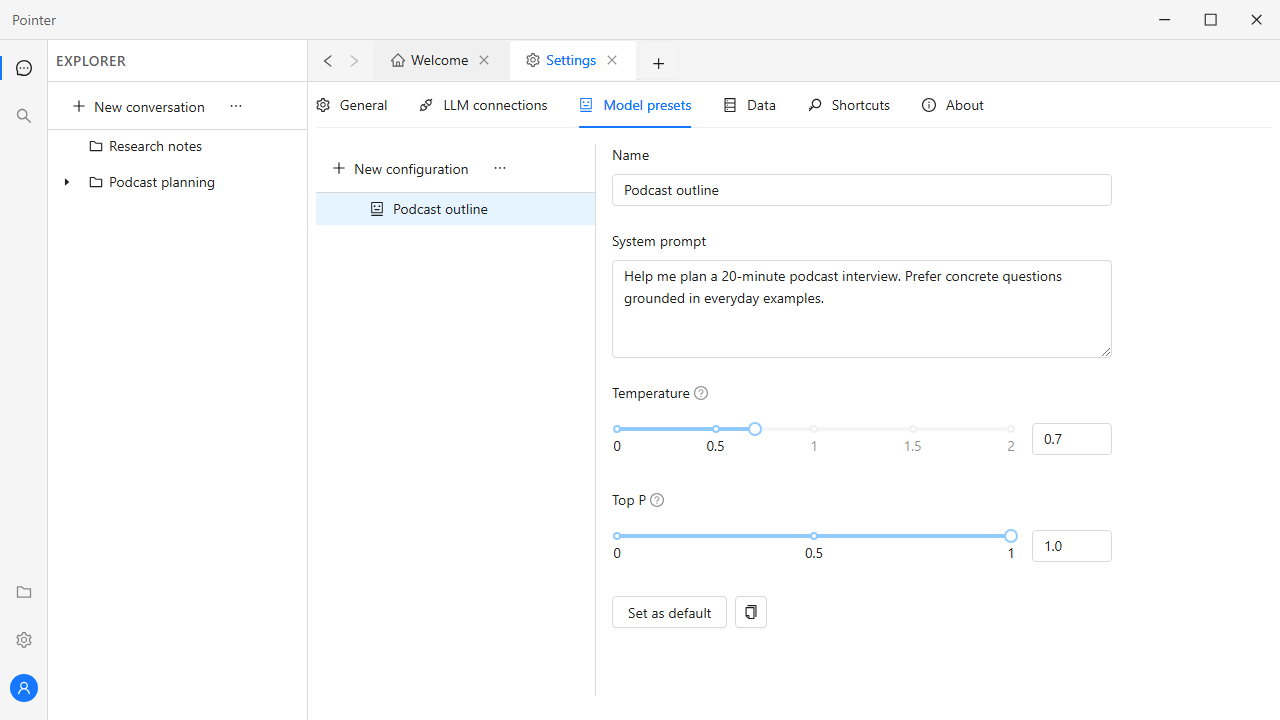
Open Settings → Model presets and select New configuration.
-
Name it Podcast outline. In System prompt, enter this brief.
Help me plan a 20-minute podcast interview. Prefer concrete questions grounded in everyday examples. -
Start with the displayed defaults, Temperature
0.7and Top P1.0. Lower temperature usually reduces variation. Lower Top P narrows the range of likely tokens the model samples from. Use values accepted by your provider and model. -
Return to the interview. Select Podcast outline in the preset selector under the composer. Choose Set as default in Settings if you want this preset selected by default.
Open the preset selector on an AI reply and choose Podcast outline. Pointer generates a sibling answer from that same point. Compare the two replies using the branch arrows or branch picker. This gives you a way to evaluate the same interview prompt with a different preset. Compare replies across branches
Use the selectors' Manage LLM connections and Manage model presets entries to reopen the relevant Settings tabs. For the original setup, see connect a model and send the opening prompt.