Architecture
The single most important thing to understand about this project:
The scene file is almost empty. The whole game is built in code.
If you open test-project/main_v2.tscn in the Godot editor expecting to see the
cubes, the goal ring, and the bumpers — they aren't there. The .tscn holds only
the bare XR rig:
-
XROrigin3D— "where you are standing" in the virtual world -
XRCamera3D— your eyes (the headset) -
WorldEnvironment— sky/background settings -
DirectionalLight3D— a sun - one script:
main_v2.gd
Everything else — every cube, the catch plates, the goal ring, the spawner, the
audio, the hands — is created from scratch in _ready() when the app starts.
Two reasons, both practical:
-
Faster iteration. Editing a live
.tscnmeans round-tripping through the Godot editor every change. With everything in script, you tweak a number, re-export, and you're testing on-device in minutes. (See Build and Deploy.) - It reads top to bottom. The entire game is one ~2,800-line file you can scroll through like a recipe. No hunting across twelve scene files to find where a node got its color.
The trade-off: main_v2.gd is big. To keep it navigable it's divided by banner
comments you can search for. Here's the map:
| Section (search for this) | What lives there |
|---|---|
LIFECYCLE & XR INIT |
_ready() — turn on XR, set the renderer, start everything |
SCENE CONSTRUCTION |
builds all the geometry procedurally |
SETUP — audio, hand tracking, info panel |
wires up the synth + the two hands |
MAIN LOOP |
runs every frame: spawn cubes, read pinches, update score |
CUBES — spawn · collision · scoring · goal |
the heart of the gameplay |
VISUAL FX |
fireworks, shockwaves, gradient skies |
PROCEDURAL AUDIO |
real-time sound synthesis (see Procedural Audio) |
HAND TRACKING |
gesture & pinch readers (see Hand Tracking) |
IMMERSION |
sky ↔ passthrough toggle |
WORLD MANIPULATION |
grab the world by a floating handle and scale it |
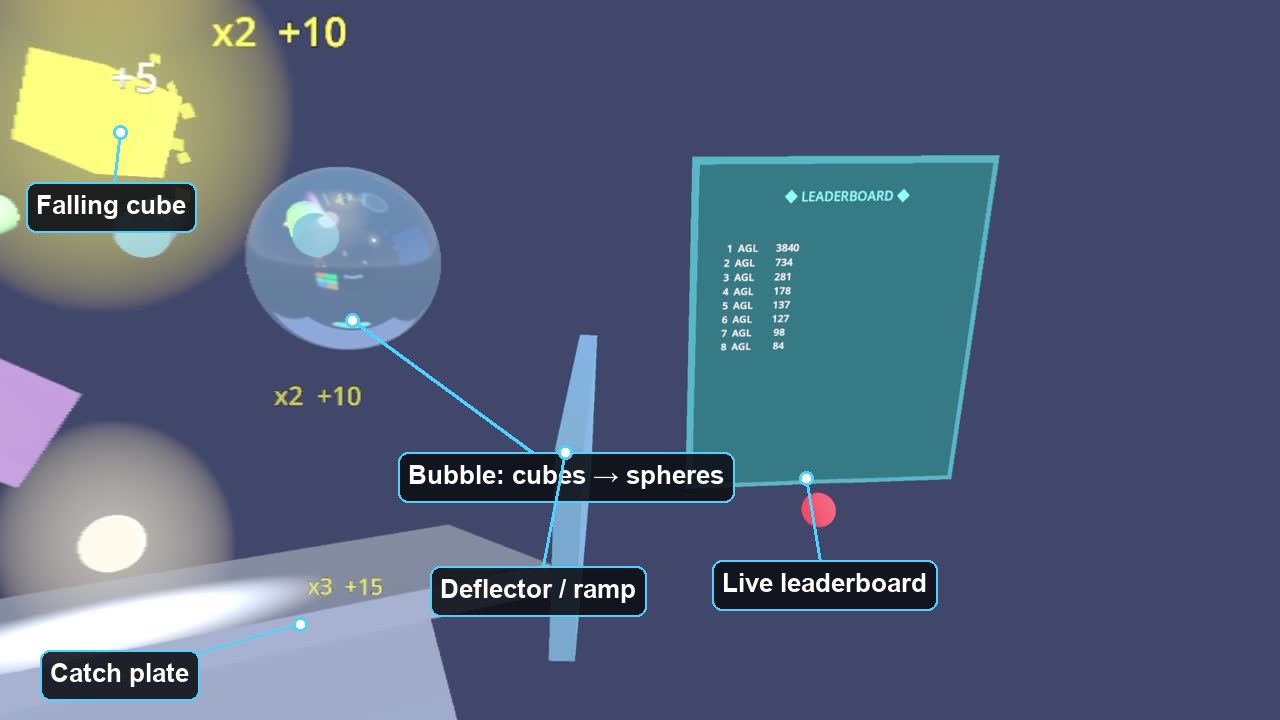 The actors, labeled. (The spawn emitter — the "faucet" — sits just above the top of frame; cubes fall from it.)
Beyond the main script, the gameplay "objects" each get their own small class in
test-project/sandbox/. Think of these as the actors; main_v2.gd is the
director. Each one is intentionally tiny (40–160 lines):
| Class (file) | ELI5 |
|---|---|
SpawnEmitter3D (spawn_emitter.gd) |
The faucet. A glowing ring with a down-arrow; cubes pour out of it. You can grab and move it. |
GoalPortal3D (goal_portal.gd) |
The hoop. Cubes that fall through the ring score and vanish. Carries its own running-total label. |
BubbleTransmuter3D (bubble_transmuter.gd) |
The magic bubble. A cube that passes through it gets turned into a sphere (and landing both a cube and a sphere earns a bonus). |
SceneHandle3D (scene_handle.gd) |
The chrome handlebar. Grab it with both hands to scale and spin the entire world around you. |
ScorePopup3D (score_popup.gd) |
The little "x3 +15" texts that pop up, float, and fade. |
BigScorePopup3D (big_score_popup.gd) |
The dramatic 3D cash-out number when a round ends — it punches in, spins, and shimmers. |
"What's that floating glass orb in the video?" That's the
BubbleTransmuter3D. Cubes fly through it and come out the other side as glowing spheres. You can also pick the bubble up and reposition it.
Every physics object in Godot belongs to layers (what it is) and scans masks (what it bumps into). This project uses just two channels:
-
LAYER_SOLID(1) — cubes, ramps, plates, bumpers. These collide with each other. -
LAYER_GRAB_ONLY(2) — the emitter, the goal ring, the bubble.
The grab-only objects are on a channel cubes don't scan, so cubes fly straight through the ring and the bubble instead of bonking off them — but your hand can still grab them. That's how a goal "hoop" can be solid enough to grab yet hollow enough to score through. One small idea, lots of mileage.
When a cube falls through the goal, the GoalPortal3D doesn't reach into the main
script and start fiddling. It just rings a doorbell — emits a signal,
cube_entered(cube, position) — and the director (main_v2.gd) has wired a handler
to that bell. The bubble does the same with cube_passed. This keeps each actor
ignorant of the scoring rules; they just announce events.
Godot gotcha we hit: connect a
RigidBody3D'sbody_enteredsignal after youadd_child()it, and setcontact_monitor = truewithmax_contacts_reported ≥ 1. Miss either and the first frame's collisions are silently swallowed — no error, just missing points.
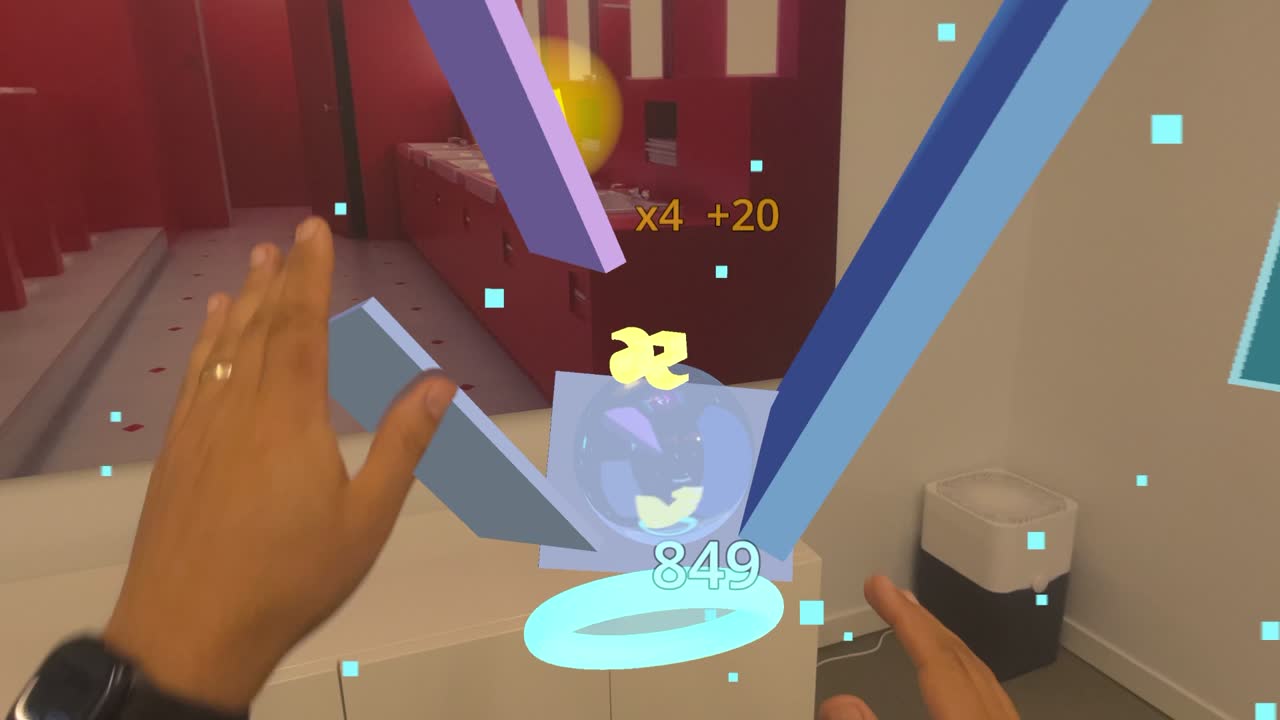 Scoring in action: the goal ring shows the running total (849), the gold "x8" is the chain multiplier maxed out, and a sphere (a transmuted cube) sits in the bubble — landing both a cube and a sphere pays the mix bonus.
The scoring is deliberately tuned so the obvious strategy is the worst one:
- Longevity pays — superlinearly. Points scale with how long a cube stays alive, on an accelerating curve. A cube you keep bouncing around is worth far more than one that drops straight into the goal. So a "funnel straight to the hoop" is a bad play.
- Only NEW surfaces count. Hitting the same plate twice, or cube-on-cube taps, earn nothing — so you can't farm points by trapping a cube in a corner.
- Chains. Hit several different surfaces quickly to build a multiplier (up to ×8).
- Mix bonus. Score a sphere right after a cube (or vice-versa) for extra — which is where the bubble transmuter becomes a strategy, not a toy.
Next: Hand Tracking, Explained → how a pinch in mid-air becomes a grab.