Repository navigation
SSH Tunnels
Define tunnels in the SSH connection editor, SSH tunnels tab. They start with the session and close with its tab. The number of active tunnels is shown on the Tunnels (N) button in the terminal and in the footer of the connection tree.
Click the Tunnels (N) button to open the list of the tab's tunnels right under the button. For each tunnel it shows where it listens and where it leads, whether it works (Active; Error with the reason – e.g. a busy local port or a remote port the server refused; a remote tunnel Waiting for the server connection) and how many connections go through it now. The address of a local or SOCKS5 tunnel can be copied with one click, and a local tunnel can be opened in the browser (http://127.0.0.1:port/, https for target ports 443 and 8443). The line at the top says whether the SSH connection that carries the tunnels is up. The list refreshes every second; Esc or a click outside closes it.
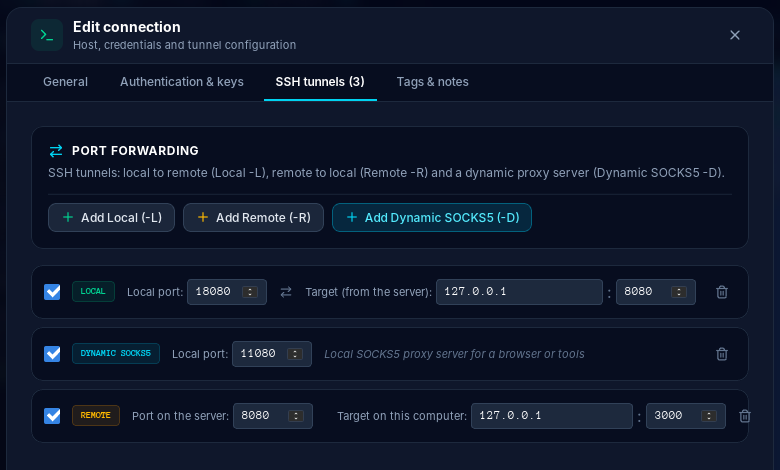
| Type | OpenSSH equivalent | Use |
|---|---|---|
| Local | ssh -L port:target:target_port |
A port on this computer (127.0.0.1) leads to a service reachable from the server – e.g. a database in an internal network |
| Remote | ssh -R port:target:target_port |
A port on the SSH server leads to a service reachable from this computer – e.g. showing a local app on the server |
| Dynamic SOCKS5 | ssh -D port |
A local SOCKS5 proxy for a browser or tools – traffic leaves "from the server" |
PostgreSQL reachable only from the server
- Type: Local, local port
15432, target (from the server)db.internal:5432. - The database client connects to
127.0.0.1:15432.
Browsing internal sites through the server
- Type: Dynamic SOCKS5, local port
1080. - Set the SOCKS5 proxy
127.0.0.1:1080in the browser.
Exposing a local dev server on the server
- Type: Remote, server port
8080, target on this computer127.0.0.1:3000.
- Local ports listen on
127.0.0.1only – they are not reachable from the network. - An empty target means
127.0.0.1(as seen from the server or from this computer, depending on the type). - A local port can be used by one tunnel at a time. When it is taken, the message tells which tab uses it or that another program does (with the command to find it). See Troubleshooting.
- On Linux ports below 1024 need administrator rights – use ports from 1024 up.
- A remote port below 1024 or reachable from outside the server needs suitable
sshdsettings (e.g.GatewayPorts).