Unite tab
In one line: one search box across every catalogue at once — GetIt, ZXDB and zxArt merged into a single grid.
Unite! has no archive of its own. It fans your search out to all three online services, merges the results, and tells you where each one came from. When you don't know which archive has the thing you're after — or you want to compare — this is the fastest way to look.
The tab title carries a running count, like 🌍 Unite! (37).
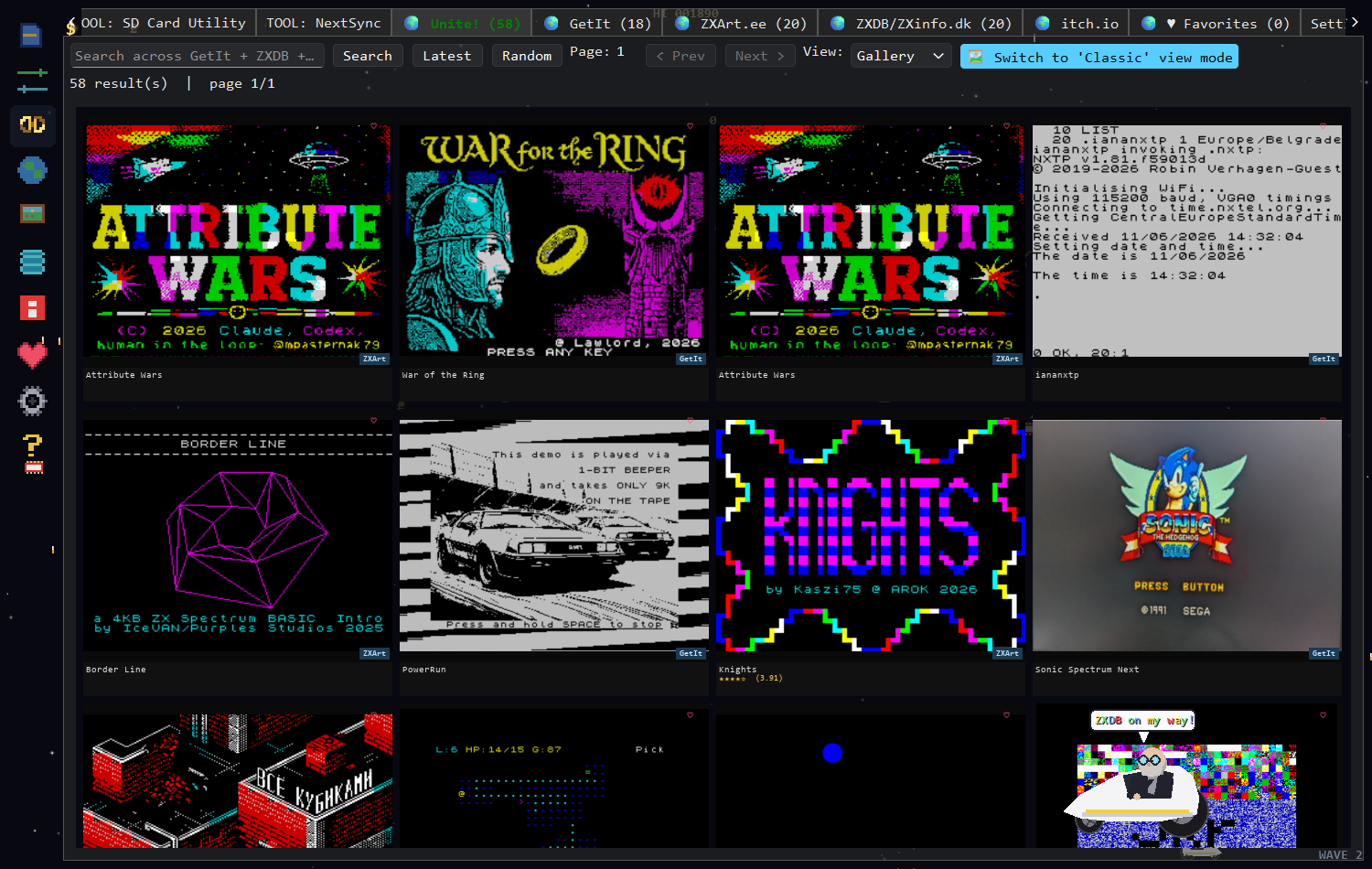
One merged grid in 🎮 Retro mode. Look at the bottom-right corner of each tile:
zxArt and GetIt tags sit side by side, which is the whole point of the tab.
- Type what you're looking for and press Search.
- Watch the tiles arrive. They come in as each service answers, so the grid fills progressively rather than all at once.
- Each tile has a small source tag in its bottom-left corner —
GetIt,ZXDBorzxArt— so you can tell who supplied it. - Double-click a tile. The app switches to that item's home tab and opens it in that pane's full-screen viewer, with all of that source's actions available.
| Control | What it does |
|---|---|
| Search box | Always searches all three services together. |
| Latest | Pulls the newest releases from all three and merges them. |
| Random | Random entries from all three. A good way to stumble across things. |
| Page / < Prev / Next > | Step through the merged results. |
| View: | Table or Gallery. Gallery suits Unite! better, since the source tags are on the tiles. |
| 🎮 Retro | 8-bit pygame rendering of the merged results (needs pygame-ce). |
Because the three services answer at different speeds and rank things differently, you can choose how the merged list is ordered. Gallery search sort ordering preference in Settings:
| Option | Behaviour |
|---|---|
| GetIt first class (default) | Next-native software from GetIt is promoted to the top. |
| Mixed | Results interleaved across sources. |
| Classic | Plain arrival order, no reranking. |
If you have the optional itch.io tab set up with an API key, your itch.io library joins the multi-search too, and its items appear here alongside the rest with their own source tag.
- Actions live in the source tab. Unite! is a finder, not a downloader. Double-clicking hands the item to its home pane, where Download / Send to SD card / Send via NextSync all work as normal.
- The heart works here. Any tile can be saved to Favorites directly from the grid.
- Individual tabs can cross-search too. The "Enable multi API endpoints search" option in Settings makes a search typed into GetIt, ZXDB or zxArt also query the other two and feed the results into this tab.
Results from only one service. Another service is slow or unreachable; the grid fills in as answers arrive, so give it a moment. If one never appears, open its own tab and search there to see the error.
Fewer results than the individual tabs show. Each source contributes a page at a time. Use Next > to pull more from all three.