Architecture
This page is for developers who want to understand how Studio is built before changing it. It covers the process layout, the threads, how events reach the browser, and the designs behind the application window, firmware builds, notebooks, hardware capabilities, the logic analyser, the code map and the MCP server.

-
Zero-setup install: one archive per operating system that carries its own Python, the
chipwhispererlibrary and libusb. - See the waveform: every captured trace is streamed to the screen as it arrives.
- Do the whole job in one window: build firmware, connect, configure, program, capture, attack, glitch, export.
-
Do not fork the library: all hardware access goes through the public
chipwhispererAPI, so Studio keeps working as the library evolves. - Hardware optional: a built-in simulator makes every feature demonstrable and testable without hardware.
- Agents are first-class users: everything is available through a documented HTTP API and an MCP server.
Studio is a single Python process running a Starlette application under uvicorn, with a small built-in router (web.py). The same server delivers the web UI (static files), the REST API and one WebSocket. The UI is shown in Studio's own window or in a browser; helper processes are used only for the Linux window, big logic decodes, OpenOCD, sigrok-cli and firmware builds.
| Thread | Job |
|---|---|
| asyncio event loop (uvicorn) | HTTP requests and WebSocket connections. Never blocks: blocking work is handed to threads. |
Hardware worker (worker.py) |
The only thread that touches the scope and target. chipwhisperer objects are not thread-safe and the USB transport keeps state, so every hardware call is queued to this thread and awaited through a future. |
CPA thread (analysis.py) |
Progressive correlation analysis over an in-memory numpy array; never touches hardware. |
| Toolchain and source download threads | Downloads, SHA-256 checks and extraction. |
| Firmware build thread | Runs make as a subprocess and streams its output. |
Notebook dispatcher (notebook.py) |
Takes queued cells of every notebook's kernel from one queue and runs each one on the hardware worker. |
Logic decode thread and worker process (logic/service.py) |
Decodes captures with many edges in a separate process, so the decoders' Python loops do not hold the GIL while the view and the API answer. |
Code map (codemap/service.py) |
Emulates firmware (Unicorn or the AVR emulator) and aligns the result on request threads; the simulator runs emulated firmware on the hardware worker. |
Window (window.py) |
With pywebview the window owns the main thread and uvicorn runs on a studio-server thread; on Linux the window is a separate process (below). |
Captures, glitch sweeps and logic analyser captures are long jobs: objects with a step() method. The worker calls step() repeatedly and runs queued short jobs (read a setting, write to serial, program) between steps, so the UI stays responsive during a 10 000 trace capture without two hardware calls ever running at once. Only one long job runs at a time.
events.py implements a thread-safe event bus. Producers on any thread publish events; each WebSocket client has a bounded queue on the event loop, and when a slow client falls behind, droppable events (such as intermediate traces) are discarded rather than blocking producers. Recent JSON events are kept for GET /api/logs.
Traces travel as binary frames (a little-endian u32 header length, a JSON header, then float32 samples), rate-limited to about 25 per second for display. The trace store (traces.py) keeps every trace regardless of what was displayed. See HTTP API for the frame format and event list.
Every scope and target sub-object in chipwhisperer implements _dict_repr(). settings.py walks that tree, looks up the matching property on each class to learn whether it is writable and to extract its docstring, and emits a JSON tree that the UI renders generically. This supports Nano, Lite, Pro and Husky without device-specific UI code and picks up new settings automatically. Choices the connected model does not have are marked with the reason from capabilities.py (below).
cli.py decides how the UI opens (--no-browser, then --browser, then --app-window, then CWSTUDIO_DEFAULT_UI, then the build's variant marker) and window.py opens it:
-
Windows and macOS: pywebview with Edge WebView2 or WebKit. Studio checks that pywebview really got WebView2 (it would otherwise fall back to Internet Explorer), keeps a persistent profile so settings survive restarts, and lets downloads and external links work. uvicorn runs on a thread; closing the window stops the server, and
/api/shutdowncloses the window. -
Linux:
resources/gtk_window.pyis a small GTK 3 and WebKit2GTK program run by the system Python, so the bundle does not ship GTK. Studio probes candidate interpreters (CWSTUDIO_GTK_PYTHON,/usr/bin/python3,python3onPATH) with--check, starts the helper with a clean environment, and tells it to close when Studio stops; the helper quits when its parent goes away. It handles downloads with a save dialog, opens other sites in the default browser, reloads after a web process crash and sets the window class so the desktop entry's icon applies. - Fallback: if no window can open, Studio prints the reason and the package to install, then uses the browser; without a display it only prints the address.
The frozen bundles come in two variants built from one spec (--variant app|web): the window build (with pywebview on Windows and macOS, a windowed ChipWhispererStudio.exe and a console cw-studio.exe on Windows) and the Web build (console executable, no pywebview).
capabilities.py turns the connected scope into a table of what it supports: UART pins, SimpleSerial versions, SPI, JTAG/SWD, trace, GPIO, USERIO, bit-banger, 1-Wire, each trigger type, each programmer and the logic analyser sources, each with a reason when unavailable. It uses the model (_getCWType(), or the simulator's sim_model), firmware features (check_feature) and what the library provides (for example scope.bitbanger). The Interfaces, Logic, Target and Scope tabs, interfaces.py, the programmers and the settings tree all consult it, so a feature is either offered or refused with the same reason everywhere. The facts behind each rule are listed on Protocols and Interfaces.
interfaces.py implements the Interfaces tab on top of the library (USART, naeusb.spi.SPI, the GPIO and USERIO settings, trigger modules, the bit-banger) on the hardware worker, openocd.py manages MPSSE mode and an OpenOCD subprocess (talking to it over its TCL port), and sim_interfaces.py provides the simulated SPI flash, pins, bit-banger and 1-Wire device.
logic/ stores a capture as, per channel, the initial level plus the sorted sample indices where it changes, so memory grows with the number of edges, not samples. The view asks for a sample range at a pixel width and gets either the edges or a per-pixel summary (low, high or busy), which keeps a 10 channel by 10 million sample capture at a few milliseconds per request. Sources (sources.py) wrap the Husky's scope.LA, thresholded ADC traces, sigrok-cli and the simulator's synthetic traffic (synth.py); formats.py reads and writes VCD, CSV and sigrok .sr; decoders.py holds the protocol decoders, which run on demand per visible range for small captures and in a worker process for big ones.
codemap/ maps firmware onto traces. program.py reads the ELF (symbols, DWARF line tables and inlined functions, with pyelftools); emu.py runs Arm Cortex-M and RISC-V code in Unicorn and avr.py is Studio's own cycle-accurate AVR/XMEGA emulator; both hook the HAL's getch, putch and trigger functions instead of emulating peripherals. cycles.py assigns clock cycles per instruction from per-core tables, power.py builds a data-dependent power model, maps cycles to samples from the scope's clocks and fits shift and scale by cross-correlation, and timeline.py turns the run into function spans and line runs for the band. sim.py lets the simulator run a programmed ELF (traces from the power model, glitches as instruction skips), and swo.py decodes the Husky's SWO program counter samples for exact mode.
| Module | Responsibility |
|---|---|
cli.py |
Entry points (cw-studio, cw-studio-web): arguments, uvicorn, window or browser, the mcp, --install-desktop and --ccwrap modes. |
window.py |
Studio's own window: pywebview (WebView2, WebKit) or the Linux GTK helper. |
resources/gtk_window.py |
The Linux window, a WebKitGTK program run by the system Python. |
app.py |
Web application: REST routes, WebSocket, static files. |
web.py |
Routing layer on Starlette: route decorators, parameter conversion, uploads, JSON errors and the /api/docs page. |
mcplite.py |
Studio's own compact MCP server: JSON-RPC over stdio, streamable HTTP and SSE, tool schemas from type hints. |
compat.py |
Stand-in for pkg_resources (removed in setuptools 81), which ChipWhisperer's TraceWhisperer imports. |
session.py |
The single application state: scope, target, jobs, trace store, and the toolchain, firmware, notebook and notes managers. |
worker.py |
Hardware thread, futures and long job scheduling. |
hardware.py |
Connect, detect and program real hardware; platform help (drivers, udev). |
simulator.py |
SimScope and SimTarget: AES leakage and glitch behaviour without hardware, posing as any model, running programmed ELFs through codemap/sim.py. |
capabilities.py |
What the connected scope supports, with reasons; gates the UI, the API and the settings tree. |
interfaces.py |
UART, SimpleSerial, SPI, GPIO, USERIO, triggers, bit-banger and 1-Wire (Interfaces tab and /api/interfaces). |
openocd.py |
MPSSE mode and the OpenOCD server for JTAG and SWD. |
sim_interfaces.py |
Simulated SPI flash, pins, bit-banger and 1-Wire device. |
logic/ |
Logic analyser: capture model and view queries, sources, decoders, file formats, sigrok, synthetic traffic, routes. |
codemap/ |
Code map: ELF and DWARF, Unicorn and AVR emulation, cycle tables, power model and alignment, timeline, simulator firmware, SWO. |
aes.py |
Small AES-128 implementation used by the simulator, the leakage models and the calculator's sbox(). |
settings.py |
Settings tree introspection and typed assignment. |
capture.py |
CaptureJob: key and text generation, capture loop, publication. |
glitch.py |
GlitchJob: parameter sweep, target reset, result classification. |
traces.py |
TraceStore: in-memory traces, statistics, import and export (npz, npy, csv, cwp). |
analysis.py |
Progressive CPA with five AES leakage models. |
toolchains.py |
Pinned, checksummed, on-demand compiler downloads; custom toolchains; registry refresh. |
firmware.py |
Firmware sources from GitHub, project and platform catalogue, builds. |
ccwrap.py |
Compiler wrapper that lets GCC-oriented makefiles build with clang. |
notebook.py |
Notebook kernels (one per notebook) and their shared queue, IPython syntax, ChipWhisperer stand-ins, .ipynb storage with conflict checks, tutorial download. |
mplbackend.py |
matplotlib backend for notebooks: plt.show() sends open figures to the running cell. |
tools.py |
Notes storage, safe calculator and statistics. |
net.py |
HTTPS using the operating system trust store (certifi fallback). |
mcp_server.py |
MCP server that exposes every feature to AI agents through the HTTP API; mcp_interfaces.py, mcp_logic.py and mcp_codemap.py add the interface, logic analyser and code map tools. |
events.py |
Event bus and binary trace frames. |
static/ |
Frontend: vanilla ES modules, uPlot, a small built-in Markdown renderer and HTML sanitiser (js/markdown.js), light and dark themes. |

Toolchain registry. resources/toolchains.json pins each toolchain (Arm, AVR and RISC-V GCC, clang from the Zig distribution, Windows make) by version, per-host URL, optional mirrors and SHA-256. An install downloads the archive (switching mirrors if a server fails or is too slow), verifies the checksum, extracts it with path traversal checks, creates tool name aliases where ChipWhisperer's makefiles expect a different prefix (for example riscv32-unknown-elf-gcc for xPack's riscv-none-elf-gcc) and writes a marker file. The registry carries a revision and an update_url, so a running Studio can fetch a newer list from the repository without a new release. Custom entries and compilers on PATH are also resolved.
Sources. firmware.py asks GitHub which commit the chosen channel (develop, latest-release, a tag or a commit) points to, downloads firmware/mcu from that commit plus the chipwhisperer-fw-extra commit it pins as a submodule, and records what it installed so updates can be detected. A known good commit is used when GitHub is unreachable. Projects are discovered from makefiles that include Makefile.inc; platforms, HALs and MCUs are parsed from hal/Makefile.hal.
Builds. plan() computes the complete build (make command, PATH, environment, output file, programmer) without side effects, which the UI and MCP expose as a dry run. GCC builds pass tool names explicitly and add compatibility flags that older HALs need with current compilers (-fcommon, relaxed implicit declaration errors, RISC-V -misa-spec=2.2). Clang builds set CC to the wrapper in ccwrap.py: it compiles C with clang against GCC's newlib or avr-libc headers, removes GCC-only options, spells out RISC-V extensions, and hands hand-written assembly to GCC; GCC links through LINK_COMPILER, so the firmware uses the same C library and linker scripts as a GCC build. In the frozen bundle the Studio executable itself acts as the wrapper (--ccwrap).
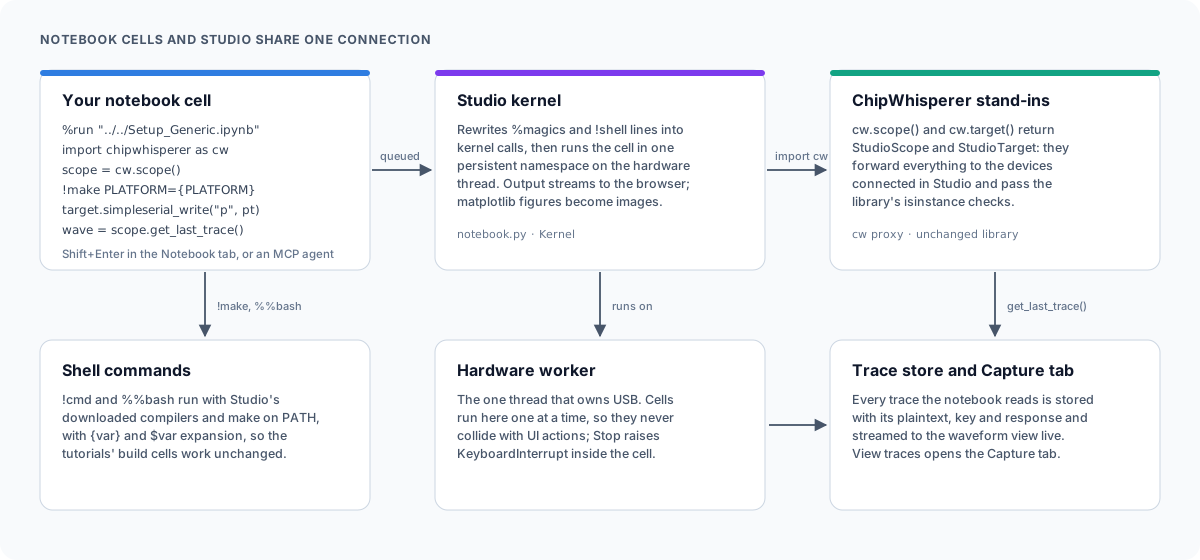
Studio uses a small in-process kernel instead of a Jupyter kernel, because a separate kernel process could not share the USB device that Studio already owns.
-
Execution: every notebook has its own kernel (namespace, execution count, working directory), keyed by its path; the API also has a shared
defaultkernel. Cells of all kernels go into one queue and a dispatcher thread executes them one at a time on the hardware worker. A cell therefore behaves like a short job: while it runs, other hardware requests and other notebooks' cells wait. -
Lifetime: windows report the notebooks they have open (
/api/kernels/attach); a kernel no window holds is shut down after a grace period, so closing a tab frees its memory. Renaming a notebook moves its kernel. - Files: saves carry the modification time the editor loaded; the server refuses a save over a newer file (409) or a deleted one (410) and announces every save, so windows reload or show a conflict notice.
-
Output:
sys.stdoutandsys.stderrare replaced by routers that send writes from the thread running a cell to that cell (preserving the order of stdout and stderr) and everything else to the real streams. Output is streamed to the browser about ten times a second. matplotlib figures that are still open when a cell finishes are converted to PNG outputs. -
Interrupt: Stop raises
KeyboardInterruptin the worker thread while that kernel's cell runs, kills a running shell command, and drops that kernel's queued cells; callers waiting for a dropped cell get a cancelled result. -
IPython syntax: line magics,
!shelllines (with{expr}and$nameexpansion) andvar = !cmdare rewritten into calls to kernel helpers before compiling, only where a statement starts (a scanner skips brackets, strings and continuations), keeping indentation so they work inside loops. Cell magics such as%%bash -s,%%writefileand%%timeare handled separately. Shell commands get Studio's installed compilers and make onPATH. -
ChipWhisperer stand-ins: the namespace has its own
__import__.import chipwhisperer as cwreturns a thin wrapper of the real module whosescope()andtarget()return stand-ins for Studio's connection. The stand-ins forward every attribute to whatever Studio is connected to at that moment and report the real class, so the library'sisinstancechecks pass. The scope stand-in records every trace read withget_last_trace()into the trace store, paired with the plaintext and key last sent through the target stand-in and the response read afterwards;cw.capture_trace()records its result the same way.cw.program_target()is simulated when the simulator is connected. -
Shims:
IPython.display(display, HTML, Markdown, Image, SVG, clear_output) andtqdm.notebook(plain tqdm, whose carriage returns the UI renders in place) are provided so tutorials run without IPython or ipywidgets.
mcp_server.py builds an MCP server with mcplite.py, a compact implementation of the protocol that ships with Studio, and registers the 106 tools (70 of its own plus those of mcp_interfaces.py, mcp_logic.py and mcp_codemap.py). Each tool is a small function that calls the HTTP API, so the MCP server is just another API client. Unsupported requests come back as {ok: false, supported: false, reason} so agents can explain them. It attaches to a running Studio or starts one headless in the same process. Long operations accept wait=true and poll the API, so an agent can do "capture 500 traces" or "build and flash" in one call. See MCP Server.
The UI is plain ES modules served as-is, with no build step or Node toolchain. uPlot draws waveforms and analysis plots on canvas, the logic view and the code band draw on their own canvases (the band follows uPlot's x scale exactly); js/markdown.js renders Markdown and sanitises the result with an allowlist. Colours are CSS custom properties with light and dark variants, and charts read them at draw time so switching themes redraws everything.
- The API has no authentication; the default bind address is
127.0.0.1. - Markdown from notebooks and notes, and SVG outputs, are sanitised by the allowlist in
js/markdown.js(no scripts, event handlers,javascript:links or embedded frames); HTML outputs are shown in iframes with an emptysandboxattribute (no scripts, no same-origin access), so opening an untrusted notebook does not execute its saved HTML. - Notebook, note, asset and firmware project paths are resolved and checked to stay inside their folders.
- Archive extraction rejects absolute paths,
..components and links pointing outside the destination. - The calculator evaluates an allow-listed subset of Python syntax (no attribute access, no names except its own functions and variables, bounded exponents and shifts).
- Downloads are verified with pinned SHA-256 checksums (compilers, OpenOCD) and fetched over HTTPS with certificate verification.
- OpenOCD commands are passed to its TCL port inside a
catch, and paths given toprogramare quoted, so a file name cannot inject commands;openocd_commanditself runs any OpenOCD command by design.
See also: Development and Releases.

Getting started
Using Studio
- Scope settings
- Target and programming
- Capturing traces
- Waveform viewer
- Protocols and interfaces
- Logic analyser
- Code on the waveform
Building and coding
Automation
Help
Developers
Links