User Guide : Estimate Progress
After transactions have been imported, the progress of actual-vs-estimated for each estimate can be seen in the estimate progress window.

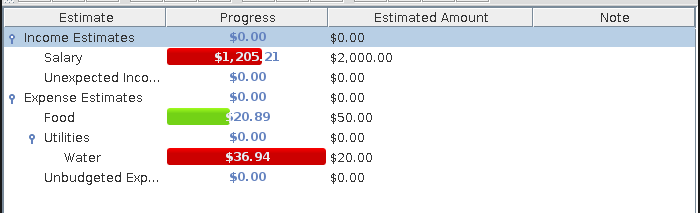
Income estimates whose actual value is less than the estimated value are shown in red indicating a lower funds increase than expected. When the actual value matches or exceeds the estimated value, the estimate is shown in green, indicating an under-estimated income.
Expense estimates whose actual value is greater than the estimated value are shown in red indicating a greater funds decrease than expected. When the actual value matches or is less than the estimated value, the estimate is shown in green, indicating an under-budget expense.