Configuration Editor
OPNGMS's flagship feature: a generic, version- and edition-aware editor for OPNsense settings. Instead of hard-coding a form per setting, the app drives the UI from a catalog of every API-modifiable model for each OPNsense version — generated from OPNsense's own source, distributed via GitHub Releases, SHA-256-verified, cached in the database, and pushed through the same typed apply pipeline as everything else. For the apply/staleness machinery see Architecture; for the curated template kinds and per-customer overrides also covered here, see Configuration; for the trust model see Security.
| OPNsense-like menu tree | Global search |
|---|---|
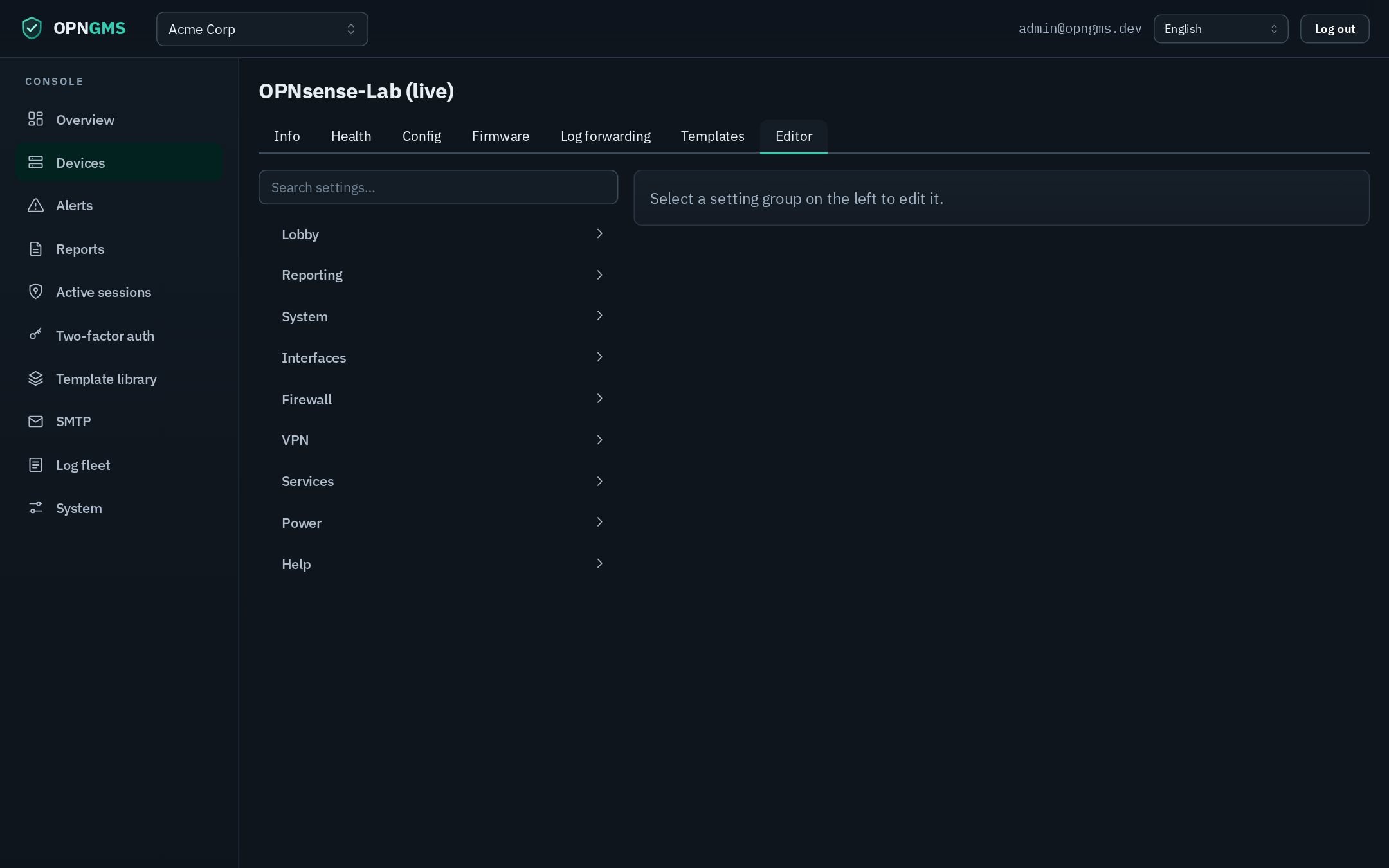 |
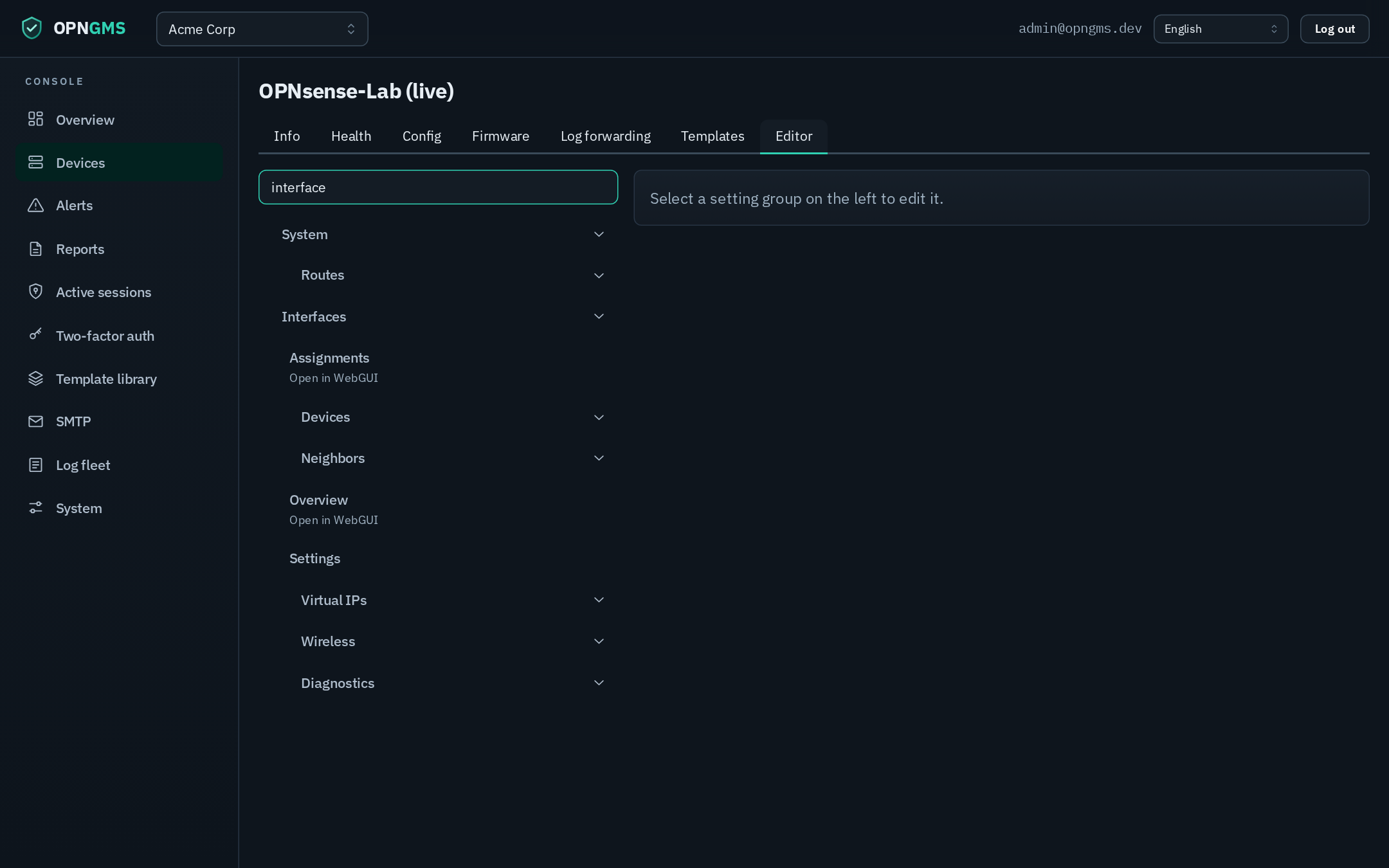 |
- What it is & why it matters
- How it works end to end
- The catalog
- The config-template library
- Operator walkthrough
- Publishing & operations
- Diff badges + live
config.xmlmap - Roadmap (planned, not yet available)
A managed OPNsense fleet rarely runs one firmware version. Two appliances on 26.1.7 and 26.1.8 can expose slightly different API models — a field added, an option list changed. A console hard-wired to one schema is wrong for everything else.
OPNGMS solves this with a catalog per OPNsense version/edition. Each catalog is a machine-generated description of every API-modifiable model that version exposes: its fields and types, its option lists, its menu position, and the API endpoints to read and write it. The editor renders the form for the catalog that matches the device in front of you — so the operator always sees that box's real settings, never a lowest-common-denominator approximation.
| Property | What it means |
|---|---|
| Version-aware | A device on 26.1.8 is edited against the 26.1.8 catalog; a device on 26.1.7 against 26.1.7. The app floor-resolves to the highest published version <= the device's. |
| Edition-aware | Business Edition devices are served the Community catalog of their base version (the shared MVC/API core), resolved through a published business-base.json map. |
| Comprehensive | The generator's never-drop principle: a field whose OPNsense class isn't yet richly typed is emitted as confidence:"raw" (editable as text, validated by the box) rather than omitted. No setting silently disappears. |
| MSP-scaled | Alongside the per-device editor, a global template library of curated, portable config kinds with per-customer override patches lets one MSP definition fan out across tenants. |
Note: The editor never trusts the client. The catalog the app serves is SHA-256-verified against a signed manifest, the API endpoints to write a setting are resolved server-side from that catalog (never sent by the browser), and a per-version safety denylist blocks models that could lock the operator out of the box.
The feature is a pipeline. Each stage is independent: catalogs can be re-published without an app release, and the app fetches them dynamically.
┌─────────────────────┐   OPNsense tagged open source (opnsense/core)
│ 1. Catalog generator│   reads mvc/app models + forms + controllers + Menu.xml
│   (offline tool)    │   ──► per-version JSON catalog  (models, fields, menu, endpoints)
└──────────┬──────────┘       + cross-version diff  +  business-base.json
           │  gh release upload catalogs … --clobber
           ▼
┌─────────────────────┐   GitHub Release  tag: `catalogs`  (rolling, assets replaced in place)
│ 2. Distribution     │   manifest.json (sha256 per catalog) + community-<ver>.json + business-base.json
│   (GitHub Release)  │   ──► app fetches <base>/manifest.json, verifies SHA-256, caches in DB
└──────────┬──────────┘
           │  catalog_provider.get_catalog(device.edition, device.firmware_version)
           ▼
┌─────────────────────┐   POST …/devices/{id}/catalog/changes   kind = "catalog_setting"
│ 3. Typed apply      │   endpoints resolved server-side from the catalog model; denylist enforced;
│   (catalog_setting) │   staleness-guarded, per-device-serialized apply ──► connector ──► reconfigure
└──────────┬──────────┘
           ▼
┌─────────────────────┐   GET …/catalog (menu tree) + GET …/catalog/models/{id} (schema + LIVE values)
│ 4. Editor UI        │   OPNsense-like left menu, generated form, live option dropdowns, grids
│   (React / Mantine) │
└─────────────────────┘
-
Generate. The offline tool in
backend/tools/opnsense_catalog/fetches anopnsense/corerelease tarball, parses the MVC model XML (fields, types, option values), the form XML (labels, help, page grouping), the API controllers (endpoint resolution), and theMenu.xmlfragments (the navigation tree), and emits one JSON catalog per version plus a cross-version diff. -
Distribute. Catalogs are not committed. They are uploaded as assets to a rolling GitHub Release tagged
catalogs, alongside amanifest.jsonmappingedition/versionto the SHA-256 of its catalog file. -
Fetch + verify + cache. At edit time the app resolves the device's
(edition, version)to a published catalog, downloads it, re-computes its SHA-256 and checks it against the manifest (failing closed on mismatch or a missing manifest entry), and caches the verified JSON in thecatalog_cachetable. Offline, a previously-cached catalog is still served. -
Apply. A proposed edit becomes a
catalog_settingconfig change carrying the endpoints resolved from the catalog, and runs through the standard apply pipeline (snapshot → staleness guard → per-device lock → write → single reconfigure). See Architecture. - Edit. The UI renders the catalog's menu tree, opens any model's generated form prefilled with the device's live current values, and proposes changes.
A catalog is a single JSON document describing one OPNsense (edition, version).
| Key | Contents |
|---|---|
edition / version
|
The OPNsense identity this catalog describes (e.g. community / 26.1.8). |
generated_from |
The source the catalog was built from (e.g. {"core": "26.1.8"}). |
models |
Map of model_id → model definition (the editable setting groups). |
menu |
The OPNsense-like navigation tree rebuilt from every module's Menu.xml, merged by id-path and ordered. Each leaf carries its model_id (or null for legacy/diagnostics pages with no MVC model). |
Each model is one editable settings group (e.g. Unbound DNS, IDS, an OpenVPN instance):
| Field | Meaning |
|---|---|
id / title
|
The catalog id (from the module directory) and human title. |
model_root |
The API set-body root (the module name, e.g. unbound). |
xml_path |
The config.xml mount location, which can differ from model_root (Unbound mounts at OPNsense/unboundplus). |
endpoints |
The resolved API paths — get, set, and the reconfigure to reload the service. |
fields |
Scalar fields: path, type, options, label, help, required, and a confidence of rich or raw. |
grids |
ArrayField tables (add/edit/delete rows), each with its own per-row fields and endpoints. |
pages |
The form's page grouping (collapsed to one model form in the editor). |
Field types map OPNsense field classes to a small set the UI can render: bool, int, string, enum, multienum, network, ref (a reference to an interface/CA/alias/etc.), plus raw for any class not yet richly typed. Static enum option values are harvested from the model XML; dynamic lists (pick an interface, a CA, an alias) are not baked into the catalog — they are read live from the device at edit time.
OPNsense Business Edition ships no separate API-model source — each BE release is a hardened snapshot of a specific Community release, stated on its docs page ("based on the OPNsense X.Y.Z community version"). The generator scrapes those pages into a small business-base.json map. At edit time, a Business device's version is mapped to its Community base, and the Community catalog is served and cached under the resolved Community identity.
The Community version list is the opnsense/core repository's release tags (NN.NN / NN.NN.NN), discovered through the GitHub API and filtered by a configurable minimum. New OPNsense releases therefore appear in the catalog set automatically as their tags are published — no OPNGMS code change required.
Note: A cross-version diff is part of the generator today (
diffsubcommand): it reports added/removed models and per-model added/removed/changed fields between two catalogs, and surfaces legacy settings newly migrated under MVC/API. That diff is also surfaced inside the editor as badges (see "Diff badges + liveconfig.xmlmap" below).
The catalog is generated from the public, open-source OPNsense — opnsense/core and opnsense/plugins — and the editor drives the device through its API. Two consequences:
- Public plugins only. Community (public) plugins are covered by the generated catalog. Proprietary / Business-only plugins that are not published on public GitHub have no generated configuration models — a Business box is still managed for everything its API exposes, but those closed plugins can't be edited here.
-
API-bound, with read-only for the rest. Only settings OPNsense exposes through its API can be written. Legacy, non-MVC settings the API can't write are surfaced read-only in the live
config.xmlmap, so you can still see them in context; and there is no firmware rollback or fullconfig.xmlrestore API, so neither is offered. As OPNsense widens its API surface, the catalog covers more — but it never reaches past the API.
The per-device editor covers everything; the template library covers the curated, portable subset an MSP wants to define once and roll out fleet-wide. Templates are global (superadmin-managed) and typed by kind.
| Kind | Body | Apply behaviour |
|---|---|---|
firewall_alias |
{name, type, content[]} |
Upsert a firewall alias (identity = name). |
suricata_ruleset |
{rulesets: [filename, …]} |
Additive — enables the listed IDS rulesets; never disables others. |
firewall_rule |
A portable filter rule (action, direction, ipprotocol, source/destination net+port, …) | Upsert a Rules[new] rule; interface is an apply-time binding (empty = floating); identity = description. |
monit_test |
{name, type, condition, action, path} |
Upsert a portable Monit health-check test (identity = name); takes effect once attached to a Monit service. |
Each kind registers itself with a validate function, the config_change.kind it materializes to, a to_change mapping, and the set of pinned identity fields an override may not change.
A template carries a base body; each tenant may attach a merge-patch override (template_overrides, one per (template, tenant), RLS-scoped). The effective body is a shallow per-key merge of base + patch, with the kind's pinned identity fields held to the base (a customer can tune an alias's content but cannot repoint its name/type). Some kinds also accept apply-time bindings (e.g. the firewall rule's target interface) resolved when the change is materialized.
Applying a template materializes a draft config_change through the same pipeline the editor and everything else use: bind apply-time inputs → validate the effective body → emit a typed change whose kind has a registered applier. Templates and the catalog editor are two front doors onto one apply engine.
The editor lives on a device's detail page as the Editor tab.
-
Pick a device. Opening the tab loads
GET …/devices/{id}/catalog: the app resolves and serves that device's catalog (schema + the OPNsense-likemenutree). -
Navigate the menu. The left pane renders the real OPNsense left menu — Category → Module → page — rebuilt from
Menu.xml, with icons and ordering, plus a global search box. A menu entry with no catalog model (diagnostics, legacy pages) is greyed and deep-links to the device WebGUI at that entry's URL. -
Open a setting. Clicking a mapped entry loads
GET …/catalog/models/{id}, which returns the model schema and the device's live current values (read live via the model'sgetendpoint), including live option lists forref/enumdropdowns and current grid rows. If the device is unreachable, the form is not prefilled and editing is disabled (a stale snapshot is never used as an editable baseline). -
Edit. The generated form renders each field by type — toggles for
bool, selects forenum/ref(populated from the live options), text forraw/string, and editableArrayFieldgrids with add/edit/delete rows. -
Propose.
POST …/devices/{id}/catalog/changes(CSRF-protected,CONFIG_PUSH) validates the submitted scalars and grid ops against the catalog model, rejects unknown fields and denylisted models (422), and embeds the server-resolved endpoints in a draftcatalog_settingchange. Nothing is pushed yet. - Schedule & apply. The draft is scheduled from the Config tab. The apply pipeline re-reads the live config, refuses to apply if it drifted from the baseline captured at proposal time (conflict, no clobber), takes a pre-apply snapshot as a rollback point, applies scalars and each grid op, then issues one reconfigure to reload the service — all under a per-device advisory lock. See Architecture for the full apply/verify state machine.
Note: A live apply only happens when live push is enabled; otherwise the same path runs as a dry-run. The audit log records every catalog change proposal (
config.catalog.create) with the model id.
Catalogs are kept fresh by a scheduled GitHub Action — no OPNGMS release is needed to support a new OPNsense version.
.github/workflows/publish-catalogs.yml runs on cron: "23 */6 * * *" (and on manual workflow_dispatch). Each run:
- Ensures the rolling
catalogsRelease exists, and downloads its currentmanifest.json. - Discovers the Community version list from the
opnsense/coretags (filtered by aminimum, default26.1). - Generates a catalog for any new version only — already-published versions are carried verbatim from the live manifest (their bytes and SHA-256 are kept) via
--prior-manifest. This is the incremental publish. - Refreshes
business-base.json(the Business→Community base map). - Uploads
manifest.json+ everycommunity-<version>.json+business-base.jsonto thecatalogsrelease, replacing assets in place (--clobber).
A force_all dispatch input regenerates every version (ignoring the prior manifest) — run it after improving the generator so older catalogs are refreshed too. A concurrency group prevents two publish runs from racing on the release.
The manifest.json maps each edition/version to the SHA-256 of its catalog file. The app re-computes the hash of every catalog it downloads and fails closed on any mismatch or on a manifest that lacks the entry — a tampered manifest that drops a key while serving a malicious catalog is rejected, not cached. See Security.
The same steps the workflow runs, from backend/:
# 1. Discover the Community version list from opnsense/core tags
VERSIONS=$(python -m tools.opnsense_catalog.cli list-versions --minimum 26.1)

# 2. Generate per-version catalogs + the sha256 manifest (incremental: --prior-manifest
#    skips already-published versions; add --force to regenerate everything)
python -m tools.opnsense_catalog.cli generate-all \
    --edition community --versions "$VERSIONS" --fetch \
    --prior-manifest /tmp/published-manifest.json --out-dir /tmp/catalogs

# 3. Refresh the Business->Community base map
python -m tools.opnsense_catalog.cli business-base \
    --fetch --out /tmp/catalogs/business-base.json

# 4. Upload all assets to the rolling `catalogs` release (replaces existing assets)
gh release upload catalogs /tmp/catalogs/* --clobber
To verify a publish, confirm the release assets resolve and hash-match:
# Each catalog's sha256 must equal its manifest entry
curl -sL "$BASE/manifest.json" | jq '.catalogs'
curl -sL "$BASE/community-26.1.8.json" | sha256sum
# where  $BASE = https://github.com/<owner>/<repo>/releases/download/catalogs
The app reads from CATALOG_RELEASE_BASE_URL (default the OPNGMS repo's catalogs release); CATALOG_AUTO_FETCH controls whether it fetches on a cache miss (off = serve cache only). See Configuration.
Note: Generating a single version locally — e.g. for inspection — is
python -m tools.opnsense_catalog.cli generate --edition community --version 26.1.8 --fetch --out …; the coverage report (models,fields_total,fields_raw, menu counts) is printed afterward.
Two enrichments shipped on top of the editor:
-
Cross-version diff badges — "new since version X" / "changed since X" markers on models and fields directly in the editor, with an operator-selectable baseline (default the previous published version). Powered by the generator's cross-version
diffexposed through aDEVICE_VIEW/catalog/diffendpoint. -
Live
config.xmlmap — a read-only, navigable view of the device's entire liveconfig.xml, including legacy / non-MVC settings the catalog cannot write. Each node is cross-referenced to the catalog: editable nodes deep-link into the editor model form; the rest are clearly marked read-only (no API coverage). The map fetches live, falling back to the latest snapshot labelled stale when the device is unreachable.
Proprietary Business-Edition-only models (beyond the shared Community core that the business-base.json mapping already covers) are out of scope today and would require a one-time harvest from a Business box. This is future work.
Note: Settings with no MVC/API coverage are not editable through OPNGMS and must be changed in the device WebGUI (reachable from the greyed menu deep-links); the live
config.xmlmap surfaces them read-only so you can still see the full picture.
See also: Configuration · Architecture · Security · Home · Installation · Upgrading · Log-Lake · Reporting · Troubleshooting · Development