Security
The security model and hardening guide for OPNGMS — how tenant isolation, secrets-at-rest, authentication, MFA, transport security, and the supply chain are enforced, plus an operator checklist. For TLS deployment models see Installation; for key rotation see Upgrading; for the log lake see Log-Lake; for every environment variable see Configuration; for how the pieces fit together see Architecture.
- Tenant isolation (Postgres RLS)
- Perimeter threat visibility
- Secrets at rest
- Authentication & sessions
- Multi-factor authentication (MFA)
- Audit log
- Fail-closed guards
- Transport security
- Supply-chain & CI security
- Operator hardening checklist
OPNGMS is a multi-tenant console: one deployment serves many customer tenants, and a row belonging to tenant A must never be visible to tenant B. This is enforced at the database layer with PostgreSQL Row-Level Security (RLS), not only in application code — so even a logic bug in a query cannot leak across tenants.
| Role | Used by | RLS status | Created by |
|---|---|---|---|
opngms_app (non-superuser) |
The API (DATABASE_URL) |
Enforced — NOSUPERUSER NOBYPASSRLS
|
Migration 0003
|
owner (e.g. opngms) |
migrate and worker (ADMIN_DATABASE_URL) |
Exempt — Postgres superuser bypasses RLS | The TimescaleDB image (POSTGRES_USER) |
The opngms_app role is created (or re-aligned) by the migration with exactly:
CREATE ROLE opngms_app LOGIN PASSWORD '...'
    NOSUPERUSER NOBYPASSRLS NOCREATEDB NOCREATEROLE;
PostgreSQL superusers always bypass RLS — even with FORCE ROW LEVEL SECURITY — so the API must connect as a non-superuser, NOBYPASSRLS role for isolation to mean anything. The worker and migrations connect as the owner because they perform fleet-wide writes and DDL (creating roles, tables, and policies) that legitimately span all tenants; they are trusted backend processes that never serve untrusted request input.
Note: The password embedded in
DATABASE_URLmust equalAPP_ROLE_PASSWORD, and the password inADMIN_DATABASE_URLmust equalPOSTGRES_PASSWORD. See Installation for the two password pairs.
Every tenant-scoped table has the same policy, applied with FORCE ROW LEVEL SECURITY and named tenant_isolation:
CREATE POLICY tenant_isolation ON <table>
    USING      (tenant_id = NULLIF(current_setting('app.current_tenant', true), '')::uuid)
    WITH CHECK (tenant_id = NULLIF(current_setting('app.current_tenant', true), '')::uuid);
The policy reads a session variable, app.current_tenant. On each authenticated, tenant-scoped request — after the membership and authorization checks pass — the API sets it transaction-locally:
await session.execute(
    text("SELECT set_config('app.current_tenant', :tid, true)"),
    {"tid": str(tenant_id)},
)
The third argument (true) scopes the setting to the current transaction, equivalent to SET LOCAL, so it cannot leak into a later request that reuses the pooled connection.
The design is fail-closed: NULLIF(current_setting('app.current_tenant', true), '')::uuid turns a missing or empty context into NULL, which the predicate never matches — so a request that forgets to set the tenant sees zero rows, never all rows. RLS currently covers the per-tenant tables (devices, metrics, alerts, events, config snapshots/changes, report settings/schedule/generated reports, firmware actions, template overrides, log forwarding, and the revoked-syslog-cert ledger), each extended in its own migration as the schema grew.
Note: A whole-project audit by six independent reviewers found no cross-tenant access or auth-bypass issues. RLS isolation is also exercised directly by the backend test suite (
test_rls_isolation.pyand per-domaintest_*_rls_api.py), and production and test policies share a single source module so they cannot drift apart.
The Security / Perimeter feature (shipped in v0.9.0) surfaces who is knocking on the edge of each managed firewall. It polls two threat signals per device through the existing SSRF-guarded OpnsenseClient — the same hardened connector used for every outbound call to a managed box (HTTPS only, no redirects, loopback/link-local blocked) — so no new outbound path is introduced.
| Signal | OPNsense source | What is extracted |
|---|---|---|
| Failed logins | The audit log — POST /api/diagnostics/log/core/audit, process audit
|
The attacker source IP + the attempted username. |
| Firewall blocks | The structured firewall log — /api/diagnostics/firewall/log, filtered to action=block
|
The attacker source IP + the targeted port/interface. |
Each attacker IP is then resolved to a country via the existing offline GeoIP layer — the same MaxMind-style local database used by the attacker-countries view — so attribution needs no third-party lookup at request time.
Note: OPNsense's diagnostics-log API is POST, not GET, even for a read. The line parser is fail-safe: an unrecognized log line is skipped rather than aborting the ingest, so a format change on a single line never poisons the whole poll.
Storage is deliberately light. OPNGMS does not store per-packet or per-event rows; instead it keeps a bounded perimeter_attacker rollup keyed by (device, kind, source-IP), carrying a count, first_seen, last_seen, and a small detail payload. Because the key is the distinct attacker IP, total storage scales with the number of distinct attackers, not with traffic volume — a box under a sustained scan adds rows only for new source IPs, not for every probe. A daily retention sweep prunes rows not seen within the window (~30 days), so the table self-bounds over time.
Ingest runs inside the existing per-device events cron, wrapped in a database SAVEPOINT: if a perimeter poll hiccups (an unreachable box, a malformed log page), the savepoint rolls back only the perimeter write — the surrounding metrics/events ingest commits normally and is never lost.
perimeter_attacker is a tenant-scoped table carrying tenant_id and the same fail-closed tenant_isolation RLS policy as every other tenant table (see Tenant isolation). The split-role rule holds: the worker writes as the owner (RLS-exempt trusted infra, ADMIN_DATABASE_URL) during the cron, while the API reads as opngms_app (RLS enforced) under the per-request tenant context. Both the ingest path and the read endpoint were security-reviewed before shipping.
- Overview — two summary cards (failed logins, firewall blocks) for the tenant's fleet.
- Perimeter page — a dedicated view ranking attackers per source IP, with a 24h / 7d / 30d window selector.
- PDF report — the two perimeter PDF sections are toggled with all the other report sections (Report settings → Report sections; per-tenant default + optional per-schedule override), exactly like the Executive summary, Attacks, and Attacker-countries sections.
Sensitive credentials are encrypted before they touch the database using a Fernet key supplied as MASTER_KEY (generate one with python -c "from cryptography.fernet import Fernet; print(Fernet.generate_key().decode())").
Encrypted at rest with MASTER_KEY:
-
Device API credentials — each managed OPNsense box's API key and secret are stored only as
api_key_enc/api_secret_encand decrypted transiently, in memory, solely to talk to that box. -
SMTP password — the relay password configured in Admin → SMTP delivery is stored as
password_enc. -
Config snapshots — captured
config.xmlis gzipped then Fernet-encrypted. -
Syslog CA private key — the internal CA that signs the log-lake's per-device mTLS certs. Beyond
Fernet encryption, it is held least-privilege: the encrypted key lives in its own owner-only table
(
syslog_ca_key) that theopngms_appAPI role cannotSELECTat all (the blanket table grant is revoked). The cert-signing path reaches it only through a singleSECURITY DEFINERaccessor function (opngms_syslog_ca_key(),EXECUTEgranted toopngms_app), so a generic read primitive (SQLi / mass-export) can no longer exfiltrate the key alongside everything else — it must invoke that one named function. CA creation is owner-only (the bootstrap/worker), and the worker reads the key owner-side to sign the revocation CRL (see Log-Lake → Certificate revocation).
These secrets are never returned by the API. The device response schema deliberately omits the encrypted fields (they are write-only), the SMTP response exposes only a has_password: bool, and the audit log explicitly records details={} for credential operations so secrets never reach a log line.
MASTER_KEY rotation is supported via MASTER_KEY_OLD_KEYS — a comma-separated list of retired keys. The crypto layer builds a MultiFernet whose first key (the current MASTER_KEY) performs all new encryption while any listed key can still decrypt older ciphertext. A re-key script then re-encrypts existing rows under the new primary key, after which the old key can be dropped. See Upgrading for the full rotation procedure.
Note: Re-keying connects as the RLS-exempt owner (
ADMIN_DATABASE_URL) because it must touch every tenant's rows, and it fails loudly if that URL is not configured rather than silently re-keying nothing.
Sessions are server-side and database-backed, not encoded into the cookie. The cookie carries only an opaque random token (secrets.token_urlsafe(32)); the server stores a keyed HMAC-SHA256 of that token using SESSION_SECRET. A database dump therefore yields only keyed hashes, and rotating SESSION_SECRET invalidates every existing session at once.
The session cookie is issued with hardening flags:
| Flag | Value | Why |
|---|---|---|
HttpOnly |
true |
JavaScript cannot read the session token (XSS containment). |
Secure |
true |
The cookie is only sent over HTTPS. |
SameSite |
lax |
Limits cross-site submission. |
A companion CSRF cookie (opngms_csrf) is intentionally readable by the SPA (HttpOnly false, still Secure) for a double-submit check: state-changing requests must echo the value in an X-OPNGMS-CSRF header, compared in constant time against the session's stored token. Sessions expire on both an absolute TTL (default 12 hours) and a sliding idle timeout (default 120 minutes).
Because the cookie is Secure, HTTPS is mandatory in production — browsers silently drop Secure cookies sent over plain HTTP on a real domain, which breaks login entirely.
When OPNGMS runs behind a TLS-terminating proxy (the recommended Model 1 in Installation), the upstream must forward the original scheme so the backend knows the request arrived over HTTPS and keeps issuing Secure cookies:
X-Forwarded-Proto: https
The stack honours this at two layers: uvicorn runs with --proxy-headers --forwarded-allow-ips "*", and the bundled nginx preserves the upstream X-Forwarded-Proto end-to-end. Without this header, logins succeed via curl but loop back to the sign-in page in a browser. See Installation for the per-model TLS setup and Troubleshooting for the login-loop symptom.
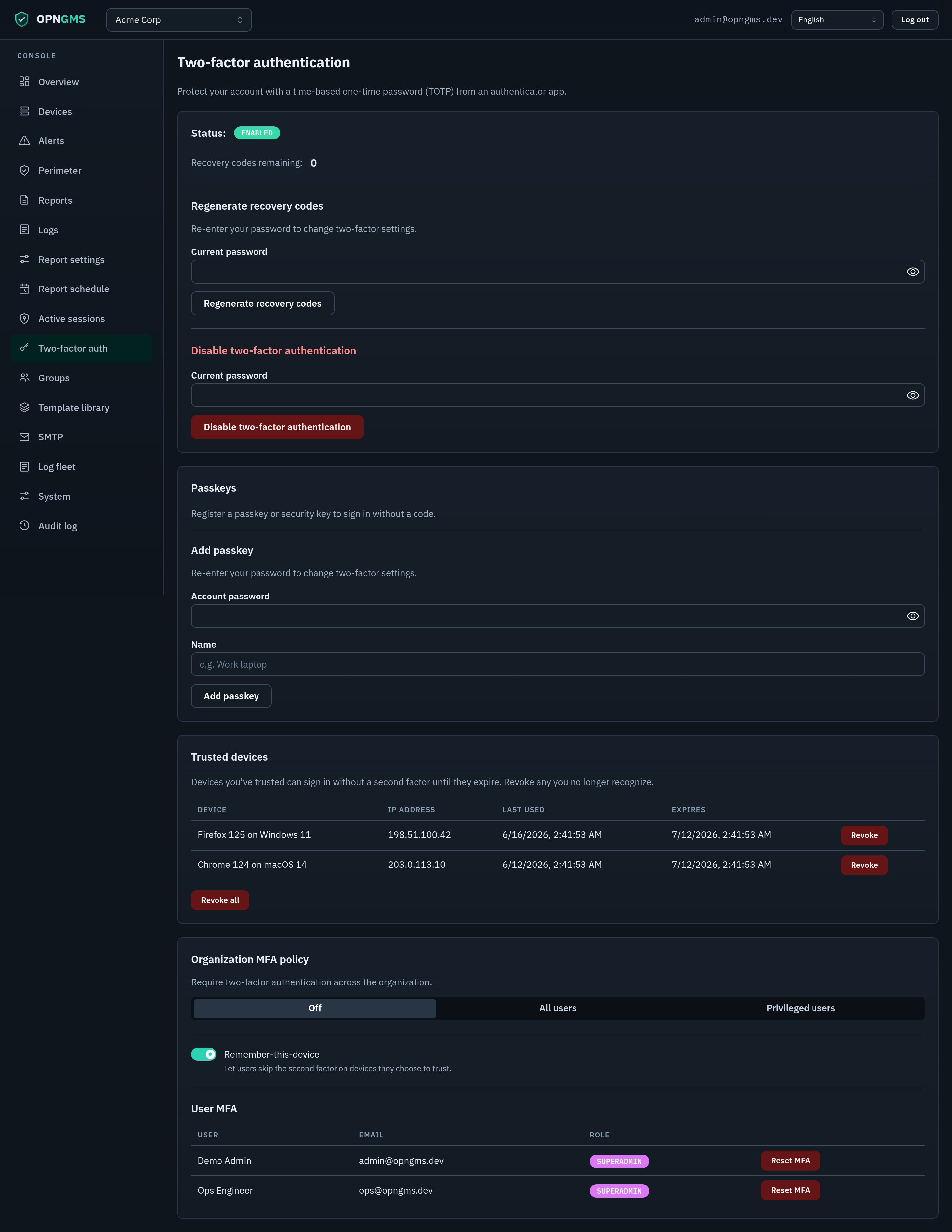
OPNGMS supports two second factors — TOTP (RFC 6238 authenticator apps) and WebAuthn passkeys (platform authenticators like Face/Touch ID or Windows Hello, and roaming security keys like a YubiKey). A user may enrol either or both; the login challenge is satisfied by a passkey or a TOTP code.
Enrolment is a password-re-authenticated flow under Two-factor auth:
-
TOTP —
POST /api/me/mfa/setup(re-auth with the account password) generates a random base32 secret, stores it Fernet-encrypted (MASTER_KEY), and returns anotpauth://provisioning URI (issuerOPNGMS, account = the user's email) plus the raw secret for the QR code;POST /api/me/mfa/confirmverifies a 6-digit code, marks MFA enabled, and issues recovery codes. -
Passkey —
POST /api/me/mfa/webauthn/register/{begin,complete}(also password-re-authenticated) runs the WebAuthn registration ceremony; OPNGMS stores only the public key + a signature counter (no secret material). Each passkey is named and individually removable, and the last remaining factor can't be removed while the policy requires MFA.
TOTP verification allows ±1 step (30-second period) of clock skew, compares in constant time, and enforces anti-replay: a code's time-step must be strictly greater than the last one used. WebAuthn verifies the challenge + RP ID + origin server-side and rejects an authentication whose signature counter does not strictly increase (cloned-authenticator detection); the per-ceremony challenge is server-generated, single-use, and bound to the session.
Passkeys need a configured domain. Set the relying-party config first (System → WebAuthn:
rp_id/origin, or envWEBAUTHN_RP_ID/WEBAUTHN_ORIGIN) — WebAuthn requires HTTPS + a stable domain, so passkey registration is refused until it is set. TOTP is unaffected.
An admin sets the org-wide policy (Admin → MFA policy, PUT /api/admin/mfa-policy) to one of:
| Mode | Effect |
|---|---|
off |
MFA optional (default). |
all |
Every user must enrol and pass MFA. |
privileged |
Only privileged users (superadmins) must enrol and pass MFA. |
When MFA applies, login is two requests, tracked by a short-lived partial session distinguished by a kind column on the session row:
-
POST /api/login— verifies the password. If the user has MFA enrolled it returnsstatus: "mfa_required"and amfa_pendingsession (TTL 5 minutes). If policy requires MFA but the user is not yet enrolled it returnsmfa_setup_requiredwith amfa_setupsession. Otherwise it returns a normalfullsession andstatus: "ok". -
POST /api/login/mfa— accepted only for anmfa_pendingsession; verifies the TOTP code (or a recovery code), then deletes the pending session and mints a freshfullsession (anti-fixation rotation) with new cookies.
The session cookie is the only carrier of this intermediate state — there is no separate bearer token — and the request dependencies reject partial sessions from protected endpoints with a 403 carrying mfa_required / mfa_setup_required.
Added in v0.21.0. Lets a user skip the second factor on a device they choose to trust — the password is always still required.
At the MFA step the user can tick "Trust this device for N days". On success, OPNGMS mints a random 256-bit token (secrets.token_urlsafe(32)), stores only its HMAC-SHA256(SESSION_SECRET) hash in a new trusted_devices row (with the user id, an expiry, and display-only UA/IP), and sets the raw token in a separate opngms_trusted_device cookie (HttpOnly + Secure + SameSite=Lax). As with the session cookie, a DB dump yields no usable tokens and rotating SESSION_SECRET invalidates every trusted device.
On a later POST /api/login, after the password verifies, if the org allows the feature, the user is MFA-enrolled, and a valid trusted-device cookie for that same user is presented, OPNGMS mints a full session directly and returns status: "ok" — the second factor is skipped (audited auth.login.trusted_device).
Fail-closed safety rails:
- The password is always required — the skip only ever bypasses the second factor.
- Trust is bound to one user: the lookup matches
token_hashanduser_id(in SQL and re-checked after fetch), so a cookie minted for user A can never skip MFA for user B. - A trusted cookie can never bypass mandatory enrolment — a user the policy forces into
mfa_setupis still forced, even with a cookie. - Expired, revoked, unknown, or empty cookies are ignored (never grant a skip). Expired rows are purged by the session-cleanup cron.
Management & revocation:
- Users see and revoke their trusted devices under Two-factor auth —
GET /api/me/trusted-devices,DELETE /api/me/trusted-devices/{id}(revoke one),DELETE /api/me/trusted-devices(revoke all). Mutations require a full session + CSRF. -
Auto-revoke drops all of a user's trusted devices on disable-MFA (
/api/me/mfa/disable), an admin MFA reset (/api/users/{id}/mfa/reset), and log out everywhere (/api/logout-all). A plain/api/logoutintentionally keeps the trust so the feature survives a normal sign-out.
Org controls (superadmin):
-
Remember-this-device on/off toggle —
GET/PUT /api/admin/trusted-device-enabled(env defaultTRUSTED_DEVICE_ENABLED=true); turning it off gates the skip at login time and hides the user-facing section. Auditedauth.trusted_device.policy_change. -
Trusted device lifetime — the runtime setting
trusted_device_days(default 30, range 1–365) under System → Runtime settings.
Confirmation issues 10 one-time recovery codes (formatted XXXXX-XXXXX from an unambiguous alphabet). Only argon2 hashes are stored; the clear codes are shown once. A recovery code can substitute for the TOTP code at the /api/login/mfa step, and consumption is atomic (guarded by used_at IS NULL) so a code can be spent only once.
If the last superadmin loses their authenticator and recovery codes, reset MFA from the host with the CLI (connects as the owner via ADMIN_DATABASE_URL):
docker compose -f docker-compose.prod.yml exec api \
  python -m app.cli mfa-reset --email admin@example.com
This deletes the user's TOTP secret and recovery codes and writes an audit-log entry (mfa.cli_reset). There is also an in-app admin reset (POST /api/users/{user_id}/mfa/reset, requires user-management permission) for resetting other users.
OPNGMS records every state-changing and privileged action in an append-only audit_log table (shipped in v0.10.0). Writes go through a single AuditService, and each row captures:
- When — the timestamp.
- Who — the acting user, together with their IP address.
- Where — the tenant the action targeted.
-
What — the action name, the target's type and id, and a JSONB
detailspayload with action-specific context.
Coverage is broad by design: authentication, device lifecycle, configuration changes, RBAC (groups and memberships), MFA, log forwarding, profiles, templates, reports and schedules, SMTP delivery, system settings, firmware actions, retention changes, and the CLI break-glass MFA reset all leave a trail.
Note: No secrets are stored in
details. Credential operations record an empty (or redacted) payload, the same discipline used everywhere else secrets are handled (see Secrets at rest).
A guard test in the backend suite enumerates every mutating route (POST / PUT / PATCH / DELETE) and fails the build if any of them ships without an audit record — or an explicit, declared read-only exemption. A new write endpoint therefore cannot merge silently un-audited; coverage stays complete as the API grows, rather than depending on a developer remembering to log.
A superadmin-only Audit page (/admin/audit) browses the ledger in the console. It supports:
- Filters — actor email, tenant, action, and a date range.
- Offset pagination through the matching rows.
- CSV export of the current result set.
It is backed by GET /api/admin/audit and GET /api/admin/audit/export.csv, gated by an org-level AUDIT_VIEW permission.
Note: Unlike the per-tenant tables,
audit_logis a global, non-RLS table — it deliberately spans all tenants so an operator can see the whole fleet's activity in one place. Because there is no RLS policy backing it, the superadmin code-gate (AUDIT_VIEW) is the only access control on the ledger; treat that permission as highly sensitive.
OPNGMS prefers to refuse rather than run insecurely:
-
change-mesecret guard. At startup (in the FastAPI lifespan, before any traffic is served) the API callsassert_secure_secrets()and refuses to start ifDATABASE_URL,ADMIN_DATABASE_URL,SESSION_SECRET,MASTER_KEY, orAPP_ROLE_PASSWORDstill contain the shippedchange-meplaceholder. You cannot accidentally run on default secrets. -
One-time
/api/setup. The first-superadmin bootstrap endpoint returns409 Conflictif any user already exists, so it cannot be used to inject an extra admin after the system is live. The first user it creates is the superadmin. -
Reserved-TLD email rejection. Every email input is validated by pydantic
EmailStr(the RFC-compliantemail-validatorlibrary), which rejects addresses on special-use/reserved TLDs such as.local,.internal, and.test. (This is an emergent property of the validator library, not a bespoke deny-list.)
The SPA carries Secure session cookies, so the console must be served over HTTPS. Installation documents four mutually-exclusive TLS models — terminate at your own proxy/LB (Model 1), built-in nginx with your certificate (Model 2), or automatic Let's Encrypt via Caddy or Traefik (Models 3a/3b). Refer to that page's TLS-model table rather than re-choosing here.
Every call to a managed box goes through the SSRF-guarded OpnsenseClient (HTTPS only, no redirects, loopback/link-local blocked, connection pinned to the resolved IP to defeat DNS rebinding). Certificate handling is a per-device decision, because OPNsense appliances ship with a self-signed certificate:
-
Verify TLSon (the default) — the device certificate is validated against the system CA store, as for any HTTPS client. Use this once the box presents a certificate from a CA you trust. -
Verify TLSoff + a pinned fingerprint — the connector retrieves the device's leaf certificate and compares its SHA-256 against the pinned value using a constant-time comparison, before any credential is transmitted, on every request. A mismatch fails closed: the request is refused and the device is reported unreachable. This is the recommended setting for a stock self-signed box. -
Verify TLSoff with no fingerprint — permissive mode. Nothing authenticates the certificate, so the device's API credentials are exposed to an on-path attacker. It exists because self-signed deployments must keep working, and the device form warns about it explicitly.
Both fields are set when adding a device (Devices → Add device); the fingerprint field and the warning appear as soon as verification is switched off. The fingerprint is accepted as a hex SHA-256 digest, with or without colons and with an optional sha256: prefix.
Note (honestly stated): changing the TLS trust settings of an already-onboarded device is not yet possible from the console — the API supports it (
PATCH /api/tenants/{tenant_id}/devices/{device_id}), but no UI exposes it. Until it does, re-add the device to change its pinning.
The optional log lake ingests device logs over mutual TLS (client certificate) on port 6514. The syslog-ng receiver is configured peer-verify(required-trusted), so it accepts only certificates signed by the OPNGMS CA. Tenant and device identity are taken straight from the verified client certificate — O = tenant id, CN = device id — which makes attribution unspoofable; logs that do not resolve to a tenant are dropped. OpenSearch itself is internal-only (plain HTTP, not published); the mTLS hop on 6514 is the trust boundary. The CA and per-device client certs are issued and managed by OPNGMS:
- Per-device client certs are short-lived (90-day default,
clientAuthEKU) and auto-renewed by the worker within a configurable window. - Operator Rotate (re-issue + swap on the box) and soft Revoke (deprovision + record the serial in an RLS-scoped revocation ledger) are implemented.
Note (honestly deferred): Hard CRL enforcement at the receiver is a tracked follow-up — the current syslog-ng build cannot enforce a CRL, which is precisely why device certs are deliberately short-lived and auto-renewed to bound the window of a stolen key. A soft revoke records the serial in the ledger but the receiver does not yet consult a CRL. Multi-node OpenSearch HA and an inter-node-TLS hardening pass are likewise staging bring-up items.
See Log-Lake for the full bring-up, network requirements, and the certificate lifecycle.
Security scanning runs in GitHub Actions, and the default branch is protected.
| Scan | Tool | Scope | Runs on |
|---|---|---|---|
| Static analysis (SAST) | CodeQL | Python, JavaScript/TypeScript, and GitHub Actions workflows — default setup's extended suite, i.e. security-extended
|
push to main, PRs, weekly |
| Container CVEs | Trivy | Backend + frontend images, HIGH/CRITICAL (SARIF → Security tab) | push to main, PRs, weekly |
| Committed secrets | gitleaks | Repo + full git history | push to main, PRs, weekly |
| PR dependency gate | dependency-review | New deps in a PR (blocks on high) |
PRs only |
| Dependency audit | pip-audit + npm audit | Backend Python + frontend prod deps | PRs (CI) + weekly |
The dependency audit is driven by scripts/security_audit.sh: pip-audit on the backend and npm audit --omit=dev on the frontend, exiting non-zero on any finding. Dependabot is configured for ongoing dependency updates.
The Trivy jobs are a baseline, not a gate. They run with
--exit-code 0, so theTrivy (backend)/Trivy (frontend)checks stay green whatever they find — the findings are published to the Security tab via the SARIF upload instead. A green Trivy check therefore does not mean the image is clean; read the Security tab, and read it after the final push rather than before.
The backend image ships no
pip. The Dockerfile uninstalls it once the application is installed. pip is not needed at runtime — the image only ever runsuvicorn,arqoralembic— and its vendored copies ofmsgpackandsetuptoolswere the only source of HIGH findings against the image, with no pip release shipping patched versions. Runpython -m ensurepipinside a container if you need pip back for debugging.
Note: CodeQL runs through GitHub's default setup, so there is deliberately no
codeql.ymlin.github/workflows/— an empty workflows directory is not evidence that CodeQL is absent. Its threeAnalyze (...)jobs are required checks onmain. One consequence worth knowing: default setup does not run those jobs on Dependabot-authored pull requests, which leaves such PRs reported as blocked on "expected" checks even when the rest of CI is green.
The main branch is protected by a strict ruleset: no direct pushes, and every change merges via PR with green required checks. Config-template catalogs are distributed with SHA-256 integrity verification — catalogs ship as GitHub Release assets alongside a manifest.json mapping each edition/version to its SHA-256, and the backend re-hashes the downloaded bytes and rejects anything that does not match (a manifest that drops the key is also rejected, fail-closed). The verified hash is persisted in the catalog cache. See Configuration and Configuration-Editor for how catalogs feed the version-aware config editor.
- Generate fresh secrets. Create unique
SESSION_SECRETandMASTER_KEYvalues; never reuse the.env.exampleplaceholders. Thechange-meguard will refuse to start otherwise. - Serve over HTTPS. Pick a TLS model from Installation; never expose the plain-HTTP frontend port to the internet.
- Forward
X-Forwarded-Proto: httpsfrom your reverse proxy/LB so the backend issuesSecurecookies. - Bind the base frontend to localhost. Keep
FRONTEND_BIND=127.0.0.1unless a TLS terminator sits directly in front of that port. - Use distinct, strong DB passwords and confirm both password pairs match (
DATABASE_URL↔APP_ROLE_PASSWORD,ADMIN_DATABASE_URL↔POSTGRES_PASSWORD). - Keep the API on
opngms_app. Never repointDATABASE_URLat the owner role — doing so silently disables RLS for request traffic. - Enforce MFA. Set the policy to
all(or at leastprivileged) and have admins enrol TOTP; store recovery codes securely. - Protect
MASTER_KEY. Back it up out-of-band — losing it makes encrypted device and SMTP credentials unrecoverable. Rotate viaMASTER_KEY_OLD_KEYS(see Upgrading). - Restrict outbound reach. The host needs HTTPS to managed OPNsense boxes and to your SMTP relay; limit egress otherwise.
- Lock down port 6514 (if you run the log lake) to managed devices only; rely on mTLS
peer-verifyand the short-lived auto-renewed device certs. - Keep dependencies current. Watch the weekly Trivy / gitleaks / audit runs and Dependabot PRs; do not merge with red required checks.
- Rotate
SESSION_SECRETto force-log-out all sessions after a suspected compromise.
For deployment see Installation; for environment variables Configuration; for day-two operations and key rotation Upgrading; for the log lake Log-Lake; for the broader system design Architecture; and for diagnostics Troubleshooting.