Log Lake
The log lake is an opt-in overlay that ingests every managed OPNsense device's syslog over mTLS into OpenSearch, giving you full per-device, per-tenant log storage and in-app investigation. It is deployed on top of the core stack and is entirely separate from the API-pull event ingest. This page covers the architecture, bring-up, network requirements, retention, the in-app Logs page, and day-two operations.
For the broader system layout see Architecture; for every environment variable see Configuration; for the trust model see Security; to add it during a first install see Installation.
- What the log lake is
- Architecture
- Bring-up guide
- Network requirements
- Multi-node OpenSearch option
- Retention
- Using the in-app Logs page
- Operations & troubleshooting
- Roadmap / deferred
OPNGMS has two independent ingest paths, and the log lake is the second of them:
| API-pull event ingest (always on) | Log lake (opt-in overlay) | |
|---|---|---|
| Mechanism | The worker polls each box's OPNsense API over HTTPS | Each box pushes its syslog to OPNGMS over mTLS |
| What it captures | Curated events & metrics — Suricata/IDS alerts, DNS queries, telemetry | Raw, full-fidelity device logs (filterlog, dhcpd, system, Suricata EVE, …) |
| Storage | TimescaleDB events hypertable (Postgres, RLS-enforced) |
OpenSearch per-tenant daily indices (opngms-logs-<tenant_id>-YYYY.MM.DD) |
| Purpose | Dashboards, reports, curated alerting | Forensics, incident analysis, free-text log search |
| Direction | OPNGMS → box (pull) | box → OPNGMS (push) |
The two paths do not depend on each other. The API-pull ingest keeps working whether or not the log lake is deployed; enabling the log lake adds raw-log storage and the in-app Logs investigation page without touching the existing event pipeline. The log lake is opt-in precisely because it brings extra moving parts (OpenSearch, a syslog-ng receiver, a per-device certificate authority) that not every deployment needs.
Note: The browser never talks to OpenSearch directly. All searches go through the OPNGMS API, which is the only OpenSearch client and always injects the tenant filter from the RBAC-verified request path — the same isolation guarantee as Postgres RLS.
Three services make up the overlay — opensearch, the one-shot syslog-bootstrap, and syslog-ng — added on top of the core six (db, redis, migrate, api, worker, frontend).
  Managed OPNsense devices                         OPNGMS host
 ┌────────────────────────┐
 │  Device A (tenant X)    │  syslog / RFC 5424
 │  client cert            │  over TLS, mTLS
 │  CN=device_id           │═══════════════╗
 │  O=tenant_id            │               ║
 └────────────────────────┘               ║   ┌──────────────────────────────────┐
 ┌────────────────────────┐               ╚══►│  syslog-ng   (port 6514, mTLS)     │
 │  Device B (tenant Y)    │  ════════════════►│  - peer-verify required-trusted     │
 │  client cert            │   port 6514       │  - tenant_id  ← cert  O= RDN        │
 │  CN=device_id           │                   │  - device_id  ← cert CN  RDN        │
 │  O=tenant_id            │                   │  - 256 MiB disk buffer (no loss)    │
 └────────────────────────┘                   └───────────────┬────────────────────┘
                                                               │ HTTP (internal net only)
                                                               ▼
                                              ┌──────────────────────────────────┐
                                              │  OpenSearch                        │
                                              │  index: opngms-logs-<tenant>-DATE  │
                                              │  docs tagged {tenant_id, device_id}│
                                              │  NOT published outside the network │
                                              └───────────────┬────────────────────┘
                                                               │ HTTP (internal net only)
                                                               ▼
  Browser  ──HTTPS──►  api  ──tenant-scoped PIT + search_after query──►  (OpenSearch)
                       (the only OpenSearch client; always tenant-filtered)
How attribution works. Each device presents a client certificate issued by the internal OPNGMS CA, with CN = device_id and O = tenant_id. syslog-ng enforces peer-verify(required-trusted), so only CA-signed certs are accepted, then reads the per-RDN macros ${.tls.x509_cn} and ${.tls.x509_o} straight off the verified peer certificate. Those values become the device_id and tenant_id fields on every indexed document — they come from the CA-verified cert and cannot be spoofed by the client. A message whose tenant_id does not resolve is refused (never indexed un-attributable).
Trust boundary. OpenSearch runs plain-HTTP with its security plugin disabled and is never published outside the Compose network. The security boundary is the mTLS device→syslog-ng hop on port 6514; everything inside the Compose network is trusted.
Durability. syslog-ng holds a 256 MiB reliable disk buffer, so a transient OpenSearch restart or rolling upgrade does not drop logs up to the buffer size.
These live in .env.example under the log-lake section. Verify the real names below:
| Variable | Default | Purpose |
|---|---|---|
SYSLOG_RECEIVER_HOST |
logs.opngms.example |
Public name/IP the managed devices ship logs to. Baked into the receiver's server certificate SAN and pushed to each box as the syslog destination host. |
SYSLOG_TLS_PORT |
6514 |
Host port the mTLS syslog receiver listens on. |
OPENSEARCH_URL |
http://opensearch:9200 |
Internal OpenSearch endpoint the receiver and the API use. Plain HTTP, internal-only. |
LOG_RETENTION_DAYS |
30 |
Global default retention horizon; a tenant's daily indices older than its effective retention are pruned by the purge_log_lake worker job. Per-tenant-overridable (Retention card). See Retention. |
Note:
SYSLOG_RECEIVER_HOSTmust be the name or IP the devices can reach, not an internal Compose name — it is what each OPNsense box dials and what the server cert's SAN must match.
syslog-bootstrap is a one-shot service that runs before syslog-ng starts (Compose waits for it via depends_on … service_completed_successfully). It runs python -m app.cli syslog-bootstrap --cert-dir /certs and:
- Ensures the internal syslog CA exists in the database (the CA private key is Fernet-encrypted at rest with
MASTER_KEY). - Issues the receiver's server certificate (SAN =
SYSLOG_RECEIVER_HOST) and writesCA.pem,server.pem,server.keyinto the sharedopngms_syslog_certsvolume (the key is written0600). - Applies the OpenSearch index template (
opngms-logs-*). Retention is no longer an ISM policy — thepurge_log_lakeworker job owns per-tenant deletion (see Retention).
It is idempotent: re-running it reuses the existing CA and skips cert files that already exist (use --force to overwrite). It connects to the database as the owner via ADMIN_DATABASE_URL and depends on migrate having completed, so run it only after a successful schema migration.
Add the log lake on top of the production base stack (Model 1 — terminate TLS upstream, see Installation):
docker compose -f docker-compose.prod.yml -f docker-compose.logs.yml pull
docker compose -f docker-compose.prod.yml -f docker-compose.logs.yml up -d
This brings up opensearch (single-node), the one-shot syslog-bootstrap, and syslog-ng (mTLS receiver on 6514), alongside the core services.
docker-compose.full.yml bundles the core six services plus the log lake in a single file:
docker compose -f docker-compose.full.yml pull
docker compose -f docker-compose.full.yml up -d
It serves plain HTTP bound to localhost (Model 1), so a TLS-terminating proxy is still required in front of the frontend. To add self-contained HTTPS, layer one of docker-compose.{tls,caddy,traefik}.yml on top — see Installation.
Build from source instead of pulling. Build the backend image locally first, then run
up -dwithoutpull— Compose uses the locally tagged image forsyslog-bootstrapand the app services.
| Requirement | Detail |
|---|---|
| Port 6514 reachable from devices | Every managed OPNsense box must be able to open an outbound TLS connection to SYSLOG_RECEIVER_HOST:6514. Open this port through any edge firewall/NAT in front of the OPNGMS host. |
| mTLS client cert per device | Each device presents a unique client certificate (CN=device_id, O=tenant_id) issued by the internal CA. The receiver rejects any cert not signed by that CA (peer-verify(required-trusted)). |
| Receiver server cert SAN | The server cert's SAN is SYSLOG_RECEIVER_HOST; devices verify it against that name/IP, so set it to the address the devices actually dial. |
You do not configure OPNsense by hand. From the device's Log forwarding tab in the console, enabling forwarding orchestrates everything through the existing OPNsense connector:
- The backend issues a fresh per-device client certificate from the internal CA.
- It imports the CA and the client cert into the box's trust store via the OPNsense API.
- It configures the box's remote-syslog TLS destination (
transport=tls, the client cert attached) pointing atSYSLOG_RECEIVER_HOST:SYSLOG_TLS_PORT. - It records the cert serial, fingerprint and expiry, and marks the device as forwarding.
The lifecycle actions on that tab — all gated by the CONFIG_PUSH action (tenant admin / operator) and audited:
| Action | What it does |
|---|---|
| Enable | Provision as above (issue cert → import CA+cert → configure TLS destination). |
| Disable | Remove the syslog destination and client cert from the box; mark disabled. Idempotent. |
| Rotate | Issue a fresh cert and swap it on the box — adds the new destination before deleting the old one, so there is no log gap. |
| Revoke | Deprovision the box and record the serial in the RLS-scoped revoked_syslog_certs ledger. The revocation is hard-enforced at the receiver (see Certificate revocation): the worker rebuilds a CA-signed CRL and the syslog-ng receiver rejects that cert at the TLS handshake. |
Device certificates are short-lived (DEVICE_CERT_DAYS, default 90 days) to bound the window of a stolen key. A worker job proactively auto-renews any enabled device whose cert falls within CERT_RENEWAL_WINDOW_DAYS (default 30) of expiry, using the same gap-free rotation swap.
Revocation is hard-enforced at the syslog-ng receiver, so a stolen device key can no longer connect
directly to port 6514 and inject forged logs after the device has been revoked (soft-revoke only stops
the box from sending).
How it works:
-
Revoke records the cert serial in the
revoked_syslog_certsledger (tenant-scoped, RLS) and enqueues a CRL refresh. - The worker (
refresh_syslog_crl, owner session — RLS-exempt so it covers every tenant) builds a single CA-signed CRL from the whole ledger and writes it, hash-named<issuer_hash>.r0, onto the shared cert volume (opngms_syslog_certs). A daily cron also refreshes it so the CRL'snext_updatenever lapses; the worker mounts the cert volume in the log overlays. -
syslog-ng.confenablescrl-dir("/certs/crl")withpeer-verify(required-trusted). Because syslog-ng caches the CRL at startup, the container's entrypoint runs a small reload-watcher: when the CRL file changes it runssyslog-ng-ctl reload, so an updated CRL takes effect within ~30s. - A revoked client cert is then rejected at the TLS handshake (OpenSSL alert certificate revoked) and its logs are dropped.
This was verified end-to-end against syslog-ng 4.5.0 (revoke → CRL refresh → reload → the cert is rejected; a valid cert keeps being accepted). It is defense-in-depth on top of short certs + auto-renew, which both remain.
For high availability, replace the single-node OpenSearch with a 3-node cluster using docker-compose.logs.multinode.yml instead of docker-compose.logs.yml:
docker compose -f docker-compose.prod.yml -f docker-compose.logs.multinode.yml up -dWhen to use it. Choose multi-node when log availability must survive the loss of a single OpenSearch node (an index stays green through a node failure) and when single-node ingest/query capacity is a bottleneck. For most deployments the single-node overlay is sufficient.
What changes:
Single-node (docker-compose.logs.yml) |
Multi-node (docker-compose.logs.multinode.yml) |
|
|---|---|---|
| OpenSearch nodes | 1 (opensearch, discovery.type=single-node) |
3 (opensearch-n1/2/3, cluster opngms-logs) |
| Index shards / replicas | 1 shard, 0 replicas | 2 shards, 1 replica (index-template.multinode.json) |
| Data volumes | opngms_os |
opngms_os_n1, opngms_os_n2, opngms_os_n3
|
OPENSEARCH_URL |
http://opensearch:9200 |
points at a cluster node (e.g. http://opensearch-n1:9200) |
| Network exposure | internal-only, not published | internal-only, not published (unchanged) |
syslog-ng and syslog-bootstrap are otherwise identical; only the OpenSearch topology and index template differ. The cluster stays on the internal Compose network and is never published — same trust boundary as single-node.
Note: HA behaviour was verified at a staging bring-up (not in CI). With the 3-node cluster and the 2-shard / 1-replica template, killing one node keeps the index fully available: it drops to
yellow(one replica unassigned), but no data is lost — every shard's surviving replica is promoted, reads and writes continue, and the missing replica re-allocates to a surviving node after OpenSearch's delayed-allocation timeout (~1 min), returning togreen. Re-validate on your own hardware before relying on it in production.
Log-lake retention is now per-tenant, owned by a worker job rather than an OpenSearch ISM policy. The global ISM retention policy has been removed — the worker is the single authority that deletes old log data.
Per-tenant daily indices. Logs are written to per-tenant daily indices named opngms-logs-<tenant_id>-YYYY.MM.DD. The tenant_id segment comes from the verified client certificate (O= RDN, see Architecture), so each tenant's logs live in their own daily indices. Search is unaffected: the API still globs opngms-logs-* (always tenant-filtered from the RBAC-verified path).
The purge_log_lake worker job. A daily worker cron walks every tenant and deletes that tenant's indices older than the tenant's effective retention:
- The global default is
LOG_RETENTION_DAYS(default 30), surfaced as thelog_lake_retention_daysruntime setting (see Configuration). - A tenant may set a per-tenant override on its Retention card (longer or shorter than the global). The effective value is
per-tenant override ?? global default. -
Legacy date-only indices (
opngms-logs-YYYY.MM.DD, written before the per-tenant scheme) cannot be attributed to a single tenant, so they age out at the global retention.
Because the index name carries the day, deletion stays clean and index-granular (whole days) — the worker simply drops any of a tenant's daily indices past that tenant's horizon.
Note: To change the global default, update
LOG_RETENTION_DAYSin.env(or thelog_lake_retention_daysruntime setting, no restart). To change one tenant's horizon, use that tenant's Retention card. Retention is also consistency-checked against reports — a report's range cannot exceed the tenant's effective retention; see Reporting.
The Logs page (visible to tenant admin and operator roles — the LOG_VIEW action) is the investigation UI for the active tenant. It posts to POST /api/tenants/{tenant_id}/logs/search; results are always confined to the active tenant.
Filtering:
-
From / To — a date-time range. The range may not exceed
LOG_SEARCH_MAX_RANGE_DAYS(default 31 days). - Device — an optional dropdown to scope the search to one device of the tenant.
-
Query (Lucene) — a free-text Lucene
query_stringover themessagefield (e.g.action:block AND src_ip:10.0.0.1). Leading wildcards are disabled; the query is confined and can never widen past the tenant/time filters.
Result table & raw document. Hits show Time, Device, Program and Message; click a row to open the raw document modal with the full JSON _source.
Available fields. Indexed documents carry: @timestamp, tenant_id, device_id, host, program, pid, facility, severity, and the raw message, plus any RFC 5424 structured-data name/value pairs. tenant_id, device_id, host and program are keyword fields (exact-match/aggregation); message is full-text.
Deep paging (search_after). Paging uses an OpenSearch Point-In-Time + search_after cursor over a stable [@timestamp desc, _shard_doc asc] sort. This is consistent across the second-granularity timestamp ties the logs produce and is unbounded past the usual 10k result window. Each page returns up to LOG_SEARCH_MAX_SIZE hits (hard ceiling 200); a Load more button fetches the next page via the stateless {pit_id, after} cursor held in the client. The PIT keep-alive is short, so an idle cursor expires.
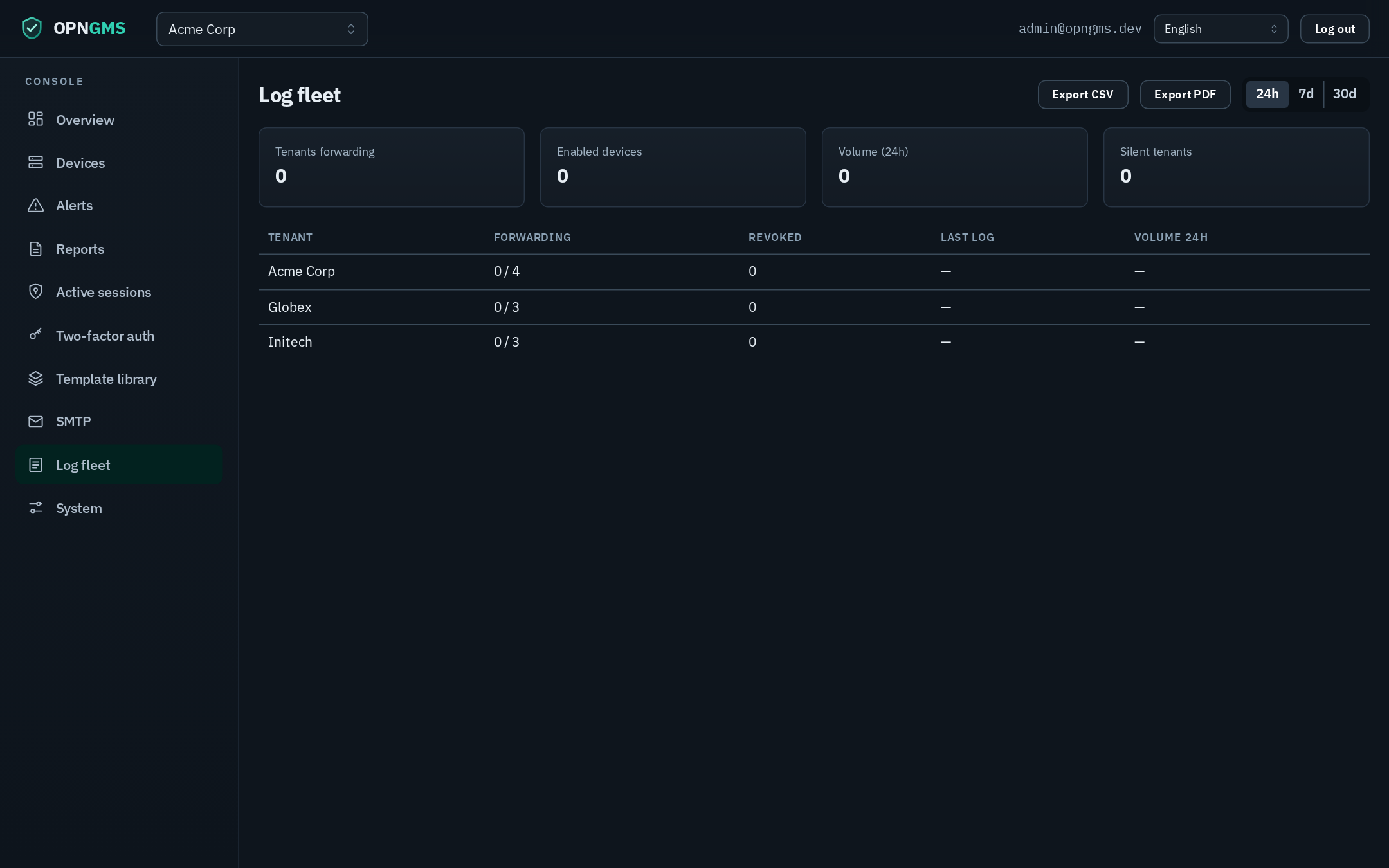
Superadmins also get an org-level Log fleet view (GET /api/admin/log-fleet, the LOG_FLEET_VIEW action) — the console's cross-tenant aggregate. It shows, per tenant: forwarding status counts (enabled / disabled / revoked), ingest health with a silent-tenant flag (forwarding enabled but no recent log), and log volume over a selectable window. A worker cron maintains silent-tenant alert rows, and the fleet table can be exported to CSV/PDF. A per-tenant drill-down lists each device's forwarding status, last log and windowed volume, with a per-device silent flag.
| Symptom | Cause / fix |
|---|---|
| A device shows as silent (forwarding enabled, no recent log) | The box isn't reaching the receiver. Confirm SYSLOG_RECEIVER_HOST:6514 is reachable from the device, and check the device's syslog destination is enabled. Inspect docker compose logs syslog-ng. |
syslog-bootstrap exits non-zero |
Usually ADMIN_DATABASE_URL not set / migrations not yet applied, or OpenSearch not reachable at OPENSEARCH_URL. Check docker compose logs syslog-bootstrap; ensure migrate completed and opensearch is up. |
| Logs not appearing in the Logs page | Verify the device cert hasn't expired (check the Log forwarding tab's expiry / "last log received"); confirm syslog-ng accepted the connection (a cert not signed by the CA is rejected by peer-verify). Check OpenSearch has opngms-logs-* indices. |
| Log search returns 502 / "log search unavailable" | The API couldn't reach OpenSearch. Verify OPENSEARCH_URL and that the opensearch service is healthy. |
| Cert about to expire | It auto-renews within CERT_RENEWAL_WINDOW_DAYS; you can also Rotate manually from the Log forwarding tab (gap-free swap). |
| Logs missing after an OpenSearch restart | The 256 MiB syslog-ng disk buffer absorbs transient outages; sustained downtime beyond the buffer can drop logs — bring OpenSearch back promptly. |
For broader diagnostics see Troubleshooting. For the trust model, CA handling and mTLS details see Security.
The following are intentionally deferred (parked with rationale, not dropped):
- CA rotation. Re-keying the internal CA and re-issuing every device cert is a dedicated effort with a large blast radius; not yet built.
- Inter-node OpenSearch transport TLS. The multi-node cluster stays on the internal network (not published), the same trust boundary as Phase 1 — inter-node transport TLS is not enabled.
- Staging-bring-up verifications. Multi-node HA (node loss → index stays available) and the syslog-ng cert/field-shape behaviour are verified at a staging bring-up rather than in CI — both were verified for the current release (see Multi-node and Certificate revocation).
Shipped since this list was first written: CRL hard-revocation is now built and receiver-enforced (was deferred as "3.2-bis") — see Certificate revocation. The earlier note that it "is not reliably achievable on syslog-ng 4.5.0 / would need an HAProxy front-end" was disproved at a bring-up:
crl-dir()enforces correctly with a hash-named CRL + a reload on change.
-
syslog_caleast-privilege. The encrypted CA key currently sits in a table the app role can read via a blanket grant (key is encrypted); the proper fix splits cert/key or moves CA-key ops to an owner session.
See also: Installation · Configuration · Architecture · Security · Troubleshooting · Configuration-Editor · Reporting · Upgrading · Development · Home