Stylus Edition

- Compatibility
- Stylus vs Bracelet
- Disclaimer
- Bill of materials
- Settings
- Buttons
- Screen pages
- Bluetooth LE
- Device Id
- Optional equipment
Stylus Edition is a successor of SoftRF Bracelet Edition.
It is supposed to require minimal skills from a builder to begin with and gives an opportunity to evaluate if the SoftRF technology is appropriate for your needs.
Stylus Edition is based on third-party's hardware - LilyGO® T-Impulse Plus product, which is available for direct purchase from manufacturer at more or less reasonable price (40+ USD).

The T-Impulse Plus is an example of cutting edge technology. It contains
- Nordic nRF52840 Low Power MCU
- Semtech SX1262 Long Range Low Power RF Transceiver with TCXO clock source
- Ublox MIA-M10Q GNSS Receiver
- 0.49" I2C OLED display
- Zetta ZD25WQ32B 4 Mbytes QSPI flash memory storage
- TDK InvenSense ICM-20948 Inertial Measurement Unit

| Type | Protocol | FLARM | OGN tracker | PilotAware | Skytraxx | SoftRF |
|---|---|---|---|---|---|---|
| Radio | FLARM AIR V7 |
|
|
|
||
OGNTP |
|
|
||||
P3I |
|
|
||||
FANET+ |
|
|
||||
SRD 860 |
|
|
||||
| Data | FLARM NMEA |
|
|
|
|
|
| Garmin GDL90 |
|
|
||||
Dump1090 |
|


1 - it is necessary for a reader to feel the difference between statement "compatible"
and statement "fully compatible".
SoftRF implements only a reasonable minimum of the protocols specs.
No "bells and whistles" so far.
| Edition | Bracelet | Stylus 
|
|---|---|---|
| First appearance | 2021 | 2026 |
| Manufacturer | LilyGO | LilyGO |
| SoC | STMicroelectronics STM32L073Z |
Nordic Semi nRF52840 |
| sub-1GHz radio | Semtech SX1276 | Semtech SX1262 |
| sub-1GHz antenna | internal, PCB | external, SMA |
| Bluetooth | 5 LE | |
| Display | 0.49" OLED 64x32 | 0.49" OLED 64x32 |
| Battery | Li-Ion 250 mAh | Li-Ion 200 mAh |
| GNSS receiver | Sony CXD5603GF | Ublox MIA-M10Q 
|
| USB | 2.0 device | 2.0 device |
| Sensors | TDK InvenSense ICM-20948 IMU | TDK InvenSense ICM-20948 IMU |
| QSPI flash memory | 4 MB |
SoftRF firmware for Stylus Edition is distributed in the hope that it will be useful, but WITHOUT ANY WARRANTY; without even the implied warranty of MERCHANTABILITY or FITNESS FOR A PARTICULAR PURPOSE.
Author of SoftRF firmware:
- will reject any hardware related claims associated with LilyGO® T-Impulse Plus product. Ask for support from seller or manufacturer ;
- reserves the right to suspend or terminate support of LilyGO® T-Impulse Plus in the firmware at any time.
For the time being ( Jul '26 ) there were no critical hardware issues reported for current version of the T-Impulse Plus product. However things my change over the time...
If you have issues with bringing up your new LilyGO® T-Impulse Plus or just not happy with the device - be prepared to execute your Purchase Protection plan.
| Number | Part | Qty | Picture | Source |
|---|---|---|---|---|
| 1 | LilyGO® T-Impulse Plus 3 |
1 |  |
Seeed Store |
3 - 868 MHz variant is applicable for these world regions: EU, RU, NZ, SA, IN ;
915 MHz - US, CA, AU, IL, KR ;
433 MHz - CN .

Procedure of settings change is explained on this page.
Basic (radio) settings description is located here.
Important
EASA ADS-L radio protocols selection is not applicable with current version of SoftRF Tool app for Android - use
- SoftRF Configurator app or
- Online Tool method instead.
If you are an application developer and you think about to add the Card configuration menu into your software, please, use:

When unit is Off:
- touch and release Touch button to turn the unit On.
When unit is On:
- touch and release Touch button to cycle between screen pages available, or
- touch and keep holding Touch button for 2-3 seconds to turn the unit Off.
- press and release Reset button one time to restart the SoftRF unit.
- press and keep holding Reset button, then
- press and keep holding Boot button, then
- release Reset button, then
- release Boot button, to enter the device into (firmware) service mode.

Factory default data output setting is to deliver GNSS and air traffic information over Bluetooth LE in NMEA plain-text format.

This data is sufficient for an app (such as XCSoar) to facilitate a Radar view:
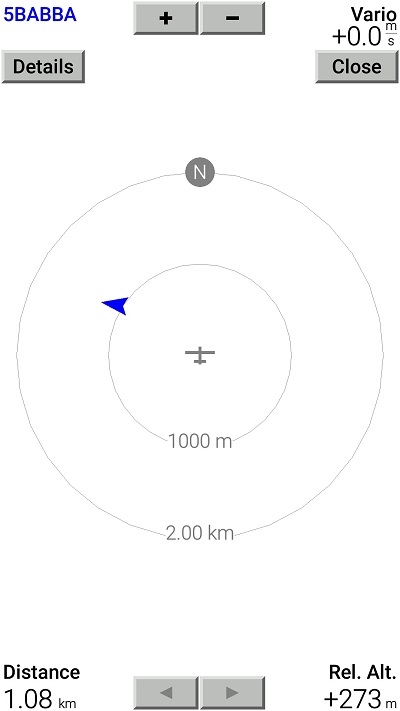
These Bluetooth LE services are available:
- UART
- Battery
- Bluefruit device information
- OTA firmware update

This is a list of mobile applications that are known good to operate with the Stylus Edition over Bluetooth LE:
-
SoftRF Tool
-
SoftRF Configurator
- XCSoar
- LK8000
- Bluefruit Connect
- nRF Connect for Mobile
- Serial Bluetooth Terminal
- FlySkyHy
- XCTrack
- Enroute Flight Navigation
Please, use the Bluetooth LE page for Badge Edition to get more information.
When a user wants to register a SoftRF device in OGN or other aircrafts database - it's Id can be obtained with assistance of SoftRF Tool application.
| Protocol | Id |
|---|---|
| OGNTP Legacy P3I ADS-B ADS-L PRoL |
 |
| FANET |  |
SkyView EZ is a DIY companion device for SoftRF Stylus Edition.
Recommended connection method is Bluetooth LE.


SoftRF
-
Standalone

- UAV
-
LoRa module
-
Concorde
-
Retro MkII
-
Prime MkIV
-
Prime MkIII
-
Badge
-
Card MkII
-
Card
-
Stylus
-
Airventure
-
Pocket
-
Nano
- Prime MkII
-
Dongle
- Ham
- Handheld
-
Solaris
-
Lyra
-
Labubu
- Eco
- Gizmo
- ES
- Octave
- Duo
- Uni
- Cozy
- Midi
- Mini
- Lego
- Balkan
-
Academy
- Raspberry
- Bracelet
- Retro
SkyView
Flight Recorder
Adapters
Firmware
Tools
Protocols