Repository navigation
Releases
0.14.0

Download
| System | File |
|---|---|
| Windows 10 or 11 x64 | DisruptorRecomp-win-Setup.exe installs the launcher that updates itself |
| Windows, without installing | DisruptorRecomp-win-Portable.zip the launcher that updates itself, no install |
| Linux x64, glibc 2.35 or newer | DisruptorRecomp.AppImage the launcher that updates itself |
In this release
| Change | |
|---|---|
| Launcher | It can close itself once the game is on the screen |
| Fixes | Triton's red pipe corridor, the sixth mission's enemies and its start, a patch of sky in a wall |
Note
Before you update
- Save states, settings, keys and memory cards stay as they are
Launcher
| Setting | Where | Default |
|---|---|---|
| Close the launcher when the game starts | Play page, under PLAY | Off |
- The launcher closes once the game is on the screen
- If the game stops with an error, the launcher comes back with the reason

Fixes
Triton's red pipes
- Behind the second drop down, in-between frames no longer drop out: the motion stays smooth instead of stepping down to half rate
- There the far walls and the nearest pipes no longer flicker and change shape every other frame
Two frames in a row, standing still:

The sixth mission
- After the jump into the underground the game no longer closes to the desktop, broken since 0.10.0
- Enemies and effects there no longer turn into squares
- At the start, while you own no weapon, Vertical mouse look, the crosshair and the Draw distance you chose work now, 0.13.0 turned them off there
Looking down and up at the start, while you own no weapon:

Sky in a wall
- A patch of sky no longer shows through a wall in front of you while you turn

Depth-sorted world
- With Depth-sorted world on, turning near a pillar on the first mission's roof no longer draws the ledge over the pillar's foot at the edge of the screen

Install
Your own Disruptor (USA, SLUS-00224) disc image is needed
Windows 10 or 11 x64
- Download DisruptorRecomp-win-Setup.exe and run it
- It installs the game into
%LocalAppData%\DisruptorRecomp, with shortcuts on the desktop and in the Start menu - Your files are kept in
%LocalAppData%\DisruptorRecompData - Or, without installing, unpack DisruptorRecomp-win-Portable.zip into a folder of its own and run
Disruptor Recompiled.exe - The portable copy needs the Microsoft Visual C++ x64 Redistributable
- The portable copy keeps your files in its
datafolder
Linux x64, glibc 2.35 or newer
- Download DisruptorRecomp.AppImage
- Make it executable:
chmod +x DisruptorRecomp.AppImage - Run it
- Your files are kept in
~/.local/share/DisruptorRecompData
0.13.0

Download
| System | File |
|---|---|
| Windows 10 or 11 x64 | DisruptorRecomp-win-Setup.exe installs the launcher that updates itself |
| Windows, without installing | DisruptorRecomp-win-Portable.zip the launcher that updates itself, no install |
| Linux x64, glibc 2.35 or newer | DisruptorRecomp.AppImage the launcher that updates itself |
In this release
| Change | |
|---|---|
| Mouse look | Mouse turning and Vertical mouse look in one group, the crosshair on by default |
| Sky | The sky moves with the view when you look up and down, the first mission's city no longer runs ahead of the roof |
| Launcher | The Controls tabs in a new order |
| Fixes | Vertical mouse look and Draw distance after Continue from mid mission |
Note
Before you update
- Mouse aim is called Mouse turning now, Smooth mouse turning is Smooth turning
- The crosshair is on by default now, 0.12.0 had it off
- A crosshair you turned off stays off
- Save states, settings, keys and memory cards stay as they are
Mouse look
| Setting | Where | Default |
|---|---|---|
| Mouse turning | Controls, Mouse tab | On |
| Vertical mouse look | Under Mouse turning | Off |
| Crosshair | Under Vertical mouse look | On |
- Turning and looking up and down are one group, Mouse look, in the launcher and in the game's menu
- Smooth turning, Invert horizontal and Sensitivity stand under Mouse turning
- Vertical mouse look needs Mouse turning, and so does tilting the view with the turning stick
- Looking up and down answers sooner
- In the launcher, turning Mouse turning off and on again keeps Vertical mouse look and the crosshair as you left them
Sky
Looking up and down
- With Vertical mouse look the sky moves with the world now, 0.12.0 kept it still on the screen
- Looking up shows more sky above the game's own sky picture, grown from it on your machine once per level
The first mission's city
- Turning in place, the city painted in the sky no longer runs ahead of the roof in the middle of the screen
- The city is drawn a little smaller and smooth, in its own shape
Launcher
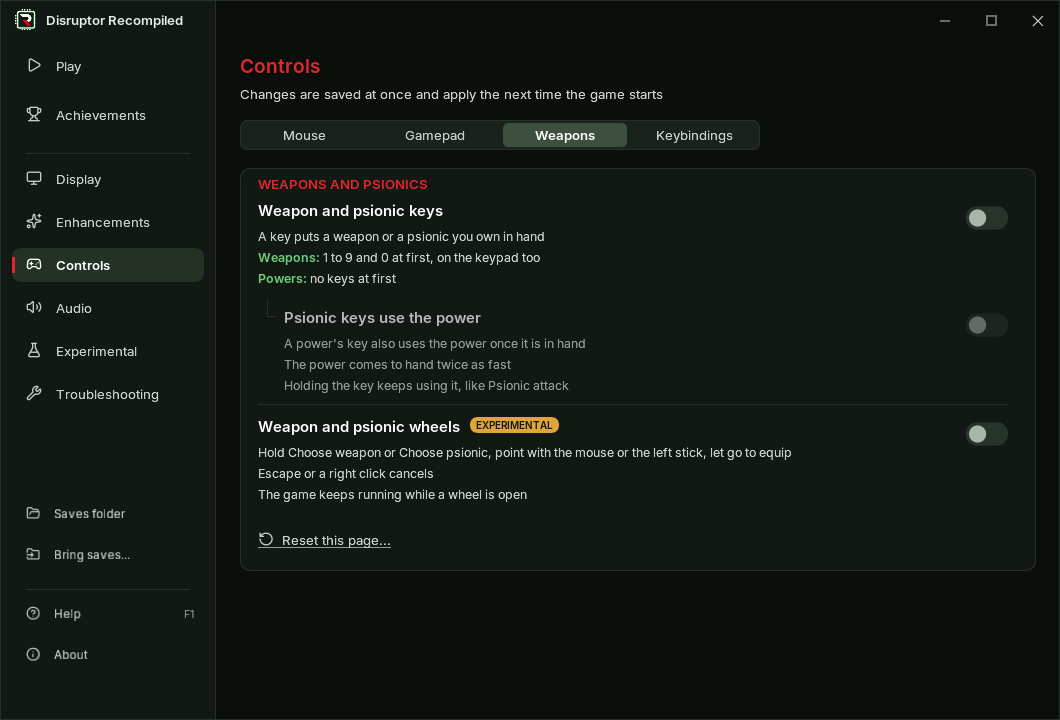
- The Controls page's tabs go Mouse, Gamepad, Weapons, Keybindings, and Keys is called Keybindings
Fixes
Continue from mid mission
- Vertical mouse look, the crosshair and the Draw distance you chose work after Continue from mid mission now, 0.12.0 turned them off to the end of the mission
Install
Your own Disruptor (USA, SLUS-00224) disc image is needed
Windows 10 or 11 x64
- Download DisruptorRecomp-win-Setup.exe and run it
- It installs the game into
%LocalAppData%\DisruptorRecomp, with shortcuts on the desktop and in the Start menu - Your files are kept in
%LocalAppData%\DisruptorRecompData - Or, without installing, unpack DisruptorRecomp-win-Portable.zip into a folder of its own and run
Disruptor Recompiled.exe - The portable copy needs the Microsoft Visual C++ x64 Redistributable
- The portable copy keeps your files in its
datafolder
Linux x64, glibc 2.35 or newer
- Download DisruptorRecomp.AppImage
- Make it executable:
chmod +x DisruptorRecomp.AppImage - Run it
- Your files are kept in
~/.local/share/DisruptorRecompData
0.12.0
Download
| System | File |
|---|---|
| Windows 10 or 11 x64 | DisruptorRecomp-win-Setup.exe installs the launcher that updates itself |
| Windows, without installing | DisruptorRecomp-win-Portable.zip the launcher that updates itself, no install |
| Linux x64, glibc 2.35 or newer | DisruptorRecomp.AppImage the launcher that updates itself |
In this release
| Change | |
|---|---|
| Vertical mouse look | No longer experimental, smooth, with Auto-aim on/off and a crosshair |
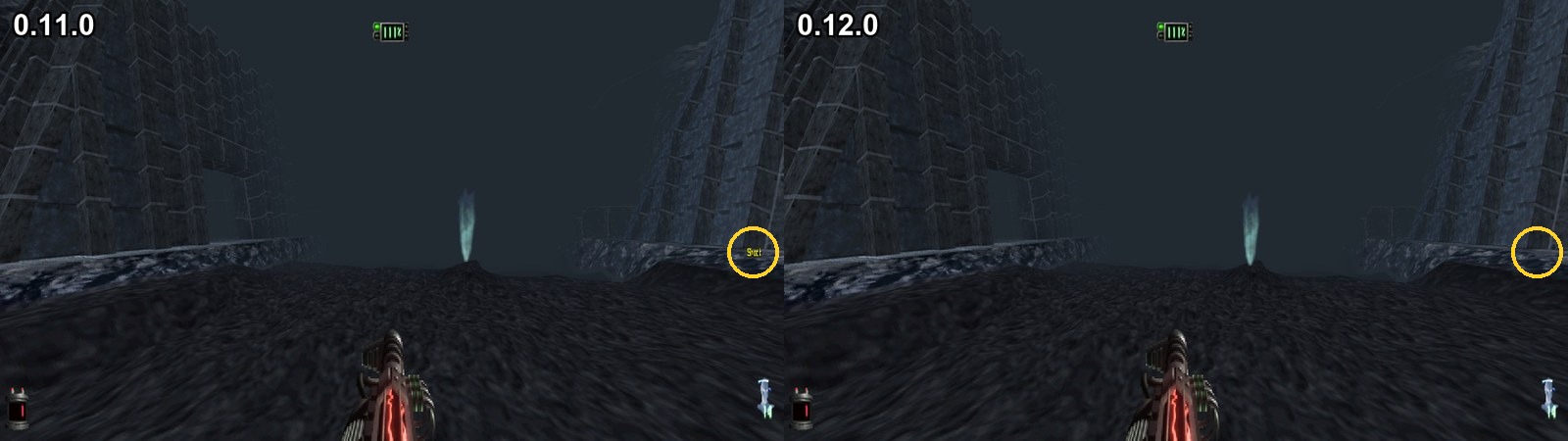
| Fixes | Items and enemies shaking while you look up or down with free look, a weapon's or power's name alone at the screen's side |
Note
Before you update
- With Vertical mouse look on, shots go where you look now, 0.11.0 raised them to the enemy the game picked
- Auto-aim under Vertical mouse look brings that back
- Save states, settings, keys and memory cards stay as they are
Vertical mouse look
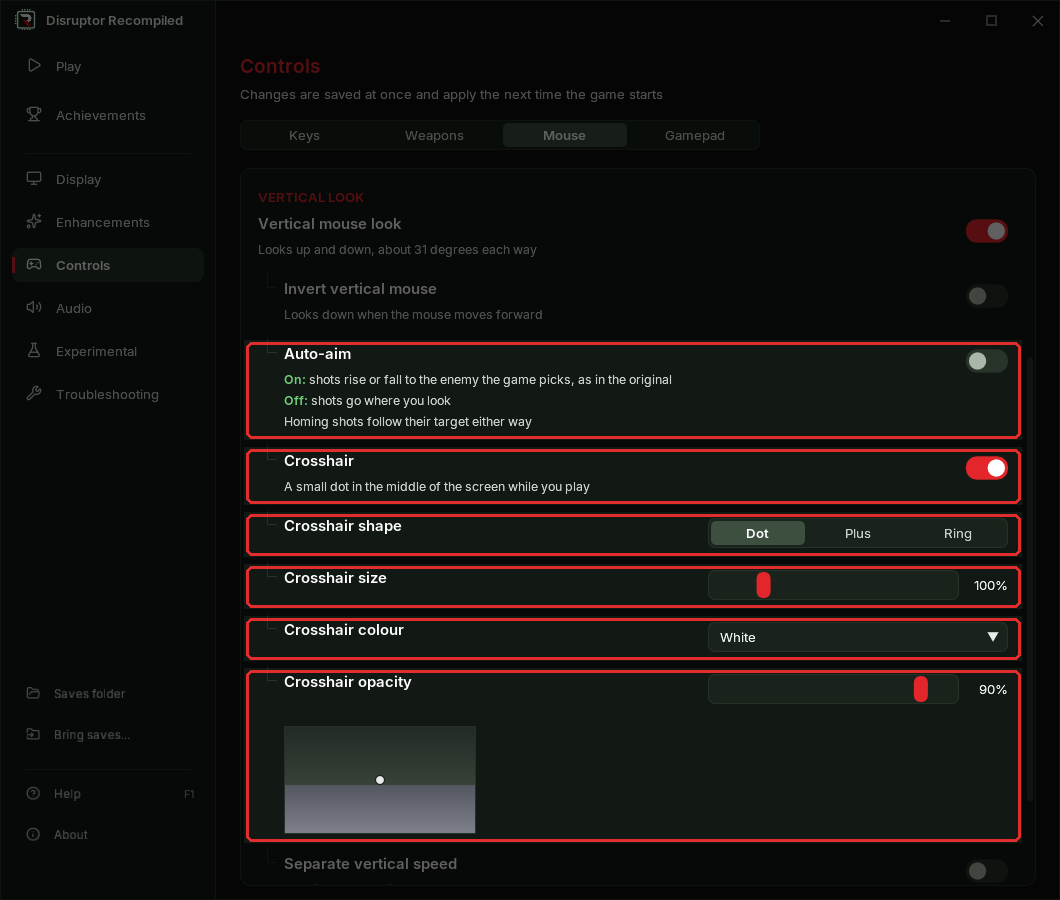
| Setting | Where | Default |
|---|---|---|
| Vertical mouse look | Controls, Mouse tab | Off |
| Auto-aim | Under Vertical mouse look | Off |
| Crosshair | Under Vertical mouse look | Off |
| Crosshair shape, size, colour, opacity | Under Crosshair | Dot, 100%, White, 90% |
The Mouse tab of the Controls page:
Vertical mouse look
- No longer experimental
- Looking up and down is smooth now, 0.11.0 moved the view in steps
Auto-aim
- Off: a shot goes where you look
- On: a shot rises or falls to the enemy the game picks, as in the original
- Homing shots follow their target either way
Crosshair
- A dot, a plus or a ring in the middle of the screen, shown only while you play
- The Controls page shows how it will look

Fixes
Vertical mouse look
- Items, bodies and enemies no longer shake while you look up or down and move
- A shadow on the floor keeps its shape when you look up or down
Weapon and psionics lists
- A weapon's or power's name no longer shows alone at the side of the screen for a frame after its list closes
Install
Your own Disruptor (USA, SLUS-00224) disc image is needed
Windows 10 or 11 x64
- Download DisruptorRecomp-win-Setup.exe and run it
- It installs the game into
%LocalAppData%\DisruptorRecomp, with shortcuts on the desktop and in the Start menu - Your files are kept in
%LocalAppData%\DisruptorRecompData - Or, without installing, unpack DisruptorRecomp-win-Portable.zip into a folder of its own and run
Disruptor Recompiled.exe - The portable copy needs the Microsoft Visual C++ x64 Redistributable
- The portable copy keeps your files in its
datafolder
Linux x64, glibc 2.35 or newer
- Download DisruptorRecomp.AppImage
- Make it executable:
chmod +x DisruptorRecomp.AppImage - Run it
- Your files are kept in
~/.local/share/DisruptorRecompData
0.11.0
Download
| System | File |
|---|---|
| Windows 10 or 11 x64 | DisruptorRecomp-win-Setup.exe installs the launcher that updates itself |
| Windows, without installing | DisruptorRecomp-win-Portable.zip the launcher that updates itself, no install |
| Linux x64, glibc 2.35 or newer | DisruptorRecomp.AppImage the launcher that updates itself |
In this release
| Change | |
|---|---|
| Save states | The F1 to F11 slots in LOAD GAME and the pause menu: load, save, delete |
| Mouse in the menus | Point and click in every menu of the game |
| Main menu | No memory card or controller menus, saves on either card are found |
| Gamepad names | Buttons named as your pad prints them, Nintendo and GameCube pads included |
| Audio | Bass starts at Reduced |
| Performance | Less processor time in busy scenes and in movies |
| Fixes | Keys set in the launcher, a crash risk in movies, a gap in the sound |
Note
Before you update
- Save states (F1 to F11) made with an earlier version do not load in this one
- Saved games in LOAD GAME, settings, keys and memory cards stay as they are
- Bass starts at Reduced if you never chose one, a Bass you chose stays
Save states
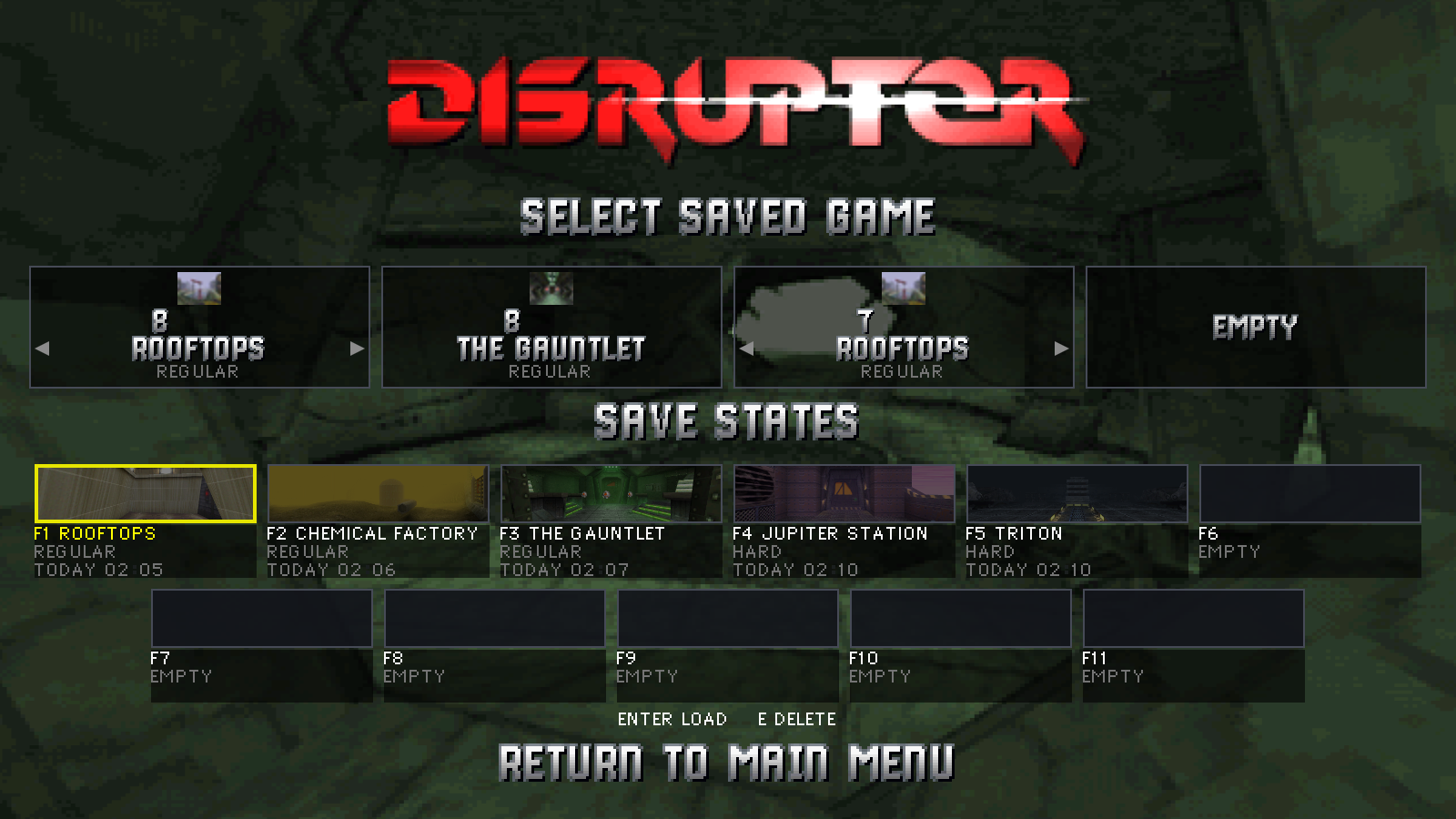
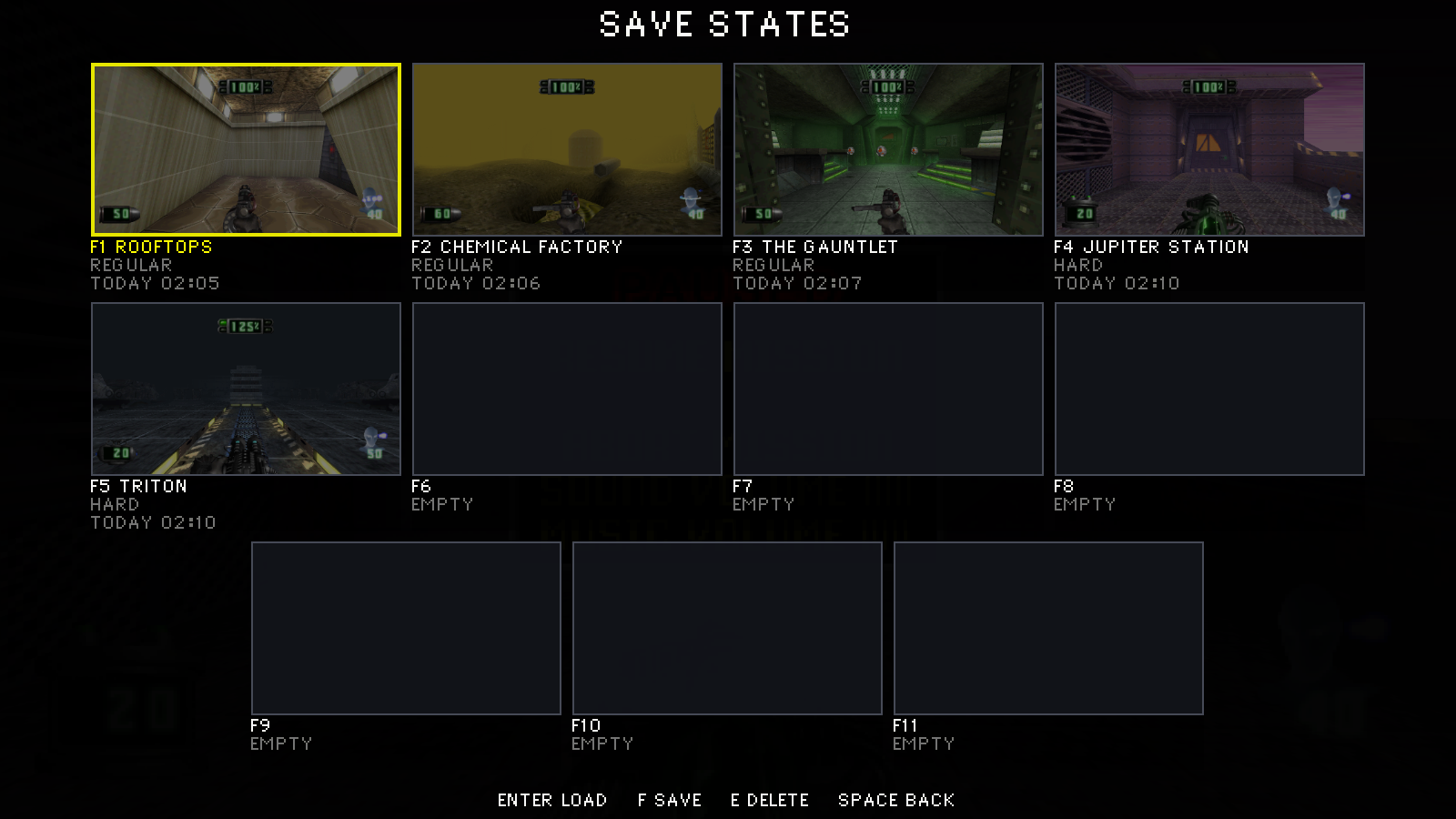
- LOAD GAME shows SAVE STATES under the saved games: the eleven slots F1 to F11
- A slot's card shows the moment it was saved, the mission, the difficulty and when it was saved
- In LOAD GAME a state loads at once
- In play, SAVE STATES under RESUME MISSION in the pause menu shows the slots
- A state can be saved there too, a load or an overwrite asks first
- A state can be deleted there after a question
- A state of another version shows as such and does not load
LOAD GAME with its save states:
The pause menu's save states:
Mouse in the menus
Tip
The menus and the pause menu have a mouse pointer now: point at a row and click
The pointer on a saved game in LOAD GAME:
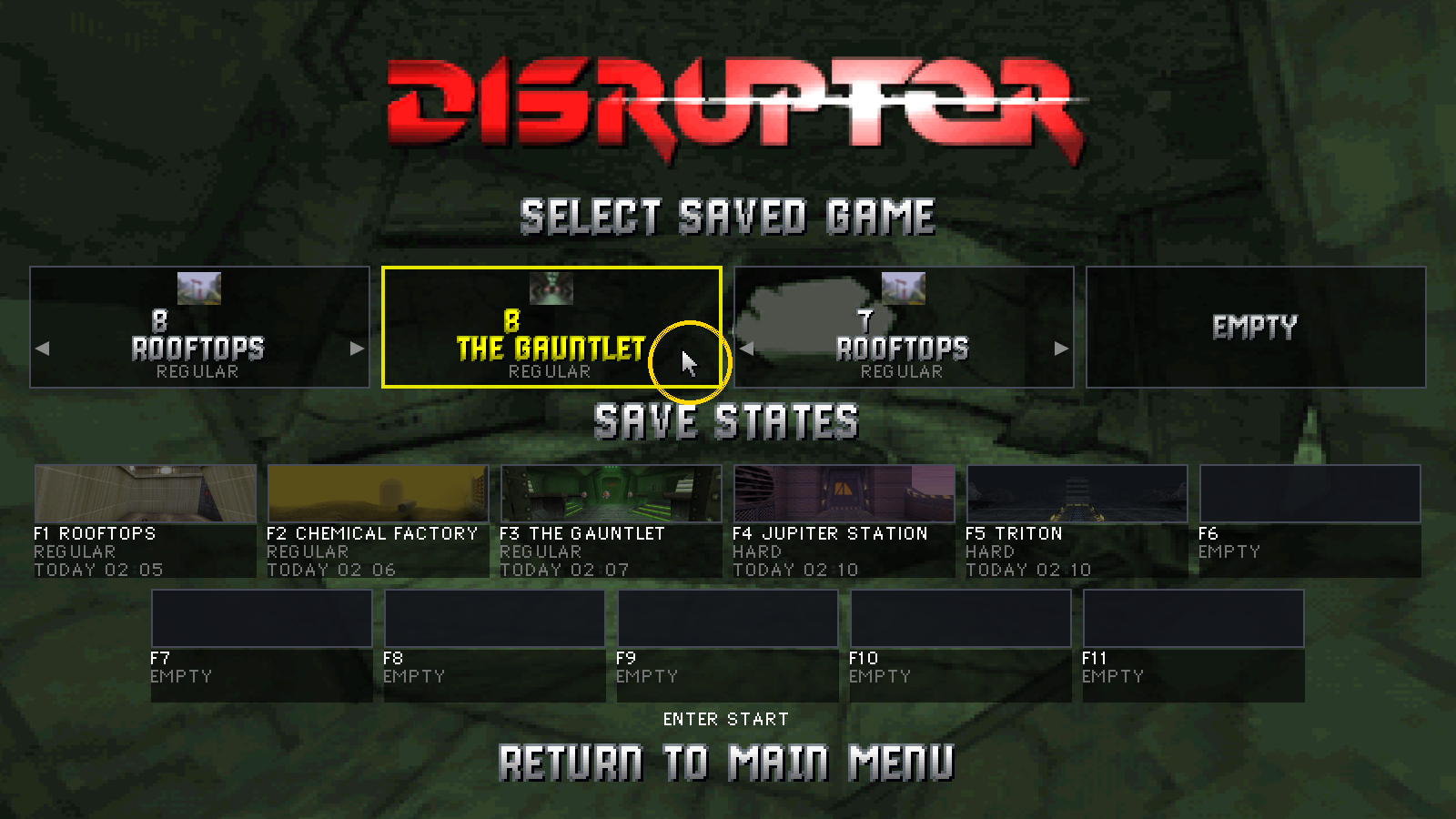
- Pointing moves the menu's cursor, a click chooses
- That works in every menu: the main menu and its screens, the pause menu, and the screens after a death or a finished mission
- On a volume, a yes or no, a save's mission or a letter of its name, a left click steps it on and a right click back
- The menus draw their own arrow, in the colours of their letters
- Escape goes back: to the main menu from its screens, to the mission from the pause menu
- The strafe keys, A and D in Modern controls, step left and right in the menus
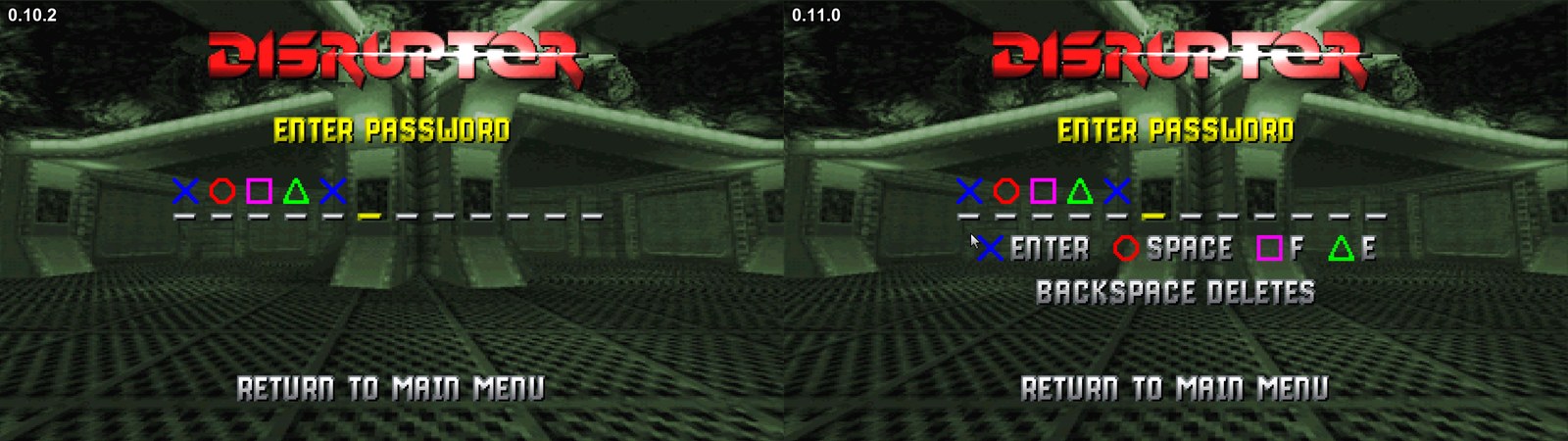
- PASSWORD shows the key or button that types each symbol
- On PASSWORD, Backspace takes a symbol back, a pad's Left as before
PASSWORD with its keys:
Main menu
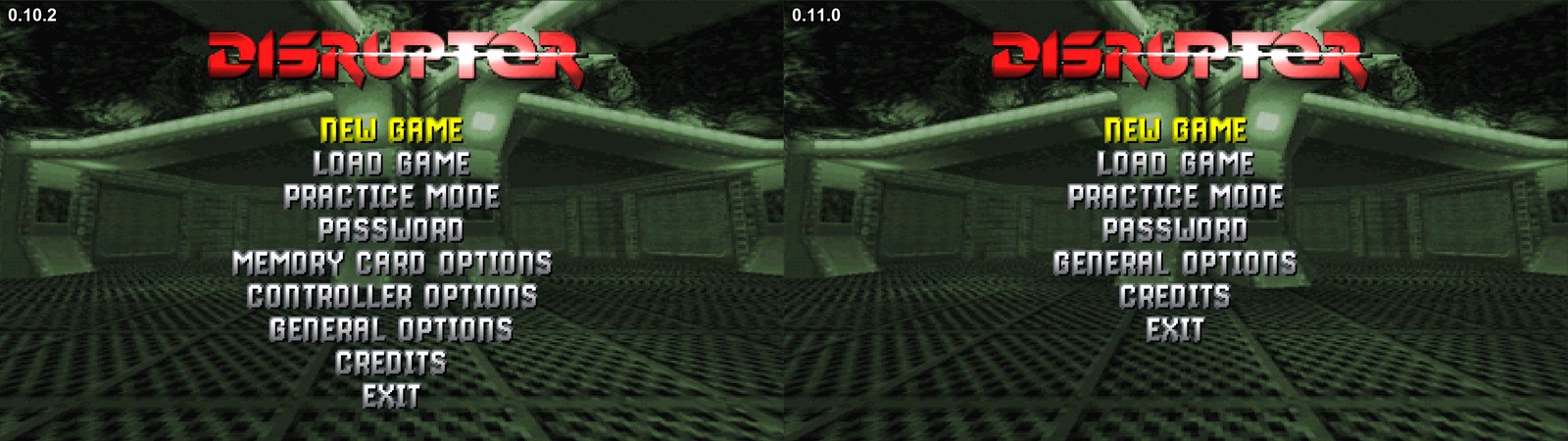
- MEMORY CARD OPTIONS and CONTROLLER OPTIONS are gone
- Keys and buttons are set in the launcher
- Saves on the right card are found too, the game used to read only the left one
- The game speaks of save data instead of a memory card: NO SAVE DATA, COULD NOT READ SAVES and the like
Gamepad names
- Buttons are named after the pad you press last: Xbox, PlayStation, Nintendo or GameCube, in the launcher and in the game's menu
- A Nintendo pad shows B, A, Y, X, L, R, ZL, ZR, Minus and Plus
- The launcher moves through its pages with whichever pad you press
- Linux: the launcher and the game show the game's icon
Audio
- Bass starts at Reduced: the deepest rumble under 80 Hz is softer
Performance
- With Render thread on, busy scenes take the processor about a tenth less time
- With In-between frames on, the in-between pictures of a scene full of enemies take about a third less time to prepare and look exactly as before
- Movies and the game's wait for the next frame take less processor time
Fixes
Keys set in the launcher
- Keys set in the launcher work in the game again in an installed or portable copy, since 0.10.0 the game used the keys it ships with
- A problem report holds your keys too
Movies and save states
- A save state made in the middle of a movie loads without the risk of a crash
Sound
- After fast-forward or a skipped intro the sound goes on without a short gap
Install
Your own Disruptor (USA, SLUS-00224) disc image is needed
Windows 10 or 11 x64
- Download DisruptorRecomp-win-Setup.exe and run it
- It installs the game into
%LocalAppData%\DisruptorRecomp, with shortcuts on the desktop and in the Start menu - Your files are kept in
%LocalAppData%\DisruptorRecompData - Or, without installing, unpack DisruptorRecomp-win-Portable.zip into a folder of its own and run
Disruptor Recompiled.exe - The portable copy needs the Microsoft Visual C++ x64 Redistributable
- The portable copy keeps your files in its
datafolder
Linux x64, glibc 2.35 or newer
- Download DisruptorRecomp.AppImage
- Make it executable:
chmod +x DisruptorRecomp.AppImage - Run it
- Your files are kept in
~/.local/share/DisruptorRecompData
0.10.2
Download
| System | File |
|---|---|
| Windows 10 or 11 x64 | DisruptorRecomp-win-Setup.exe installs the launcher that updates itself |
| Windows, without installing | DisruptorRecomp-win-Portable.zip the launcher that updates itself, no install |
| Linux x64, glibc 2.35 or newer | DisruptorRecomp.AppImage the launcher that updates itself |
Warning
0.10.2 may break things that worked in 0.9.0
- The game moved to a new version of the framework it runs on, and that touched almost every feature
- Not everything could be checked by hand before this release
- If something works worse than in 0.9.0, please open an issue
Note
Before you update
- Save states of 0.9.0, 0.10.0 and 0.10.1 do not load in 0.10.2
- Save the game on a memory card first if a save state holds progress you need
- Render thread is on by default since 0.10.0, 0.9.0 had it off: Display, Render thread turns it off
- Settings, keys and memory cards stay as they are
Fixes
Important
The blocker of 0.10.0 and 0.10.1 is fixed
- 0.10.0 was packed without the game's own enhancements and fixes, so none of them worked
- 0.10.1 packed them, but the game still looked for them in the player's folder, so they stayed off when the launcher started it
- 0.10.2 reads them from its own folder
| 0.10.0 and 0.10.1 | 0.10.2 | |
|---|---|---|
| The game's own enhancements and fixes | Off | On |
| Main menu, the item under CREDITS | RETURN TO MAIN MENU, opens the death screen | EXIT, closes the game |
| Starting a mission or loading a saved game | Locks up in the teleport, only the music plays on | Starts the mission |
| Restart mission on that death screen | Never finishes loading | That screen no longer opens |
| Display, Aspect ratio set to Match window | Starts at the widest view, with black bars on a 16:9 or 16:10 screen | Fills the screen |
| The game's own package missing | The game starts broken without a word | The game says so and does not start |
Everything new in 0.10.0 is in this release too
Install
Your own Disruptor (USA, SLUS-00224) disc image is needed
Windows 10 or 11 x64
- Download DisruptorRecomp-win-Setup.exe and run it
- It installs the game into
%LocalAppData%\DisruptorRecomp, with shortcuts on the desktop and in the Start menu - Your files are kept in
%LocalAppData%\DisruptorRecompData - Or, without installing, unpack DisruptorRecomp-win-Portable.zip into a folder of its own and run
Disruptor Recompiled.exe - The portable copy needs the Microsoft Visual C++ x64 Redistributable
- The portable copy keeps your files in its
datafolder
Linux x64, glibc 2.35 or newer
- Download DisruptorRecomp.AppImage
- Make it executable:
chmod +x DisruptorRecomp.AppImage - Run it
- Your files are kept in
~/.local/share/DisruptorRecompData
0.10.1
Download
| System | File |
|---|---|
| Windows 10 or 11 x64 | DisruptorRecomp-win-Setup.exe installs the launcher that updates itself |
| Windows, without installing | DisruptorRecomp-win-Portable.zip the launcher that updates itself, no install |
| Linux x64, glibc 2.35 or newer | DisruptorRecomp.AppImage the launcher that updates itself |
Warning
0.10.1 may break things that worked in 0.9.0
- The game moved to a new version of the framework it runs on, and that touched almost every feature
- Not everything could be checked by hand before this release
- If something works worse than in 0.9.0, please open an issue
Note
Before you update
- Save states of 0.9.0 and 0.10.0 do not load in 0.10.1
- Save the game on a memory card first if a save state holds progress you need
- Render thread is on by default since 0.10.0, 0.9.0 had it off: Display, Render thread turns it off
- Settings, keys and memory cards stay as they are
Fixes
Important
A blocker of 0.10.0 is fixed
- 0.10.0 was packed without the game's own enhancements and fixes, so none of them worked
- 0.10.1 has them back
| 0.10.0 | 0.10.1 | |
|---|---|---|
| The game's own enhancements and fixes | Off, their package was left out | On |
| Main menu, the item under CREDITS | RETURN TO MAIN MENU, opens the death screen | EXIT, closes the game |
| Restart mission on that death screen | Never finishes loading | That screen no longer opens |
Everything new in 0.10.0 is in this release too
Install
Your own Disruptor (USA, SLUS-00224) disc image is needed
Windows 10 or 11 x64
- Download DisruptorRecomp-win-Setup.exe and run it
- It installs the game into
%LocalAppData%\DisruptorRecomp, with shortcuts on the desktop and in the Start menu - Your files are kept in
%LocalAppData%\DisruptorRecompData - Or, without installing, unpack DisruptorRecomp-win-Portable.zip into a folder of its own and run
Disruptor Recompiled.exe - The portable copy needs the Microsoft Visual C++ x64 Redistributable
- The portable copy keeps your files in its
datafolder
Linux x64, glibc 2.35 or newer
- Download DisruptorRecomp.AppImage
- Make it executable:
chmod +x DisruptorRecomp.AppImage - Run it
- Your files are kept in
~/.local/share/DisruptorRecompData
0.10.0
Download
| System | File |
|---|---|
| Windows 10 or 11 x64 | DisruptorRecomp-win-Setup.exe installs the launcher that updates itself |
| Windows, without installing | DisruptorRecomp-win-Portable.zip the launcher that updates itself, no install |
| Linux x64, glibc 2.35 or newer | DisruptorRecomp.AppImage the launcher that updates itself |
In this release
| Change | |
|---|---|
| Framework | The game runs on PSXRecomp v0.3.4-alpha |
| Display | Render thread on by default and with in-between frames, less processor time |
| Fixes | Windows, sky and walls in all levels, settings, the launcher |
Warning
0.10.0 may break things that worked in 0.9.0
- The game moved to a new version of the framework it runs on, and that touched almost every feature
- Not everything could be checked by hand before this release
- If something works worse than in 0.9.0, please open an issue
Note
Before you update
- Save states of 0.9.0 do not load in 0.10.0
- Save the game on a memory card in 0.9.0 first if a save state holds progress you need
- Render thread is on by default now, 0.9.0 had it off: Display, Render thread turns it off
- Settings, keys and memory cards stay as they are
Framework
- The game now runs on PSXRecomp v0.3.4-alpha, the framework the recompilation is built on
- 0.9.0 ran on a build of it from August, after v0.3.1-alpha
- Every enhancement and fix of the game was carried over to the new version. That was the largest piece of work in this release
Display
| Setting | Where | Default | For |
|---|---|---|---|
| Render thread | Display | On | Better performance, most of all on slower processors and graphics cards |
Render thread
- Works with In-between frames on now, 0.9.0 left it without effect there
- On by default now, 0.9.0 had it off
Other changes
- The game asks less of the processor at the same settings
- Busy scenes, such as a field of fallen enemies, take the graphics card less time to draw
- The sky is drawn pixel by pixel from the level's whole panorama now. This is the base for a high-resolution sky and a real skybox later
Fixes
All levels
- A window no longer shows a green wedge between the sky and its frame
- Through a window you no longer see the next room in place of the sky, standing or walking past it
- A green square no longer shows at the edge of a window seen through a doorway
- Thin green ticks no longer flicker along a window's frame as you move past it
- With In-between frames on, the sky in a window no longer lags behind and stretches at the window's edge while you turn
- Outdoors, a thin green line no longer runs along the bottom edge of the screen, and no longer grows when you jump
- In widescreen, the sky beside a pillar no longer shows a thin line of the fog colour where two parts of the sky meet
- In widescreen, a wall you stand pressed against no longer turns see-through at the edge of the screen
- A thin light line no longer runs down the edge of some wall textures
Settings
- Dynamic resolution now works on a graphics card below 15 FPS, and after a few slow steps it can still raise the resolution again
- Dynamic resolution with In-between frames on no longer counts the in-between pictures as the game's own drawing
- Loading a save state with Render thread on no longer turns the picture one flat colour
- With a longer Draw distance and Smooth distance fade, a far wall at the end of a long corridor no longer opens a lighter hole into the fog
Launcher
- The launcher's page titles no longer show letters of another size after a while, as the S in "DiSplay"
Thanks
- Discord user M-state, for the reports that many of these fixes came from
Install
Your own Disruptor (USA, SLUS-00224) disc image is needed
Windows 10 or 11 x64
- Download DisruptorRecomp-win-Setup.exe and run it
- It installs the game into
%LocalAppData%\DisruptorRecomp, with shortcuts on the desktop and in the Start menu - Your files are kept in
%LocalAppData%\DisruptorRecompData - Or, without installing, unpack DisruptorRecomp-win-Portable.zip into a folder of its own and run
Disruptor Recompiled.exe - The portable copy needs the Microsoft Visual C++ x64 Redistributable
- The portable copy keeps your files in its
datafolder
Linux x64, glibc 2.35 or newer
- Download DisruptorRecomp.AppImage
- Make it executable:
chmod +x DisruptorRecomp.AppImage - Run it
- Your files are kept in
~/.local/share/DisruptorRecompData
0.9.0
Download
| System | File |
|---|---|
| Windows 10 or 11 x64 | DisruptorRecomp-win-Setup.exe installs the launcher that updates itself |
| Windows, without installing | DisruptorRecomp-win-Portable.zip the launcher that updates itself, no install |
| Linux x64, glibc 2.35 or newer | DisruptorRecomp.AppImage the launcher that updates itself |
In this release
| Change | |
|---|---|
| Gamepad | Dual analog sticks, with Classic and Southpaw |
| Second keys | Every action takes a second key, a mouse button too |
| Launcher | CHD disc images, a quicker start |
| Display | CPU and GPU usage optimizations, Resolution, Dynamic resolution, Render thread |
| Sprites face the camera | Enemies, pickups and shots turn to face you |
| Main menu | EXIT closes the game |
| Loading | No pause at the prison's H Block |
| Fixes | Ceilings, sky, near walls and floors, bodies behind walls, a crash |
| Memory cards and save states | A crash while saving no longer damages a card |
Note
Before you update
- A gamepad uses Dual analog by default now, 0.8.0 worked as Classic
- Stick layout on the Gamepad tab brings Classic back
- Settings, keys and memory cards stay as they are
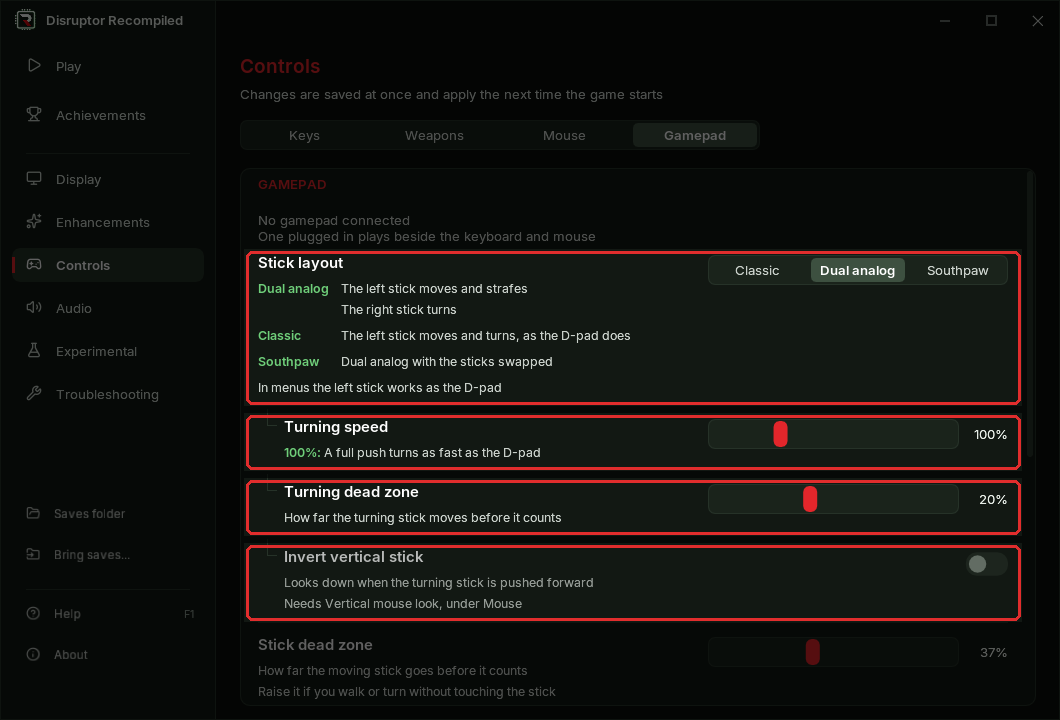
Gamepad
| Setting | Where | Default |
|---|---|---|
| Stick layout | Controls, Gamepad tab, and the game's Controls tab | Dual analog |
| Turning speed | Gamepad tab | 100% |
| Turning dead zone | Gamepad tab | 20% |
| Invert vertical stick | Gamepad tab | Off |
Stick layout
- Dual analog: the left stick moves and strafes, the right stick turns
- Classic: the left stick moves and turns, as in 0.8.0
- Southpaw: Dual analog with the sticks swapped
Turning speed and Turning dead zone
- Turning speed sets how fast a full push turns, from 25% to 300%
- Turning dead zone is how far the stick moves before it counts, raise it if the view drifts on its own
Looking up and down
- With Vertical mouse look on, the right stick looks up and down too
- Invert vertical stick turns that around
The Gamepad tab of the Controls page:
Second keys
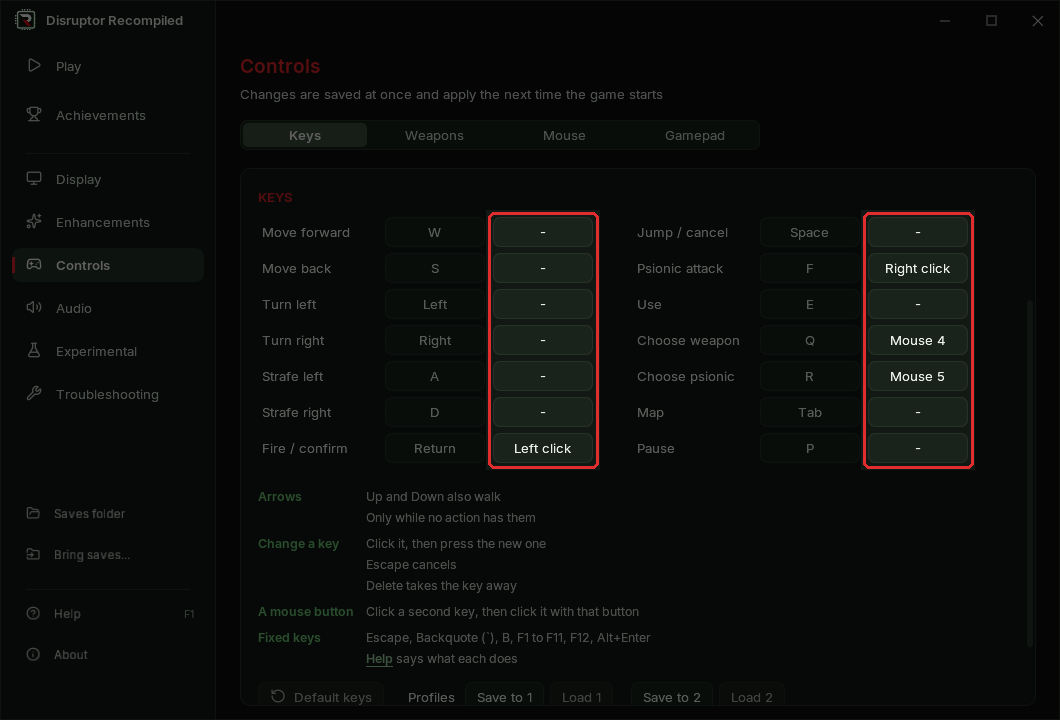
- Every action on the Keys tab takes a second key
- A second key may be a mouse button: left, right, Mouse 4 or Mouse 5
- Key profiles keep the second keys too
The Keys tab with its second column:
Launcher
- The launcher takes the game disc and a language disc as a CHD made with chdman, about 425 MiB in place of 607 MiB
- The game starts about 2 seconds sooner when no mod is on
- A launcher opened while the game runs holds settings, Play and updates back until the game closes
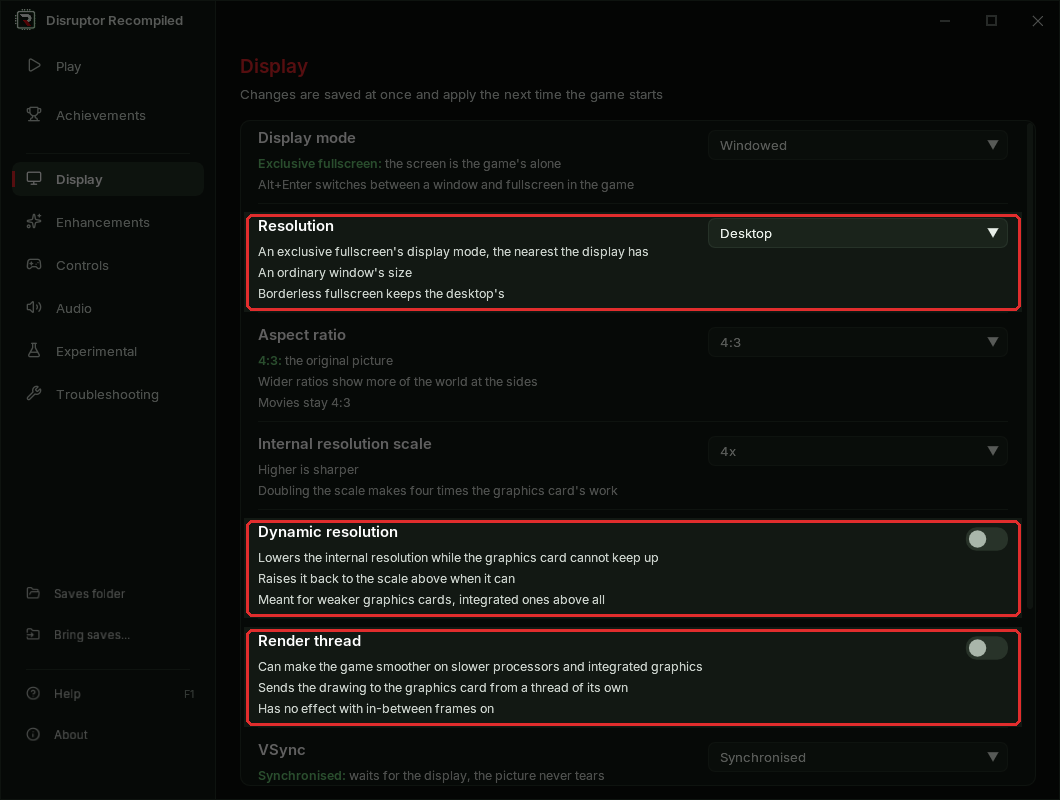
Display
| Setting | Where | Default | For |
|---|---|---|---|
| Resolution | Display | Desktop | A set window size or fullscreen mode |
| Dynamic resolution | Display | Off | Weaker graphics cards |
| Render thread | Display | Off | Slower processors and integrated graphics |
Resolution
- Sets the display mode in exclusive fullscreen and the window's size in a window
- Borderless fullscreen keeps the desktop's size
- Exclusive fullscreen with Desktop takes the desktop's display mode now, 0.8.0 took the window's size
Dynamic resolution
- Lowers the internal resolution while the graphics card cannot keep up, and raises it back when it can
- Meant for weaker graphics cards, integrated ones above all
Render thread
- Can make the game smoother on slower processors and integrated graphics
- Has no effect with in-between frames on
Other changes
- 16x MSAA and 16x SSAA are gone, a saved 16x reads as 8x
- In a window or borderless fullscreen on Windows each frame is shown at once, as with Immediate
- The game asks less of the graphics card at the same settings, the picture stays the same
The Display page with Resolution, Dynamic resolution and Render thread:
Sprites face the camera
| Setting | Where | Default |
|---|---|---|
| Sprites face the camera | Enhancements, the game's menu | Off |
- Enemies, pickups and shots stand in the world like cut-outs and face you
- Without it they turn with the view when you turn on the spot
- Toward the screen's sides they get wider, as walls there do
facing-sprites.mp4
Main menu
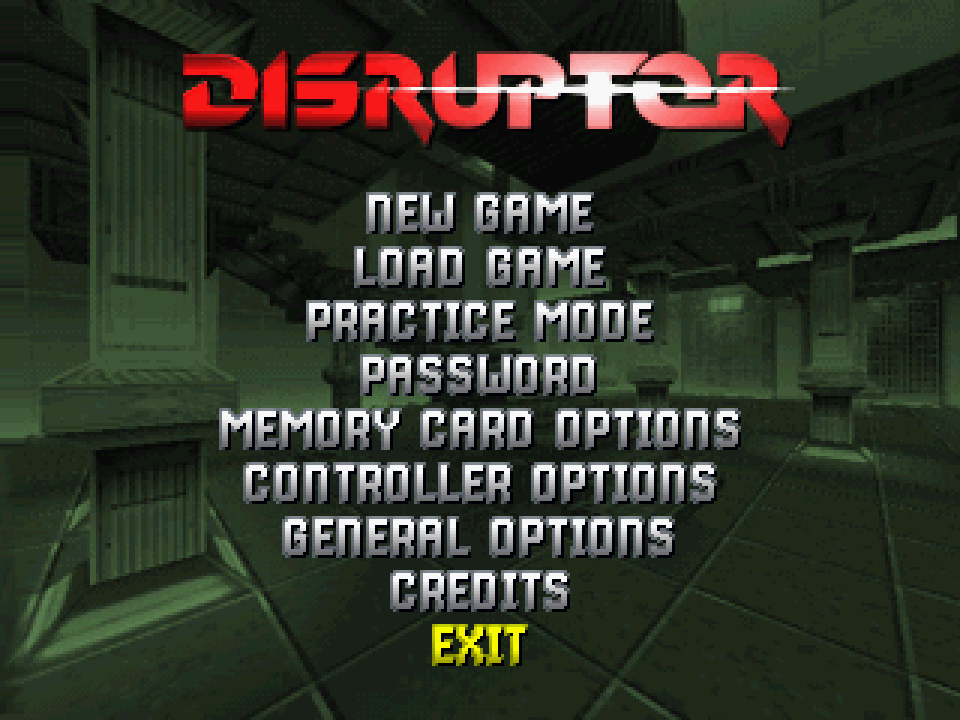
- EXIT under CREDITS closes the game
- It is translated for the game's German and French discs: BEENDEN and QUITTER
The main menu with EXIT chosen:
Loading
- The level data the game streams during play arrives at once instead of at the console drive's speed
- The pause of about a second and a half near the prison's H Block is gone
Fixes
Near H Block
- With a longer Draw distance or the smooth fade, the game no longer stops for several seconds near the prison's H Block
hblock-stall.mp4
A crash after long play
- The game no longer closes with an access violation (0xC0000005) after an hour or more of play
The teleport at a level's end
- The green wave and the fade after it stay in widescreen now, 0.8.0 showed them at 4:3 with black bars
teleport-wave.mp4
The pause menu under 60 FPS gameplay
- With many enemies, bodies or pickups in view, the pause menu no longer shows broken pictures and streaks of text
pause-menu.mp4
The menu's demo
- With a longer draw distance or a wide screen the menu's demo no longer runs slow
Ceilings at the screen's edge
- Ceilings at the screen's edge no longer show grey patches
ceilings.mp4
Sky
- Looking out of a doorway, the sky no longer turns into a flat purple rectangle
A doorway onto the sky:
sky-doorway.mp4
- Where the skies of two rooms meet, the clearer one shows now, 0.8.0 left a pale band of sky beside a pillar
The sky beside a pillar:
sky-meet.mp4
- With geometry correction on, walking beside a wall with smooth mouse aim no longer flashes a strip of sky at the screen's edge
A pillar's edge with the depth-sorted world
- With the depth-sorted world on, the line between two faces of a pillar no longer jumps back and forth
At half speed:
pillar-line-slow.mp4
Walls and floors right in front of you
- A texture right in front of you, such as the striped frame round a wall button, no longer changes its shape while you turn
A wall button's frame up close:
near-texture.mp4
near-texture-turn.mp4
- The floor or wall right beside you no longer opens onto the sky at the screen's corner
The floor under a wall button:
floor-corner.mp4
Staircases
- Climbing a staircase onto its landing no longer opens a strip of empty background under the landing's edge
staircase.mp4
Bodies and enemies behind walls
- A body behind a column no longer shows through the column's base
- An enemy just behind a wall no longer shows over the wall
Fog
- With Smooth distance fade on, far shapes in the fog no longer show a faint blue line along an edge, as the terraformer's claws on Triton did
Memory cards and save states
- A game that closes or crashes while saving no longer leaves the memory card empty or cut short
- A save the disk refuses shows as failed in the game, it was reported as saved
- A memory card that cannot be read is left as it is, it was replaced by a blank card
- A save state that cannot be loaded is refused and the game goes on as it was
- Save states of 0.8.0 are carried over by the launcher on the first start
Thanks
- Discord user M-state, for the reports that many of these fixes came from
Install
Your own Disruptor (USA, SLUS-00224) disc image is needed
Windows 10 or 11 x64
- Download DisruptorRecomp-win-Setup.exe and run it
- It installs the game into
%LocalAppData%\DisruptorRecomp, with shortcuts on the desktop and in the Start menu - Your files are kept in
%LocalAppData%\DisruptorRecompData - Or, without installing, unpack DisruptorRecomp-win-Portable.zip into a folder of its own and run
Disruptor Recompiled.exe - The portable copy needs the Microsoft Visual C++ x64 Redi...
0.8.0
Download
| System | File |
|---|---|
| Windows 10 or 11 x64 | DisruptorRecomp-win-Setup.exe installs the launcher that updates itself |
| Windows, without installing | DisruptorRecomp-win-Portable.zip the launcher that updates itself, no install |
| Linux x64, glibc 2.35 or newer | DisruptorRecomp.AppImage the launcher that updates itself |
In this release
| Change | |
|---|---|
| RetroAchievements | The game counts Disruptor's 52 achievements |
| Launcher | Works from the keyboard and a gamepad |
| Text on a small HUD | A shrunk HUD keeps its text readable |
| Mission 9 | The reactor at 60 FPS: teleport, timer, voice |
| Fixes | Abort mission, the menu's demo, quicker psionic keys |
| Changes | No Cheats tab, Experimental later, occlusion without experimental values, quicker psionic keys |
| Save states | States from 0.7.0 load as they are |
RetroAchievements
- The game counts Disruptor's RetroAchievements set: 52 achievements
- They are for finishing levels, finding hidden areas and clearing a whole map
Sign in
- Make an account on retroachievements.org if you have none
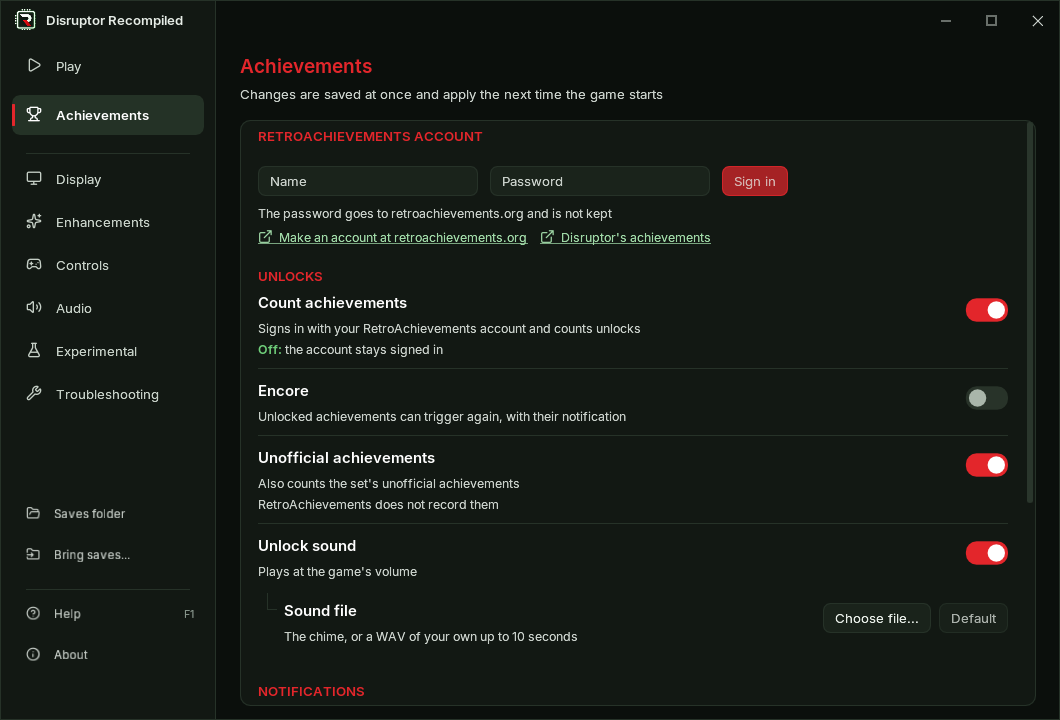
- Open the launcher's Achievements page
- Enter the account's name and password and press Sign in
- Start the game: it signs in and shows how many achievements you have
Signing in on the launcher:
- The password is sent to retroachievements.org once and is not stored
- The launcher keeps the token the site returns
- On Windows the token is sealed for your Windows account
- A problem report never includes it
- Sign out, on the same page or in the game's menu, removes it
In the game
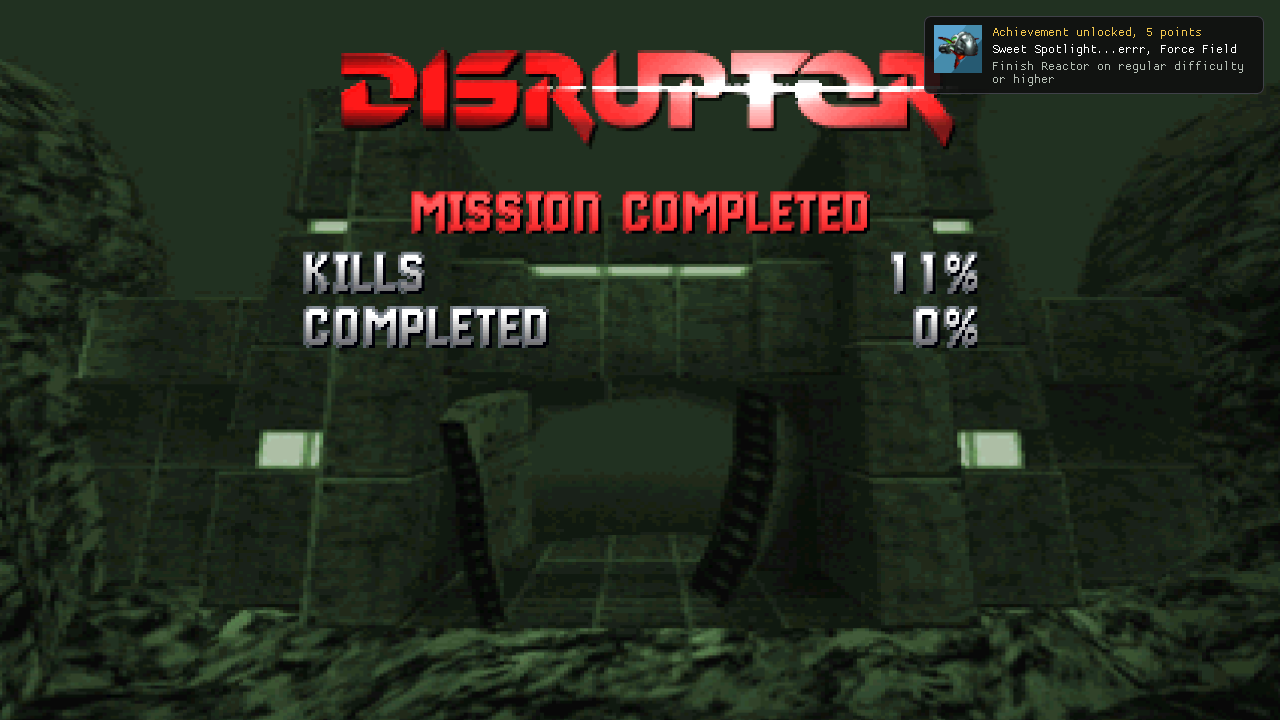
- An unlock shows a card in a corner of the screen and plays a chime
- The card has the achievement's picture, name, points and description
Finishing the Reactor:
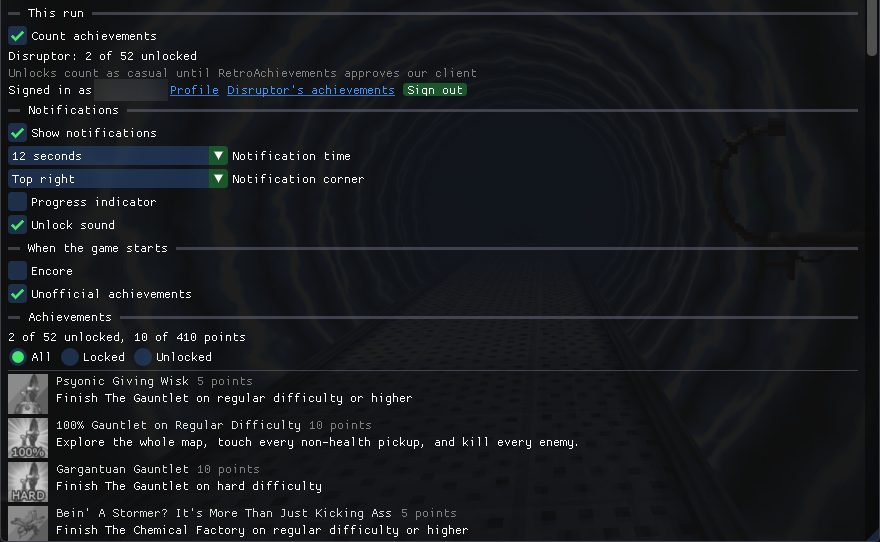
- The game's menu, opened with Backquote (
`), has an Achievements tab - It lists every achievement with its picture, points and description
- A counting one shows how far it has come, such as the kills and pickups of a level's 100%
- All, Locked and Unlocked filter the list
- The tab shows your count of achievements and points
- It links to your profile and to Disruptor's page on the site
The Achievements tab of the game's menu:
Settings
- They are on the launcher's Achievements page and in the game's tab
Signed in, with the settings below:
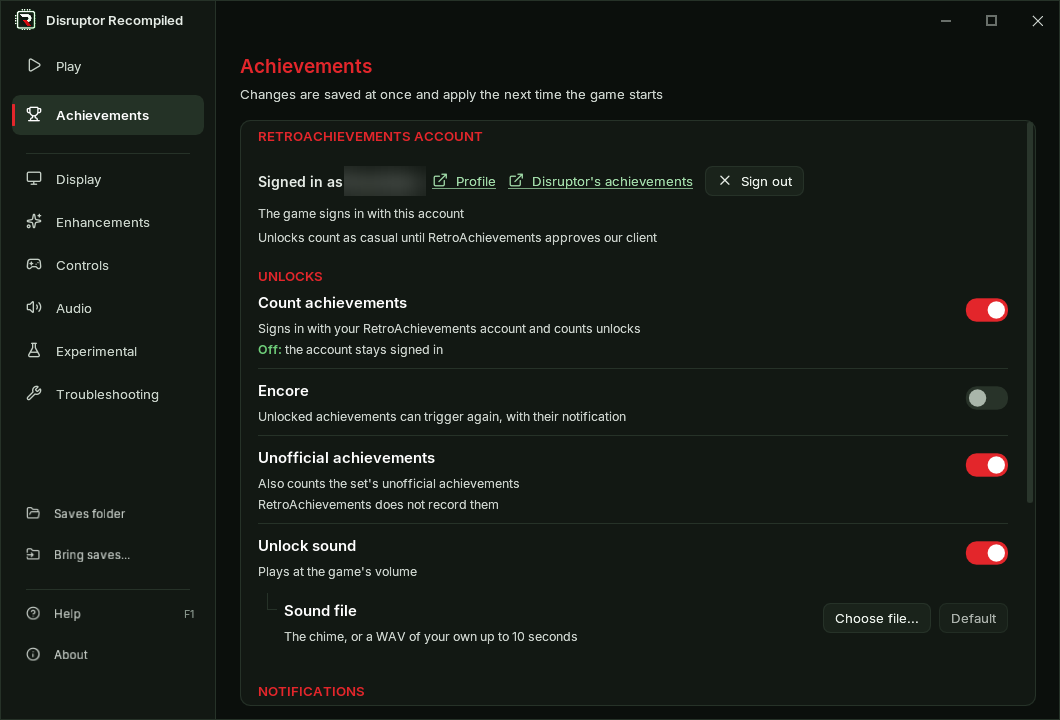
| Setting | Default | What it changes |
|---|---|---|
| Count achievements | On | Off plays without them, the account stays signed in |
| Show notifications | On | The card of each unlock |
| Notification time | 12 seconds | 3, 5, 8, 12, 15 or 30 seconds |
| Notification corner | Top right | Any corner of the screen |
| Progress indicator | Off | A short note when a count moves |
| Unlock sound | On | The chime, at the game's volume |
| Sound file | The chime | A WAV of your own in place of the chime |
| Encore | Off | Achievements you have can trigger again, with their card |
| Unofficial achievements | On | Also the set's three unofficial ones, which the site does not record |
- Achievement pictures are downloaded once and kept with your files, the grey ones of locked achievements too
Save states
- A save state keeps how far each achievement has counted, in a file beside it
- After a load, a 100% achievement still counts the kills made before the save
- Loading a state does not stop an unlock
Casual only
- Unlocks count as casual on your profile
- Hardcore stays off until RetroAchievements approves our client
- Any copy of the disc counts as the USA one, a language disc too
Details: RetroAchievements in the player's guide
Launcher
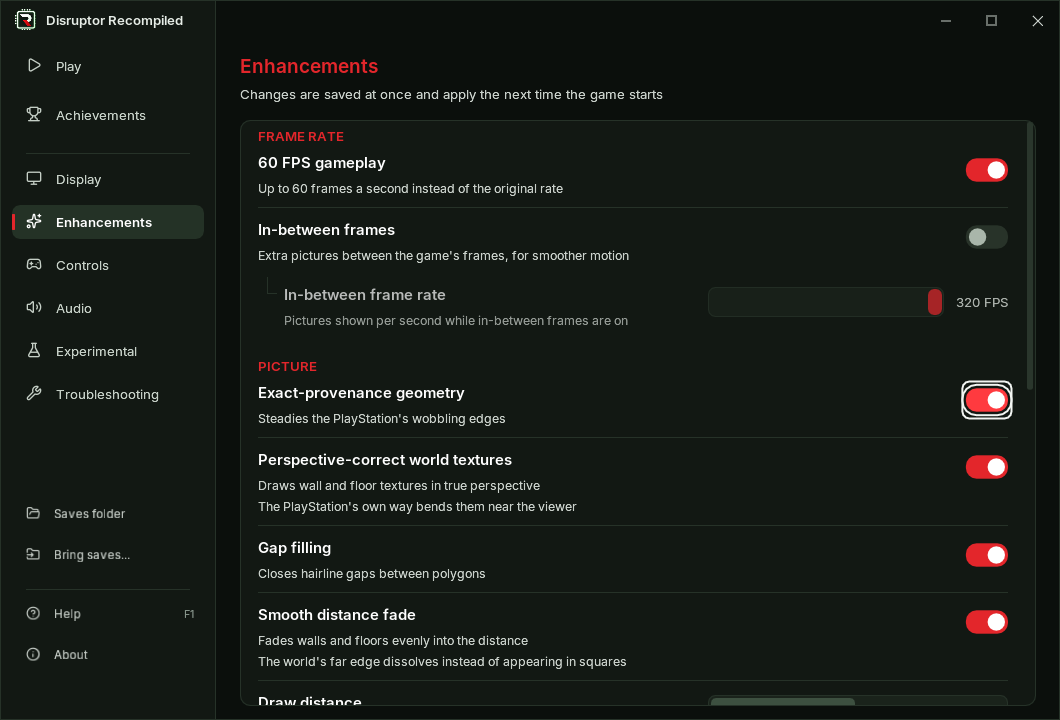
- The whole launcher works from the keyboard
- Tab and the arrows move through a page, Space or Enter presses, Escape goes back to the side bar
- On the side bar, Right or Space opens a page
- Ctrl+Tab steps through the pages
- A gamepad moves through it too: the D-pad, A to press, B to go back, LB and RB for the pages
- The cursor shows as a light frame
- Enter starts the game only on the home page, while no control has the cursor
- Default keys, Default weapon and psionic keys and Default buttons ask first
- They are grey while nothing would change
- Save to 1 or 2 asks before it replaces a key profile saved earlier
- A settings.toml that cannot be read no longer leaves the pages grey
- The page says why and offers Start over with defaults, keeping the file as settings.unreadable.toml
- A change that cannot be written is named on the page it was made on
- On a wide window the settings stand in a column in the middle of the page
- Every page keeps its own scroll
- Group headings such as Picture and Notifications are larger and red
- On the Controls page the names in a hint stand in a column of their own, with one fact a line beside them
- Anti-aliasing moved from Experimental to Enhancements, in the launcher and in the game's menu
- The side bar fits short windows, 125% on a 1366 by 768 screen included
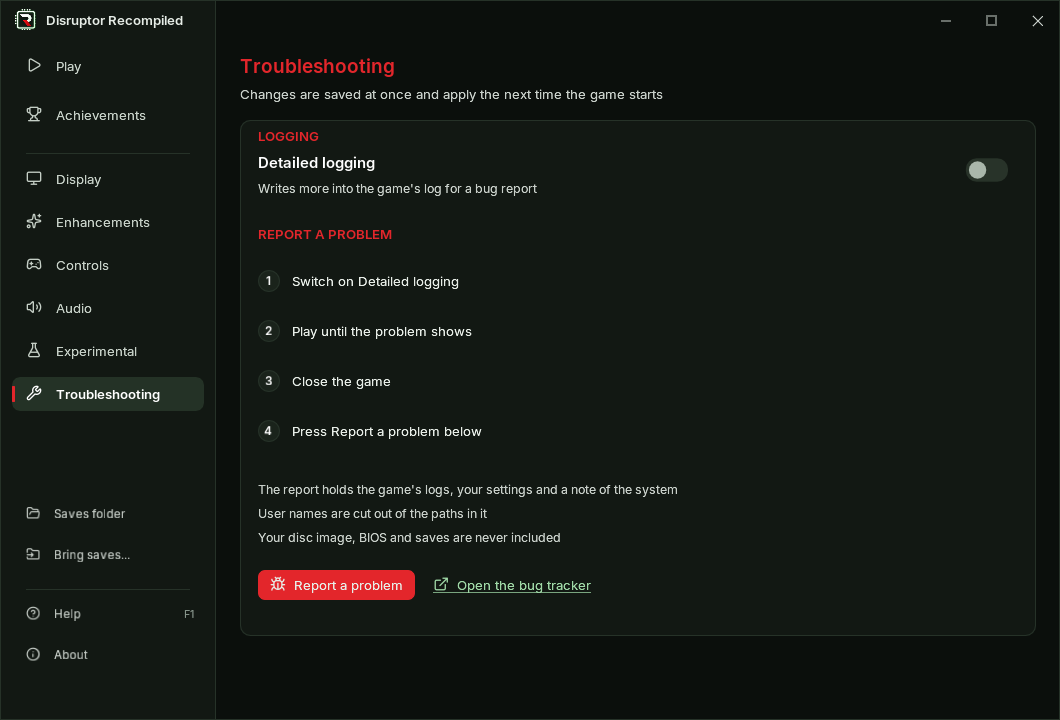
- Troubleshooting lists the steps of a bug report
- Report a problem moved there from the side bar, beside Detailed logging
The keyboard cursor on a switch:
Troubleshooting:
Text on a small HUD
- Below HUD size 100 the game's text shrank with the HUD and its one-pixel strokes got thin
- Now it is drawn bolder and with a dark edge, so a small line stays readable
- Dark text, such as the weapon and psionic names, gets no edge
- At 100% and in 4:3 the text is as before
HUD 50, before and after:

Mission 9
The reactor under 60 FPS gameplay (#51):
- After the lever the teleport comes before the explosion again, as at 30 FPS
- Before, the explosion came first and killed you
60 FPS, before and after:
issue51-teleport.mp4
- The countdown line no longer flickers with a pickup's message
- A message stays as long as at 30 FPS, before it stayed half as long
60 FPS, before and after:
issue51-message.mp4
- The reactor's voice says its whole line again, before it stopped at "sec"
- The countdown stays on screen while the weapon or psionics list is open
- The list shows the chosen item's name beside it
- The same holds when a weapon or psionic key opens the list
- The original game hid the countdown and showed only the name
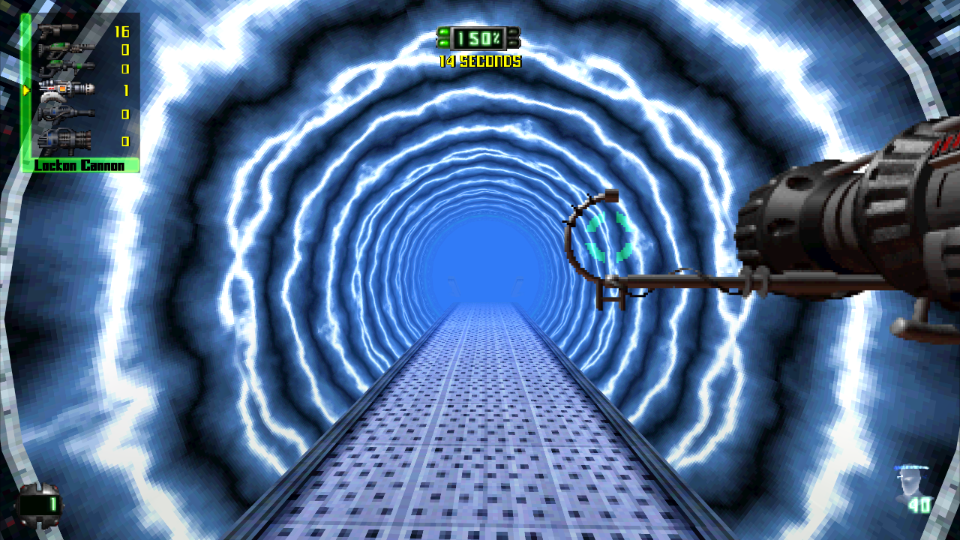
The original game, the name without the countdown:
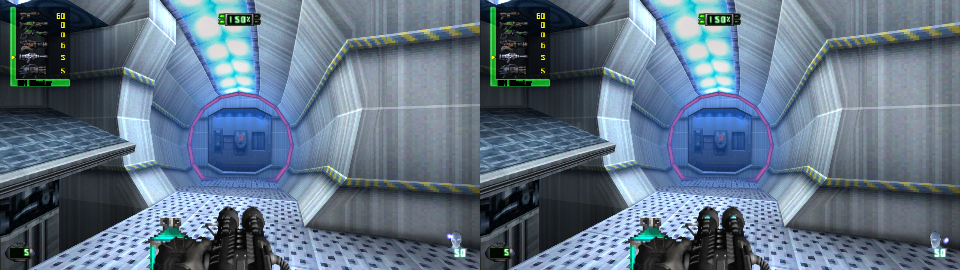
Now, the countdown and the name:
Fixes
- Abort mission no longer flashes the world behind the darkening pause screen
- In widescreen that world was half-drawn, with see-through floors
- The reactor mission's end: the "0 SECONDS" line no longer blinks while the screen fades
- A list's name no longer shows alone for a frame before its box, as the original game drew it
- The menu's demo: the mouse no longer turns its camera and number keys no longer change its weapon
- A click still ends the demo
- With Psionic keys use the power a power's key uses it 9 to 13 frames after the press, it was 21 to 23
- For that the game reads the power's pictures from the disc at 4x
- Under 60 FPS gameplay a sound that does not loop plays its full 8 seconds again, it was cut after 4
Changes
- The Cheats tab of the game's menu is gone from this release
- God Mode and all weapons and psionics are no longer offered
- The Debug tab keeps Detailed logging and the capsules
- Record the screen and the diagnostic views are left out
- The Experimental page holds a note: what is tried there comes in a later version
- Anti-aliasing, its one setting in 0.7.0, is on Enhancements
- Occlusion strength is 100% at first, it was 80%, and goes up to 100%
- Occlusion reach goes up to 160
- A saved occlusion value past the new end is taken as the default
- Psioni...
0.7.0
Download
| System | File |
|---|---|
| Windows 10 or 11 x64 | DisruptorRecomp-win-Setup.exe installs the launcher that updates itself |
| Windows, without installing | DisruptorRecomp-win-Portable.zip the launcher that updates itself, no install |
| Linux x64, glibc 2.35 or newer | DisruptorRecomp.AppImage the launcher that updates itself |
In this release
| Change | |
|---|---|
| Movie filter | The game's movies without their square blocks and grain |
| Launcher | Controls in four tabs, long paths and every window width handled |
| Fixes | Mars pickups, Prison walls, cracks along walls |
| Save states | States from 0.6.0 load as they are |
Movie filter
- A new setting on the Enhancements page: Movie filter, Smooth at first
- Smooth takes away the square blocks of the PlayStation's video compression and the grain in flat areas
- The movies are drawn smoothly at the size of your screen
- Original shows every pixel of a movie as a square, as before
- It is in the game's menu too, on Enhancements
The first mission's movie:
mission1-movie.mp4
The second mission's movie:
mission2-movie.mp4
Launcher
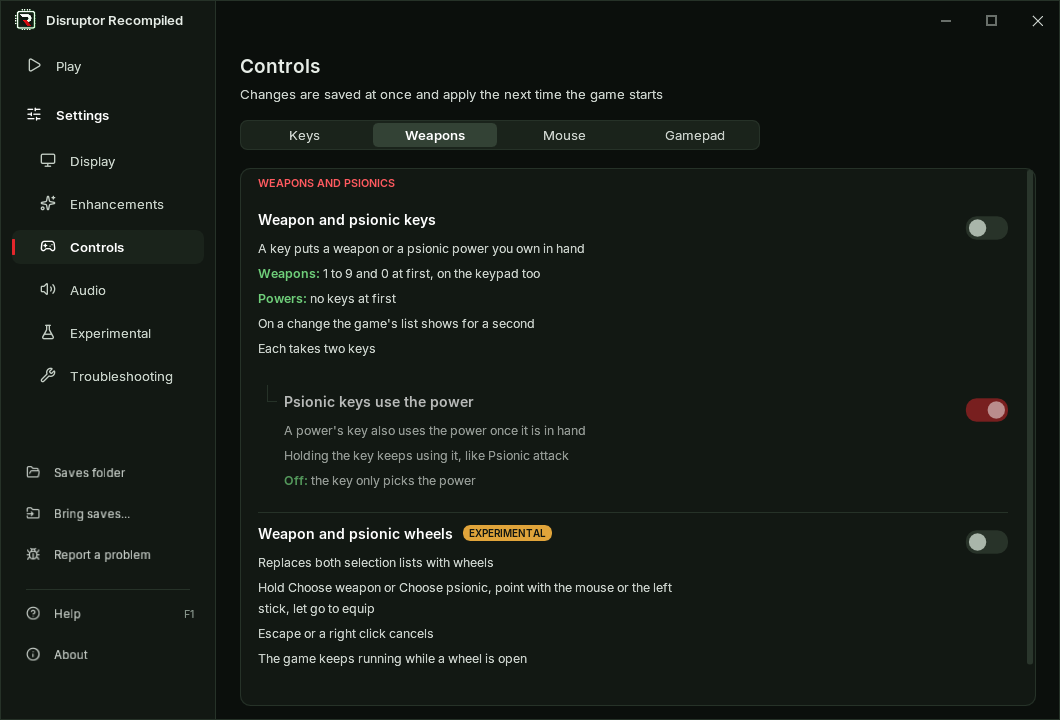
- The Controls page has four tabs: Keys, Weapons, Mouse and Gamepad
- A slider shows its value beside the track, where the handle no longer covers it
- The settings' controls stand in one column on every page
- About shortens a long folder path in the middle
- The whole path shows when you point at it
- Folder names in Japanese, Chinese or Korean show correctly
- An available update shows green, a download amber
- The launcher fits its smallest window, 900 pixels wide, without cut text
- Help shows its F1 key
- PLAY says that Enter starts the game too
- Switches and tabs move smoothly, unless Windows has its animations turned off
Fixes
- Mars (mission 6): pickups no longer turn into pink or cyan squares after the second part of the level loads (#49)
- Prison (mission 12): windows and gates are no longer solid green up close with Smooth distance fade (#49)
- Smooth distance fade: each texture fades with its own palettes on every level
- Walls no longer show light cracks along the edges of their polygons
- They showed in widescreen, with Smooth distance fade or with a longer draw distance
- Detailed logging also counts the pictures shown and the longest gap between them
The ice level, before and after:
ice-wall.mp4
The same in the shading view, where the cracks show best:
ice-wall-shading.mp4
Save states
- The game's code did not change in this version
- Save states from 0.6.0 load as they are
- Capsules from 0.6.0 load, but the game leaves their recording at once
- Memory card saves are not affected
Install
Your own Disruptor (USA, SLUS-00224) disc image is needed
Windows 10 or 11 x64
- Download DisruptorRecomp-win-Setup.exe and run it
- It installs the game into
%LocalAppData%\DisruptorRecomp, with shortcuts on the desktop and in the Start menu - Your files are kept in
%LocalAppData%\DisruptorRecompData - Or, without installing, unpack DisruptorRecomp-win-Portable.zip into a folder of its own and run
Disruptor Recompiled.exe - The portable copy needs the Microsoft Visual C++ x64 Redistributable
- The portable copy keeps your files in its
datafolder
Linux x64, glibc 2.35 or newer
- Download DisruptorRecomp.AppImage
- Make it executable:
chmod +x DisruptorRecomp.AppImage - Run it
- Your files are kept in
~/.local/share/DisruptorRecompData