Attribute Monitor
The attribute monitor allows you to extract a single attribute from any entity and expose it as a dedicated sensor. This is useful for making specialized attributes available to automations, templates, and displays.
An attribute monitor sensor displays the current value of a specified entity attribute. Whenever the source entity's state or attributes change, the sensor updates in real-time.
- Go to Clockwork configuration
- Select "Add Calculation"
- Choose "Attribute Monitor"
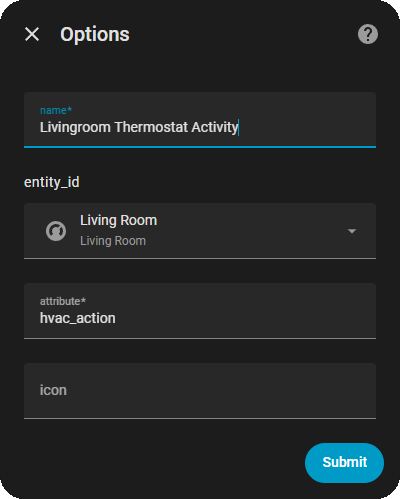
- Fill in the following:
- Calculation Name: A friendly name for your sensor (e.g., "Living Room Temperature")
- Entity to Monitor: The entity containing the attribute you want to track
- Attribute Name: The name of the attribute (e.g., "current_temperature", "battery")
- Icon: Optional custom icon
{
  "type": "attribute",
  "name": "Living Room Temperature",
  "entity_id": "climate.living_room",
  "attribute": "current_temperature",
  "icon": "mdi:thermometer"
}{
"name": "Home Temperature Sensor",
"entity_id": "climate.home",
"attribute": "current_temperature"
}Example: Extract current_temperature from a climate entity to use in automations or display on a dashboard.
{
  "name": "Front Door Battery",
  "entity_id": "binary_sensor.front_door",
  "attribute": "battery"
}
Example: Monitor battery levels of wireless devices without creating automation notifications.
{
  "name": "Bathroom Humidity",
  "entity_id": "sensor.bathroom",
  "attribute": "humidity"
}
Example: Track humidity levels for ventilation automations.
{
  "name": "Set Point Temperature",
  "entity_id": "climate.living_room",
  "attribute": "target_temperature"
}
Example: Create a sensor showing the thermostat's target temperature setpoint.
{
  "name": "Device Signal Strength",
  "entity_id": "sensor.device",
  "attribute": "rssi"
}
Example: Monitor WiFi signal strength for devices.
Attribute monitors work with any attribute type:
- Numeric: Temperature, humidity, battery percentage, signal strength
- String: Device name, model, status text
- Boolean: Connection status, online/offline state
- Date/Time: Last update, installation date
- Custom: Any custom attribute your entities expose
If the source entity or attribute is missing, the sensor will:
- Show
Noneas the state - Display an error message in the
_errorattribute - Log a warning message
- Continue listening for the entity/attribute to become available
Example error attribute:
_error: "Attribute 'current_temperature' not found on entity 'climate.living_room'"
condition:
  - condition: numeric_state
    entity_id: sensor.living_room_temperature
    above: 72
below: 85condition:
- condition: state
entity_id: sensor.device_status
state: "connected"{% set temp = states('sensor.living_room_temperature') | float(0) %}
{% if temp > 75 %}
Room is warm
{% endif %}Display attribute sensors on your dashboard as regular sensors:
entities:
  - sensor.living_room_temperature
  - sensor.front_door_battery
  - sensor.bathroom_humidity
type: entities
title: Monitored Attributes- Lightweight: Each attribute monitor adds minimal overhead
- Real-time Updates: Updates occur whenever the source entity changes
- No Polling: Uses Home Assistant's event system, not interval-based polling
- Multiple Monitors: You can monitor multiple attributes from the same entity
Cause: The attribute doesn't exist on the entity Solution:
- Check the exact attribute name in the entity's details
- Verify the attribute exists (not all entities have all attributes)
- Check the sensor's
_errorattribute for details
Cause: The source entity was deleted or renamed Solution:
- Modify the sensor configuration with the correct entity ID
- Check Home Assistant logs for error messages
- Restart Home Assistant if the entity was recently added
Solution:
- In Home Assistant, go to Developer Tools > States
- Find your entity in the list
- Look at the "Attributes" section to see available attributes
- Use the exact attribute name in Attribute Monitor configuration
Monitor a climate.living_room entity:
-
current_temperature- Current measured temperature -
target_temperature- Set point temperature -
humidity- Current humidity percentage -
preset_mode- Current mode (heat, cool, auto, etc.) -
current_swing_mode- Swing mode setting
Monitor a sensor.weather entity:
-
temperature- Temperature value -
humidity- Humidity percentage -
pressure- Barometric pressure -
wind_speed- Wind speed
Monitor a binary_sensor.wireless_device entity:
-
battery- Battery level percentage -
rssi- Signal strength -
lqi- Link quality indicator
Next: Learn about Season Detection →
Previous: Back to Date Range Duration →