Holiday Countdown
Track the number of days remaining until holidays with automatic yearly updates.
The Holiday Countdown calculation creates a sensor that displays the number of days until a specified date (usually a holiday). The countdown refreshes daily and automatically recalculates for the next occurrence of the holiday at the start of each year.
Clockwork includes pre-configured US holidays, or you can define your own custom holidays for any date that's important to you—birthdays, anniversaries, special events, etc.
- In Home Assistant, go to Settings > Devices & Services > Clockwork
- Select Configure
- Choose Add Calculation > Holiday Countdown
- Configure:
- Calculation Name: A friendly name (e.g., "Days Until Christmas")
- Holiday: Choose from preset US holidays or custom holidays you've defined
- Day Offset: (Optional) Offset the countdown by a number of days
- Icon: (Optional) Custom icon for the sensor
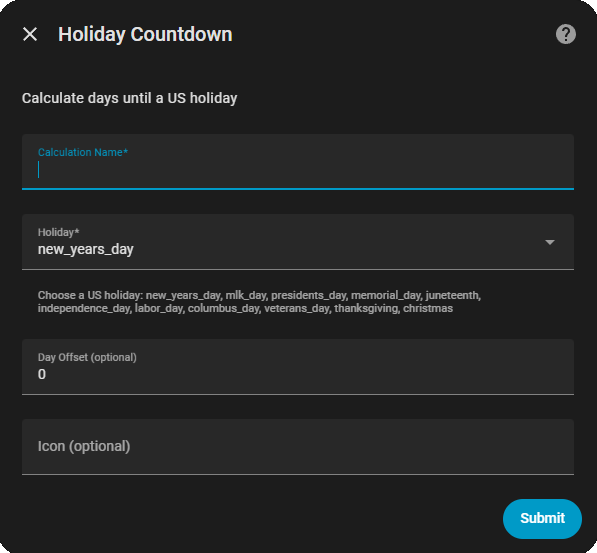
Clockwork includes these pre-configured holidays:
- New Year's Day (January 1)
- MLK Jr. Day (3rd Monday in January)
- Presidents' Day (3rd Monday in February)
- Memorial Day (Last Monday in May)
- Juneteenth (June 19)
- Independence Day (July 4)
- Labor Day (1st Monday in September)
- Columbus Day (2nd Monday in October)
- Veterans Day (November 11)
- Thanksgiving (4th Thursday in November)
- Christmas (December 25)
The Auto-create built-in holiday sensors setting controls whether Clockwork automatically creates countdown sensors for all preset US holidays.
- A countdown sensor is automatically created for each preset US holiday (e.g.,
sensor.days_until_christmas) - You can use these sensors immediately in automations without manually creating Holiday Countdown calculations
- You can still create additional Holiday Countdown calculations if you want different names or offsets
- No automatic sensors are created for preset holidays
- You must create explicit Holiday Countdown calculations to use these holidays
- You retain full control over which holidays you track
- Only custom holidays you define will have their countdown sensors auto-created
To Change This Setting:
- Go to Settings > Devices & Services > Clockwork
- Select Configure > Settings
- Toggle "Auto-create built-in holiday sensors"
- Save
You can define your own holidays for any important date. Custom holidays don't reset yearly—they stay the same date every year, making them perfect for birthdays and anniversaries.
To create a custom holiday:
- Go to Settings > Devices & Services > Clockwork
- Select Configure
- Choose Add Custom Holiday
- Define the date:
- Fixed Date: Same date every year (e.g., your birthday)
- Nth Weekday: Specific weekday in a month (e.g., 2nd Monday in September for Labor Day)
- Last Weekday: Last occurrence of a weekday in a month (e.g., last Thursday in November)
See Custom Holidays for detailed examples.
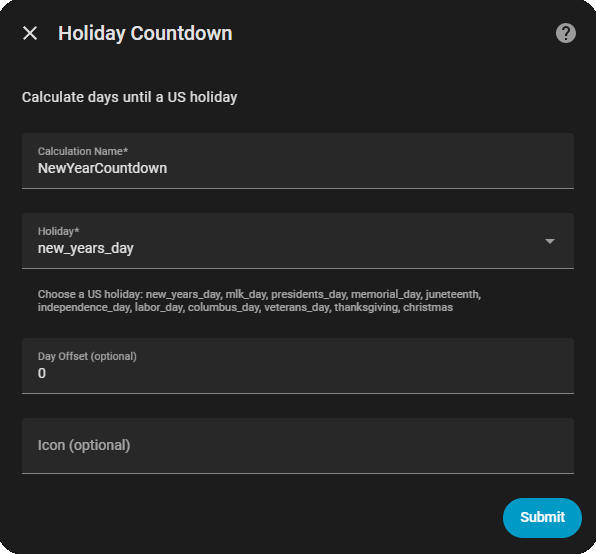
Create a sensor showing days until New Year:
{
  "type": "holiday",
  "name": "Days Until New Year",
  "holiday": "new_years_day"
}
This sensor will be available as sensor.days_until_new_year with the current day count.
First, create a custom holiday for your birthday in the Add Custom Holiday menu. Then create the countdown:
{
  "type": "holiday",
  "name": "Days Until My Birthday",
  "holiday": "my_birthday"
}
This shows how many days until your special day all year round.
Count down to a date before the actual holiday for preparation:
{
  "type": "holiday",
  "name": "Days to Holiday Prep",
  "holiday": "christmas",
  "offset": -7
}
With offset: -7, the countdown reaches 0 seven days before Christmas, perfect for starting decorations or planning.
Count days after a holiday has passed:
{
  "type": "holiday",
  "name": "Days Since Thanksgiving",
  "holiday": "thanksgiving",
  "offset": 1
}
This example counts up after Thanksgiving (showing positive numbers after the date passes).
automation:
  - alias: "Holiday reminder - 1 week out"
    trigger:
      platform: numeric_state
      entity_id: sensor.days_until_christmas
      below: 8
      above: 6
    action:
      service: notify.mobile_app_phone
      data:
        title: "Holiday Coming Up!"
message: "Only {{ states('sensor.days_until_christmas') }} days until Christmas!"automation:
- alias: "Birthday is today"
trigger:
platform: numeric_state
entity_id: sensor.days_until_my_birthday
below: 1
action:
service: persistent_notification.create
data:
title: "🎂 Happy Birthday!"
message: "It's your special day today!"automation:
- alias: "Start holiday prep"
trigger:
platform: numeric_state
entity_id: sensor.days_to_holiday_prep
below: 1
action:
service: notify.mobile_app_phone
data:
message: "Time to start decorating!"type: entities
entities:
- entity: sensor.days_until_christmas
name: Days Until Christmastype: custom:bar-card
entities:
- entity: sensor.days_until_christmas
name: Days Until Christmas
color: '#2196F3'type: custom:banner-card
image: /local/holiday.jpg
title: |
🎄 {{ states('sensor.days_until_christmas') }} days until Christmas!- Multiple Holidays: Create several holiday countdowns to track different dates throughout the year
- Negative Values: Offsets can be negative (countdown to prep) or positive (count days since)
- Family Dates: Add all family birthdays and anniversaries as custom holidays
- Special Events: Track days until concerts, vacations, or other memorable events
- Automation Chains: Use countdown sensors in automations to trigger seasonal decorations, menus, or notifications
- Custom Holidays - Detailed guide for creating your own holidays
- Between Dates Check - Check if current time is within a date range
- Season Detection - Detect current season for seasonal automations