Between Dates Check
Checks if the current time falls within a date/time range.
A between dates sensor is ON when the current time lies between two datetime values, and OFF otherwise. This is useful for time-based automations and business hour checks.
- Select "Between Dates Check"
- Configure:
- Calculation Name: A friendly name
- Start Datetime Entity: Entity with start datetime/time
- End Datetime Entity: Entity with end datetime/time
- Icon: Optional custom icon
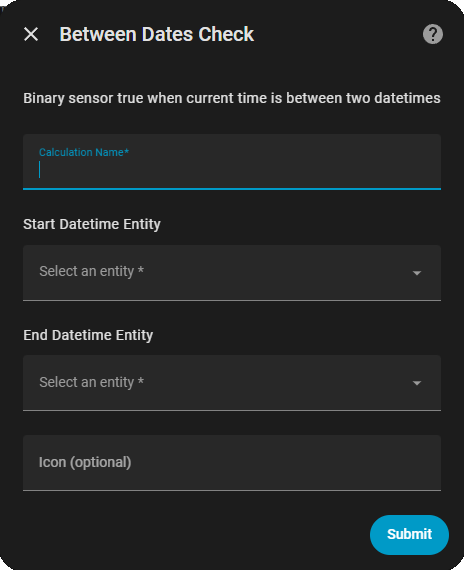
The sensor compares the current time against the start and end values:
- Same date on entities → Treated as daily recurring range
- Different dates → Treated as one-time range
- Start time > End time → Treated as overnight range
{
  "type": "between_dates",
  "name": "During Business Hours",
  "start_datetime_entity": "input_datetime.business_start",
  "end_datetime_entity": "input_datetime.business_end"
}
Set input_datetime values:
- Start: 09:00:00 (9 AM)
- End: 17:00:00 (5 PM)
Result: ON between 9 AM - 5 PM, OFF outside those hours
{
  "type": "between_dates",
  "name": "Quiet Hours",
  "start_datetime_entity": "input_datetime.quiet_start",
  "end_datetime_entity": "input_datetime.quiet_end"
}
Set input_datetime values:
- Start: 22:00:00 (10 PM)
- End: 06:00:00 (6 AM)
Result: ON between 10 PM - 6 AM (including midnight)
{
  "type": "between_dates",
  "name": "During Event",
  "start_datetime_entity": "input_datetime.event_start",
  "end_datetime_entity": "input_datetime.event_end"
}
Result: ON only during the specific date/time range
automation:
  - alias: "Send emails only during business hours"
    trigger:
      platform: state
      entity_id: binary_sensor.work_email_received
      to: "on"
    condition:
      - condition: state
        entity_id: binary_sensor.during_business_hours
        state: "on"
    action:
      service: notify.email
      data:
message: "Work email received"Next: Outside Dates Check →