Repository navigation
10 Ful forms
ful-form wraps its fields in a native form, takes over its submission, runs it through an async pipeline that handles one submit at a time, and maps typed failures back onto the fields.
<ful-form action="/api/ledger" method="POST">
    <ful-errors hidden></ful-errors>
    <ful-input name="user.email" required type="email">Email</ful-input>
    <button type="submit">Save</button>
</ful-form>
With action the form posts its values as json to that url, with method (POST by default), and the response it hands on is fetch()'s raw Response, undecoded. Without action nothing is sent: the response is whatever a submit:requested listener resolves to, which is how to get a decoded body. The form reports how each submit went through four events:
| Event | Detail | Cancelable |
|---|---|---|
submit |
{ submitter, values, request } |
yes, and cancelling aborts the submission |
submit:requested |
{ submitter, values, request } |
no (async, pipeline) |
submit:success |
{ submitter, values, request, response } |
no |
submit:failure |
{ submitter, values, request, exception } |
no |
All bubble. A form under track-changes also dispatches dirty:change, see Unsaved edits. The canonical remote pattern is submit:success → redirect/reload; the canonical local pattern is a submit:requested async listener that does the work and returns the outcome.
That listener is registered through ful.AsyncEvents.asyncOn, which is what lets the form await it. One added with addEventListener runs, but nobody awaits it: the form reports submit:success at once, before the work is done, and a failure ends as an unhandled rejection instead of a submit:failure with its problems on the fields.
ful.AsyncEvents.asyncOn(form, 'submit:requested', async (e) => {
    return await http.post('/api/tickets').json(e.detail.request).fetchJson();
});
Because the events bubble, a listener on an ancestor of a ful-form, the document or an enclosing form, also hears the submits of every ful-form nested in it, a ful-table's filter form included. Such a listener checks e.target === form before acting. An asyncOn listener cannot opt out that way: in pipeline mode it counts as an answer even when it returns early, so one on an ancestor answers the submit:requested of every nested form, and a nested form with an asyncOn listener of its own then fails with two answers. Put asyncOn listeners on the form they serve, never on an ancestor.
The attributes are listed under ful-form in the element reference. A response-mapper on a remote form receives the raw Response, so decoding it is the mapper's own job. autocomplete reaches the fields through the library rather than through the platform: see Autofill.
On upgrade the component:
- creates an inner
<form novalidate>and moves all its children into it (form-*attributes on the host are forwarded, stripped:form-autocomplete,form-class, …). - binds the form's submit:
preventDefault()+stopPropagation(), routing to its own pipeline.
That inner form is a dom node but not a layout box: it is display: contents and ful-form itself is display: block, so the host is what you lay the fields out on.
<ful-form style="display: grid; grid-template-columns: 1fr 1fr; gap: 1rem">Two things follow. Layout and the dom are different questions, so anything walking the children still meets the form: reach the fields through ful-form.form.children, or query for them. And nothing paints on a box that does not exist, so a background, a border or a scroll container belongs on ful-form.
The values property reads flat named controls into a nested javascript object, and writes such an object back onto the controls. A control named company.departments.0.name is one control with one name; the object around it is assembled on the way out and taken apart on the way in.
Reading collects every named, enabled control in form.elements and assembles them along their dotted paths. A numeric segment builds an array rather than an object, so company.departments.0.name arrives as company.departments[0].name.
Five conversions happen on the way:
| in the dom | in the object |
|---|---|
| an empty string | null |
| a checkbox | a boolean |
| a radio group with nothing checked |
null, with the key kept |
any control carrying data-ful-bind-type="boolean"
|
'true' / 'false' cast to a real boolean |
a native <select multiple>
|
an array of the selected values |
Those five are the extraction's own. A field can also shape its value before the extraction reads it: ful-input type="decimal" answers a dot whatever separator was typed, and v-type="number" answers a number rather than a string (see inputs).
Writing reverses it. The object is flattened back to dotted keys and each value lands on its control: radios check by value, checkboxes by boolean, a multiple select selects the options the array names, everything else by assignment.
The flattening stops descending at any path that is itself a field name. That is what lets one component own a whole object: give a field the name address and it receives the entire address, rather than the form trying to find an address.city control that does not exist.
form.values;            // { user: { email: 'a@b.c' }, privacy: true }
form.values = payload; // fill the form from a server payloadful.Bindings is what both directions go through, and it works on any form, not only a ful-form:
| call | does |
|---|---|
extractFrom(form, submitter?) |
the getter above: every named, enabled control assembled into a nested object |
mutateIn(form, values) |
the setter above: a nested object flattened back onto the controls |
extract(el) |
the value of one control, with the conversions above |
mutate(el, value) |
writes one value into one control, the inverse of extract
|
providePath(result, path, value) |
writes one dotted path into a nested object |
flatten(values, prefix, stops) |
a nested object as a map of dotted paths, not descending below any path in the stops set |
errors(form, problems, scrollOnError?) |
the error routing described below |
Reach for it directly when the form is not a ful-form, a plain <form> in a dialog being the usual case, and you want the same nesting rules.
flowchart TD
    S0["submit button, or Enter in a field"] --> S1["spinner on:<br/>spinners show, submit/reset held off"]
    S1 --> S2["loader = component(loader attribute)"]
    S2 --> S3["values = extract(form, submitter)"]
    S3 --> S4["request = loader.prepare(values)"]
    S4 --> E1{"submit event"}
    E1 -- "preventDefault()" --> R["spinner rolls back, stop"]
    E1 -- continue --> S5["errors = []"]
    S5 --> E2["submit:requested<br/>(async, at most one listener,<br/>its value becomes a local response)"]
    E2 --> S6["response = loader.submit(request, form, response)"]
    S6 --> S7["response = loader.transform(response)"]
    S7 --> S8["spinner off:<br/>the form has settled"]
    S6 -- "any throw" --> ERR["Failure? errors = exception.problems"]
    ERR --> S8
    S8 -- succeeded --> E3["submit:success"]
    S8 -- failed --> E4["submit:failure"]
A submit, whether from a button or from Enter in a field, since the fields submit their form, runs one exchange at a time: a submit while one is in flight is dropped before anything fires or travels, so a racing gesture or a programmatic call cannot double the write. Each submit runs:
| # | step | what happens |
|---|---|---|
| 1 | spinner on | every ful-spinner descendant un-hides and the submit and reset buttons are held off (aria-disabled, see below). Spins nest: a caller's own spinner(true) may wrap a submit, and only the outermost restores |
| 2 | loader |
registry.component(loader).create(form): a RemoteJsonFormLoader when action is set, a LocalFormLoader otherwise |
| 3 | extract | values = Bindings.extractFrom(form, submitter) |
| 4 | prepare |
request = await loader.prepare(values, form), where the request-mapper runs |
| 5 |
submit fires |
cancelable, detail { submitter, values, request }. preventDefault() aborts the pipeline and rolls the spinner back. This is the client-side gate |
| 6 | clear | errors = [] |
| 7 |
submit:requested fires |
async, through fireAsync(el, evt, { mode: 'pipeline' }): at most one listener, awaited here. Its resolved value is the response of a local form, and it may also replace e.detail.request
|
| 8 | transmit |
response = await loader.submit(request, form, response). Remote: http-client sends request as json with the form's method. Local: the listener's value, passed as the third argument |
| 9 | transform |
response = await loader.transform(response, form), where the response-mapper runs |
| 10 | spinner off | always, success or failure: the spinners hide, aria-busy goes and the buttons are no longer held off. On a failure, an httpc Failure first routes its problems into errors
|
| 11 |
submit:success fires |
detail { submitter, values, request, response }
|
submit:failure fires |
on any failure instead: detail { submitter, values, request, exception }
|
The form has settled by the time either outcome event reaches its listeners: the submit is no longer in flight and a Failure's problems are already on the fields and in the banners. So a submit:failure listener writing errors has the last word, and a listener calling submit() starts a new submit instead of being dropped as one in flight.
A submit listener may replace detail.values or detail.request: the submit:requested listener then receives the replacements, and the request is what the loader sends. The outcome events carry the values the form extracted, not a replaced values, and the request as it was last replaced: by submit:requested when its listener replaced it, else by submit, except that a failure thrown by the submit:requested listener carries the request prepare built.
submit() never rejects: the outcome is carried by the events listed at the top of this page, and the call resolves true after submit:success, false when the submit failed, was cancelled by a submit listener or was dropped for one in flight. That is enough for code that only needs to know whether to go on:
if (await form.submit()) {
    location.reload();
}The two protocols meet here:
Busy. While the pipeline runs the form carries aria-busy="true", the same way ful-table and an async section declare themselves busy. Every ful-spinner inside it is revealed and, unless it carries a role of its own, given role="status"; one with no text of its own also gets the localized spinner.loading label, so the wait is announced rather than only drawn. A spinner you labelled yourself keeps your text. Outside a submitting form, a spinner's role is yours to set.
Held off. Every submit and reset button inside the form is marked aria-disabled="true", and a capturing handler refuses clicks on it. It is deliberately not the disabled property: the submitter is almost always the focused element when a submit starts, and disabling what holds the focus drops it to <body>, losing the user's place in the middle of the transaction the form has just announced. Held off this way the button keeps its focus and its name, and .ful-button dims it the same way it dims a disabled button. Nested submissions nest, so only the outermost one releases them.
The real double-submit guard is not the button state at all: submit() drops a call while one is in flight, before anything is extracted or sent.
Disabled fields. A field carrying its own disabled claim, or living in a disabled <fieldset>, is absent from values: extraction walks form.elements and skips anything matching :disabled. Only :disabled is skipped: a field hidden with hidden or css, but enabled, is still in values and is submitted. Buttons follow the platform's rule instead of the disabled one, so the submitter contributes its name and value and no other button does.
Readonly. Readonly fields submit normally. Their values extract like anyone else's and only interaction is frozen, so a half-edited readonly field cannot go stale on you.
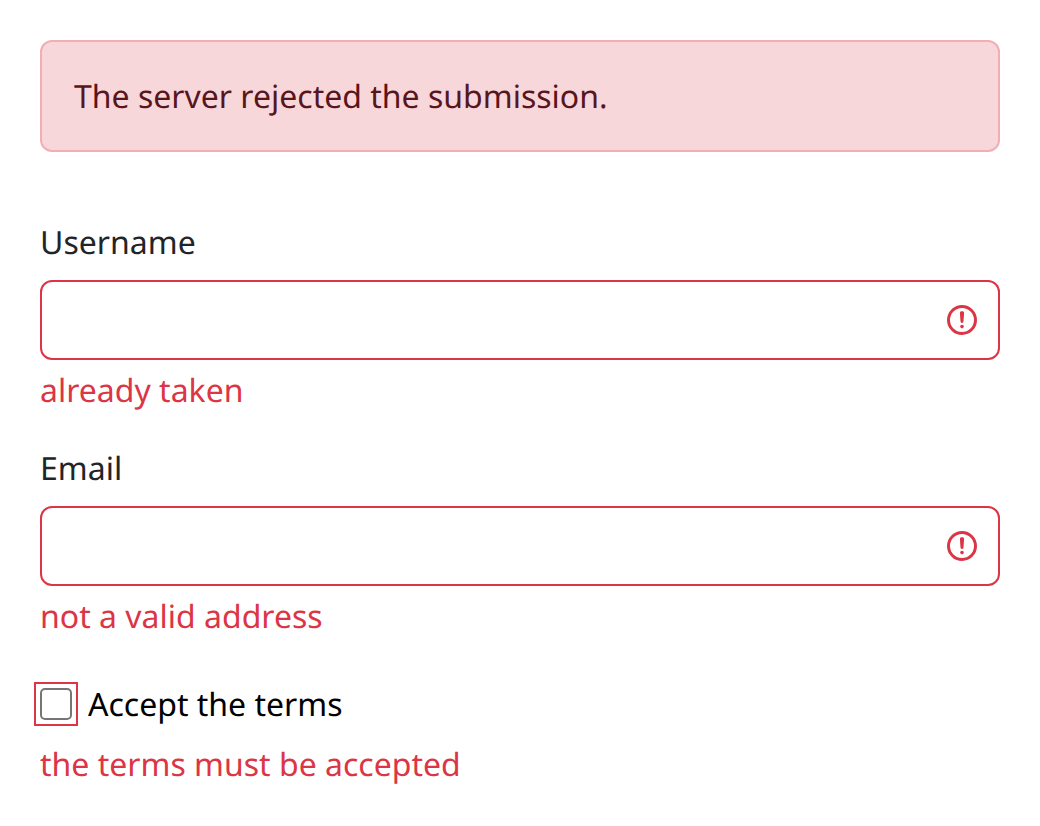
Assigning problems (any array of { type, context, reason }) to form.errors routes them:
Field errors are the problems whose type is FIELD_ERROR or INVALID_FORMAT. Their context names the field, with brackets normalized first, so users[0].name becomes users.0.name.
The name is then walked from the full path down, dropping one trailing segment at a time, and setCustomValidity(reason, remainder) is applied to the most specific prefix that actually names an element. Two things fall out of walking in that direction. A deep path still catches onto a container component that owns a whole object, and a container never doubles a message that an exact field is already showing.
The remainder is what is left of the path below the element that caught it: '' on an exact match, the inner path on a composite catch. That is how a composite field routes the problem to the inner control it names.
Several problems landing on the same element with the same remainder all show: their reasons reach it in one setCustomValidity call, one per line.
A field error whose context names no element at all joins the banner rather than vanishing, and so does one whose element cannot show it: an element counts only when it has a setCustomValidity of its own, so a form-associated element built on ParsedElement rather than on ful.Field passes its problems to a shorter prefix or to the banner.
Global errors are everything else. Their reasons are joined by newline into every ful-errors banner, which is then unhidden.
ful-errors is yours to place. It is a style-only tag, not an element, and nothing renders it for you: a form without one shows its field errors and does not show the other problems anywhere. Put one where the summary belongs, hidden, as the form at the top of this page does, and the routing fills and reveals it.
More than one is allowed and each gets the same text, which is how a long form repeats the summary at the foot. The banner is revealed before it is filled, deliberately: a live region mutated while hidden and shown afterwards is announced unreliably.
A fresh assignment first clears all custom validity and hides the banners. With scroll-on-error, all :invalid fields are sorted by viewport position and the topmost is focused.
Everything the routing touches is the form's own: extraction, the validity reset, the problem pinning, values, the banners and the topmost invalid field all read form.elements, the platform's association list. A field in the subtree that belongs to another form, a ful-table's filter form nested in a ful-form, a drawer form authored inside one, a form attribute pointing elsewhere, is not this form's to clear, pin or write, where a subtree query would have reached it; the same rule keeps a submit from holding another form's buttons off and clear-invalid-on-change from clearing another form's problems.
form.errors = [
    { type: 'FIELD_ERROR', context: 'user.email', reason: 'already taken' },
    { type: 'GENERIC_PROBLEM', context: null, reason: 'try later' },
];
The natural source is a submit:failure with an httpc Failure: e.detail.exception.problems has exactly this shape, so a RemoteJsonFormLoader form wired to an endpoint speaking application/failures+json needs no mapping code at all. A Failure is also the expected outcome of a refused submit, so it is not warned about: the console stays quiet on a server 422 whose problems just landed on the fields, and warns only when the failure is anything other than a Failure.
track-changes has the form keep track of what the user edited and has not saved yet; guard-leave implies it and also asks, through the browser's own prompt, before the page is left while there is anything.
<ful-form action="/api/ledger" track-changes guard-leave>
    <ful-input name="description" value="Rent">Description</ful-input>
    <button type="submit" class="ful-button">Save</button>
</ful-form>
What counts as an edit. An edit is what the controls report as one: an input or a change bubbling from a named control of this form, which is what a field dispatches for the user's edits and only for them (assigning value, reload(), writing src dispatch nothing). So a select dropping a key its vocabulary no longer knows, a section delivering its fields when its tab is entered, a field the page fills after a fetch, a filter typed into in a table nested in the form: none of them is an edit, whatever their timing. An edit inside a composite field (rows of a field built on several inner controls) counts under the composite's name.
Dirty. dirty is true while a name the user edited since the last commit holds values other than the committed ones, so an edit undone is clean again. A control the last commit did not see, as one a section delivered, compares with its values when it was first focused. While dirty the host matches :state(dirty), its own submit buttons carry data-ful-dirty, which the stylesheet paints as a dot in their corner (--ful-dirty-mark-color), and each change of the state dispatches dirty:change with { dirty }. The state and the mark follow an edit at the next frame; the property is exact at any time.
Committing. The form commits once its fields have rendered, so what the page rendered is the saved state, and after each successful submit, before submit:success, with the values that submit sent: an edit made while it was in flight stays unsaved. A save of the page's own calls commit(), as does a page that writes the values it loaded:
form.values = await http.get(`/api/ledger/${id}`).fetchJson();
form.commit();
A value the page writes on the user's behalf, as a "copy the address" button does, reports nothing by itself: edited(...els) counts it, one control or several.
street.value = billing.street;
city.value = billing.city;
form.edited(street, city);
Removing a row is not an edit either: dirty looks only at the names an edit touched, and a removal touches none. Call form.edited(control) on the row's controls before removing them, and their names, now holding nothing, compare against the committed values.
Saving before an action. An action that would lose the edits, one reloading the page after a change of status for instance, saves them first: save() submits only while the form is dirty, and resolves whether no unsaved edit is left, so a failed save, or an edit made while it was in flight, stops the action.
if (!await form.save()) {
    return;
}
await http.post(`/api/ledger/${id}/publish`).fetch();
location.reload();
Without track-changes there is no telling what is unsaved, and save() always submits.
reset(), or a native <button type="reset"> in the form, counts as an edit of every control, so it leaves the form dirty when the defaults differ from what was committed. The leave guard is PageLeave.guard(isDirty, signal) underneath, usable on its own for anything that is not a form, such as saves still in flight. A form in a drawer or a dialog is guarded by the overlay instead: guard-dismiss there asks before a dismissal drops the edits (see Disclosures).
What dirty means here is deliberate: edited by the user and not saved, not the platform's dirty value flag, which a script assigning value sets too (see decision 0022 in the repository).
| Member | Description |
|---|---|
values |
get/set, see above |
form |
the inner <form> the children were moved into |
errors |
setter, routes problems (no getter) |
submit(submitter?) |
run the pipeline programmatically, resolving whether it succeeded |
save(submitter?) |
submit only while dirty (always without track-changes), resolving whether nothing unsaved is left |
reset() |
the inner form's native reset (fields restore their markup value); under track-changes every control counts as edited |
spinner(bool) |
toggle spinners and hold submit and reset buttons off |
dirty |
getter, under track-changes: whether an edit holds a value other than the committed one; always false otherwise |
commit() |
under track-changes, record the current values as saved |
edited(...els) |
under track-changes, count the values the page wrote as the user's edits |
loader names the component the form submits through, loaders:form by default. A loader of your own implements prepare, submit and transform; the contract and a worked example are under the form loader.