Repository navigation
23 Extending loaders
A component is anything you register on the registry by name, for an element to resolve at render time:
ftl.registry
    .plugin(new ful.Plugin())
    .defineComponent('loaders:my-select', MySelectLoader)
.configure();<ful-select loader="loaders:my-select" name="country">Country</ful-select>This is how a select, a table or a form gets its data, and it is the seam to use when the built-in ones do not fit: the element keeps its rendering, its keyboard handling and its accessibility, and you replace only where the data comes from.
The plugin registers the defaults under loaders:select, loaders:table, loaders:form and http-client. Registering your own under those names replaces them page-wide; registering under a new name and pointing one element at it with loader="…" replaces it for that element alone.
Anything with a create(el, conf). Most elements call it once, during their render, and keep what it answers. ful-select and ful-table call it again when their src or method change, and keep the new loader; ful-form builds its loader on every submit, so a form loader holds no state between submissions:
const MyLoader = {
    create: (el, conf) => new MyLoaderInstance(el, conf),
};
el is the element itself, so your loader can read its own configuration off it. conf carries whatever the element passes: a select hands over { options }, the content of its options slot.
A plain object with a create is enough; so is a class with a static create, which is how the built-ins are written.
sequenceDiagram
    participant S as ful-select
    participant L as your loader
    S->>L: create(el, { options })
    S->>L: prefetch()
    Note over L: optional warm-up, resolving either way
    S->>L: exact(...keys)
    Note over S: labels the value it was given
    S->>L: load(needle)
    Note over S: the user typed, or opened the list
load and exact answer { key, label, metadata } entries, directly or through a promise; prefetch and invalidate are optional:
| method | contract |
|---|---|
load(needle) |
the entries matching the typed text. A nullish or empty needle means no filter, which is the empty search the list opens with |
exact(...keys) |
the entries for those keys. Used to label a value assigned without going through the list; a key it leaves out is dropped from the selection |
prefetch() |
optional. Warm the vocabulary if you can. The select calls it at the upgrade without waiting for it, so the field paints first, and awaits it in reload()
|
invalidate() |
optional. Drop whatever you cache, so the next question fetches again. select.reload() calls it, and does nothing when your loader does not have it |
An entry whose metadata.disabled is truthy is shown and cannot be picked, with metadata.reason, when present, as the row's title.
class CountryLoader {
    static create(el) {
        return new CountryLoader(el.component('http-client'), el.getAttribute('region'));
    }
    constructor(http, region) {
        this.http = http;
        this.region = region;
    }
    async prefetch() {}
    async load(needle) {
        const rows = await this.http.get('/api/countries')
            .param('region', this.region)
            .param('q', needle ?? '')
            .fetchJson();
        return rows.map((r) => ({ key: r.iso, label: r.name, metadata: { flag: r.flag } }));
    }
    async exact(...keys) {
        const rows = await this.http.post('/api/countries/by-code').json(keys).fetchJson();
        return rows.map((r) => ({ key: r.iso, label: r.name, metadata: { flag: r.flag } }));
    }
}
metadata is carried on each entry and is available to the option and item templates, which is how you render more than a label:
<ful-select loader="loaders:countries" region="eu" name="country">
    Country
    <template slot="dropdown">
        <li data-tpl-each="self" data-tpl-value="index" role="option">
            {{ metadata.flag }} {{ label }}
        </li>
    </template>
</ful-select>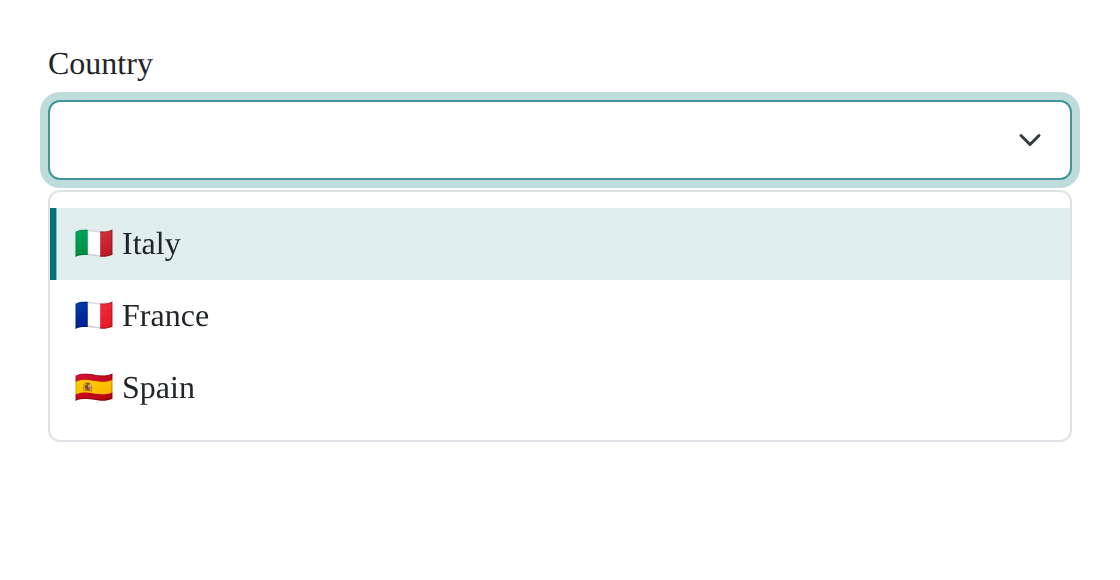
The dropdown slot is the option template. It iterates the entries itself with data-tpl-each="self", so each entry's own fields are in scope directly: key, label, metadata, plus the index the select needs on data-tpl-value. See ful-select.
exact matters more than it looks. A form that populates itself with form.values = { country: 'IT' } hands the select a key and nothing else. The select calls exact to label it, so a loader without exact makes that assignment throw: it is required, and only prefetch and invalidate are optional.
Your loader reads its own configuration with getAttribute, as region does above. declared(name) answers for the element's own declared vocabulary only and will tell you so if you ask it for anything else.
One method:
async load(pageRequest, sortRequest, filterRequest) → { data, size }| argument | shape |
|---|---|
pageRequest |
{ page, size }: the zero-based page index and the page size |
sortRequest |
{ sorter, order }: the column's sorter and 'asc'/'desc', or null
|
filterRequest |
the values of the filters slot's controls, by name, such as { byName: ['CONTAINS', 'IGNORE_CASE', 'ada'] }; {} when there are none |
The answer is { data, size }: data is this page's rows, size the total number of elements across all pages. The table divides one by the page size to lay out the pagination, so a size that counts pages instead of elements produces a one-page table. If the requested page is past the end, the table reloads at the last one by itself.
class ReportLoader {
    static create(el) {
        return new ReportLoader(el.component('http-client'));
    }
    constructor(http) {
        this.http = http;
    }
    async load(pageRequest, sortRequest, filterRequest) {
        const response = await this.http.post('/api/report/search')
            .json({
                page: pageRequest.page,
                size: pageRequest.size,
                sort: sortRequest?.sorter ? `${sortRequest.sorter},${sortRequest.order}` : null,
                ...filterRequest,
            })
            .fetchJson();
        return { data: response.rows, size: response.total };
    }
}
The table owns the rest: the loading chrome, the error state, the busy announcement, and discarding the outcome of a load that a newer one has superseded. A rejection paints the table's error row, so you do not have to catch it.
Three methods, called in order:
sequenceDiagram
    participant F as ful-form
    participant L as your loader
    F->>F: extract the values
    F->>L: prepare(values, form)
    Note over F: dispatches submit, then submit:requested
    F->>L: submit(request, form, response)
    F->>L: transform(response, form)
    Note over F: settles, then dispatches submit:success with the result
| method | contract |
|---|---|
prepare(values, form) |
turn the extracted values into the request to send |
submit(request, form, response) |
perform it and return the response. The third argument is whatever a submit:requested listener already answered, which is how a loader with nothing to send returns it unchanged |
transform(response, form) |
turn that response into the response field of the submit:success detail |
A rejection from any of the three is reported as submit:failure. If it is a Failure, as the HttpClientError the http client rejects with is, the form first routes each problem to the field its context names and puts the rest in the ful-errors banner. See Forms.
class DraftLoader {
    static create(el) {
        return new DraftLoader(el.component('http-client'));
    }
    constructor(http) {
        this.http = http;
    }
    prepare(values) {
        return { ...values, draft: true };
    }
    async submit(request) {
        return await this.http.put('/api/drafts').json(request).fetchJson();
    }
    transform(response) {
        return response.id;
    }
}The default loader posts the values as json, so a ful-input-file contributes its file names. A loader that sends the files themselves builds a multipart request: the values as one json part, each file field's selection as file parts under its name. It reads the fields from form.form.elements, the inner form's own controls, so a file field of a nested form (a table's filters, say) stays out, and it skips a disabled one, as the values do. A dotted name such as doc.scan is nested in values ({ doc: { scan: … } }), so the file names are dropped at that path rather than by a top-level key.
class MultipartFormLoader {
    static create(el) {
        return new MultipartFormLoader(el.component('http-client'), el.declared('method') ?? 'POST', el.declared('action'));
    }
    constructor(http, method, url) {
        this.http = http;
        this.method = method;
        this.url = url;
    }
    prepare(values, form) {
        const fields = [...form.form.elements]
            .filter((el) => el instanceof ful.InputFile && el.hasAttribute('name') && !el.matches(':disabled'));
        const rest = structuredClone(values);
        for (const field of fields) {
            const path = field.getAttribute('name').split('.');
            const parent = path.slice(0, -1).reduce((node, key) => node?.[key], rest);
            delete parent?.[path.at(-1)];
        }
        return { values: rest, files: fields.map((field) => [field.getAttribute('name'), [...field.files]]) };
    }
    async submit({ values, files }) {
        return await this.http
            .request(this.method, this.url)
            .multipart((parts) => {
                parts.json('request', values);
                for (const [name, selection] of files) {
                    parts.blobs(name, selection);
                }
            })
            .fetchJson();
    }
    transform(response) {
        return response;
    }
}

ftl.registry.defineComponent('loaders:multipart', MultipartFormLoader);<ful-form loader="loaders:multipart" action="/api/documents">
<ful-input name="title">Title</ful-input>
<ful-input-file name="attachments" multiple>Attachments</ful-input-file>
<button type="submit">Upload</button>
</ful-form>The server reads the request part as json and the files under their field names; with Spring, @RequestPart("request") and @RequestPart("attachments") List<MultipartFile>. Problems it answers route to the fields as for any other form.
The select's built-in loaders can be built from a plain configuration, without an element:
const loader = ful.SelectLoader.from({
    http: myStubClient,
    url: '/api/countries',
    responseMapper: (rows) => rows.map(([key, label]) => ({ key, label })),
});
await loader.load('it');
SelectLoader.create(el, conf) is the same thing with the element's attributes parsed first. Your own loader is testable the same way if you keep the parsing in create and the work in the instance.
The same mechanism carries anything an element resolves by name:
| name | used by | contract |
|---|---|---|
http-client |
every remote loader | an httpc client, or anything with the same verbs |
loaders:select / loaders:table / loaders:form
|
the defaults for each family | above |
a response-mapper
|
ful-select |
(response) => entries |
a response-mapper
|
ful-table |
(response) => ({ data, size }) |
a response-mapper
|
ful-form |
(response, form) => result, the response of the submit:success detail |
a request-mapper
|
ful-form |
(values, form) => request |
Replacing http-client is how you give every remote loader on the page the same interceptors:
const http = httpc.HttpClient.builder()
    .withCsrfToken()
    .withRedirectOnUnauthorized('/login')
    .withInterceptors({
        async intercept(url, request, chain) {
            request.headers.set('X-Tenant', currentTenant());
            return await chain.proceed(url, request);
        },
    })
    .build();

ftl.registry.plugin(new ful.Plugin({ httpClient: http })).configure();
See Http client for the builder and the interceptor chain.