Repository navigation
Providers
ZenithBoard does not make FlightAware, ADSB Exchange, Flightradar24 or Plane Finder. It installs their software and keeps it fed with what your antenna hears. Any of them may rename a file, move a download, publish a new version or change a signing key, and none of them tells ZenithBoard first.
A provider's change can stop that provider's install or update, and nothing else. The wall, the other feeders and your settings keep running. Package signature checking is never switched off to get past it.
| The provider… | What happens | What you do |
|---|---|---|
| publishes a new version, same address | Nothing breaks | sudo zenithboard update |
| moves or renames a file | That provider's update stops with a warning | One line to fix — see Fixing it |
| changes its signing key | The key is refused until its fingerprint is checked. A key file that carries more keys gives apt the pinned one only (0.99.12) | Update, once the new fingerprint is in |
| changes what its installer does | Not detected. See What cannot be seen coming | Nothing automatic can help here |
Each feeder fails on its own. A 404 from Plane Finder does not stop FlightAware from updating: zenithboard update warns, carries on to the next component, and still ends with Update finished. If it is the ZenithBoard code itself that could not be pulled, the update says Update NOT complete instead and exits 1 (0.53.7; before, it said finished and the console showed done on the old version). If the new files could not be copied to /opt/zenithboard (a full card), the update stops right there with Update NOT complete, exit 1, before any component is touched (0.99.12; before, it went on with the half-copied files), and says the two commands to run once the cause is fixed. Afterwards, zenithboard status says what is really running.
| Fetched | The flightaware-apt-repository package, once, at install |
| Pinned | That package's address and version (FA_REPO_*) |
| Kept current by | APT — zenithboard update upgrades piaware and dump1090-fa
|
| If it moves | Only a fresh install breaks. An installed Pi keeps updating through APT |
| Fetched |
feed.sh to install, feed-update.sh to update — downloaded and run as root every time
|
| Pinned | The two addresses (ADSBX_*). Not the content |
| Kept current by | Their own script, run again at every update |
| If it moves | A warning, and no update that round |
| If it changes | Run as it is: trusted, not checked. zenithboard mlat-guard then restores the single-MLAT rule |
| Fetched |
stats.sh (it redirects to their GitHub, then clones adsbexchange/adsbexchange-stats and runs its install.sh), downloaded and run as root by adsbx-stats on and at each update while it is on |
| Pinned | The address (ADSBX_STATS_URL). Not the content. Read in full on 22 October 2026, commit 11647f2 (February 2023) |
| Kept current by | Their script, run again at every update, the way their README updates it |
| If it moves |
on says so and changes nothing; an update warns, and the stats keep running as they were |
| If it changes | Run as it is: trusted, not checked, like their feed's script |
What it is. Their feed sends ADSB Exchange what your antenna hears. Their stats package is a second program that fills Feed Details on https://www.adsbexchange.com/myip/. Without it, that panel says Feed UID Not Found and No Stats while the feed and MLAT are fine. With it you get:
-
ADS-B Exchange Anywhere, their map of only the aircraft your antenna hears, viewable from anywhere (the link is at the bottom of the myip page, or
zenithboard adsbx-stats url); - your receiver's statistics on their site;
- the claim of the receiver under an ADSB Exchange account, if you want one. ZenithBoard never creates that account.
What it sends, read in their code: every 5 seconds, the feed's aircraft list (/run/adsbexchange-feed/aircraft.json, what the feed already gives them), the feed's UUID, three signal figures (average, weakest, strongest) and the Pi's power warnings (vcgencmd get_throttled). It runs as the adsbexchange user, at the lowest priority.
What it costs on the reference Pi 3B: 6 MB of memory, in two processes (measured 22 October 2026, Hardware). What it uploads (the aircraft list, compressed, every 5 seconds) has not been measured on the Pi yet.
What it adds: jq, bind9-host and bash-builtins from apt (signed; whichever are missing), its folder /usr/local/share/adsbexchange-stats, the adsbexchange-stats service, adsbexchange-showurl, and the adsbexchange user in the video group (for vcgencmd). off takes all of that back: their uninstaller, the packages that were not there before (unless something installed since needs one, which is said), and the group. The feed's UUID stays: it is the feed's, the backup keeps it, and on again gives the same map.
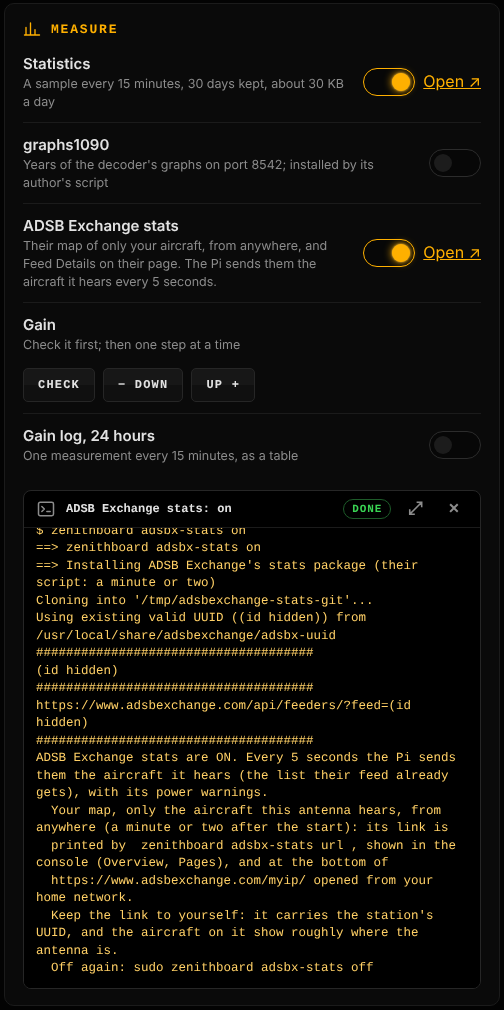
Keep the link to yourself. It carries the UUID, and the aircraft on the map show roughly where the antenna is. Only zenithboard adsbx-stats url prints it, and the console links to it (signed in). on, status, zenithboard status and the update say where it is instead, because their output is pasted and screenshotted. Their script prints the UUID and the link at its end, and ZenithBoard shows that output with both hidden as (id hidden). zenithboard health hides a station's UUID in the last lines of a boot that ended abruptly.
If off cannot finish (apt busy with the daily security fixes, the group refused), it says so and keeps what is left for the next off. A package that something installed since needs is left, with the command to remove it later. graphs1090 also brings bash-builtins and git: while it is on, those stay. Their installer and graphs1090's run one at a time, so neither counts the other's packages as its own.
| Fetched | An installer script, then fr24feed from FR24's APT repository |
| Pinned | The installer address (FR24_INSTALL_URL) and the signing key's fingerprint (FR24_KEY_FPR) |
| Kept current by | APT |
| If it moves | A warning |
| If the key changes | Refused until the fingerprint in lib/versions.sh is updated. apt update keeps calling the repository unsigned until then. The key is never skipped — see Security
|
| Fetched | A .deb for your CPU, at a pinned version (PF_VERSION_*) |
| Pinned | Both the version number and the address |
| Kept current by | Nobody. zenithboard update reinstalls the pinned version; it does not look for a newer one |
| If it moves | A warning: the Plane Finder package URL may have changed |
| Also worth knowing | This is the feeder that has never been watched feeding on a real Pi (Project status) |
0.99.6 (30 October 2026), at the owner's word. Ticked in menu 1 ADS-B → 1 Decoder and networks.
| Fetched | The package rbfeeder from AirNav's own apt repository (https://apt.rb24.com/), added by ZenithBoard as /etc/apt/sources.list.d/zenithboard-rb24.list with its key in /etc/apt/keyrings/zenithboard-rb24.gpg. A source of AirNav's own (their installer, an earlier setup) is used as it is |
| Pinned | The key's full fingerprint, 78F6D790E30AE7F360B716FED4F914061D043681 (AirNav Systems, made 30 January 2018, read on keyserver.ubuntu.com on 30 October 2026). A key with another fingerprint is refused and nothing is added; only the pinned key, matched as a primary key, goes into the keyring, whatever else the file carries (0.99.12). The suite is the system's own when AirNav has it, else bookworm, the one the community's container (sdr-enthusiasts/docker-airnavradar) uses. A repository apt refuses is taken away again; signature checking is never switched off |
| Settings |
/etc/rbfeeder.ini, written again at each install and update: [client] network_mode=true, the antenna's lat, lon and alt (whole metres); [network] mode=beast, external_host=127.0.0.1, external_port=30005; [mlat] autostart_mlat=false: ADSB Exchange keeps the only MLAT client. zenithboard mlat-guard puts it back to false and restarts rbfeeder
|
| Its identity | The sharing key, made by rbfeeder at its first start (key= in [client]; sudo rbfeeder --showkey --no-start prints it). Shown once on the terminal with the claim steps (0.99.7): sign in to a free AirNav Radar account (ZenithBoard never creates it), open https://www.airnavradar.com/raspberry-pi/claim, paste the key into the page's Sharing Key field and press Claim!. The key never goes into the address, and the claim does not depend on the Pi's public IP. A backup keeps it; it is kept on the Pi when AirNav Radar is removed, so putting it back is the same station |
| Its page | The station's serial (EXTRPI…) that rbfeeder prints once the key is accepted; the console links https://www.airnavradar.com/stations/SERIAL (since 0.99.8; the old radarbox.com/stations/SERIAL answers 302 there, RadarBox being AirNav Radar's former name), as AirNav's blog does |
| Kept current by | apt: sudo zenithboard update (or update only radarbox) upgrades rbfeeder, then writes its settings again |
| If it moves | The repository is refused or the key changed: the installer says so and adds nothing. Check the key on AirNav's sharing-data page and lib/versions.sh
|
| Also worth knowing | Written from the container and AirNav's documented settings: not yet run on a Pi (Project status). On Debian 13 (trixie), a key apt finds too weak would be refused as Flightradar24's first key was: the installer then stops cleanly |
| Fetched | wiedehopf's installer script, run as root |
| Pinned | The address (READSB_INSTALL_URL) |
| Kept current by | Its own installer, run again at every update |
| If it moves | A warning. It has no uninstaller, so removing readsb prints the commands to run by hand |
MLAT locates the aircraft that send no position, by comparing when several receivers hear the same reply. Each network has its own client for it; one runs on the Pi, one at a time, which is what a 1 GB Pi carries. Until 1.2 it was ADSB Exchange's, written into the code. It is now a setting, MLAT_NETWORK, and ADSB Exchange is only its default: a Pi that touches nothing changes nothing.
zenithboard mlat                      # who does it now, and each network's own switch
sudo zenithboard mlat flightaware     # or: adsbx, airnav, none
Also menu 1 ADS-B → 5 MLAT, and the console's Receiver (MLAT: which network does it). Only a network that is installed can be chosen, and each change says how to go back.
| Choice | What is switched | Read on 14 November 2026 |
|---|---|---|
adsbx (default) |
the adsbexchange-mlat service, enabled and started |
as since the first release |
flightaware |
piaware-config allow-mlat yes, piaware restarted |
PiAware advanced configuration: it also needs the receiver's location set on FlightAware's My ADS-B page |
airnav |
their mlat-client package installed from their signed repository, then [mlat] autostart_mlat=true in /etc/rbfeeder.ini, rbfeeder restarted |
AirNav's Raspberry Pi guide, step 4 |
none |
every client off | aircraft that send no position are then located by this Pi for nobody |
- The others are switched off first, then the chosen one on: never two at once. A feeder is restarted only when its own switch moved.
-
Flightradar24 is not offered. Its support page How to disable MLAT on T-feeds asks for its MLAT to be off on a receiver that also shares with other networks, and this receiver always does. Its
mlatandmlat-without-gpsstayno, whatever is chosen. Plane Finder has no MLAT client. -
The guard follows the choice:
zenithboard update, each install andsudo zenithboard mlat-guardenforce the chosen network's client instead of ADSB Exchange's. If the network that held MLAT is removed, MLAT goes back to ADSB Exchange, and it is said. -
On the reference Pi (14 November 2026, 23:26 to 23:28): MLAT moved to FlightAware and back. piaware's own log said multilateration data requested, started
fa-mlat-clientand connected its results;zenithboard statuscounted one client;sudo zenithboard mlat adsbxgave it back, piaware saying multilateration data no longer required. It stayed two minutes with FlightAware: its MLAT column after a day, and the memory with that client, are not read yet. AirNav Radar's switch has not run on a real Pi. - After a change,
zenithboard statusmust count one MLAT client; the network's own page shows MLAT after some hours.
Before an install fails. On the 1st of each month a GitHub workflow requests every pinned address (tools/check-links.sh). If one stops answering, it opens a single issue — A pinned download address no longer answers — naming which. You can run the same check in your own clone:
bash tools/check-links.shDuring an update. A warning naming the provider, such as Plane Finder update failed (check lib/versions.sh).
From APT. A repository reported as "not signed" by apt update. That is how a changed Flightradar24 key announces itself.
The fix is one line in lib/versions.sh, made through a pull request and released like any other change. Then, on the Pi:
cd ~/ZenithBoard
sudo zenithboard update
update brings the new addresses first, then updates the components with them. To retry only the provider that failed:
sudo zenithboard update only planefinder # or adsbx, piaware, fr24, readsbThe component names are in the Command reference.
Find the current download on the provider's own page, change that one line in ~/ZenithBoard/lib/versions.sh, then update that component. A pull request with the same line is welcome.
If a later update says You changed files … so it was not updated, the fix has reached the release and your edit is now in the way:
git -C ~/ZenithBoard checkout lib/versions.sh
sudo zenithboard updateDo not switch off signature checking to get past an APT error. A provider whose key changed has to be checked, not skipped: take the new fingerprint from the provider's own page, compare it, and put it in FR24_KEY_FPR. ZenithBoard installs a key only when its fingerprint matches that line, and installs that key alone.
The monthly check proves that an address answers. It does not prove that the file behind it is still the right one, that a newer version exists elsewhere, or that an installer still does what it did last month. Three honest consequences:
An installer that changes behaviour is not detected. ADSB Exchange's, Flightradar24's and readsb's installers run as root and are trusted on purpose (Security). If one of them started doing something else, ZenithBoard would not notice. The remedy is the one the Security page gives: if that trust is more than you want, install the decoder yourself and use the wall alone.
Plane Finder does not move on its own. Its version is a number in lib/versions.sh. A new client version arrives only when that number is changed.
Feeders can rewrite their own settings. An update of FlightAware or Flightradar24 can switch their MLAT back on, and only one MLAT client may run, the chosen network's (below). zenithboard update ends with the MLAT guard; zenithboard status counts the running MLAT clients (one at most); sudo zenithboard mlat-guard puts it right at any time.
When the monthly issue appears: open the provider's own page, find the current file, change the line in lib/versions.sh, run the full test set, and merge through the usual pull request. Each version becomes a signed GitHub release, so the next zenithboard update carries the fix — the steps are on the Release process page.
This last step is deliberately not automated. Guessing a new address and installing it as root is exactly the thing being avoided.