Repository navigation
Social sharing
Off by default. Switched on, the Pi posts the aircraft worth a post — a military tanker, a Beluga, a type it has not seen in a month — to Bluesky, as a picture with a short text. Two looks for the picture, each beside a map of the aircraft's track, both drawn by the Pi itself in a second or two, on a Pi 3B included, with no browser:
| Look | What it shows |
|---|---|
dotmap (default) |
The dot-matrix wall as it is at that moment, and in the right-hand column a map with the aircraft's track over the last minutes |
flap |
The split-flap board, beside the same map, wider |
alternate |
The two in turn, one post each |
The map can be a plain map, a dark one, satellite, terrain, or none (the track on black, nothing fetched). Until 0.24.0 a third look, dots, drew the track in dots in place of a map; it was taken out at the owner's word. A Pi still set to it posts dotmap, and the update says so with the command.
sudo zenithboard social setup      # the Bluesky account, the words, the picture   (or: menu -> 7 Options -> 3 Bluesky)
sudo zenithboard social test       # draw the picture, print the text, post nothing
sudo zenithboard social on         # from now on, under the rules you chose
What it looks like on Bluesky — the author's account, @zenithboard.bsky.social, on 20 October 2026 (0.26.1): a KLM Cityhopper Embraer in the split-flap look on the satellite map, then a Tunisair A320 in the dot-matrix look, each with the photographer's link to Planespotters.

Why Bluesky alone: X closed its free API in February 2026 and charges per post; Threads and Instagram cannot take an uploaded picture, they fetch it from a public address, which would mean putting the Pi on the internet. Bluesky takes the picture directly, costs nothing, and its API is open. Mastodon was supported in 0.18 and taken out in 0.19.0; an update removes its token from the Pi (revoke it on your instance too). See When a provider changes something for the general attitude.
The Pi never gets your real password. Bluesky has a secret made for one program, which you can revoke without changing anything else.
Create the account at bsky.app. Then Settings → Privacy and Security → App Passwords → Add App Password. Name it zenithboard. The password is shown once, in the form xxxx-xxxx-xxxx-xxxx: copy it. The wizard asks for your handle (yourname.bsky.social, without @) and that app password.
Declare the account as automated, before the first post. This is what keeps an account like this one from being reported and suspended as an undeclared bot: Settings → Account → Automation label (Étiquette d'automatisation), switch it on (Bluesky 1.119, March 2026). It puts a bot self-label on the profile, and a badge shows beside the name on the profile and on every post. Bluesky's developer guidance asks bot accounts to do exactly this.
Say it in the bio as well, in plain words — the badge means nothing to someone who does not know it — and say that the texts are templates, not generated by AI, so nobody has to guess which kind of automated account it is.
Revoking: delete the app password on Bluesky. The Pi's posts stop with the next attempt, and zenithboard social check says so.
sudo zenithboard social setupGive the handle and paste the app password (typed blind, as a password); the wizard tries the account before going further and stops if Bluesky refuses it. Then it asks for the words:
| Question | What it is for | Default |
|---|---|---|
| Where is this? | The place named at the end of the posts. Your words: a town name (Trémery) reads above Trémery, words that start with their own preposition (near Metz, over the Moselle) are kept. The receiver's position is never used. A small village narrows your home down to a few kilometres; a city, a department or a region does not |
nothing |
| Sharing radius | An aircraft is a candidate while inside it. Separate from the wall's radius. Whole kilometres, 1 to 200: anything else is refused and asked again (0.53.7; before, it was dropped without a word and the wizard still said Saved.) | 15 km |
| Minimum minutes between posts | 0 = none: every crossing of the radius is posted, once (the default since 0.20.0). Whole minutes, 0 to 1440; anything else is refused and asked again (0.53.7). There is no floor: this row said ten at least and 120 until 0.53.7, which has not been true since 0.20.0 | 0 |
| Hashtags | Ending every post. Change them any time with sudo zenithboard social hashtags ADSB avgeek Moselle — the # is optional, and left out the shell cannot take it for a comment; none for none at all (the registration's own hashtag excepted, below), default for the three |
#ADSB #avgeek #ZenithBoard |
| What is worth a post | See the rules below | rare, military, helicopter, heavy, farthest |
And then for the picture:
| Question | Choices | Default |
|---|---|---|
| The look |
dotmap (the dot-matrix wall beside a map), flap (the split-flap board beside a map) or alternate (the two in turn) |
dotmap |
| The units, picture and text (0.24.3) | the wall's own, metric (m, km/h, km), imperial (ft, knots, mi; 0.99.16: a range record then says over 200 mi, rounded down to 25 mi — before, it still said kilometres) or aviation (ft, kt, NM; 0.55.0: a range record then says over 175 NM, rounded down to 25 NM, never the figure) |
the wall's |
| The colour of the letters and the track | the wall's own colour, or amber, green, red, white, turquoise — the wall's colours, read from its own style sheet | the wall's |
| The map |
normal, night, satellite, terrain, none (the track on black, nothing fetched), rotate
|
normal |
To vary the posts (optional): the look can be alternate — the dot-matrix wall with a map, then the split-flap board, one post each — the colour rotate — amber, green, red, white, turquoise in turn, one step per post — and the map rotate — normal, night, satellite, terrain in turn: at every post for a fixed look, after each pair of posts when alternating. Five colours against two looks: over ten posts each look meets each colour; over eight, each look meets each map. Since 0.23.0, asked for by the owner, alternate is the two looks with a real map. The dark blue went the same day, from the wall and from the posts; a picture colour still set to it gives the wall's colour, and the update says so. social status names the next picture. Posts made by hand move the turn on too.
sudo zenithboard social look alternate
sudo zenithboard social colour rotate
sudo zenithboard social map rotate
Each of these has its own command too, for a quick change: social words, social picture (the three picture questions), social look dotmap|flap|alternate, social colour green|wall, social units imperial|wall, social photolink on|off, social map satellite.
sudo zenithboard social testWaits up to half a minute for an aircraft with a track, draws the picture, and prints the text and the alt text. Nothing is posted, ever, by test. It always finds something to show (it adds the all rule for itself), so it also says plainly whether the service, under your rules, would post that aircraft — and if not, why not. The picture is at http://PI-ADDRESS:8080/social/preview, on your home network like the wall. social test 4071f1 does it for one aircraft by its hex code.
Post now (menu, or sudo zenithboard social post) is different: it posts the aircraft it finds at once, whatever the rules and the gap. Use it to see a real post; the service itself waits for an aircraft your rules pick. A post made by hand counts for the service like its own: a gap, if you set one, starts again from it, and that aircraft is not posted again during the same crossing.
sudo zenithboard social on
zenithboard social status
zenithboard logs social
on installs what the picture needs from Debian if it is missing — Node (about 30 MB; it draws the dot-matrix picture and formats the rows of both), plus Pillow with the DejaVu fonts for the two looks with a map, dotmap and flap (a few MB) — starts the service, and says the rules it will follow. off stops it and keeps the account; remove forgets the account too.
sudo zenithboard social sentence ... (menu 7 Options → 3 Bluesky → 4 How a post looks → 2) chooses the shape of a post's text. Templates, filled from the flight's own data — the account says "Texts from templates, not AI" and that stays true. On RYR5ZK, Brussels → Pisa, above Trémery:
| Shape | The post |
|---|---|
factual (default) |
Flight Ryanair #RYR5ZK · Boeing 737-800 · Brussels → Pisa · altitude 10 570 m · heading south · above Trémery |
story |
A Ryanair Boeing 737-800 bound for Pisa from Brussels has just crossed the sky above Trémery, 10 570 m up. #RYR5ZK |
board |
✈ #RYR5ZK · EI-ENK / Brussels → Pisa / Boeing 737-800 · 10 570 m · 720 km/h · heading south / Above Trémery at 20:37 (four lines) |
spotter |
EI-ENK, a Ryanair Boeing 737-800, flying Brussels → Pisa as #RYR5ZK: 10 570 m above Trémery at 720 km/h. |
lookup |
Look up, Trémery! Ryanair #RYR5ZK is passing 10.6 km overhead on its way from Brussels to Pisa. |
Where it is heading, by default (1.1). The factual and board shapes say it after the altitude: in words, in the posts' language (heading south, cap sud-est, Kurs Südosten; the owner chose the word over a first draft's arrow, 14 November 2026). It comes from the aircraft's own track, never from where the antenna is, and an aircraft that sends no track has none. Everything else comes first: the heading is written only when the post with it is, to the letter, the post without it plus the heading. If its room would cost a hashtag, the photo's line, a word of the text or the board shape itself, it is the heading that is left out. The three sentences (story, spotter, lookup) are left as they were written, and so are your own templates, where {arrow} and {heading} put it wherever you like.
Several shapes, comma-separated (story,spotter,lookup), or random: one is drawn at each post. The reason the post was made comes first when the words do not already say it: Rare visitor:, Heavy overhead:, Military traffic:, Helicopter:. A range record keeps the factual words, which say "range record for 30 days" and where it was seen from rather than "overhead". A shape that lacks what it needs (an aircraft with neither airline nor type) or would pass 220 characters gives the factual text, which can be cut cleanly at Bluesky's 300. No shape ever says the distance or the direction from the receiver: with the area, they would place it. The hashtags, the map's credit and the photo link follow as before.
English until you choose another: sudo zenithboard social lang fr (menu 7 Options → 3 Bluesky → 4 How a post looks → 3, or the console's
Sharing → Language of the posts). Every language of the web pages is offered, Swahili too since 0.53.1, Hindi since 0.55.0. It covers every word of the aircraft posts, in all five shapes and your own templates, and the summaries'
four texts. The alt texts come along too. The numbers, the dates, the weekdays and the country names are written as
that language writes them (Unicode's CLDR data): 11 280 m and 12–18 octobre in French, 11.280 m and
12.–18. Oktober in German, 10月12日~10月18日 in Japanese. Since 0.52.1 the time of day and the metric units
are written that way too: pukul 13.50 in Indonesian and klo 13.50 in Finnish (13:50 elsewhere), 839 км/ч and
10 670 м in Russian, 839 km/u in Dutch, 839 km/j in Indonesian, 10,670米 in Chinese. Feet and knots stay
ft and kt, as in aviation. Each post also tells Bluesky its language, for its language filters. On RYR5ZK,
Brussels to Pisa, above Ennery, in French:
Vol Ryanair #RYR5ZK · Boeing 737-800 · Brussels → Pisa · altitude 10 570 m · cap sud · au-dessus d'Ennery
Un Boeing 737-800 de Ryanair en route de Brussels vers Pisa vient de traverser le ciel au-dessus d'Ennery, à 10 570 m d'altitude. #RYR5ZK
La semaine au-dessus d'Ennery, 12–18 octobre : 3 587 avions, 58,7 millions de messages.
What stays as it is:
- The pictures keep their English labels for now, both the board and the summary cards. Each script needs its letters in the 5 × 7 dot font, and the cards need a font for Chinese, Japanese and Korean (Translation plan, steps 4 and 5).
- City and airport names come as the route database spells them (Brussels, Munich).
- The hashtags are yours, as set.
- The map's credit line, as its providers word it.
A place name given alone gets the language's own word (au-dessus de, über). A phrase you write yourself is kept as you typed it: start it with a small letter (près de Metz). Every word of the posts has its line on the language's review sheet, under posts.
Posts in your words, in your language, as a sixth style beside factual, story, board, spotter and lookup. Tick
your own among the words of a post (sudo zenithboard social sentence factual,custom); with several styles ticked,
one is drawn at each post, and with several templates, one of them is. You write a template once, and ZenithBoard fills
in its tags for each aircraft:
{flag} {airline} {flight}[, {from} → {to}] · {type} at {altitude}. {why}
🇮🇪 Ryanair FR5ZK, Brussels (CRL) → Pisa (PSA) · Boeing 737-800 at 10 570 m. A rare visitor.
A part between [ and ] is left out when a tag inside it is empty: an aircraft with no route loses the whole
[, {from} → {to}]. {tag|cap} gives a capital first letter.
| Tag | What it gives |
|---|---|
{flight} |
The flight number when it is known (FR4512), else the callsign |
{callsign} |
The callsign as the aircraft sends it (RYR4512); #{callsign} makes it a hashtag |
{airline} · {airline_country} · {flag}
|
The airline, the country it is based in, that country's flag as an emoji (else the country of registration's) |
{registration} · {reg_country}
|
The registration (it becomes the hashtag #EI-ENK when it follows a space; every post carries that hashtag anyway, 0.55.1), the country it is registered in |
{type} · {type_code}
|
Make and model (Boeing 737-800), the ICAO type code (B738) |
{category} |
Airliner, cargo aircraft, business jet, helicopter, military aircraft, light aircraft, glider, balloon |
{from} · {to} · {from_code} · {to_code}
|
Departure and arrival, city and code (Dublin (DUB)), or the codes alone |
{altitude} · {speed} · {climb} · {heading} · {arrow}
|
In the posts' units; climbing, descending or level; where it heads (south-east); the same as an arrow, north up (↘, 1.1) |
{squawk} |
Its transponder code |
{why} |
Why it is posted: A rare visitor., Military traffic. … empty for the rule all |
{area} |
Your place name, as the posts say it (above Trémery) |
{time} · {date}
|
When, on the Pi's clock |
{photo} · {tracker}
|
Its Planespotters page (when photo links are on), its page on ADSB Exchange's map |
{hashtags} |
Your hashtags; a template that places them gets them once, not again at the end |
No tag gives a distance, a direction from the antenna or a place near it. The templates cannot give the receiver's
position away any more than the built-in words. A tag the list does not have is refused when the template is saved,
and so is a [ left open. So is a template that would pass 250 characters filled with long names: Bluesky takes 300,
and the map's credit needs the rest. A template too long for one aircraft gives the factual words for that one.
sudo zenithboard social template                     # yours, numbered, and what is wrong with any
sudo zenithboard social template add '{airline} {flight}[, {from} → {to}] at {altitude}. {why}'
sudo zenithboard social template test                # each filled on an aircraft overhead now, or a sample; posts nothing
sudo zenithboard social template del 2
sudo zenithboard social template tags                # the tags, as above
sudo zenithboard social template set none            # delete them all
sudo zenithboard social template undo                # put back the ones before the last change (0.53.3)
In the menu: 7 Options → 3 Bluesky → 4 How a post looks → 4 Your own templates. In the console: Sharing → Your own templates, one per line, the tags a click away, Try (posts nothing) and Save.
Deleting them (0.53.3, the owner: a real button rather than an emptied field): Delete them all in the console,
asked first, or 4 Delete them all in the menu. The posts go on with the other words ticked, the factual ones when
none is left. Unticking your own instead keeps them for later. Every change keeps the file before it as .bak:
Put back the previous ones in the console (shown while there is something to put back), 5 Put back in the menu,
or social template undo. Today's templates take the .bak's place, so a put-back can be undone too.
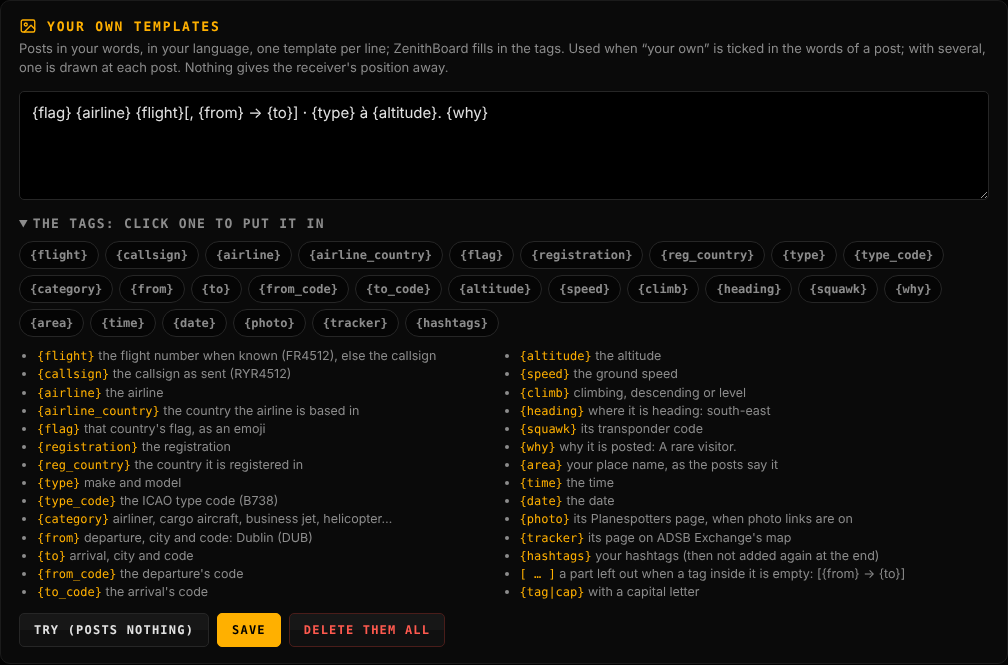
They live in /etc/zenithboard/social-templates.txt, one per line, no secret in it.
The answers of social words are fields in the console's Sharing tab, and commands of their own:
| In Sharing | Command |
|---|---|
| Place name |
sudo zenithboard social area 'near Metz' (or none) |
| Sharing radius |
sudo zenithboard social radius 15 (1 to 200 km) |
| What is worth a post |
sudo zenithboard social rules all or military,helicopter,heavy,rare,farthest
|
| Least time between posts | sudo zenithboard social gap 0 |
| Town names on the maps | sudo zenithboard social places on |
| Hashtags |
sudo zenithboard social hashtags ADSB avgeek ZenithBoard (or none) |
| Language of the posts (0.51.0) |
sudo zenithboard social lang fr (or en) |
| Your own templates (0.51.0) |
sudo zenithboard social template add '…', del N, set none, undo, test
|
A place name is your words: letters, digits, spaces and ' - . ,, 40 characters at most. A name alone reads
above Trémery; words with their own preposition (near Metz, over the Moselle) are kept as typed. The
receiver's position is never used.
Three summaries, each off by default, each at its own day and time on the Pi's clock, each with the posts you pick among the four below (1 the period, 2 cargo and business jets, 3 military aircraft, 4 general aviation; the first always goes, the others follow it):
sudo zenithboard social summary                         # the three, on or off, when, which posts
sudo zenithboard social summary daily on                # the last 24 hours, every day
sudo zenithboard social summary daily at 21:00          # HH:MM
sudo zenithboard social summary weekly at "sun 19:00"   # mon..sun HH:MM (0.33.0's Sunday 19:00 is the default)
sudo zenithboard social summary monthly at "1 09:00"    # a day of the month, 1 to 28, and HH:MM: the last 30 days
sudo zenithboard social summary weekly parts 1,3        # or all
sudo zenithboard social summary monthly test            # its posts drawn and shown, nothing posted
sudo zenithboard social summary daily post2             # that post of that summary, now
Or menu 7 Options → 3 Bluesky → 5 Summaries. social weekly … (0.33.0), the old name of social summary weekly …, was removed in 1.1.0. Defaults: daily at 21:00 with post 1 only; weekly on Sunday at 19:00 and monthly on the 1st at 09:00, with all four. A day of the month stops at 28, which every month has.
Since 0.40.5 every card says its period in words at the top right, LAST 24 HOURS, LAST 7 DAYS or LAST 30 DAYS (a date there read as that day, the owner found), and its exact span at the foot, 20 October, 09:20 – 21 October, 09:20, raised clear of Bluesky's ALT badge; the first card is titled Aircraft above Trémery like the others. Since 0.43.0 the airlines on the first card and the cargo airlines on the second start with their flag too: the country the airline is based in (see Statistics). On the general aviation card each row starts with the flag of the country the aircraft are registered in (by their address), a row per model and country, every column aligned. A military aircraft whose type neither the decoder nor tar1090's database knows is asked of adsbdb, then hexdb, by its address when the summary is made (routes on, a dozen at most, two seconds apart); what they do not know either stays Unknown type.
The daily card has the 24 hours as one row of lit dots, the busiest hour by aircraft with a position; the thirty-day card a column of dots a day, as tall as that day had aircraft; the weekly one is unchanged. The airlines, models and the other lists come in once their lists cover half the period at least (0.40.4), as for the week.
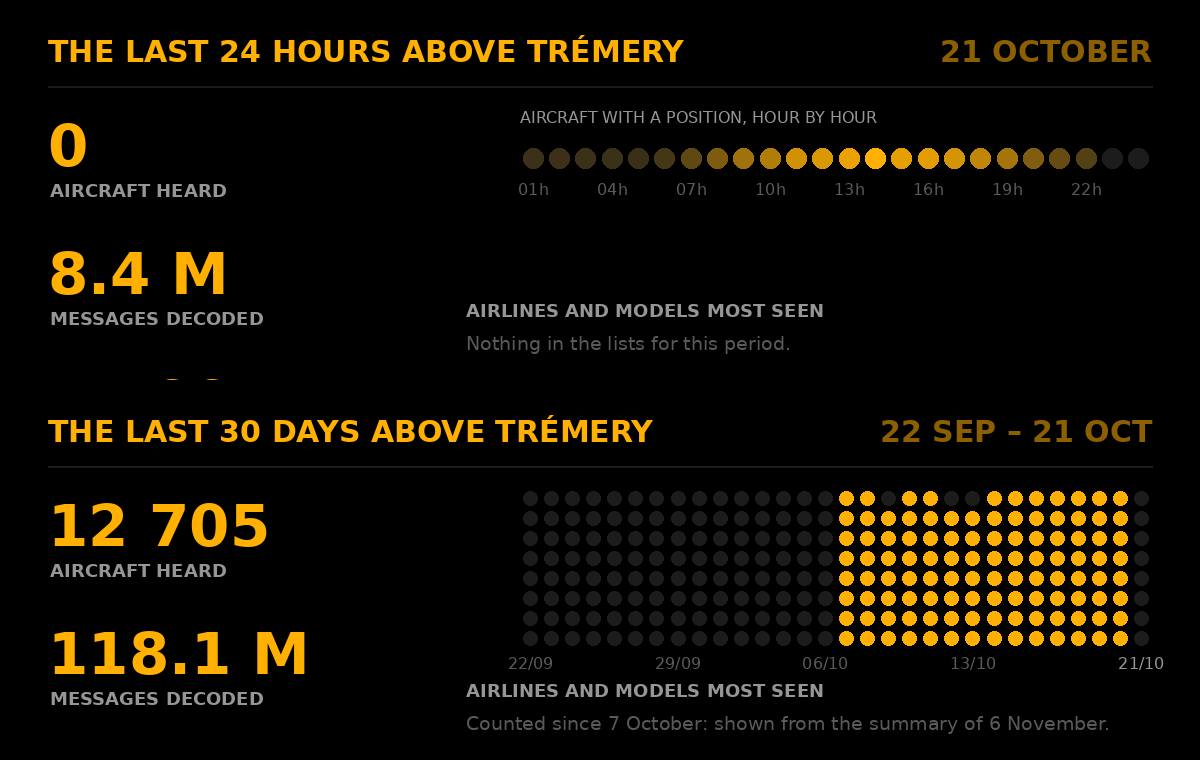
Two summaries at the same time (the daily one at 19:00 on a Sunday, the weekly one at Sunday 19:00; or the first of the month falling on that Sunday) are not posted on top of each other. The service keeps one queue: when several are due, the longer period goes first (30 days, then the week, then the day), and every post, of whichever summary, comes two minutes after the one before. With everything on and all four posts each, that is up to twelve posts over 22 minutes. What that means in practice:
- Later, not lost. The second summary starts two minutes after the first one's last post: a weekly summary of four posts pushes a daily one at the same time back by eight minutes.
- A failure holds the whole queue. If Bluesky refuses a post (busy, down, the app password revoked), that post is tried again ten minutes later, and everything behind it waits; after four hours of failures that summary is dropped (it is not posted late, nor the next day), and the queue moves on to the next one.
- Nothing to say is no wait. A post with nothing to say (no military aircraft this week) is skipped and the next takes its turn at once. A summary whose first post has nothing (no statistics) is skipped whole.
- The aircraft posts carry on. The crossings overhead are posted as before, between the summary posts; the gap you set between posts applies to them, not to the summaries.
- Once per cycle, even after a restart. A summary is marked as scheduled the moment it enters the queue, which is kept in the service's state: a restart in the middle of a queue goes on with what is left and posts nothing twice. A Pi that was off at that time posts the summary if it comes back the same day, never the next day.
- Once per scheduled slot (0.49.0, the owner: the schedule is enough to keep a summary from going twice). A summary goes once at its time; moved to later the same day, it goes again at the new time; set to a time that has already passed today, or switched on after its time, it does not go at once but from the next day, week or month (the service says so in its journal). 0.38.0 to 0.48.0 sent one per day, week or month whatever the time was moved to.
When each went out, when each goes next, and why one did not (0.48.0; why 0.49.0):
sudo zenithboard social summary
  daily    ON   23:35      posts 1,2,3,4
           last: 2026-10-21   next: Thu 2026-10-22 23:35
  ...
sudo zenithboard social summary why            # as set, last and next, the queue, what it needs, the service's version,
                                               # two days of its journal lines about summaries and errors, its starts
What why showed on the real Pi on 22 October 2026, cut short (0.49.1 wording):
  Service: active, since Thu 2026-10-22 00:11:33 CEST
  It runs: ZenithBoard 0.47.0   (this copy: 0.49.1)
  It still runs the code it started with, from before the last update: the summaries follow its rules, not this copy's.
  Restart it:  sudo systemctl restart zenithboard-social

The service's lines about the summaries and its errors, the last two days:
  Oct 21 09:20:06 rp3 python3[27276]: social: posted the daily summary, post 1: {"bluesky": "at://…"}
  Oct 21 09:22:07 rp3 python3[27276]: social: no daily summary, post 2: the airline and type lists do not cover the last 24 hours yet (counted since 2026-10-20, shown from the summary of 2026-10-22)
  …
Its starts, the last two days (each update restarts it):
  Oct 21 23:19  0.46.0
  Oct 22 00:11  0.47.0
A last with a date and no time was recorded by 0.48.0 or before: it stands for that day whatever the time. A service
still on older code: an update restarts the social service at its very end. Until then (the update still running),
or for good if it stopped before (an error, a closed SSH window), the service posts with the code it
started with, which why and sudo zenithboard social status say, with the restart command.
The service writes a line when a summary falls due (social: daily summary due (every day at 23:35): posts 1,2,3,4
queued, 2 min apart, the first now), one per post (posted the daily summary, post 2), and why a post was skipped or
failed. The web console shows the same last and next under each summary in Sharing, and names its posts:
Post 1 · The period, Post 2 · Cargo & business jets, Post 3 · Military, Post 4 · General aviation. Its Try
(posts nothing) draws them without posting. zenithboard logs social shows the last hundred lines only, which may not reach back
to the evening before; summary why reads two days.
- To keep them apart, give them different times: the daily one at 21:00 and the weekly one at 19:00, say.
sudo zenithboard social summary weekly on (menu 7 Options → 3 Bluesky → 5, off by default): on Sundays from 19:00 the service posts the seven days ending that day, from the statistics — so statistics must be on. The text:
The week above Trémery, 12–18 October: 3 587 aircraft, 58.7 million messages. Busiest: Friday (612 aircraft) and 17:00. Airlines: Ryanair (2 144), easyJet (1 171), Lufthansa (762). Models: Airbus A320 (2 007), Boeing 737-800 (1 818), Airbus A320neo (776). Posted here: 41 crossings. #ADSB #avgeek #ZenithBoard
The crossings posted are counted over the summary's own period: the seven or thirty days by date, and for the daily summary the 24 hours before it by the time of each post (0.99.16: it counted only the calendar day, so a summary at 10:00 said 2 after a day of 32).
When the hashtags would not fit in Bluesky's 300 characters, the lists go down from three names to two, then one, and only then are lines dropped from the end; the first line always stays, and the hashtags stay whole. The picture is drawn by the Pi (Pillow, 1200 × 675) in the posts' colour: the counts, the week by hour (a dot per hour, brighter where more aircraft had a position, as on the statistics page), and under it, side by side since 0.35.0, the airlines and the models most seen as bars, their names in plain text — no logos.
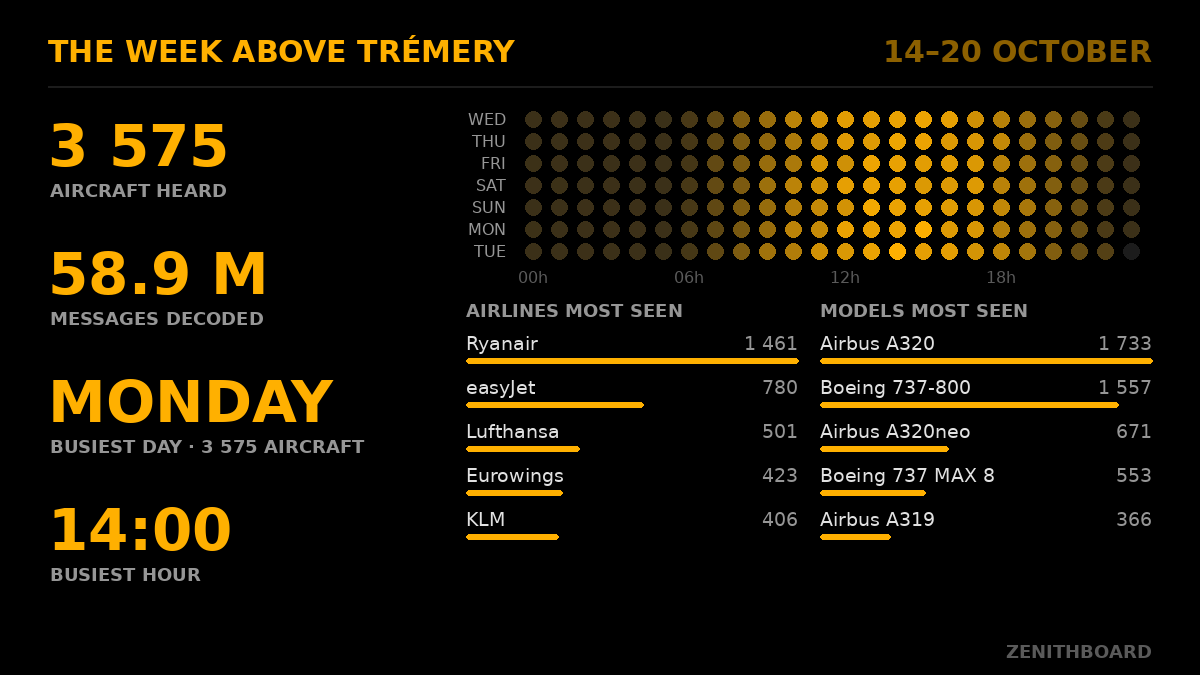
Then three more, two minutes apart (0.35.0 and 0.36.0), each with its own card:
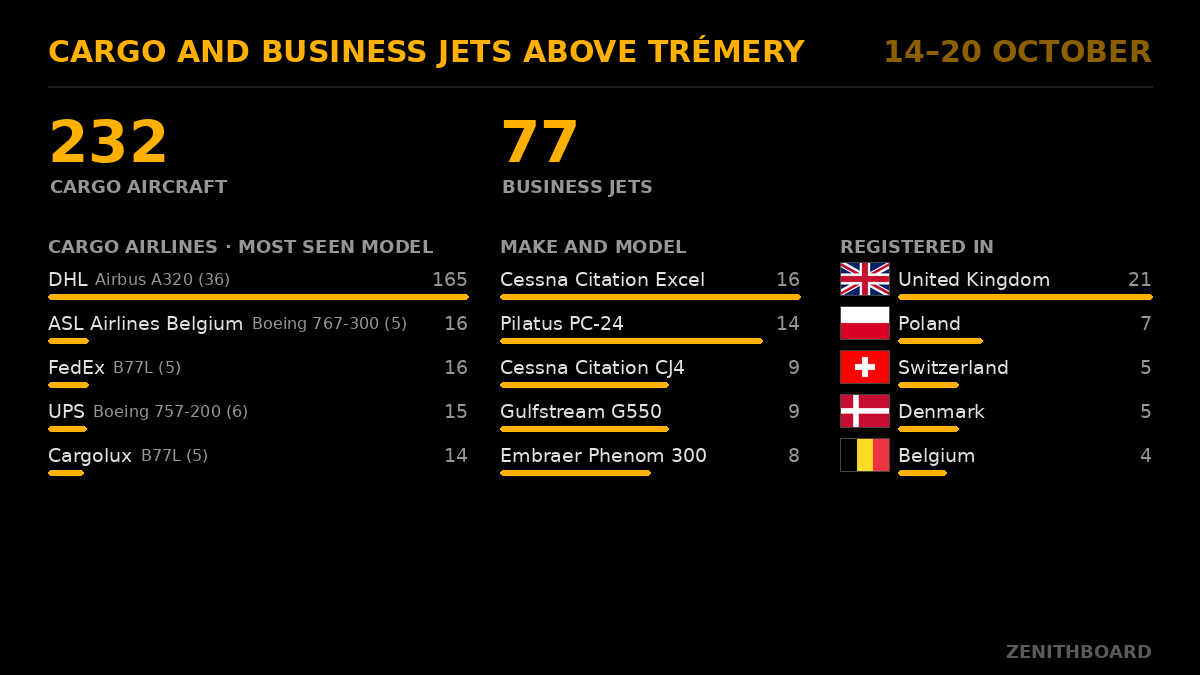
2. Cargo airlines and business jets. Each cargo airline with the model it flew most (DHL · Boeing 767-300 (18) … 39); the business jets by make and model; and the countries the business jets are registered in, with the wall's own flags, a bar and the count.
Cargo and business jets above Trémery, 12–18 October: 42 cargo aircraft, 31 business jets. Cargo: DHL (18), FedEx (9), UPS (6). Business jets: Cessna Citation Excel (7), Pilatus PC-24 (5), Dassault Falcon 7X (4).
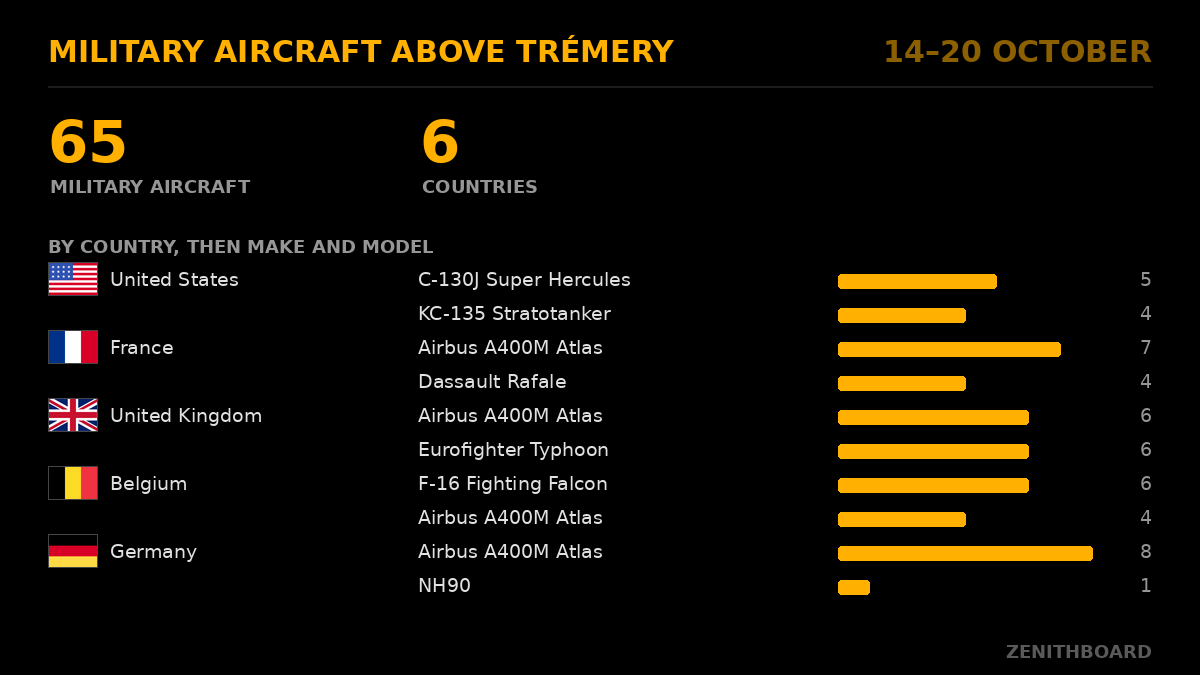
3. Military aircraft, by country, the most represented first: the country's flag, then its makes and models, each with a bar and the count (two a country on the card, ten rows at most).
Military aircraft above Trémery, 12–18 October: 23 aircraft from 5 countries. United States: KC-135 Stratotanker (4), C-17 Globemaster III (2). Germany: Airbus A400M Atlas (5). …
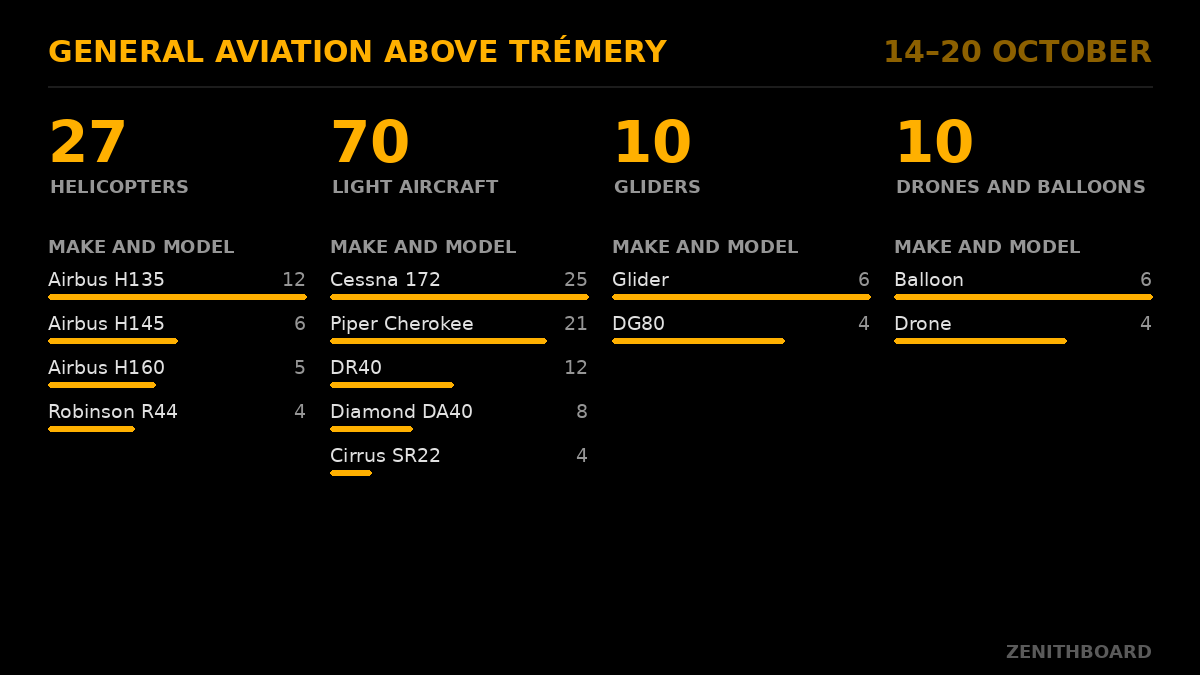
4. General aviation: helicopters, light aircraft (a Cessna 172, a Robin DR400), gliders, and drones and balloons together, a column each with its total and its makes and models.
How each is told:
-
Cargo airlines by their own callsign prefix, from
flightinfo/data/cargo_airlines.json: 40 dedicated cargo operators, each code checked against a published source on 20 October 2026 (FedEx, UPS, DHL's five airlines counted together as DHL, AeroLogic, Lufthansa Cargo, Cargolux, ASL Airlines, Atlas, Kalitta, Martinair Cargo, Challenge, Swiftair, West Atlantic and others). Turkish, Qatar, Emirates, Air France and the like fly their freighters under their passenger prefix (THY6147 is a 777F, so is QTR8486): a callsign cannot tell them apart, so they are not counted as cargo. -
Business jets as the wall itself classes them, by make and model. Their country is the state the aircraft's ICAO address is allocated to, which is the state it is registered in (ICAO Annex 10; the table in
flightinfo/data/icao_countries.jsonis tar1090's). Never a registration or a callsign: a private jet belongs to someone. -
Military aircraft: marked so by the decoder's database or tar1090's, or with an address in a block allocated to military aircraft (
flightinfo/data/military_ranges.json, tar1090-db's), or of a combat class (fighter, bomber). The country is the address's, as for business jets. A military helicopter or business jet is counted here, not in the other posts. - General aviation: by the wall's class, or else by the category the aircraft sends (A7 rotorcraft, A1 light, B1 glider, B2 balloon, B4 ultralight, B6 drone). A drone or a glider without a type is counted as Drone or Glider, type unknown.
-
The flags are the real ones, at scale (0.36.1): 48 × 32 pictures made once from country-flag-icons (MIT), the set tar1090 ships, in
flightinfo/data/flags. 0.36.0 drew the wall's own dot flags, crude at that size (the owner). A country without one shows its two letters in a box. -
A post with nothing to say has no picture: after
weekly test,/social/preview2(3, 4) then says so instead of a bare not found (0.36.1). - Two minutes between posts is nothing for Bluesky (its limits are in hundreds of posts an hour). A post with nothing to say that week gives its turn to the next. A failure waits ten minutes like any post; after four hours it is dropped, and the ones after it too, rather than posted late. None of them goes out without the first, nor before the lists cover half the period.
What it never says: a distance, a direction, a range. The farthest aircraft of the week is left out on purpose: named with the city nearest it, two such posts would narrow down where the antenna is. Only your own words for the place (the area of the wizard) say where.
Once a week (the ISO week): a Pi switched off on Sunday evening posts nothing on Monday, a summary a day late not being what the account promises. A post that fails waits ten minutes like any other; a week with no statistics is skipped, said once in the journal (zenithboard logs social). sudo zenithboard social summary weekly test draws this week's four posts so far and prints their texts, posting nothing (see them at /social/preview1, /social/preview2, /social/preview3 and /social/preview4, linked on the console's Summaries card since 0.55.2 for the first; /social/preview shows the last picture drawn, a summary's first or a crossing's); social summary weekly post posts the first now (post2, post3, post4 the others), and Sunday's still go out. The airlines, the models, the cargo airlines, the business jets, the military aircraft and general aviation come from the fleet lists of 0.31.0 (the category and the military mark from 0.36.0), and only once those lists cover half the period at least (0.40.4; the whole period from 0.34.1): the first test on the reference Pi, the evening the lists began, put 6 435 aircraft heard beside Ryanair (14), a week against two hours. Between half and whole, the lists are shown and every card says since when, bottom left: Lists counted since 20 October, 19:15 (the reference Pi's first daily summary, 21 October, went out with no list and none of posts 2 to 4 under the old rule, the lists having begun the day before). Under half, the text leaves them out and the picture says from which summary they will be shown; test says it too. The type is written as the posts write it (Boeing 737-800, not BOEING 737-800). The crossings posted are counted from 0.33.0.

The wall's rows as the tablet shows them (FLT EWG11S, REG D-AIDO, then airline, type, altitude, speed, route), with two differences: the time on the last row with its offset from GMT as the Pi's time zone has it that day (11:39 GMT+2 in a French summer, GMT+1 in winter), where the tablet shows the distance and direction; and, in the right-hand column, a map where the tablet has the silhouette and the photo. The flags are the wall's: the country of the registration beside the REG row (since 0.20.0; it sat beside the airline, where it read as the airline's country), and the maker's beside the model.
sudo zenithboard social look dotmap (0.23.0, asked for by the owner; the default since 0.24.0): the map is the split-flap look's, below — the same four maps, the same credit, the same social map setting and its rotate — with the track, the aircraft, the key and north. Node draws the dots with that column left dark and says where it is; Pillow lays the map there and writes a JPEG under Bluesky's limit. The map is a strip 400 pixels wide and 800 high, so when the aircraft would land under the key, the view is chosen in the part above the key and the credit: an aircraft flying south ends above the key, not under it. With social map none the strip shows the track on black over a faint grid, and nothing is fetched.
Above: a real post from the reference Pi, 20 October 2026 (0.27.3), with the light map: RYR5236, Pisa to Brussels, over Metz. Twenty-six names from the region's own list (social places on), Pont-à-Mousson, Nomeny and Rémilly filling the south of the map. When the tiles do not come, the strip shows the track on a dark grid, with no credit.


Real posts from the reference Pi, 20 October 2026: the light map (normal, 0.26.1) and the dark one (night, 0.27.2, with the region's own list of places: Hayange, Florange, Villerupt and Aubange beside Metz and Luxembourg), each town named once.
The board as the wall's split-flap look draws it — the same nine rows, without the flags, fourteen letters wide instead of sixteen so the map gets the room — beside a map centred on the track. On the map: the track and the aircraft in the picture's colour, edged in black so they read on any background; a key in the corner (LAST 10 MIN, and a scale bar in km or miles); north; and the map's credit along the bottom.
| Map | What it is | Credit on the picture (in full) | Credit in the post (names as links) |
|---|---|---|---|
normal |
EOX's light relief and EOX's main roads, tinted orange on the Pi, with the towns named by ZenithBoard (0.26.1) | © OpenStreetMap contributors and others, rendering © EOX (maps.eox.at); place names: GeoNames (CC BY 4.0) | Map © OpenStreetMap, EOX, GeoNames |
night |
The same relief, darkened on the Pi, with the roads in white | the same | the same |
satellite |
Sentinel-2 cloudless 2025 by EOX, with the towns named by ZenithBoard | EOxCloudless 2025 https://cloudless.eox.at by EOX IT Services GmbH (Contains modified Copernicus Sentinel data 2025); place names: GeoNames (CC BY 4.0) | Map: EOxCloudless by EOX, GeoNames |
terrain |
EOX's terrain rendering, with the towns named by ZenithBoard | Terrain: data © OpenStreetMap contributors and others, rendering © EOX (maps.eox.at); place names: GeoNames (CC BY 4.0) | Map © OpenStreetMap and others, EOX, GeoNames |
Town names (0.24.4). On the satellite and terrain maps EOX's label layer named one village in forty kilometres (Amnéville, on a real post over Metz). ZenithBoard now names the towns itself: the places of 5 000 inhabitants or more from a list it ships (flightinfo/data/places5000.tsv.gz, GeoNames, CC BY 4.0, made by tools/make_places.py), the largest first, at most twenty-six in a smaller type (0.25.2; sixteen before); a map with fewer than three of them takes the villages of 1 000 to 4 999 too (0.26.2, places1000.tsv.gz, read only then: DAH1217, two minutes after leaving Metz-Nancy, went out on a strip east of the Moselle with no name at all), never over another name, the aircraft, north or the key, and drawn over the track so that it never cuts a letter out of a town (0.25.3; each dot stays where its town is). Nothing is looked up for it. Since 0.25.3 the normal and night maps carry the same names. No town is named twice (0.26.1): in 0.25.3 those two maps were EOX's OpenStreetMap layer, whose own labels stayed under ours, a few pixels apart (EWG8QR over Nancy, on a real post). EOX has no OpenStreetMap layer without labels, so these two maps are now built from two EOX layers that carry no name, the light relief (terrain-light) and the roads (streets, white, tinted orange for the light map), and every map ZenithBoard names is drawn on such layers only (a test holds it). The price: the main roads only, not OpenStreetMap's small ones. The scale is the map's own: the bar is worked out from the zoom and the latitude (Web Mercator, 156 543 m per pixel at zoom 0 on the equator), so the track, the bar and the distances between towns agree: Metz to Thionville, 28 km, measures 27 km against the bar on a preview.
Town names anywhere in the world (0.27.0). The shipped lists name the places whose population GeoNames knows, and GeoNames knows it unevenly: 2 074 places of 5 000 or more in France, 479 in Indonesia, a country four times as populous, where 257 515 of 258 055 populated places have no population at all. On test maps the shipped lists named nothing over East Sumba, one place around Pontianak (Borneo) or Ulaanbaatar. sudo zenithboard social places on (menu 7 Options → 3 Bluesky → 4 How a post looks → 6) makes the region's own list on the Pi: it downloads GeoNames' file of every country with a place of 500 or more within 400 km (download.geonames.org, CC BY 4.0; 24 MB around Metz since 0.27.2, 10 MB for Java, once), keeps every populated place within 400 km and gives each a weight, its population when known, otherwise its rank: national capital, province seat, district seat (PPLA2: 50 000), subdistrict seat (PPLA3: 10 000), village seat (PPLA4: 2 000), village (100). Parts of a town, historical and abandoned places are left out, and a lighter place within 1.5 km of a heavier one is taken for a part of it. The maps then name the heaviest first, down the same tiers as the shipped lists: 5 000 and more, then 1 000, then any place, until three are named. Then the empty parts (0.27.3): the heaviest village wherever no name is within 120 pixels of it, so that seven towns on the edges of a map (SWR3AG over the Moselle plateau) no longer leave the 30 km between them bare. Along the track (0.28.0): all of this within 70 pixels of the aircraft's track, plus three of the largest cities elsewhere on the map (50 000 or more, 150 pixels apart) to say where the map is; the rest of the map only when the track's surroundings give fewer than three names. RYR5ZK, Brussels → Pisa, had a dozen towns in the north of its map and few along a track from Namur to Luxembourg; it now names Namur, Ciney, Rochefort, Bastogne, Arlon, Luxembourg, Hayange and Metz along the line, and Leuven, Aachen and Trier around it. The list stays on the Pi (a few hundred kilobytes, readable by the service only since 0.27.1: its first lines give the centre, the receiver's position); nothing about the receiver is sent, the country files being the same for everyone. Beyond 400 km (a farthest aircraft), the shipped lists are used.
Measured with the real code, GeoNames' real files and EOX's real tiles, on 20 October 2026, a light map 420 by 840 pixels, a 2-minute track (the most zoomed) and an 8-minute one, names shown with the shipped lists → with the region's list: East Sumba 0 → 11 and 0 → 3, Pontianak 0 → 19 and 0 → 10, Ulaanbaatar 0 → 7 and 3 → 12, Kano 1 → 6 and 12 → 24, Manaus 2 → 11, Yellowknife 0 → 2 and 0 → 7, Lima 8 → 24 on the 8-minute map; Trémery 8 → 9 and 26 → 26, Jakarta and Nairobi about the same. One fewer: Innsbruck on the 2-minute map, 11 → 4, because the shipped list counts the city's districts (Arzl, Pradl) as places of their own and the region's list does not; the map stops at three towns, as everywhere. A name now goes left of its dot when the right is taken, and a place is never named twice.
| none | No map: the track on black, over a faint grid. Nothing is fetched | none | none |
Where the map comes from, and why there. The tiles come from EOX::Maps, whose layers are free to use with attribution and a link back. The whole required text is drawn on the picture and read in its alt text; the post ends with one short line whose names are links — Map © OpenStreetMap, EOX — which is what OpenStreetMap's attribution guideline accepts (the name, linked to its copyright page) and what EOX asks of an online publication (the name and the link). Until 0.19.6 the post repeated the whole text, three lines of small print under every aircraft. OpenStreetMap's own tile servers are not used: their usage policy rules out automated fetching that nobody is looking at, which is what a service posting by itself does. The satellite layer is licensed CC BY-NC-SA 4.0: free for a hobby account like this one, not for commercial use, and a picture made with it is shared under the same licence. The Pi asks only for the few tiles under the picture, names itself in every request, and keeps them for a month under its state folder, so the tiles over your area are fetched once, not at every post. If the tile service does not answer, the picture is drawn with no map and no credit, and social test says so.
sudo zenithboard social photolink on (or menu 7 Options → 3 Bluesky → 4 How a post looks → 5): when the wall has a Planespotters photo of the aircraft, the post ends with a line Photo: Jane Doe / Planespotters, the whole line a link to the photo's page. The photographer is named and the picture opens at Planespotters, full size. Only the link: Planespotters' photo API terms forbid storing, re-hosting or passing on the picture, so it is never posted, and the post carries no link card (Bluesky's card would mean uploading the thumbnail). With photos off on the wall, or no photo for that aircraft, there is no line. When the text would not fit beside it, the line is left out rather than the text cut. JetPhotos is not used: it has no photo API, and finding out whether it has a photo would mean querying the site, which its terms do not grant. Off by default.
Aircraft never to post (1.1). The regulars that would fill the feed, a flying school's aircraft, the police helicopter over its own base, are left out by name: sudo zenithboard social ignore add F-GXXX (menu 7 Options → 3 Bluesky → 3 Words and rules → 2, or the console's Aircraft never to post). A word is a registration (F-GXXX, with or without its hyphen), an ICAO address (3944ef) or a callsign (SAMU57), fifty at most; sudo zenithboard social ignore lists them, remove F-GXXX takes one off, clear empties the list and says how to put it back. The list is empty by default and the services take a change at their next look. What it does and does not do:
- An aircraft on the list is never a candidate for a post, a range record included, and has no crossing message on Telegram.
- An emergency squawk is always sent, whoever squawks.
- The wall still shows it, and it is still counted: its type stays as common as it is for the
rarerule, and the day's range is what the antenna heard. -
Try it and Post now never pick it by themselves; asked for by its address (
sudo zenithboard social post HEX), it is posted: that is your own hand.
The rules. An aircraft is a candidate while inside the sharing radius (except a range record, below), known (a type, a registration or an airline — an aircraft with nothing known is never posted), airborne, with at least thirty seconds of track, and not already posted during this crossing (below). Among the candidates, the rules say which are worth it:
| Rule | Posts an aircraft that is… |
|---|---|
rare |
of a type that at most two other aircraft have flown in the last thirty days. Counted per aircraft, not per look |
military |
military, by the decoder's database flag or by its type |
helicopter |
a helicopter |
heavy |
an A380, 747, Beluga, Antonov 124/225, C-5, C-17, A400M, or any four-engined airliner |
farthest |
a new range record: farther than anything in the last thirty days, and over 50 km. Looked for in the whole sky, not only inside the sharing radius |
all |
everything that flies over, the special aircraft included: ticking all is ticking every line. When several are there at once, the special one goes first, then the others. (Called any before 0.19.1; the old word still works) |
rare and farthest judge against history, so they wait until the service has watched for three days; zenithboard social status says where it stands. The other rules work from the first minute.
Several rules can match; the best candidate is the one matching the most, and knowing the most (route, airline, model each count); between equals, the one that came inside the radius first. One post at a time, and the next as soon as the last is out.
One post per crossing, every crossing (0.20.0). A crossing starts when an aircraft comes inside the sharing radius and ends when it has been outside it for an hour. Whatever it does in between — circling, or leaving and coming back in five minutes later — it is posted once. The same airframe back after that is another crossing and is posted again: the return flight in the evening, the same rotation the next day. A new callsign is another flight even sooner (an aircraft turned round at a nearby airport, leaving under another number); a callsign that only appears or disappears on the way is not. An aircraft that left the radius before its turn — its route still being looked up, another one posted first — is still posted, up to ten minutes after it left, with what the wall shows of it then: every crossing counts, not only those caught at the right moment. A post is written down the moment Bluesky takes it, before the summaries are looked at (0.99.16): a summary that stops the service cannot make its restart post the same aircraft again.
Nothing caps the posts. By default there is no gap between two posts: the feed is the sky over your radius, each aircraft once per crossing, as many as there are. The radius is the control: five times the radius is twenty-five times the area, and roughly that many more crossings. Bluesky's own ceiling is far above what one receiver's sky can give: 1,666 posts an hour. A gap can still be set (sudo zenithboard social gap 30, or in social words; social gap 0 for none); from 0.19.3 to 0.19.10 it could not go under ten minutes, which is gone.
Complete before posted. The wall looks up an aircraft's route and, when the decoder does not know them, its registration and model on adsbdb.com, and it does so when the aircraft comes inside the radius it is asked about — the sharing radius, for the service. Those answers take a few seconds — longer when adsbdb's route is for another flight under the same callsign, which the wall refuses, or adsbdb does not know the callsign (since 0.99.3), and hexdb.io is asked for a second opinion (since 0.19.9 that second answer is waited for too: two flights went out without a route that hexdb had a few seconds later). An aircraft whose lookups are still on their way waits, up to two minutes from the moment the service first saw it waiting; then it goes with what is known. (Before 0.19.5 it went at once: a KLM flight was posted with empty registration, model and route rows, because its track, followed from far out, was already long enough.) social test waits within its own half minute, then shows what is known. Since 0.99.3 a post that goes out without a route says why on its posted line in zenithboard logs social (Routes, photos and data).
The text. Says what the wall knows, in English, and nothing it does not. It starts with the flight and ends with the place you gave (here Trémery); the altitude is said as one (altitude 8 500 m) so it never reads as a distance from the place; an airline callsign is a hashtag, so the flight can be followed:
| Case | Text |
|---|---|
| Airline flight, route known | Flight Etihad #ETD11K · Airbus A380-800 · Paris → Abu Dhabi · altitude 8 500 m · heading south-east · above Trémery |
| Airline flight, route unknown | Flight British Airways #BAW123 · Airbus A380-800 · altitude 11 900 m · heading north-west · above Trémery |
| Callsign, no airline known | Flight #BGA113J · Airbus A330-743 Beluga XL · F-GXLH · altitude 9 750 m · heading west · above Trémery |
| Registration only | Aircraft D-EABC · Cessna 172 · altitude 910 m · above Trémery |
| Helicopter | Helicopter D-HABC · Airbus Helicopters H145 · altitude 460 m · above Trémery |
| Military | Military flight #RCH123 · Boeing KC-135R Stratotanker · altitude 7 620 m · above Trémery |
| Range record | Flight Emirates #UAE201 · Boeing 777-300ER · … · altitude 11 280 m · range record for 30 days: over 300 km out, seen from Trémery |
| Nothing known | no post |
The registration is a hashtag in every aircraft post (0.55.1, the owner's request), whatever the words: the five shapes and your own templates. Searching Bluesky for #EI-ENK then lists every time that aircraft crossed, and a period's count can be read there. It is written as registered, hyphen included: Bluesky keeps a hyphen inside a hashtag (its own rule, TAG_REGEX in atproto, checked on 25 October 2026). Where the words already show the registration after a space or at the start of a line (Aircraft #D-EABC, the board's first line, the spotter's opening), that one becomes the hashtag; otherwise it goes first among the hashtags (#EI-ENK #ADSB #avgeek), or first in a template's {hashtags}. It is never dropped to fit the 300 characters: the other hashtags go first, then the text gives way; if a long text was cut where the registration stood, it is put back among the hashtags. Never twice. It stays with social hashtags none. The summaries of the day and the week carry none: they are about many aircraft. An airline flight is otherwise known by its callsign, and the registration is on the picture. A range record ends with seen from rather than above: it was nowhere near overhead. Then the hashtags (#ADSB #avgeek #ZenithBoard by default, sudo zenithboard social hashtags … to change them; #helicopter or #military replace #avgeek when they apply, or are added when #avgeek is not there, unless the hashtags are none), and last, when the picture has a map, its credit in one short line. The picture carries an alt text built from the same facts, for screen readers, with the map's full credit. Units follow the wall's setting.
What never leaves the Pi:
-
The receiver's position, and anything that gives it away: the posts carry no bearing and no distance — a range record says over 300 km, rounded down to 50, which tells the record and draws no useful circle — the picture's last row shows the time where the tablet shows
12KM NE, and the track, on dots or on a map, is centred on the aircraft with nothing marking the receiver. A hundred posts give nothing to triangulate. The map's tiles are asked for by the Pi, from your connection, like any map you would open. - The Planespotters photo. Their terms forbid re-hosting it. The track takes its place.
-
The secret. It lives in
/etc/zenithboard/social.env, owned by root, readable by thezenithboardgroup (the service's user), mode 0640; never inconfig.env, never in a log, never inzenithboard config.zenithboard securitychecks the file's owner and mode. -
The picture itself, after the post: it is drawn in
/run/zenithboard/social— memory, not the card — and deleted once Bluesky has answered, whether it took it or not.
zenithboard-social.service runs flightinfo/social.py as the zenithboard user inside the same sandbox as the wall (exposure at most 1.5 on systemd's scale; tests/test_units.sh holds the ceiling). Every five seconds it reads the decoder's aircraft.json and keeps the last fifteen minutes of positions per aircraft in memory. Every fifteen seconds it asks the wall itself, on the loopback, which aircraft are inside the sharing radius — with everything the wall knows about them: airline, model, route, flags. When a candidate passes the rules (and a gap, if one is set, has passed), it draws the picture and posts it, then looks again five seconds later rather than fifteen, in case another is waiting its turn. It also notes, from the decoder's positions every five seconds, which aircraft are inside the radius: that is what keeps a crossing going, even at a moment the wall does not answer.
The dot-matrix picture is tools/social-render.js: Node reads app.js and lifts the wall's own text functions (the way the tests do), draws the rows and the flags from flags.js, and writes a PNG with Node's zlib; the colours come from the wall's style.css. The right-hand column starts at dot 88, two dots clear of the flags (dots 74 to 86 with an outline): until 0.23.0 it started at 86 and its frame was drawn over a German flag's outline. The script leaves that column dark and says where it is in pixels; social_card.py lays the map there (render_dotmap) and writes a JPEG, like the split-flap picture. The split-flap picture asks the same script for the board's rows (--lines, the wall's own formatting) and paints them with Pillow in flightinfo/social_card.py, with the map tiles and the track; a JPEG of about 500 KB, under Bluesky's limit of 1,000,000 bytes (the quality steps down if a picture would not be). A Pi without Pillow (installed by social on, social look and social test, so only an offline Pi) gets the dot picture with the track drawn in dots in that column, as dots drew it before 0.24.0, rather than no picture; the service's journal says why.
Bluesky is the standard library only: a sign-in (createSession), then for each post uploadBlob → createRecord, with the hashtags and the map's link as facets so they are clickable, and the alt text and the aspect ratio with the image. The session is kept, in memory only: Bluesky allows an account 300 sign-ins a day and 30 in five minutes, and signing in for every post, as 0.19 did, would pass that on a busy day once every crossing is posted. After an hour the access token is renewed with the refresh token (refreshSession); a new sign-in only if Bluesky refuses it, or if the account in the file has changed. A token refused in the middle of a post means one new sign-in and one more try, never a loop. social check always signs in afresh: that is what it is for.
State lives in /var/lib/zenithboard/social/state.json: for each type, the last few distinct aircraft seen and the day (for rare), the farthest aircraft of each of the last thirty days (for farthest), the day the service started watching, the aircraft posted whose crossing is not over yet (each with the callsign it was posted under; the 0.19 form, a bare time, is read too), the times of the last day's posts, and the last post's time. The file is written when what it holds has changed and before the service stops (one helper for this service and the Telegram one, flightinfo/saved_state.py, since lot 0 after 1.0). The map tiles are cached next to it, in tiles/, at most 60 MB and a month. Once an hour the service writes one line to its journal — how many looks, how many found a candidate, when the next post is possible — so zenithboard logs social answers why no post? Its first line says which version it runs. Memory: the service measures its own — about 40 MB at rest, up to about 140 MB in the second it draws a split-flap picture (Python with Pillow, plus Node for the rows) — and gives the figures in its hourly journal line and in sudo zenithboard social status. systemctl status cannot: Raspberry Pi OS boots with the kernel's memory controller off (cgroup_disable=memory), so systemd shows no Memory line, and the unit's MemoryMax=300M only takes effect on systems where that controller is on. ZenithBoard does not change the boot command line for it. social remove deletes it all.
sudo zenithboard update carries the service like every other: the unit file is refreshed and the service restarted when sharing is on. The secret is untouched by an update — except a Mastodon token left from 0.18, which the update removes.
sudo zenithboard social off       # stop posting; account kept
sudo zenithboard social remove # asks you to type remove; account, state, map tiles and service gone (Node and Pillow stay)| What you see | What to do |
|---|---|
social status says it cannot read the account file or the state folder |
You ran it as pi. Those files belong to the service's user; sudo zenithboard social status reads them as that user |
social status says the service runs the code from before the last update
|
sudo systemctl restart zenithboard-social. Since 0.19.3 an update restarts it by itself; before, it only made sure it was enabled, and a running service kept its old code |
social check says FAILED |
The handle has no @, and the password is the app password, not the account's. Make a new app password if in doubt |
social test says nothing to show |
No aircraft with thirty seconds of track inside the sharing radius right now. Try a wider radius, or social test HEX with an aircraft from zenithboard status
|
| It posts nothing | First: test never posts. Then zenithboard social status — is it on, is the account ready, is a gap set and still running? Does it say the aircraft you expected is in a crossing already posted? Then zenithboard logs social: the hourly line says how many looks found a candidate. rare and farthest start after three days, so on the first days only military, helicopter and heavy can fire: tick all to see it post the ordinary traffic too (the special aircraft still go first) |
| A post went out, but not by the service |
Post now posts at once, whatever the rules. The service's own posts show in zenithboard logs social as posted …
|
| The split-flap picture has no map | The Pi could not reach tiles.maps.eox.at (no internet, or the service busy: EOX limits heavy load). social test says so; the next picture tries again. social map none stops asking |
zenithboard logs social shows the wall did not answer
|
The wall server is down: zenithboard status, zenithboard logs flightinfo
|
| A post went out that you would rather not have | Delete it on Bluesky. Narrow the rules with social words. Nothing posted can be recalled by the Pi |