Repository navigation
The wall
The wall is one HTML page served by flightinfo/server.py, drawn on a single <canvas>. No framework, no build step: flightinfo/static/ is what the browser gets.
Everything is laid out on a fixed grid of 128 × 80 dots (16:10), not in pixels. The browser window only decides how big a dot is:
pitch = min(width / (GW + 3), height / (GH + 3))
The + 3 leaves a margin, and the grid is then centred with an ox / oy offset. One consequence worth knowing: the wall never reflows. A phone and a 4K television show the same layout, just at different dot sizes. That is why it reads correctly from across a room.
| Area | Grid box | Holds |
|---|---|---|
| Text | left of column 86 | Nine rows of 14 characters: FLT BAW123, REG G-XLEA (the flight and the registration, labelled like the rows under them, since 0.19.0; before, the callsign alone stood two rows high), airline, type, altitude, speed, route, and the last row with the distance and bearing. The route rows give the city when it fits (→SAN JOSE), else the airport's name |
| Silhouette | x 90, y 0, 38 × 34 | The aircraft seen from above, drawn in dots |
| Photo or scene | x 86, y 38, 42 × 30 | A real photo from Planespotters, or an animated side view when there is none |
| Free | below row 68, on the right | Deliberately empty. The settings gear lives here |
The photo box ends at row 68 of 80, which leaves the bottom-right corner clear. That is what makes the gear's new position safe.
Under a real photo sits its credit, © photographer · planespotters.net, and the photo is the link to its page on Planespotters. On a phone the corner is about a hundred pixels wide: when the line does not fit, · planespotters.net goes (the photo stays the link), and a photographer's name still too long wraps onto a second line, the photo giving up that line's height, rather than being cut by an ellipsis (0.99.17).
A faint circle in the bottom-right corner (it was top-right until 0.10.3). Tap it for units, radius, seconds per plane, colour, full screen and reset.
It moved because televisions put their browser bar at the top of the screen, sliding down over anything in that corner and making the gear unreachable. The bottom-right corner has no such furniture, and the box above it is free.
Two details follow from the corner it is in: the panel opens upward from the gear, and on a short screen it scrolls rather than running off the top. tests/test_layout.js checks on fifteen screen sizes that the gear never overlaps the photo box or the silhouette and stays on screen.
Choices made in the gear are stored in that browser only. They override the Pi's settings for that tablet and nothing else. Reset returns the tablet to the Pi's own settings.
| Mode | What it looks like |
|---|---|
dots |
The dot-matrix wall: text on the left, silhouette and photo on the right. The default |
flap |
An airport split-flap board: 16 letters × 9 rows on the left 84 dots, with the flaps rolling as the text changes. The photo column stays |
Set it for the whole Pi with zenithboard mode dots|flap, or per tablet with a link.
Every display setting can ride in the address, which is how one Pi drives several screens that each look different:
http://<pi>:8080/?theme=green&mode=flap&units=imperial&radius=5&cycle=8
A link beats the gear when you are setting up a screen you will not touch again — a television with no keyboard, for instance. The link wins over the Pi's setting, and the gear wins over the link.
Five themes: amber (the default), green, red, white and turquoise (#00d6d7). One dot colour at a time, because the point is a lit sign rather than a screenshot of a map. A sixth, a dark blue (#0404e2), was taken out in 0.23.0: it read poorly on the wall and in the posts. A wall, a preset or a tablet still set to it shows the Pi's colour, or amber; sudo zenithboard update names the setting and the command, and changes nothing by itself.
On the dot-matrix wall, a small flag sits at the right of the registration row (REG) and another at the right of the model row. The first is where the aircraft is registered, the second is where it was built. Until 0.20.0 the first sat beside the airline row, where it read as the airline's country: a German flag beside LUFTHANSA says the same as one beside D-AIUB, but not beside an Irish-registered aircraft flown for a British airline. Both are drawn into the same dot grid as everything else, eleven dots by seven, so they scale with the wall rather than needing a size of their own.
The country comes from the registration the wall already receives: OE-LMP is Austria, HB- Switzerland, N the United States, CN- Morocco and not Canada, because the longest prefix wins. It is a published allocation table held in flags.js, so there is no lookup and nothing to reach over the network. A registration whose prefix is not in the table shows no flag rather than a wrong one.
The second flag is the country the airframe comes from: European for Airbus and ATR, American for Boeing, Brazilian for Embraer, Canadian for De Havilland. No manufacturer's logo is drawn, in dots or otherwise. Those marks are protected, and redrawing one in dots is still redrawing it. A country is not protected, which is why the badge shows one.
At eleven dots a flag is its bands of colour. Flags carrying an emblem keep the colours and lose the emblem: Portugal has no armillary sphere, the United Kingdom's crosses do not have their true widths, Morocco's star is five dots. They are made to be recognised across a room.
A flag's colours are never changed to make it show: the black of a flag stays black, a navy stays that navy. What a flag that would be invisible against the black wall gets instead is a one-dot white outline, so its edge is there to see. Two kinds qualify. The first carries black — Germany, Belgium, Estonia, Egypt, the United Arab Emirates. The second is simply too dark: the union flag is two thirds #012169, and at eleven dots on an unlit wall it read as a hole rather than a flag, which is how a British Airways aircraft came to look as though it had no flag at all (found on the real wall, 0.17.1). The United Kingdom is the only flag the second rule catches today; tests/test_flags.js holds the list, so a flag cannot quietly join or leave it. Every other flag is drawn bare, with nothing around it.
The flags take the last two characters of the text column, twelve instead of fourteen. The airline row keeps to twelve too, although no flag sits beside it any more: an outlined flag's last row of dots is the dark row just above the airline's letters, and a name running under it would touch it. The model row copes with its twelve by dropping the maker's name as soon as the whole does not fit: AIRBUS A-380-800 becomes A-380-800 and stands still, because a short name read at a glance beats a long one walking past. Only what is still too long without its maker scrolls. A name that no longer fits turns continuously: the row holds the name, three spaces, then the name again, and the window walks one length before starting over, so what leaves on the left is already arriving on the right. One dot every 110 milliseconds, and only those two rows are repainted rather than the whole wall. An aircraft stays on screen for fourteen seconds by default, which is time enough for a long name to come round.
Without the flags (below), the rows have their fourteen characters, and a longer name turns within them. Before 0.20.0 it ran on towards the silhouette instead: BRITISH AIRWAYS, fifteen letters, ended one dot short of it, and anything longer went under it.
Flags are a dot-matrix matter. The split-flap board is sixteen letter drums and a flag is not a letter, so it shows none.
| For every screen |
FLAGS in /etc/zenithboard/config.env, then zenithboard config
|
| For this tablet only | the gear, Flags, or ?flags=0 in the address |
At the foot of the gear panel sits one grey line: the version the wall is running, and behind it the release notes for that version on GitHub. When statistics are on, the way to the statistics page sits beside it in the same grey; switch them off and the link goes, because the page would only say it is off. It is a link and nothing more — the page asks GitHub for nothing, so a wall with no way out to the internet still names its version. The statistics page carries the same line at its foot.
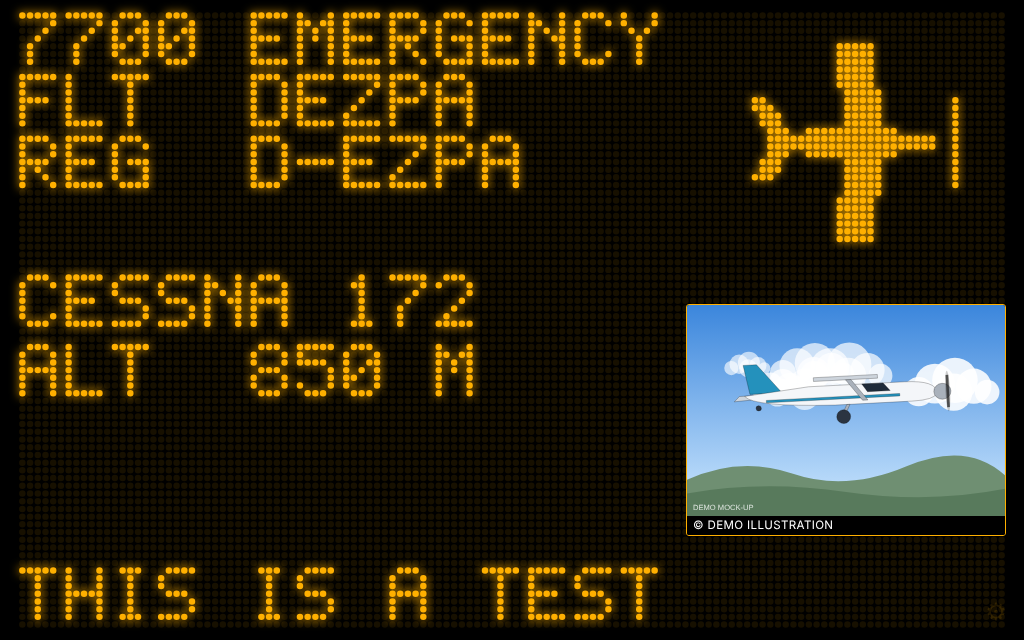
When an aircraft squawks 7500 (unlawful interference), 7600 (radio failure) or 7700 (general emergency) anywhere in the antenna's range, not only inside the wall's radius, the wall leaves what it was showing and says so for thirty seconds, with which aircraft and where (the owner, on seeing the first form, 14 November 2026: what plane and where, with the picture as usual). It is the aircraft's own screen: the code on the first row (7700 EMERGENCY, 7600 NO RADIO, 7500 UNLAWFUL), then its callsign, registration, airline, model, altitude and route, its silhouette and its photo as for any aircraft, and on the last row where it is: NEAR KELSTERBACH (the town of 5 000 inhabitants or more nearest the aircraft, within 15 km), else 37 KM FROM FRANKFURT AM MAIN (the nearest city of 100 000 or more, in the tablet's units). A place near the aircraft, never the antenna's, and never how far it is from you. Then it is the wall again. An aircraft the Pi cannot describe (it sends no position) gets a plain banner: EMERGENCY SQUAWK, the code, its meaning, the callsign.
| For every screen |
sudo zenithboard squawk-banner on (or off), or menu 2 The wall → 2 What it shows → 4
|
| For this tablet only | the gear, Emergency squawks, or ?squawk=1 in the address (?squawk=0 to keep it off on one screen) |
| To see it now | add ?squawk_test=7700 (or 7500, 7600) to the wall's address: the banner once, on the aircraft overhead at that moment, its last row saying THIS IS A TEST (an invented aircraft, TEST123, when the sky is empty: 1.2.1), the setting on or off |
- Once per aircraft and code in an hour: a code heard for forty minutes is one banner, not eighty. Another aircraft, or another code, is another banner once the first has had its thirty seconds.
- A code is believed the way the Telegram messages have believed it since 0.99.6: heard on two reads at least four seconds apart, or at once when the aircraft's own emergency status says the same. One reply decoded wrongly once shows nothing.
- Nothing is published. The banner is on your own wall, in your own room; an emergency is not a fact to broadcast. The wall is told the aircraft as it is told any other, and the name of a town or city near it, never its position.
- The speed row and the flags give way to the code and the place: a row each.
- On the split-flap board the same rows turn on the flaps:
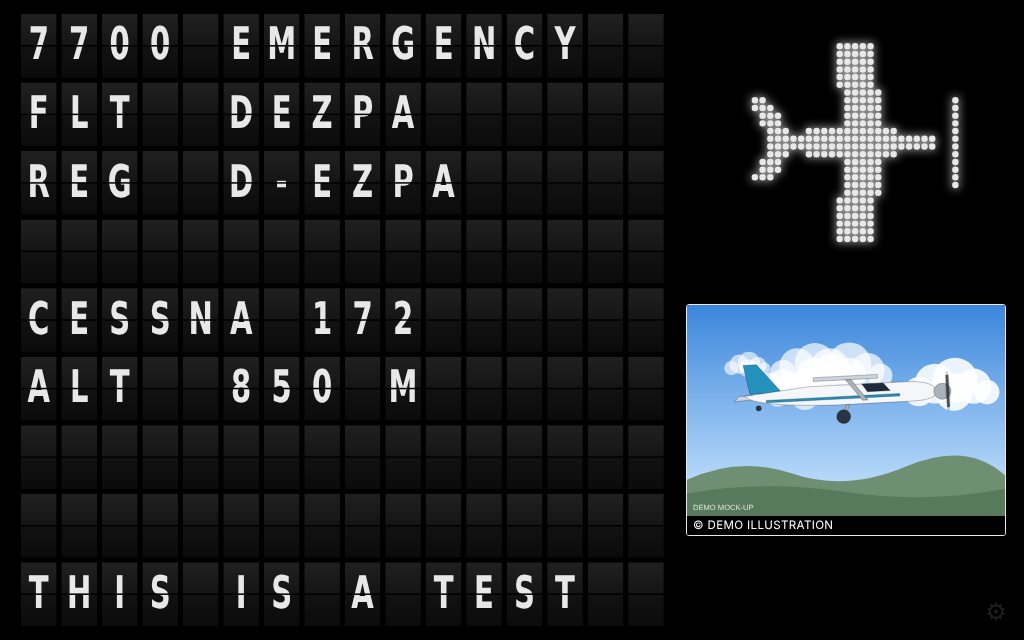
The words are English, like the rest of the wall. A tablet shows a banner only for what is heard while its page is open; the demo's invented sky has no emergency.
The page refreshes itself. It polls /api/planes for the aircraft inside the radius, cycles through them at CYCLE_SECONDS each, keeps the screen awake, and reloads itself if the Pi restarts — so a power cut ends with the wall back on screen and nobody touching the tablet. If the decoder stops answering it says NO DATA – RECEIVER NOT RESPONDING – CHECK THE DECODER instead of showing stale aircraft. If it is the tablet that no longer reaches the Pi (three polls in a row fail: the Wi-Fi, the Pi restarting) it says NO ANSWER – THE TABLET LOST THE PI – CHECK THE WI-FI (0.54.4; before, it blamed the decoder). After a minute of that it tries to reload itself, but only once the Pi answers again: a reload with the network still down would leave the browser's own error page on the wall. A poll that gets no answer at all — the Pi frozen, or the Wi-Fi up but nothing coming back — is given up after five seconds and counts as a failed one, and the wall never has more than one poll out at a time (0.99.17: before, such polls waited for ever and piled up, and the wall kept its last aircraft). Opened by a name the Pi does not answer to (a name of your own that is not in CONSOLE_HOSTS), the wall says WRONG NAME – USE THE PI ADDRESS – OR ADD THIS NAME TO CONSOLE_HOSTS rather than NO ANSWER, and does not reload itself: the Pi is there, it is the name that is refused. sudo zenithboard config-set CONSOLE_HOSTS your.name, or the Pi's address, and the wall comes back by itself.
It also respects prefers-reduced-motion: with that set in the browser, the flap animation and the scene stop moving.
Either tap the gear → Full screen, or use the browser's Add to Home Screen, which gives a cleaner result because the browser's own bars disappear for good.