Repository navigation
Tasks
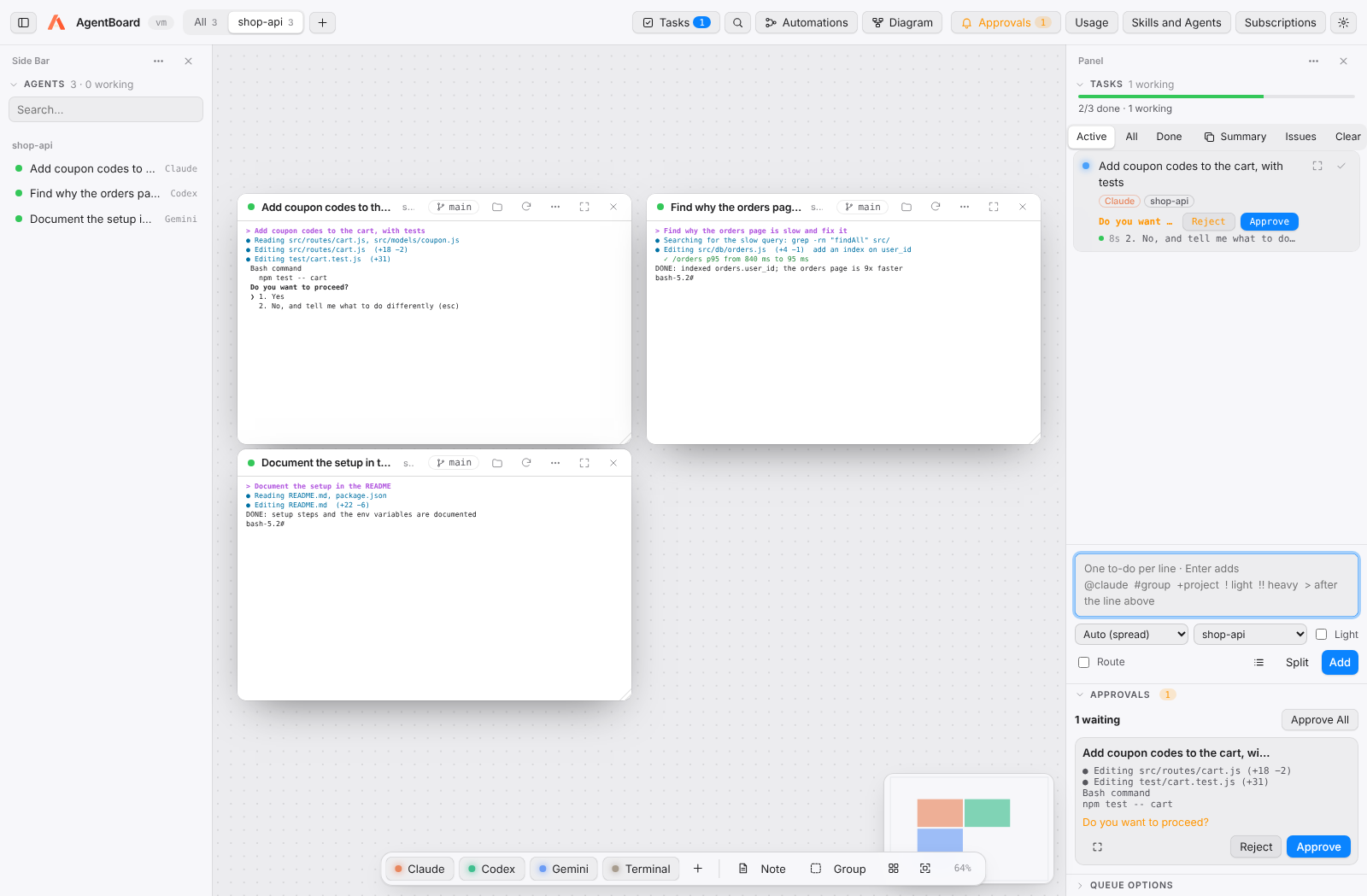
Open with the Tasks button (⇧⌘T). Write one to-do per line and press Enter.
| Token | Meaning |
|---|---|
@claude, @codex, @gemini… |
Which subscription does it. Without @ it is auto: the one with the least work. |
#group |
Open the agent in that board group (created if missing). |
+project |
Which project it runs in. |
! |
Light: a cheaper model (e.g. haiku). |
!! |
Heavy: a more capable model (e.g. opus). |
> at the start |
Wait for the task on the line above. |
Example:
fix the Google login #backend
@claude write tests for the payments API
update the README !
refactor the payments module !!
| Status | When |
|---|---|
| Queued | Waiting for a free slot. |
| Working | An agent is on it, in a fresh session. |
| Needs your review | The agent finished or asked a question. |
| Done | The agent wrote DONE: <summary>. |
| Blocked | The agent wrote BLOCKED: <reason>. |
- Parallel caps how many tasks run at once; per subscription caps each plan.
- With Run queue on, queued tasks start by themselves when there is room.
- Move to top reorders the queue.
- Usage limit: if a subscription runs out, the task moves to another; the exhausted one waits for its reset time.
- Trust and Continue answers the "trust this folder" prompt without going to the card.
- The bar at the top of the panel shows how many tasks are done, working, blocked or with errors, and how many subagents are open.
- Under each running task: time working, the last line its agent printed, and each subagent it opened with its status. Click any line to go to that card.
- When a terminal prints an error (
npm ERR!,Error:,Traceback,FAIL, an API or rate-limit error…), its card turns red, you get a notice (and a notification if you are in another app) and the task shows the line. Clicking the card clears the mark. -
Subagents: with Agent Connection set up (Skills and Agents), a task agent may split its work with
start_agent. Helpers open next to it as↳ Agentcards. Settings → Tasks sets whether they may and how many (4 by default).
When an agent asks for permission (run a command, edit a file), the request shows up under Approvals in the toolbar and under its task, with the command or file in question. Approve allows it once; Reject presses Esc so the agent asks what to do instead. Approve All answers every request at once.
-
Checks: give a project a check command in Settings → Projects (for example
npm test), or a default one in Settings → Tasks. When the agent says DONE the command runs; if it fails, the output goes back to the same agent (twice by default) and the task is marked blocked only if it keeps failing. - Cross-review (Settings → Tasks, off by default): another subscription reviews the finished task without editing it, and approves it or sends the problems back.
- Review: the diff button opens the full diff file by file. Click a line to quote it, write what to change and Send to Agent. With a worktree you can also Merge, Create Pull Request or Discard.
- Undo: without a worktree, each task starts from a checkpoint of the project. Undo puts the project back exactly as it was (new files removed, changed ones restored).
- Tokens per task: running tasks show how many tokens they have used (read from Claude's session logs); the progress bar shows the total.
- Budgets (Settings → Tasks → Costs and limits): a budget per task, in thousands of tokens, that either warns you or asks the agent to wrap up; and a daily budget, past which new tasks use light models.
-
Limits: when a subscription hits its usage limit, its tasks move to another (also tasks pinned with
@name, unless you turn that off). When all of them are out, AgentBoard shows when the first one comes back and suggests something to do meanwhile; queued tasks restart by themselves. - Local models: mark an agent as local in Settings → Agents (an Ollama or LM Studio setup). With Send light tasks to local models first, light tasks go there at no cost, and the router knows they are free.
- Start a line with
>to make it wait for the task on the line above (write the API/> write tests for the API). With Route, haiku may also mark a task that needs another one's result. -
Templates (list button in the composer) insert to-dos you write often;
<placeholders>are selected so you can type over them. Save your own with Save Current Text.
Each task works on its own branch agentboard/<task> in a separate git worktree, so several agents can change the same repository safely. When it finishes, View changes shows the diff and lets you Merge or Discard.
-
Route (on by default): when you add tasks, Claude's cheapest model (haiku, one short call with no terminal) splits what you wrote into independent tasks and picks the subscription and the model (light or heavy) for each one; the queue then runs them in parallel. Markers you write (
@agent,#group,+project,!,!!) always win. Turn it off in the composer or in Settings → Tasks. Without Claude installed, lines are added as they are. - Split: paste free text and Claude breaks it into tasks, without starting them.
- Summary: copies what was done today and what is pending, as Markdown.
-
Issues: lists the chosen project's open GitHub issues (needs the
ghCLI signed in) with their labels, age, author, comments and assignees. Filter by text or label, expand an issue to read it, select several or all, and queue them as tasks. Issues from people outside the project are flagged. The automation button on an issue creates the Fix a GitHub issue automation for it, ready to run. -
Branches (branch button): every branch of the chosen project, the ones being worked on first — the tasks and agent cards on each, its worktree, its last commit, commits ahead of and behind the main branch, and whether it is pushed. With the
ghCLI, each branch also shows its pull request and whether its checks pass. A branch named after an issue (fix/issue-12), or whose pull request closes one, shows that issue, and Issues shows the branches already working on each issue. Graph shows every branch as a colored line: where branches split, where they were merged (hollow dots, labeled with the merged branch) and each commit, with its files, parents and children; click a branch to jump to it, and move with the arrow keys. Clean Up lists merged branches and task worktrees no task uses, for you to review and delete; worktrees with uncommitted changes or unmerged commits are never deleted. Click a card to jump to it, or Switch to check a branch out in the project folder. - Global shortcut (⌃⌥Space, configurable): add a task from any app.
- Command palette (⇧⌘P): typing something that does not exist and pressing Enter adds it as a task.
- Agents can also manage tasks themselves through MCP: see Agent Connection.
- Live tokens under each running task and in the progress bar.
- Budgets in thousands of tokens: per task (Settings → Tasks: warn, or ask the agent to wrap up), per day, per week and per month for all projects (Settings → Tasks), and per week and month for each project (Settings → Projects).
- At 80% and 100% of a budget you get a notice once per period; turn on Also send budget alerts to the daily summary's chat to get them in Slack or Discord too.
- Past a budget, new tasks in its scope use light models until the period ends (weeks start on Monday).
- Usage also estimates what the tokens would cost at API prices (editable in Settings → Tasks; with a subscription you don't pay per token).
- Usage → Cost by Project shows each project's tokens today, this week, this month and over the last 30 days, and Usage → Budgets how far along each budget is.