Repository navigation
Access Token
To call the Selldone Backoffice API you need a valid access token, sent as Authorization: Bearer YOUR_ACCESS_TOKEN.
Depending on your use case (internal tools, integrations or public apps) there are different ways to generate and
manage tokens. This page compares them and lists every scope you can request.
| Method | Best for | Token scope |
|---|---|---|
| Personal Access Token | Internal tools, admin usage | All your shops |
| OAuth2 Access Token | Third-party apps that need user authorization | Scopes the user grants |
| ERP Bridge | Inventory, ERP and fulfillment integrations | One shop, the scopes in the link |
| Connect Bridge | Services fully integrated into Selldone | Managed by the Connect flow |
- Best for: internal tools, admin usage.
-
Steps:
- Go to the Developer Panel.
- Generate a new Personal Access Token.
- Warning: this token gives access to all shops under your account. It is not safe for third-party integrations.
- Best for: third-party applications that require user authorization.
-
Steps:
- Visit the OAuth Client Panel.
- Create a new OAuth2 client.
- Follow the standard OAuth2 flow to obtain access and refresh tokens.
-
Best for: direct API integrations for inventory, ERP or fulfillment tools.
-
Steps:
-
Share the following link with the shop owner:
https://selldone.com/auth/erp?scopes[]=selldone:identification&scopes[]=backoffice:shop:read&scopes[]=backoffice:product:read&scopes[]=backoffice:product:write&scopes[]=backoffice:category:read -
The shop owner selects the shop:
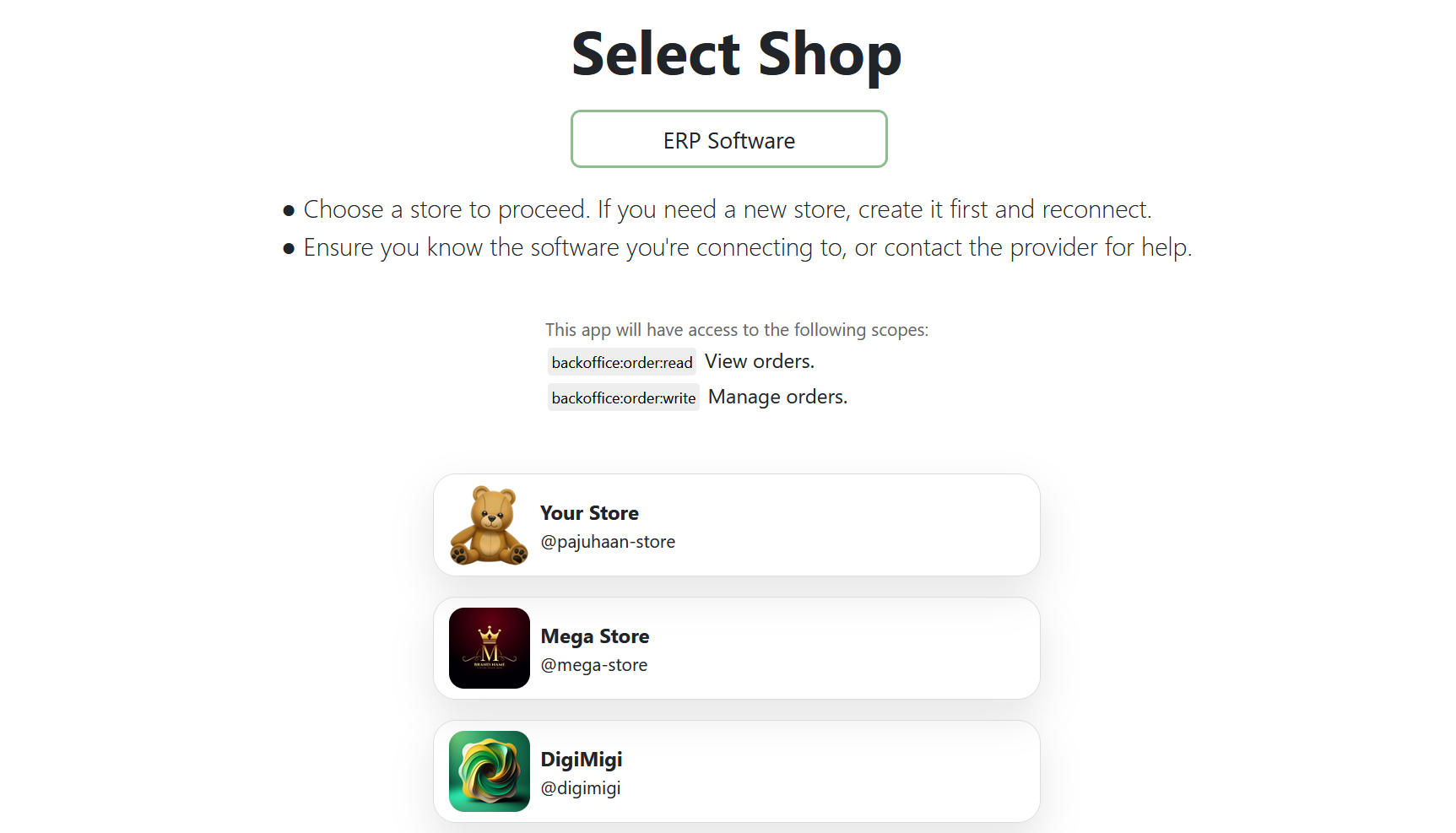
-
They receive a copyable token, together with the shop ID and the granted scopes:
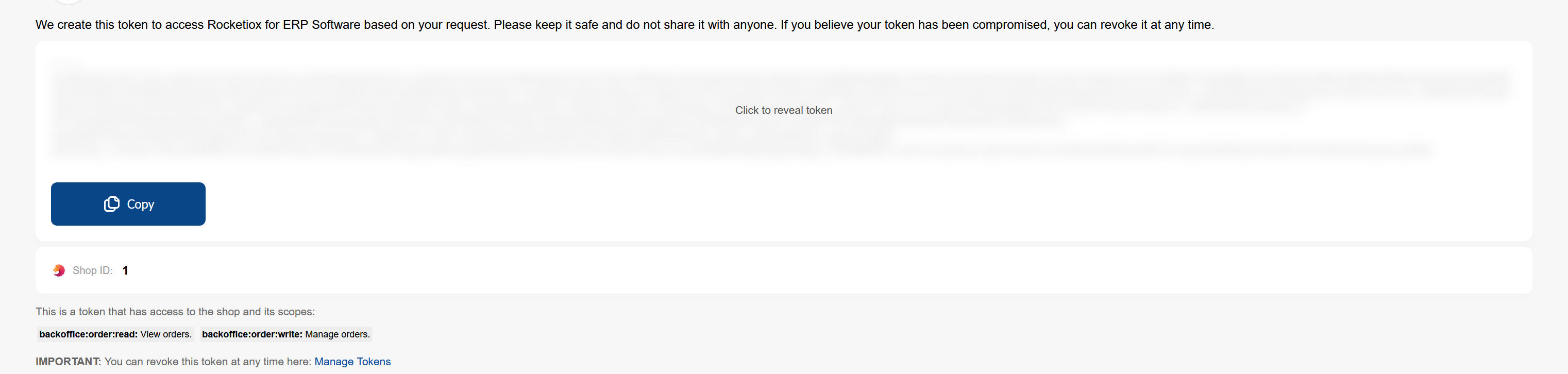
-
-
Tip: customize the link to request additional scopes (see the full list below).
-
Docs: ERP repository on GitHub.
- Best for: fully integrated Selldone apps with built-in auth (similar to Stripe Connect).
- No token copy and paste required.
- Docs: Sample Connect Provider.
Here is the list of scopes you can include in your access link to define permissions:
| Scope | Description |
|---|---|
backoffice:order:read |
Read orders |
backoffice:order:write |
Modify orders |
backoffice:support-tickets |
Access support tickets |
backoffice:shop:read |
Read shop details |
backoffice:shop:write |
Modify shop details |
backoffice:shop:add |
Add a new shop |
backoffice:shop:delete |
Delete a shop |
backoffice:giftcard:write |
Create/edit gift cards |
backoffice:giftcard:read |
Read gift cards |
backoffice:faq:write |
Create/edit FAQ entries |
backoffice:faq:read |
Read FAQ entries |
backoffice:category:write |
Create/edit categories |
backoffice:category:read |
Read categories |
backoffice:product:write |
Create/edit products |
backoffice:product:read |
Read products |
backoffice:report:read |
Read reports |
backoffice:finance:write |
Manage financial records |
backoffice:finance:read |
Read financial records |
backoffice:page:write |
Create/edit pages |
backoffice:page:read |
Read pages |
backoffice:logistic:write |
Manage logistics |
backoffice:logistic:read |
Read logistics details |
backoffice:staff:write |
Manage staff accounts |
backoffice:staff:read |
Read staff details |
backoffice:business-profile:write |
Edit business profile |
backoffice:business-profile:read |
Read business profile |
backoffice:discount-code:write |
Manage discount codes |
backoffice:discount-code:read |
Read discount codes |
backoffice:wallet:write |
Manage user wallets/accounts |
backoffice:wallet:read |
Read user wallets/accounts |
backoffice:notifications |
Access notifications |
backoffice:coupon:write |
Manage coupons |
backoffice:coupon:read |
Read coupons |
backoffice:offer:write |
Manage offers |
backoffice:offer:read |
Read offers |
backoffice:cashback:write |
Manage cashback programs |
backoffice:cashback:read |
Read cashback programs |
backoffice:lottery:write |
Manage lottery programs |
backoffice:lottery:read |
Read lottery programs |
backoffice:community:write |
Manage community posts |
backoffice:community:read |
Read community posts |
backoffice:customer:write |
Manage customer data |
backoffice:customer:read |
Read customer data |
backoffice:ribbon:write |
Manage ribbons |
backoffice:ribbon:read |
Read ribbons |
backoffice:ai:write |
Manage AI settings |
backoffice:ai:read |
Read AI settings |
backoffice:vendor-payment:write |
Manage vendor payments |
backoffice:vendor-payment:read |
Read vendor payments |
backoffice:company:write |
Manage company data |
backoffice:company:read |
Read company data |
backoffice:note:write |
Manage notes |
backoffice:note:read |
Read notes |
backoffice:affiliate:write |
Manage affiliates |
backoffice:affiliate:read |
Read affiliates |
backoffice:print:write |
Manage print-related settings |
backoffice:print:read |
Read print-related settings |
backoffice:reviews:write |
Manage reviews |
backoffice:reviews:read |
Read reviews |
backoffice:property-set:write |
Manage property sets |
| Scope | Description |
|---|---|
vendor-read |
Grants read access to vendors and their related assets within the vendor panel. |
vendor-write |
Grants write access to vendors and their related assets within the vendor panel. |
Vendor panels are built with the Vendor SDK.
Add any of these scopes as query parameters in the ERP Bridge link, for example:
https://selldone.com/auth/erp?scopes[]=backoffice:order:read&scopes[]=backoffice:product:write
The more specific your scope list, the safer your integration. Each endpoint's required scope is documented in the
URL builder comments of apis/API.ts (the
@scope tag). A request made with a token that lacks the scope fails with 403 and the error code
token_has_no_access.
GET https://api.selldone.com/shops/12345/products/all-admin?offset=0&limit=10
Authorization: Bearer YOUR_ACCESS_TOKEN
With the JavaScript SDK:
window.axios.defaults.headers.common["Authorization"] = `Bearer ${ACCESS_TOKEN}`;Keep tokens secret: store them on your server or in a secrets manager, never in public repositories or public client-side bundles, and revoke them in the developer panel if they leak.
- Fast Start
- Getting Started
- Rate Limits
- ERP repository and Sample Connect Provider
- Need help building your access link? Contact Selldone Support or browse the Selldone GitHub for working samples.