Repository navigation
System Tray Context Menu
Home / User Manual / System Tray Context Menu
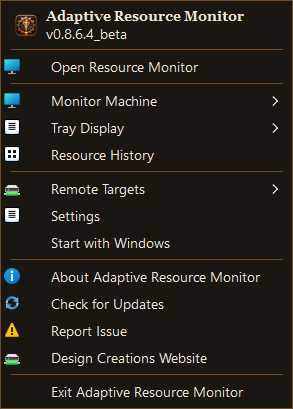
Right-click the ARM icon. The heading shows the product name and current version. An update action may appear beneath it when a verified release is available or ready.
| Entry | What it opens or changes |
|---|---|
| Open Resource Monitor | Main monitoring window. |
| Monitor Machine | Checkable list and an All Systems master selection. |
| Tray Display | Overlay, Stacked, Composite, or Application Icon. |
| Resource History | Expanded monitor with its longer history view. |
| Remote Targets | Add Remote Target or Manage Remote Targets. |
| Settings | Shared Settings tab, including edits already in progress. |
| Start with Windows | Per-user startup toggle. |
| About Adaptive Resource Monitor | About tab. |
| Check for Updates | About tab and a new public release check. |
| Report Issue | Public issue index in your browser. |
| Design Creations Website | Developer website in your browser. |
| Exit Adaptive Resource Monitor | Ends the background monitor and removes its tray icons. |

Original application developed by Sonja M Thomas, SLT Design Creations, LLC. Copyright 2010-2026 SLT Design Creations, LLC. Design Creations