Troubleshooting
English | Deutsch
Symptom first.
The board took the wrong pin map, or the boot probe refused to guess.
If you flashed a single-board image onto the other board, that is the cause: the two are indistinguishable once flashed and their display pins differ. Flash the unified image from Releases instead — it detects the board at every boot.
If you already have the unified image, a dark screen means the probe could not tell which board it was on, three times over, and stopped deliberately rather than driving pins for hardware that might not be there. The board is still reachable over USB.
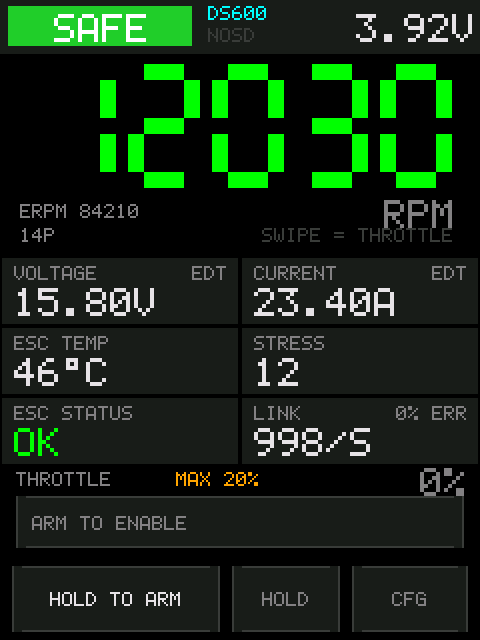
Nothing is answering on the signal wire. In rough order of likelihood:
-
Wrong pin. Check CFG → SETUP → ESC PIN against where the wire
actually is. The
LINKrow on that same screen is live, so you can watch it as you change the pin — any non-zero packet rate means you found it. - No ground. The ESC's ground and the board's ground have to be tied together. This is the one that looks like a dead ESC.
- The ESC is not powered. It runs from its own battery, not from the board.
- The ESC does not do bidirectional DShot, or it is disabled in the ESC's own settings. Plain DShot sends nothing back.
-
The wire is too long or too noisy. Drop DSHOT KBAUD to 300 and see if
LINKcomes alive.
That is an ESC answering eRPM and sending no Extended DShot Telemetry. Either it does not support EDT, or EDT has not been switched on yet.
Check the chip under the title on the settings screen. If it says EDT OFF,
read the next section. If the ESC's datasheet or firmware does not list EDT
support, RPM is all you get on two wires — a
KISS telemetry wire is the way to get the
rest.
The firmware asks repeatedly and by itself, so a chip that stays red for more than a few seconds means the attempts are not being accepted.
- Is the motor stopped? DShot commands are only executed with the motor stopped, and a disarm leaves a propeller coasting for several seconds. Wait for it to actually stop.
- Is the tester disarmed? Commands do not go out while armed.
- Is the ESC actually EDT-capable? BLHeli_S without an EDT-capable build, and some older AM32 versions, will ignore the enable forever and look exactly like this.
- Power-cycle the ESC. The link dropping resets the firmware's state, so the replacement — even if it is the same ESC — is asked again from scratch.
If it used to work and stopped, that is worth reporting: prior to the current firmware there were three ways an enable could be thrown away, and a disarm and re-arm was the known workaround. On current firmware it should not be needed.
Three things stop a motor deliberately, and each announces itself:
- The idle interlock. Thirty seconds without touching the screen while armed and it disarms, counting down in the top right for the last five seconds. The panel dips as it happens.
-
Entering
CFG. The settings screen force-disarms every time. - The heartbeat backstop. If the display firmware stops responding, the second core commands zero throttle within a quarter second. You would notice this as a frozen screen, not just a stopped motor.
If it stops with none of those, suspect the ESC's own protections — low voltage
cutoff, temperature, desync — and look at ESC STATUS and ESC TEMP.
Amber above 5 %. It is nearly always the signal wire: length, routing, or a missing ground. Shorten it, keep it away from the motor phases, then drop DSHOT KBAUD.
A high error rate with a working RPM readout is not harmless — the frames that fail are frames the ESC did not act on.
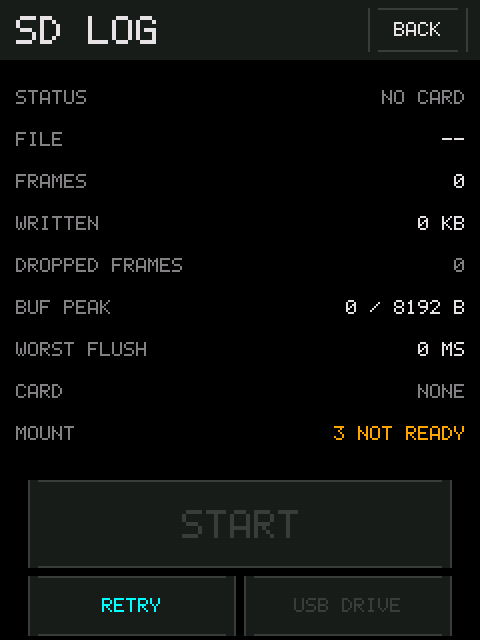
Look at the MOUNT row on the SD LOG screen; it distinguishes cases that
otherwise look identical.
-
3 NOT READY— nothing answered on the bus. No card, or not seated. -
13 NO FILESYSTEMwith a size underCARD— the card is present and talking, and the filesystem is the problem. Reformat as FAT32. -
Card inserted after boot — press
RETRY MOUNT. The card is only mounted once at power-up and neither board has a card-detect pin.
DROPPED FRAMES above zero means the log has holes. Look at BUF PEAK and
WORST FLUSH: a peak approaching the buffer size, or a flush longer than the
buffer can cover, means the card cannot keep up.
Try a different card first. This is almost always the card.
The bootloader listens only briefly at power-up. Unplug and replug the ESC battery while the AM32 screen is showing. Doing it beforehand does not work.
-
REPLY NOT UNDERSTOOD— the link is alive and the framing is wrong. Usually not an AM32 ESC. -
NO VALID SETTINGS— something answered but the settings block was not plausible. Do not write anything.
They were never saved. Pole count and throttle ceiling are edited on the
settings screen, but the button that writes them to flash is HOLD TO SAVE on
SETUP. UNSAVED under the title is the warning.
It ships that way. It is one tap to turn on: CFG → SETUP → KISS TELEM.
The 2.8" brings out exactly two free GPIOs, and the ESC signal starts on one of them — so defaulting KISS to on would spend the only spare pin on a wire most people have not soldered. The 2.0" has a camera header's worth of spare pins and defaults to on for the same reason in reverse.
Turning it on moves it to the free pin by itself; you do not have to pick. The pin stepper also refuses to land on whichever pin the ESC signal is using, so the two cannot collide.
This was once genuinely impossible on the 2.8", and is not any more. While the receiver was a hardware UART it needed a pin with a UART-RX function, and the only free one on that board was GP29 — the pin the ESC was already on. Enabling KISS found no pin at all and validation switched it straight back off. The receiver is a PIO state machine now and samples any GPIO. If you have read somewhere that KISS does not work on the 2.8", that is what it was about.
If it does switch itself off with KISS OFF: NEEDS A PIN OF ITS OWN, then both
pins really are spoken for: move the ESC signal to the other one first, then
enable KISS.
Open an issue at
github.com/subtilitas/DshotDisplay/issues.
Useful to include: which board, which image (unified or single-board), what the
LINK row shows, and what the ESC is.