Repository navigation
fw1
The following configuration is for the pfSense firewall that separates our virtual LAN and WAN environments. All other devices in the environment are located on the LAN, meaning that fw1 was essential to have configured before continuing with other devices.
The firewall needs two network adapters to access both the WAN and LAN. A second adapter can be added via vSphere settings. Ensure that one adapter is configured for the WAN and the other for the LAN, as shown below.

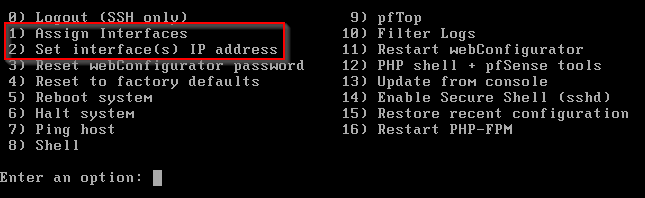
For the WAN, the upstream gateway address is 10.0.17.2. When asked about using HTTP for the webConfigurator protocol, select yes, as this protocol determines how to access the firewall via a browser.

We are also not using DHCP or IPv6 on the firewall so these prompts can be denied.
| Adapter | Network | IP |
|---|---|---|
| em0 | WAN | 10.0.17.202/24 |
| em1 | LAN | 172.16.1.2/24 |
To finalize the configuration, firewall settings need to be accessed through a browser. But before we can do that, a client workstation (w1 or w2) needs to be configured with a working browser.
| User | PW |
|---|---|
| admin | pfsense |
In a browser, I navigated to https://10.0.5.2 to finish configuring the firewall, where I set its hostname, added to it to the bestteam.local domain, set its DNS to be 8.8.8.8, and unblocked private networks from accessing the firewall as our virtual WAN is a private network.
