Repository navigation
Plugins Clipboard
A clipboard history manager. Keeps the last 100 copied items and lets you search and re-paste any of them instantly.
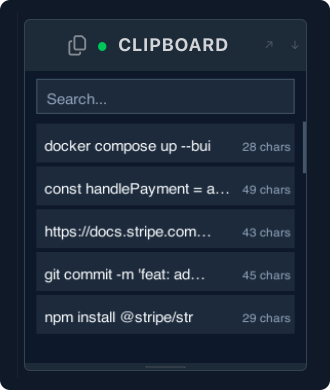
mado plugin install clipboardRestart Mado to activate the panel.
| Action | How |
|---|---|
| Search history | Type in the panel while it's focused |
| Clear search | Escape |
| Scroll | Mouse wheel or trackpad scroll |
| Paste an item | Click it |
Clicking an item copies it to the clipboard and pastes it into the focused pane. The item flashes briefly to confirm the action.
History is saved to ~/.config/mado/clipboard-history.json and persists across Mado restarts. A maximum of 100 items are kept — older entries are dropped automatically.
Old items aren't showing. The plugin keeps the last 100 items. Anything older has been dropped.
The panel isn't picking up new copies. The plugin polls the clipboard every 500ms. There may be a short delay before a newly copied item appears.
Can I clear the entire history?
Delete ~/.config/mado/clipboard-history.json. The plugin will start fresh on the next Mado launch.
Passwords are showing in the history. The plugin captures everything that goes through the macOS clipboard. Avoid copying sensitive values while the plugin is active, or delete the history file after a session where you copied credentials.