Repository navigation
Plugins Timer
A workspace billing timer. Tracks time spent per project and auto-pauses when you switch to a different workspace.
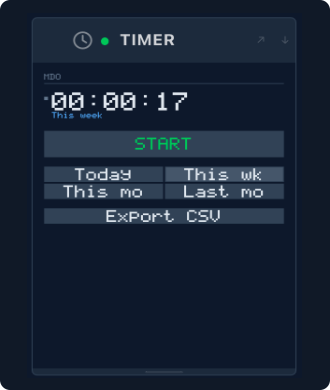
mado plugin install timerRestart Mado to activate the panel.
| Action | How |
|---|---|
| Start / stop timer | Click START / STOP |
| View today's total | Click Today |
| View this week's total | Click This wk |
| View this month's total | Click This mo |
| View last month's total | Click Last mo |
| Export sessions to CSV | Click Export CSV |
The timer automatically pauses when you switch workspaces and resumes on the workspace it was last running on.
Sessions are stored as JSON files at ~/.config/mado/timers/<PROJECT_CODE>.json. Each workspace has its own file and sessions accumulate indefinitely.
The timer kept running after I closed Mado. The timer stops when Mado quits. Sessions are saved to disk so totals are preserved across restarts.
How do I reset the timer for a project?
Delete or edit ~/.config/mado/timers/<PROJECT_CODE>.json directly.
Where does the exported CSV go? The CSV is copied to your clipboard — paste it into a spreadsheet or file of your choice.
The timer shows the wrong project. The timer is scoped to whichever workspace is active in Mado. Switch to the correct workspace and the timer will show that project's sessions.