Repository navigation
Plugins World Time
Shows the current time across up to 4 cities, with a day/night indicator and date for each.
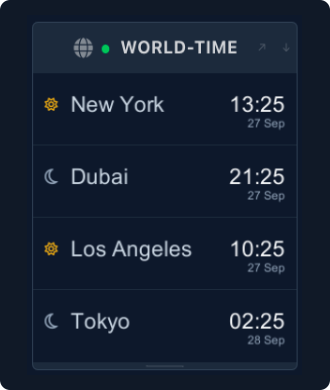
mado plugin install world-timeRestart Mado to activate the panel.
Config lives at ~/.config/mado/plugins/world-time.toml:
time_format = "24h"   # global default: "12h" or "24h"

[[cities]]
name        = "New York"
timezone    = "America/New_York"

[[cities]]
name        = "London"
timezone    = "Europe/London"

[[cities]]
name        = "Dubai"
timezone    = "Asia/Dubai"

[[cities]]
name        = "Tokyo"
timezone    = "Asia/Tokyo"
If no config file exists, those four cities are used as defaults. A maximum of 4 cities are shown — any extras are ignored.
Each city can override the global time_format:
[[cities]]
name        = "New York"
timezone    = "America/New_York"
time_format = "12h"
Timezone values must be valid IANA timezone identifiers (e.g. "Europe/Berlin", "Asia/Singapore").
How do I change the cities?
Edit ~/.config/mado/plugins/world-time.toml and replace the [[cities]] entries. Restart Mado for changes to take effect.
The day/night icon looks wrong. Day is shown for hours 6–19 in the city's local time, night otherwise.
I only want 2 cities.
Just define 2 [[cities]] blocks. The panel scales to however many cities you configure (up to 4).
The panel is blank on Linux. The plugin requires a system font. Install one if missing — on Arch/Omarchy:
sudo pacman -S ttf-dejavuOn Debian/Ubuntu: sudo apt install fonts-dejavu.