Skip to content

Conversation

@hyanwong
Copy link
Member

@hyanwong hyanwong commented May 2, 2020

This implements the idea by @benjeffery of grouping SVG components using the tree hierarchy, which should allow subtrees to be styled and even moved using SVG. It is a continuation of #555, and it could be argued that it should be rolled into that, as it will require the documentation proposed in #555 to be changed.

To see how it might work, try the following example:

ts = msprime.simulate(20, mutation_rate=2, random_seed=1)
# Colour all descendant edges & mutations descended from parent node 37
SVG(ts.first().draw_svg(size=(400, 400), style=".mut {fill: grey} g.p37 .edge {stroke: red} g.p37 .mut {fill: red}"))

Screenshot 2020-05-02 at 19 36 52

The implementation means that we have to abandon the idea of putting edges, symbols, & text in different groups. Instead we ensure that text & symbols are above edges within each group by putting edges as the first group item. This seems to work OK: for instance

ts = msprime.simulate(20, mutation_rate=2, random_seed=1)
# Colour all nodes yellow to show they are in from of black edge lines
SVG(ts.first().draw_svg(size=(400, 400), style=".node circle {r:6px; fill: yellow; stroke: black}"))

Screenshot 2020-05-02 at 19 38 00

@hyanwong
Copy link
Member Author

hyanwong commented May 2, 2020

Note that since the label and the symbol are now quite tightly linked, the mutation labels naturally default to being displayed in red text, matching the symbols. I left this in, as it seemed possibly a better viz idea anyway, but we can style them back if necessary.

@codecov
Copy link

codecov bot commented May 2, 2020

Codecov Report

Merging #570 into master will increase coverage by 0.02%.
The diff coverage is 100.00%.

Impacted file tree graph

@@            Coverage Diff             @@
##           master     #570      +/-   ##
==========================================
+ Coverage   87.30%   87.32%   +0.02%     
==========================================
  Files          22       22              
  Lines       16733    16760      +27     
  Branches     3274     3279       +5     
==========================================
+ Hits        14608    14636      +28     
  Misses       1040     1040              
+ Partials     1085     1084       -1     
Flag Coverage Δ
#c_tests 88.55% <100.00%> (+0.03%) ⬆️
#python_c_tests 90.48% <100.00%> (+0.02%) ⬆️
#python_tests 99.03% <100.00%> (+<0.01%) ⬆️
Impacted Files Coverage Δ
python/tskit/trees.py 98.18% <ø> (ø)
python/tskit/drawing.py 99.68% <100.00%> (+<0.01%) ⬆️
c/tskit/trees.c 90.69% <0.00%> (+0.06%) ⬆️
c/tskit/core.c 90.66% <0.00%> (+0.06%) ⬆️

Continue to review full report at Codecov.

Legend - Click here to learn more
Δ = absolute <relative> (impact), ø = not affected, ? = missing data
Powered by Codecov. Last update bbb020f...190e2a3. Read the comment docs.

@petrelharp
Copy link
Contributor

petrelharp commented May 2, 2020

Sorry, basic question: how do we get the SVG( ) command you're using to do this? (This looks totally fantastic, btw: easy styling of subtrees is a good idea!)

@hyanwong
Copy link
Member Author

hyanwong commented May 2, 2020

Sorry, basic question: how do we get the SVG( ) command you're using to do this?

Oh, sorry, this is in a jupyter notebook:

import msprime
from IPython.display import SVG

But the exported svg file should be viewable in a browser like chrome, in which case, outside of Jupyter, simply do

ts.first().draw_svg("output.svg", size=(400, 400), style="circle.node {r:6px; fill: yellow; stroke: black}")

to get output.svg which you can open in a browser

@hyanwong
Copy link
Member Author

hyanwong commented May 2, 2020

Even on a medium-sized TS (200 samples) this only increases the file size by a quarter or less, so I would say it's worth it. Not sure whether to add it to #555 though - thoughts @benjeffery ?

@petrelharp
Copy link
Contributor

Wow, this looks great. I haven't looked into the prevoius, non-hierarchical implementation, but... pooking around at the SVG, here's a suggestion: seems like the mutation labels should be in the same g as the mutations themselves? that might make label placement easier also or at least more elegant?

@hyanwong
Copy link
Member Author

hyanwong commented May 2, 2020

seems like the mutation labels should be in the same g as the mutations themselves?

Yep, fair point. I was wary of increasing the number of groups any more than I had already, but, in for a penny, in for a pound, as they say here. That could also apply to the node + node label, I guess. In fact, it probably will mean slightly smaller files, as I won't need to duplicate the class names: I can just put them on the enclosing group.

More likely than changing individual mutations, it seems likely that people might want to do something with all the mutation labels, or all the symbols, but the classes allow us to do that anyway.

[edit - done with latest commit]

@hyanwong
Copy link
Member Author

hyanwong commented May 3, 2020

More improvements just committed, which give much greater flexibility. Moreover, they result in a svg file size which is smaller (in bytes) than the current versions on master, because of using transformations on the groups, which leads to integer positioning. I have also extracted most of the hard-coded positioning hacks and placed them as css transformations, which can therefore be easily overridden.

The following Jupyter notebook script demos a few examples:

import msprime
from IPython.display import display, SVG, HTML
ts = msprime.simulate(20, mutation_rate=2, random_seed=1)


display(
    HTML("<h1>Default setting</h1>"),
    SVG(ts.first().draw_svg(size=(400, 400))),

    HTML("<h1>Demos styling parts of the tree</h1>"),
    HTML("<p>Here we give an #id to the SVGs (e.g. EX1) so that our style changes only apply to one specific tree</p>"),

    HTML("<h3>1) Edges are hidden behind node & mutation symbols</h3>"),
    SVG(ts.first().draw_svg(
        size=(400, 400),
        root_svg_attributes={"id": "EX2"},
        style="#EX2 .node {r:6px; fill: yellow; stroke: black}")),

    HTML("<h3>2) Target a specific node via id (n35)</h3>"),
    HTML("<p>note the child selector, '>', otherwise all descendants of 35 would be changed</p>"),
    SVG(ts.first().draw_svg(
        size=(400, 400),
        root_svg_attributes={"id": "EX3"},
        style="#EX3 .n35 > .node {r:6px; fill: yellow; stroke: black}")),

    HTML("<h3>3) Target all children of a node</h3>"),
    HTML("<p>Here we color edges. Targetting can be done by node id or e.g. as here, by id of a mutation (m4) above the node</p>"),
    SVG(ts.first().draw_svg(
        size=(400, 400),
        root_svg_attributes={"id": "EX4"},
        style="#EX4 .m4 .edge {stroke: red;} #EX4 .mut {fill: gray}")),

    HTML("<h3>4) Hide internal node labels via css</h3>"),
    SVG(ts.first().draw_svg(
        size=(400, 400),
        root_svg_attributes={"id": "EX5"},
        style="#EX5 :not(.sample) > text {visibility: hidden;}")),

    HTML("<h3>5) Hide internal node labels and rotate leaf labels</h3>"),
    SVG(ts.first().draw_svg(
        size=(400, 400),
        root_svg_attributes={"id": "EX6"},
        style="#EX6 .leaf > text {transform: translateY(10px) rotate(90deg); text-anchor: start} #EX6 :not(.sample) > text {visibility: hidden;}")),

    HTML("<h3>6) Highlight an edge via child and parent node ids</h3>"),
    HTML("<p>Using both child and parent is useful when plotting an entire ts</p>"),
    SVG(ts.first().draw_svg(
        size=(400, 400),
        root_svg_attributes={"id": "EX7"},
        style="#EX7 .p34.n33 > .edge {stroke-width:3; stroke: green}")),
)

@benjeffery
Copy link
Member

Looking good - haven't done a line by line yet, but glad this seems to be working well. I'm trying to think of use cases where this structure is worse than the previous, can you think of anything that is harder this way?

As for PRs, as #555 is close to done I say don't combine them.

@hyanwong
Copy link
Member Author

hyanwong commented May 4, 2020

Looking good - haven't done a line by line yet, but glad this seems to be working well. I'm trying to think of use cases where this structure is worse than the previous, can you think of anything that is harder this way?

I don't think it restricts anything but some stuff may be a little more complicated, mainly because of the way I've structured it. E.g. if you want to target a particular node but not its children you need to remember to use the "child only" selector, e.g. .n1 > node not simply n1 node to target the node symbol Also the way of selecting text on nodes but not on mutations might be thought a little obscure - I chose not to give (yet another) class to the node labels, as you can simply look for a label next to a node with .node + text.

As for PRs, as #555 is close to done I say don't combine them.

Right. Howvever, if we are thinking of going in the direction of this PR, I wonder if I should remove the documentation about css classes from #555 @benjeffery , as it will be obsoleted by the changes here?

@hyanwong
Copy link
Member Author

hyanwong commented May 4, 2020

I'm trying to think of use cases where this structure is worse than the previous, can you think of anything that is harder this way?

Oh, another point is that I am now using styles to position the text relative to the node, rahter than hard-coding offsets. This opens up the problem that, if the SVG is embedded in an html document, the styles will apply over the entire document. We could anticipate this and assign each SVG a unique ID (if one wasn't provided by the user) and target all the styles to that ID, which would stop the styles "spilling out", as it were. Or we could just document that this is expected to happen given the SVG specs, and provide an example like the one above for people to follow if they expect to be embedding SVGs.

@hyanwong
Copy link
Member Author

hyanwong commented May 4, 2020

Also 2 more ideas on which I'd quite like your opinion, @benjeffery (and possibly @jeromekelleher).

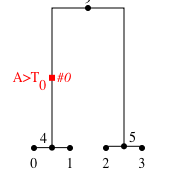
  1. I wonder if we should by default put the derived state and/or in the mutation label, e.g. on the other side of the branch from the text? The example below is maybe a little over-complicated (A changed to T at site 0 (mutation id #0), but I imagine that for "real" users, the state change might be more relevant than the mutation id

Screenshot 2020-05-04 at 09 17 16

  1. I am wanting to colour all the edges under a mutation in a colour. I had a sudden thought that we could treat the mutation like a unary node, and instead of drawing a line from a parent node directly to the child node, drawing through the (say) 2 mutations between them, we could draw it from the parent node to the first mutation, then another line from that mutation to the next mutation, and then finally the last line to the child node. Like a node, each mutation would also create a hierarchical group that could then be targetted. Does this sound sensible, or a silly overkill?

@benjeffery
Copy link
Member

I wonder if I should remove the documentation about css classes from #555 @benjeffery , as it will be obsoleted by the changes here?

Not much point, just change them with this PR.

This opens up the problem that, if the SVG is embedded in an html document, the styles will apply over the entire document.

I haven't looked at the exact way you're doing the text positioning but could you assign a unique class name and qualify all the styles that way?

I wonder if we should by default put the derived state and/or in the mutation label

I like this, but I think we should nail down the customisation API first as otherwise we'll end up with loads of flags for options like this. This example would be easy to do with a callback to customise mutation label, and could be included as an example?

I had a sudden thought that we could treat the mutation like a unary node, and instead of drawing a line from a parent node directly to the child node

I like this, separate PR? (I know there are few piling up, but generally smaller and a few is better, although not sure I'm following my own advice here with metadata!)

@hyanwong
Copy link
Member Author

hyanwong commented May 4, 2020

This opens up the problem that, if the SVG is embedded in an html document, the styles will apply over the entire document.

I haven't looked at the exact way you're doing the text positioning but could you assign a unique class name and qualify all the styles that way?

Yes, I could. The question is whether we want to do this invisibly to the user, or get them do do it explicitly. It seems a bit ugly taking their SVG styles and modifying them on the fly.

I like this, but I think we should nail down the customisation API first as otherwise we'll end up with loads of flags for options like this. This example would be easy to do with a callback to customise mutation label, and could be included as an example?

Also easy to do using the mutation_labels dict which we already have. It's really a question of what we want to be the default.

I had a sudden thought that we could treat the mutation like a unary node, and instead of drawing a line from a parent node directly to the child node

I like this, separate PR?

OK. Will add it to this PR though, as it's integral to this one, I think.

@benjeffery
Copy link
Member

This opens up the problem that, if the SVG is embedded in an html document, the styles will apply over the entire document.

I haven't looked at the exact way you're doing the text positioning but could you assign a unique class name and qualify all the styles that way?

Yes, I could. The question is whether we want to do this invisibly to the user, or get them do do it explicitly. It seems a bit ugly taking their SVG styles and modifying them on the fly.

Ahh, I misunderstood you meant you as a user, rather than internal to tskit.

@petrelharp
Copy link
Contributor

This opens up the problem that, if the SVG is embedded in an html document, the styles will apply over the entire document.

Shouldn't the css be embedded in the SVG? Then (I'd think?) that it wouldnt affect other SVG in the same document? - https://www.w3.org/TR/SVG/styling.html#StyleElementExample

@petrelharp
Copy link
Contributor

I wonder if we should by default put the derived state and/or in the mutation label, e.g. on the other side of the branch from the text?

Gee, that'd be nice, but I'll bet it gets too busy very quickly. If there's an easy way to say "please give alleles instead of mutation ID" that might be useful?

Like a node, each mutation would also create a hierarchical group that could then be targetted. Does this sound sensible, or a silly overkill?

Nice idea. So, it'd be easy to color all samples with a particular mutation, for instance. But I suppose that's already pretty easy, by looking up the mutation's node. I'm leaning towards "overkill", but not for a good reason...

@hyanwong
Copy link
Member Author

hyanwong commented May 5, 2020

Shouldn't the css be embedded in the SVG? Then (I'd think?) that it wouldnt affect other SVG in the same document? -

It is embedded in the SVG, but I'm afraid your gut thought is wrong - stylesheets are always taken as applying to the entire document, even if embedded deep within an element. Or as https://www.w3.org/TR/SVG/styling.html#StyleSheetsInHTMLDocuments says, "any HTML ‘style’ element used in an SVG document must also apply its style sheet to the (entire) document". Also see multiple questions on Stack Overflow, e.g. see the end of the answer at https://stackoverflow.com/questions/20078032/inline-svg-embedded-css-interpreted-at-page-level

@hyanwong
Copy link
Member Author

hyanwong commented May 5, 2020

I'm leaning towards "overkill", but not for a good reason...

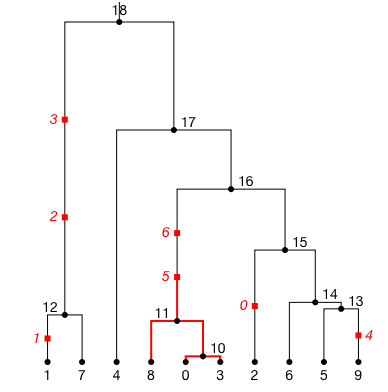
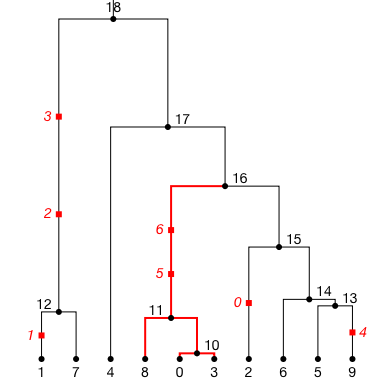
The specific reason I wanted this is to target the fraction of the edge that lies below a particular mutation. E.g. for focal mutation 5, I would like a picture like the one below:

Screenshot 2020-05-05 at 12 13 16

Not the one that we previously would have been stuck with:

Screenshot 2020-05-05 at 12 09 43

A minor different, but an improvement, I think. The change is coded up in 9f19cdd. It means that the styles defined at the top of this issue will need changing, however. I'll post equivalents below, although I think the class labels might need a bit or work to make styling easier (I should chat about this with @benjeffery )

@petrelharp
Copy link
Contributor

It is embedded in the SVG, but I'm afraid your gut thought is wrong

Hah, thanks for explaining. I should have googled some more. It does seem pretty unfortunate to have one tree's svg affecting other ones: that'll cause all sorts of bad things happen when including more than one tree on a page, no? You could add a random id at the top level and modify the css to make the properties only apply to this SVG?

@benjeffery
Copy link
Member

I don't think rewriting the CSS is trivial. I'd prefer a note to the user in the docs that they should qualify their CSS if needed.

:type mutation_labels: dict(int, str)
:param dict root_svg_attributes: Additional attributes, such as an id, that will
be embedded in the root ``<svg>`` tag of the generated drawing.
:param str style: A
Copy link
Contributor

Choose a reason for hiding this comment

The reason will be displayed to describe this comment to others. Learn more.

should say here that this stuff applies to the entire doc it's in

Copy link
Member Author

Choose a reason for hiding this comment

The reason will be displayed to describe this comment to others. Learn more.

I've put this as a Note in #555:

        ..note::
             A feature of SVG style commands is that they apply not just to the contents
             within the <svg> container, but to the entire file. Thus if an SVG file is
             embedded in a larger document, such as an HTML file (e.g. when an SVG
             is displayed inline in a Jupyter notebook), the style will apply to all SVG
             drawings in the notebook. To avoid this, you can tag the SVG with a unique
             SVG using ``root_svg_attributes={'id':'MY_UID'}``, and prepend this to the
             style string, as in ``#MY_UID .tree .edges {stroke: gray}``.

@petrelharp
Copy link
Contributor

The specific reason I wanted this is to target the fraction of the edge that lies below a particular mutation. E.g. for focal mutation 5, I would like a picture like the one below:

Damn, that's really nice. I say go for it.

@petrelharp
Copy link
Contributor

So: how would we add a font_size argument? This is specified in the css, so the only good way I can think of to do it without affecting other trees in the same document is to add a top-level ID that qualifies all the embedded css. How about (a) adding a root_id argument to the method, which if not specified is randomly generated, and (b) inserting it as a qualifier to the embedded css here? I'm not sure what you are saying, @benjeffery, but I'm not proposing dynamically rewriting the css, so if a user specifies css they've got to do the right qualifying themselves.

Sorry I'm a bit slow on all this, hope I'm not making too much noise.

@hyanwong
Copy link
Member Author

hyanwong commented May 5, 2020

So: how would we add a font_size argument?

I guess by style = ".tree {font-size: 16pt}" (which as you say will affect all trees in the notebook) or style = "#MY_UID .tree {font-size: 16pt}", which will require you to supply 'id':MY_UID to the root_svg_attributes parameter when drawing the SVG.

This is specified in the css, so the only good way I can think of to do it without affecting other trees in the same document is to add a top-level ID that qualifies all the embedded css. How about (a) adding a root_id argument to the method, which if not specified is randomly generated, and (b) inserting it as a qualifier to the embedded css here?

Right: for the styles we create ourselves, we can add the ID. But unless we have a font_size argument, the user will always be stuck with the pre-defined font size for a tree, unless they explicitly override it using the styles= param, when they would have to hand-insert the ID anyway! In other words, all the trees in a notebook will have the same (default) style anyway, so we don't really care that the styles from one is (under the hood) overriding the styles from other. It's only when you want to change one tree that you start seeing problems, in which case you are specifying your own style string anyway, and will have to insert an ID if you don;t want the styles to spill over.

I'm not sure what you are saying, @benjeffery, but I'm not proposing dynamically rewriting the css, so if a user specifies css they've got to do the right qualifying themselves.

The problem here is that we then need to somehow return the ID we autogenerated, so that the user can use it. Which seems a bit messy to me. Why not just let them define it themselves?

@hyanwong
Copy link
Member Author

hyanwong commented May 5, 2020

Damn, that's really nice. I say go for it.

Thanks @petrelharp . The one issue here is that @jeromekelleher mentioned he'd prefer to split this into smaller incremental PRs (e.g. (1) one for nesting nodes, and a further one (2) for nesting mutations as well as nodes). I'm happy to do this, but not so happy to document the first behaviour, when it will then be obsoleted by the second. I suspect the way you would use css to target a node in (1) vs (2) would be quite different, so documenting (1) would end up being a waste of time if we are going to go with (2) in the long term. Not sure what I should do, other that perhaps remove the documentation for the time being, until we decide on a scheme?

@petrelharp
Copy link
Contributor

petrelharp commented May 5, 2020

Right, I agree with what you're saying, @hyanwong. I think we should be able to, in the future, do things like add a font_size argument to draw_svg( ), so we need a way to deal with this.

The problem here is that we then need to somehow return the ID we autogenerated, so that the user can use it. Which seems a bit messy to me. Why not just let them define it themselves?

My proposal lets them define it themselves if they want to use it, but does not require that they do so. Something like:

def draw_svg(self, ..., root_id=None):
   # ...
   if root_id is None:
       root_id = np.random.randint(10000000)

edit: To be clear, we don't need to return the ID, since if anyone wants to use it they can specify it.

@petrelharp
Copy link
Contributor

@jeromekelleher mentioned he'd prefer to split this into smaller incremental PRs

This is good in general, but if splitting it would make much extra work, then it's not the right thing to do...

@jeromekelleher
Copy link
Member

I'm confused about why targeting mutations make targeting nodes obsolete - surely we'd want to do both? We might want to style subtrees when there are no mutations present. My suggestion is that we focus on nodes in the this PR and then follow up with another PR for mutations. There's too much going on at once otherwise.

@benjeffery
Copy link
Member

I think we should be able to, in the future, do things like add a font_size argument to draw_svg( ), so we need a way to deal with this.

The way to deal with this is to have a uid class we apply and use if we need to do stuff like this. Leave the ID to be selected and used by the user.

@hyanwong
Copy link
Member Author

hyanwong commented May 5, 2020

Done. I will move the mutation grouping stuff to another PR.

@hyanwong hyanwong marked this pull request as ready for review May 5, 2020 21:26
@hyanwong hyanwong force-pushed the grouped-svg branch 2 times, most recently from cb6422e to 17210ea Compare May 5, 2020 21:58
@hyanwong
Copy link
Member Author

hyanwong commented May 5, 2020

@benjeffery if you are in SVG mode from checking #555 you might want to check this too. It's ready for review, I reckon, although an intermediate step on the way to the full mutation grouping idea, which I haven't submitted yet (just working through edge cases at the root)

Copy link
Member

@benjeffery benjeffery left a comment

Choose a reason for hiding this comment

The reason will be displayed to describe this comment to others. Learn more.

Just a couple little things and a thought about numerical precision.

@benjeffery
Copy link
Member

As background got merged this is now rebased to master so only the new changes are visible. I had to force push, so you'll need to git reset.

@hyanwong
Copy link
Member Author

By the way, when importing these SVGs into Inkscape (and presumably other SVG editors) the nested groupings become a pain. Fortunately Inkscape has a "deep ungroup" function which does recursive ungrouping, but it's in the "extra-plugins" menu, not next to "group" and "ungroup". Something to mention in a graphics vignette perhaps, but to specific for the general docs

@benjeffery
Copy link
Member

@hyanwong, @jeromekelleher I'm now happy with this PR, we have a follow up hot on its heels to add some additional testing and the mutation-hierarchy-level feature.

@jeromekelleher
Copy link
Member

Looks great! Can we get a few simple unit tests for rnd, just to document the behaviour and make sure it doesn't diverge by accident in the future?

Happy to merge after that.

@jeromekelleher
Copy link
Member

Looks like mergify isn't merging because codecov hasn't reported on the PR. Probably simplest to just merge manually. This is quite a bit behind the tip of master, so needs a rebase.

@hyanwong
Copy link
Member Author

I'll rebase now

…tree

Places everything using transformations, not absolute coords

This is much more flexible for transformations, and allows us to get rid of the extra text positioning group.
@benjeffery
Copy link
Member

Codecov status last night stated they had degraded service.

@jeromekelleher jeromekelleher merged commit d81a29e into tskit-dev:master May 15, 2020
@jeromekelleher
Copy link
Member

Merged! Thanks @hyanwong and @benjeffery, this is a huge step forward for viz!

Sign up for free to join this conversation on GitHub. Already have an account? Sign in to comment

Labels

None yet

Projects

None yet

Development

Successfully merging this pull request may close these issues.

4 participants