Repository navigation
Hex Conversion
Normative source: SPRU018D, chapter 11 (Hex Conversion Utility). The record
layouts below are transcribed from that chapter; the field-by-field byte
output of c5xhex is additionally checked against the TI utility's golden
files.
The hex conversion utility reads an executable COFF object file and rewrites its initialized sections as one of several ASCII hexadecimal object formats (or as a raw binary image) that EPROM programmers and boot loaders accept. It does not change the data; it re-packages it. The job has three distinct phases: the raw COFF data is truncated to the data width, the data-width words are regrouped into memory words, and the memory words are split across one or more output files in the chosen format. The utility also knows how to build on-chip boot-loader tables, but this page covers only the conversion and output-format machinery.
There are two ways to drive the TI utility (dsphex):
- Put the options and the input filename on the command line:
dsphex -t firmware -o firm.lsb -o firm.msb
- Put the same options and filenames (and optionally the ROMS and SECTIONS directives) in a command file and name that file instead:
dsphex hexutil.cmd
The general command-line form is:
dsphex [-options] filename
where filename is a COFF object file or a command file. Option rules: every
option starts with a dash and is case-insensitive; an option that takes a
parameter must have at least one space before the parameter; multi-character
option names must be spelled in full; option order does not matter, with the
single exception of -q, which must come before any other option.
| Option | Meaning |
|---|---|
-a |
Select ASCII-Hex output format |
-i |
Select Intel output format |
-m |
Select Motorola-S output format |
-t |
Select TI-Tagged output format |
-x |
Select Tektronix output format (the default when no format is given) |
-o filename |
Name an output file; repeat for each file in a set, least significant first |
-map filename |
Write a map file describing the ranges, output files, and their contents |
-q |
Run quietly (suppress the banner and progress text); must be the first option |
-memwidth value |
System memory word width in bits; power of 2, at least 8; default 16 |
-romwidth value |
ROM device width in bits; power of 2, at least 8; default depends on the format |
-order LS |
Little-endian: the least significant memory word comes first (the default) |
-order MS |
Big-endian: the most significant memory word comes first |
-image |
Image mode: emit a gap-free image of each ROMS range |
-fill value |
Value used to fill gaps between sections in image mode (default 0) |
-zero |
Reset the output address origin to zero for each file (image mode only) |
-byte |
Increment the output address field once per byte instead of per word |
If more than one format option is given, the last one wins.
Four widths matter, and keeping them apart is the key to understanding the utility:
| Width | What it is | Fixed or variable |
|---|---|---|
| Target width | Size of a raw COFF data field (an opcode). 16 bits on the 'C1x/2x/2xx/5x. | Fixed |
| Data width | Logical width of the data words in a COFF section. 16 bits on these targets. | Fixed |
| Memory width | Physical width of the memory system; set with -memwidth
|
Variable (default = target width = 16) |
| ROM width | Physical width of one ROM device and its output file; set with -romwidth
|
Variable (default from format) |
Phase I truncates the raw data to the 16-bit data width. Phase II regroups the
data-width words into memory words of the size given by -memwidth. You lower
the memory width below 16 only in special cases, chiefly when a single 16-bit
target word must occupy two consecutive 8-bit memory locations (for example, a
'C5x booted from 8-bit memory, specified as -memwidth 8).
Phase III breaks each memory word into one or more ROM-width output files. The file count is:
number of files = memory width / ROM width (memory width >= ROM width)
So a 16-bit memory width with -romwidth 16 yields a single file of 16-bit
words, while -romwidth 8 yields two files, one carrying bits 0-7 and the other
bits 8-15. The default ROM width is 8 bits for every format except TI-Tagged,
which is a 16-bit format and whose ROM width cannot be changed. Setting a ROM
width wider than the format's natural unit just makes the utility write
multibyte fields.
When the memory width is narrower than 16, each target word is split across
consecutive locations inside one output file, and -order chooses which half
comes first. -order LS (the default) puts the least significant part first;
-order MS puts the most significant part first. The option is ignored when the
memory width is 16. For the input words AABBh, 1122h with -memwidth 8:
    -order LS (default)      -order MS
         BB                      AA
         AA                      BB
         22                      11
         11                      22
-order never changes how files are split into a set: when you list filenames
you always list the least significant file first, whatever the order.
A command file is plain ASCII holding options, filenames, /* comments */, and
the two directives below.
ROMS describes the physical memory as a list of address ranges; each range
produces one set of output files, one file per ROM device. General form:
    ROMS
    {
      [PAGE n:]
        romname: [origin=value,] [length=value,] [romwidth=value,]
                 [memwidth=value,] [fill=value,]
                 [files={ file1, file2, ... }]
        ...
    }
| Parameter | Meaning |
|---|---|
PAGE n |
Memory space; PAGE 0 is program memory, PAGE 1 is data memory. Ranges belong to the last named page (page 0 if none). |
romname |
1-to-8-character label for the range; has no meaning to the utility (duplicates allowed). |
origin (org, o) |
Start address of the range; decimal, octal, or hex; defaults to 0. |
length (len, l) |
Length of the range, i.e. the ROM device size; defaults to the whole address space. |
romwidth |
ROM width for this range; overrides -romwidth; power of 2, at least 8. |
memwidth |
Memory width for this range; overrides -memwidth; power of 2, at least 8. Requires a paddr on every SECTIONS entry. |
fill |
Fill value for gaps in this range, target-width wide; overrides -fill; requires -image. |
files |
Output filenames for the range, in braces, least significant first. |
Ranges on one page must not overlap and must be listed in ascending address order. Outside image mode every parameter is optional, and a range with no origin or length covers the whole address space. If you give no ROMS directive, the utility uses one default range spanning all of program memory (PAGE 0). Data that falls outside every defined range is silently dropped, which lets you exclude sections by leaving their addresses unconfigured.
SECTIONS names exactly which COFF sections to convert. General form:
    SECTIONS
    {
      sname: [paddr=value]
      sname: [paddr=boot]
      sname: [= boot],
      ...
    }
| Item | Meaning |
|---|---|
sname |
A section in the COFF input. An unknown name draws a warning and is ignored. |
paddr=value |
Physical ROM address for the section, overriding the linker's load address. If any section uses paddr, all must. |
paddr=boot / = boot
|
Mark the section as a boot-loader table section. |
If you use SECTIONS, only the listed sections are converted and all others are
ignored. If you omit it, every initialized section inside configured memory is
converted (the 'C2x/2xx/5x compiler's initialized sections are .text,
.const, .cinit). Uninitialized sections are never converted. Commas are
optional, and a colon after a name may stand in for the = before boot, so
these are equivalent:
    SECTIONS { .text: .data: boot }
    SECTIONS { .text, .data = boot }
A COFF file is a set of sections with gaps between them. In ordinary mode the utility bridges a gap by emitting an address record that jumps ahead to the next section, so the output addresses are discontinuous - which some EPROM programmers reject.
With -image, the utility instead emits a continuous stream that matches a
target memory range exactly, filling every gap before, between, and after
sections. The fill value comes from the range's fill parameter, then from
-fill, then defaults to zero; the constant is taken to be target-word wide and
is not sign-extended. Image mode requires a ROMS directive so the utility knows
the finite ranges to fill (otherwise it would try to image the entire address
space). -fill is ignored without -image. -zero (also image-mode only)
restarts the address origin at zero in each file, so the records become offsets
within the ROM rather than target addresses.
The utility writes one of five formats. Each supports a fixed number of address bits and a default output width:
| Option | Format | Address bits | Default width |
|---|---|---|---|
-a |
ASCII-Hex | 16 | 8 |
-i |
Intel MCS-86 | 32 | 8 |
-m |
Motorola-S | 16 | 8 |
-t |
TI-Tagged | 16 | 16 |
-x |
Tektronix | 32 | 8 |
Formats with 16-bit addresses reach 64K only; the utility truncates wider addresses to fit.
A byte stream, bytes separated by spaces. The file opens with an ASCII STX
character (ctrl-B, 02h) and closes with an ASCII ETX character (ctrl-C, 03h). An
address record has the form $AXXXX, where XXXX is a 4-digit (16-bit) hex
address. Address records appear only at a discontinuity or when the stream does
not start at address 0; using -image with -zero removes them, leaving a bare
list of byte values.
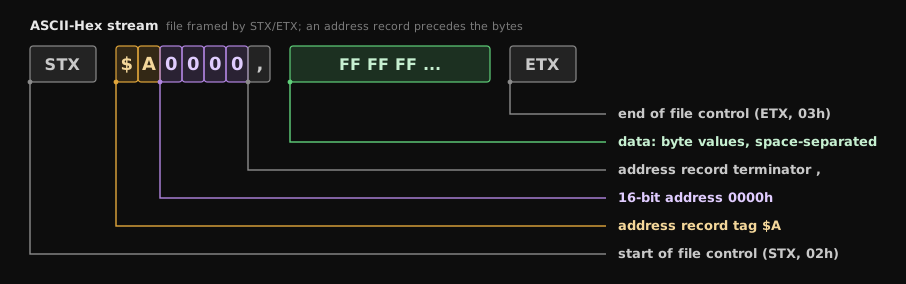
    (STX) $A0000,
    XX XX XX XX XX XX XX XX XX XX ... (ETX)
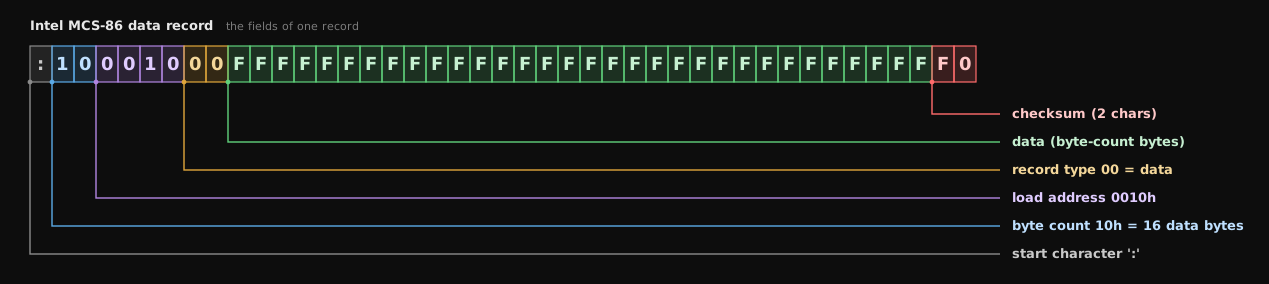
Each record is a 9-character (4-field) prefix - start character, byte count, load address, record type - followed by the data and a 2-character checksum. The record types are:
| Type | Record |
|---|---|
| 00 | Data record |
| 01 | End-of-file record |
| 04 | Extended linear address record (gives the upper 16 bits of a 32-bit address) |
The data record's address is the low 16 bits; it is joined to the most recent type-04 record to form the full 32-bit address. The checksum is the 2s complement of the sum of every preceding byte in the record (byte count, address, record type, and data).
A header record, data records, and a termination record. Every record has five fields: record type, byte count, address, data, checksum. The source range names three record types:
| Type | Record |
|---|---|
| S0 | Header record |
| S1 | Code/data record |
| S2 | Termination record |
The byte count is the number of character pairs in the record after the type and the byte count itself. The checksum is the least significant byte of the 1s complement of the sum of the byte-count, address, and code/data pairs.

In the source figure the header is an S0 record (for example
S00600004844521B) and the file ends with a termination record carrying the
tag S9 (for example S9030000FC).
A start-of-file record, data records, and an end-of-file record. A data record is a run of small fields, each introduced by a tag character:
| Tag | Follows with |
|---|---|
K |
the program identifier |
9 |
a 16-bit load address |
B |
a data word (four hex characters) |
* |
a data byte (two hex characters) |
7 |
a checksum |
8 |
a dummy checksum (ignored) |
F |
marks the end of a data record |
If any data appears before the first address, that first field is given address
0000h; address fields are optional elsewhere. The 7 checksum is the 2s
complement of the sum of the 8-bit ASCII values of the characters from the first
tag character through the checksum tag (7 or 8). The end-of-file record is a
single colon (:).

    K000COFFTOTI
    90000BFFFFBFFFFBFFFFBFFFFBFFFFBFFFFBFFFFBFFFF7F234F
    :
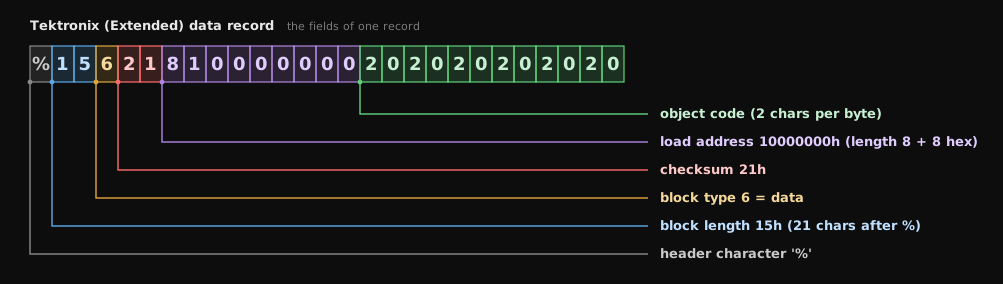
Two record kinds: a data record (header field, load address, object code) and a termination record (end of module). The header field holds:
| Item | ASCII chars | Meaning |
|---|---|---|
% |
1 | Marks a Tektronix record |
| Block length | 2 | Number of characters in the record after the %
|
| Block type | 1 | 6 = data record, 8 = termination record |
| Checksum | 2 | Two-digit hex sum modulo 256 of every value in the record except the % and the checksum itself |
In the load address the first digit is the address length, always 8; the rest of the data record is object code, two characters per byte.
c5xhex is the hex-conversion stage of c5xtools. It reads the linked COFF
output and produces Intel-HEX, Motorola-S, TI-tagged, and ASCII hex, plus a flat
binary image. It accepts -romwidth 8 and -romwidth 16 for the device width,
-order lsb and -order msb for the split order when the memory width is
narrower than the target word, and -image with -org, -len, and -fill for
a gap-free binary image of a bounded range. Its Intel-HEX and Motorola-S output
is confronted byte for byte against the TI utility's output for the same input,
so a file produced by c5xhex is interchangeable with one produced by the
reference tool.
MIT - (c) 2026 Grzegorz Worona grzegorz@worona.pl. See LICENSE.