Viewing Models from BIMServer
See also:
- Viewing BIM Models Offline - loading BIM models from the file system
- High-Performance-Model-Representation - high performance scene representation for huge models
- Importing Models - loading models from other formats
In this tutorial you'll learn how to use xeokit's BIMServerLoaderPlugin to load models from BIMserver 1.5.120. Note that BIMServerLoaderPlugin currently only works with BIMServer 1.5.120.
You'll also learn how to use IFC types to selectively load portions of models and set the initial appearance of objects.
- Example
- Loading the Model
- Model Representation
- Setting Initial States for IFC Types
- Masking what IFC Types are Loaded
- BIMServer Instance
- BIMServerClient
Click the image below for a live demo.
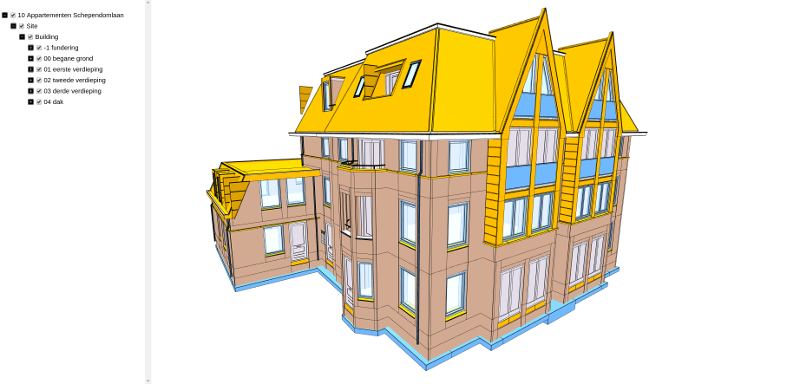
The code snippets below show how it's done.
Let's load the latest revision of a project from BIMServer. We'll assume that we have
our demo BIMServer instance running, with a model loaded for project ID 196609, and a user who is authorized to download that project.
First, we'll create a Viewer.
Then we'll create an initialize a BimServerClient, which is a JSON-RPC client through which we can talk to BIMServer's service interface.
We'll then add a BIMServerLoaderPlugin, which we'll configure with the BimServerClient, through which it will download our model.
Next, we'll log into to our BIMServer through the client, get the number of the latest model revision for our project, then instruct the BIMServerLoaderPlugin to load that revision.
Since xeokit's default World "up" direction is +Y, while the model's "up" is +Z, we'll rotate the model 90 degrees about the X-axis as we load it. Note that we could also instead configure xeokit to use +Z as "up".
import {Viewer} from "./../src/viewer/Viewer.js";
import {BIMServerLoaderPlugin} from "./../src/plugins/BIMServerLoaderPlugin/BIMServerLoaderPlugin.js";
import BimServerClient from "./../src/viewer/utils/BIMServerClient/bimserverclient.js";

const bimServerAddress = "https://xeokit.cleverapps.io/";

const username = "kevin.flynn@en.com";
const password = "secretPassword";

const poid = 196609;

// Create a Viewer
const viewer = new Viewer({
    canvasId: "myCanvas"
});

// Create a BIMServerClient
const bimServerClient = new BimServerClient(bimServerAddress);

// Add a BIMServerLoaderPlugin
const bimServerLoader = new BIMServerLoaderPlugin(viewer, {
    bimServerClient: bimServerClient
});

// Initialize the BIMServerClient
bimServerClient.init(() => {

    // Login to the BIMServerClient
    bimServerClient.login(username, password, () => {

        // Get information on our project
        bimServerClient.call("ServiceInterface", "getProjectByPoid", {
            poid: poid
        }, (project) => {

            // Load the latest revision of the project.
            // Use whatever IFC schema the model uses.

            const roid = project.lastRevisionId;
            const schema = project.schema;

            // Load our model from BIMServer
            const model = bimServerLoader.load({ // Returns a Node representing the model
                id: "myModel",                   // Assigned to Node#id, and Node#isModel will also be set true
                poid: poid,
                roid: roid,
                schema: schema,                 // Load the schema that's available for our project
                scale: [0.001, 0.001, 0.001],   // Scale the model
                rotation: [-90, 0, 0],          // Rotate the model
                edges: true                     // Emphasise edges
            });

            // Fit camera to model when loaded
            model.on("loaded", function() {
                viewer.cameraFlight.jumpTo(model);
            });

            model.on("error", function (errMsg) {
                console.error("Loading failed: " + errMsg);
            });
        });

    }, (error) => {
         console.log("Error logging in: " + error.message);
    });
});Having loaded our model, the BIMServerLoaderPlugin has created an Entity with a corresponding MetaModel loaded from our metadata JSON file.
that contains a MetaObject for each of our model's IFC elements.
We can then get metadata on each element like this:
// Get matadata on our model
const metaModel = viewer.metaScene.metaModels["myModel"];

// Get metadata on an element
const metaObject = metaModel.metaObjects["3NI6Sp$yf87eKCx0T$FWj3"];

const name = metaObject.name; // "stelkozijn",
const type = metaObject.type; // "IfcWindow",
const parent = metaObject.parent; // "2SWZMQPyD9pfT9q87pgXa1"When loading IFC metadata, BIMServerLoaderPlugin will by default apply certain initial states to objects whose types match known standard IFC types. For example, setting "IfcSpace" types invisible and unpickable, setting "IfcWindow" types blue and transparent, etc.
BIMServerLoaderPlugin has a default map of these states, but we can override that as needed to apply our own states. In the example below, our map is the same as the default, except that we'll set "IfcCovering" types green and "IfcDoor" types crimson.
Click the image below for a live demo.

// Define our own custom initial states for objects

 const myObjectDefaults = {
    IfcDoor: {
        colorize: [0.837255, 0.203922, 0.270588]
    },
    IfcCovering: {
        colorize: [0.4470588235, 0.727450980392, 0]
    },
    //...
};

// Use our custom initial default states for object Entities

const model = gltfLoader.load({
    id: "myModel",
    src: "./models/gltf/duplex/scene.gltf",
    metaModelSrc: "./metaModels/duplex/metaModel.json",

    objectDefaults: myObjectDefaults
});In development.
The xeokit examples use a dedicated BIMServer instance hosted at Clever Cloud, accessible at https://xeokit.cleverapps.io/.
xeokit is compatible with BIMServer v1.5.120 and later.
To set up the BIMServer, I did the following:
- Deployed the BIMServer WAR file to Clever Cloud
- Created an admin user for the BIMServer
- Created example projects and checked in their IFC models
- Created a read-only user, which I added to the projects
The examples then use that read-only user's credentials to load the latest revisions of those projects.
The BimServerClient (see the example source code) is a JavaScript client API that's bundled with BIMServer. It provides a client facade through which the example code can issue RPC calls to the BIMServer Service Interface.
Since these examples log into the BIMServer using the read-only user's credentials, they can only download revisions of those projects to which I added that user.
However, if the examples logged in as the admin user, then they could do a whole lot more, such as create projects, upload IFC models, create users etc.
BIMServer can serve us the BimServerClient JavaScript file via HTTP, however that currently violates the browser's same origin security policy when the BIMServer and the examples are hosted at different domains.
Therefore, the xeokit-sdk currently bundles the BimServerClient as a utility within the SDK's source code.