Repository navigation
Server settings
The host decides what players can do on their server. Every player decides how much they see on their own screen.
Only the host has the Server button, at the top left of the window. These settings are saved on the host's machine and used whenever they host. Nothing a host turns off is deleted: it stays with each player's look and comes back when it is turned on. Players are told why theirs is hidden. The host's own always shows.

For each player:
- Choose model opens the grid. Click a model to put it on that player.
- Revert gives them their own pick back.
- Mute effects hides their effects from everyone here. Unmute effects lets everyone see them again.
| Setting | What it does |
|---|---|
| Models from sbox.game | Off: nobody can wear them, and anyone who does goes back to the citizen |
| Models from mounted games | The same for mounted games |
| Players can add model folders | Off by default. Everyone gets every mounted game's characters either way |
| New sbox.game models per player | How many new ones each player other than you can bring in (1 to 50, default 3) |
| Counted over | Over how many minutes (1 to 60, default 5) |
The default citizen and the game's own models can always be worn. Everyone downloads each sbox.game model a player puts on, which is why there is a limit. Models already on the server don't count.
Lists the games the players here have mounted. Block keeps a game's models off, and anyone wearing one goes back to the citizen. Allow undoes it.
- Players can change body groups: off, models show their own body groups.
- Players can wear items: off, items stay with their looks and don't show.
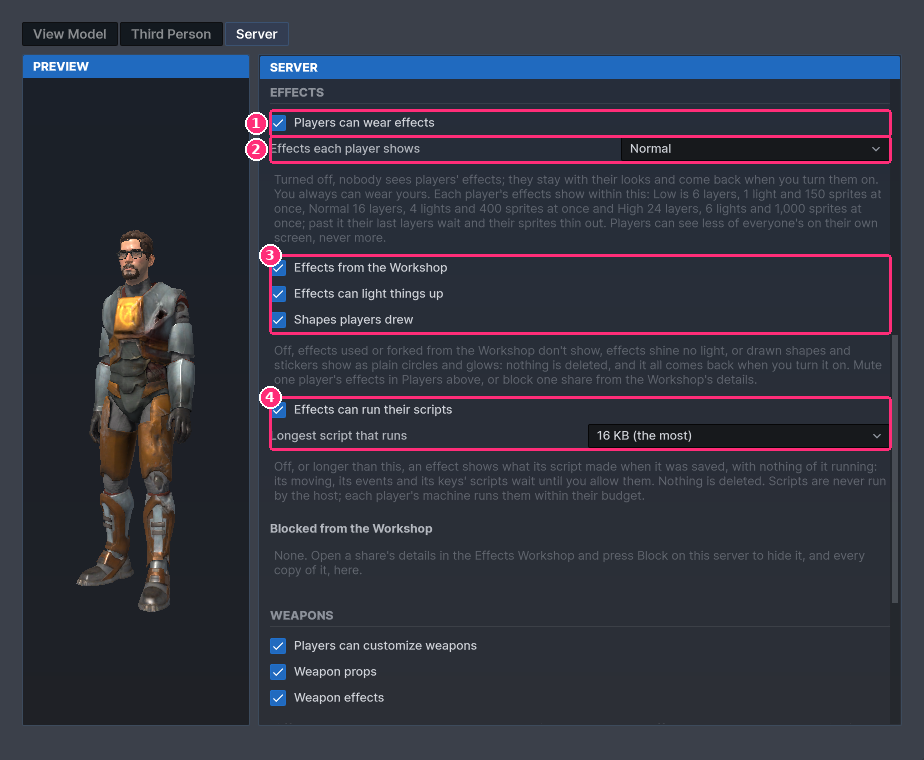
- Whether effects show at all.
- The budget, below.
- What effects may use.
- Scripts.
| Setting | What it does |
|---|---|
| Players can wear effects | Off: nobody sees players' effects |
| Effects each player shows | The budget, below |
| Effects from the Workshop | Off: effects used or forked from the Workshop don't show |
| Effects can light things up | Off: effects shine no light |
| Shapes players drew | Off: drawn shapes and stickers show as plain circles and glows |
| Effects can run their scripts | Off: an effect shows what its script made when it was saved, with nothing of it running |
| Longest script that runs | 16 KB at most, down to 2 KB. A longer one is treated as off |
The budget, per player:
| Level | Layers | Lights | Sprites at once |
|---|---|---|---|
| Low | 6 | 1 | 150 |
| Normal | 16 | 4 | 400 |
| High | 24 | 6 | 1,000 |
| Custom | up to 32 | up to 8 | up to 2,000 |
Past it, a player's last layers and lights wait and their sprites thin out. Nothing is taken from their look. The Effects tab marks what waits, and the preview shows a look as others see it.
To stop one share: open its details in the Workshop (the i icon), then press Block on this server. It and every copy of it are hidden here. They are listed under Blocked from the Workshop, with Unblock.
The host never runs anyone's scripts.
- Players can customize weapons: off, players' weapons show as they come.
- Weapon props: off, weapons show without the props players gave them.
- Weapon effects: off, weapons show without their effects. With effects off, weapon effects are off too.
Players can set up armatures: off, players can't give body parts a bone by hand, bones they picked are dropped, and models that need them show the citizen.
To block a model: point at its tile in the Models grid and click the no-entry icon. Whoever wears it goes back to the citizen.
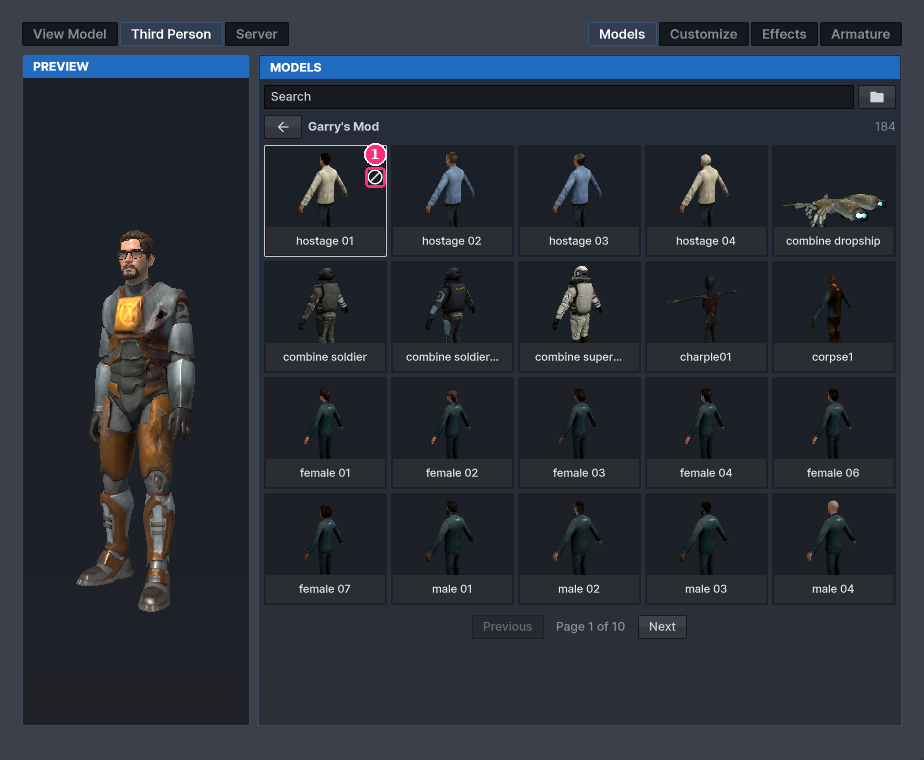
Blocked models are listed here, the latest first, with Unblock.
The host holds everyone to the limits. It takes at most two picks a second from each player, with the last one always landing, and refuses looks and model paths too long to be real. It checks every sbox.game pick against the same rules as the window, so a changed client can't wear what the window leaves out. When the host leaves, whoever hosts next takes over the selector, with everyone's picks and the rules as they were.
What You See, at the bottom of the Effects tab, changes only your screen. It is kept on your machine.
| Setting | What it does |
|---|---|
| Effects quality | High (as the host allows), Normal, Low or Off. Shows less of everyone's, you too, never more than the host allows |
| Hide name's effects | Hides that player's effects and weapon designs, for you alone |
Show weapon effects in first person and Use my player model's arms are on the View Model page.