Getting Started
Minecraft Bedrock 26.40 or newer. Cheats, commands, and experimental gameplay toggles are not required.
- Download
Andys_Portable_Campsite_1.5.0.mcaddon. - Open it with Minecraft Bedrock.
- Wait for Minecraft to confirm that the included packs imported successfully. The download carries three: the Behavior Pack, the Resource Pack, and the optional Comforting Campfires Bridge.
- Create a world, or edit the world where you want to use the add-on.
- Activate Andy's Portable Campsite under Behavior Packs.
- Confirm Andy's Portable Campsite Resources is active under Resource Packs.
- Both packs must show the same version 1.5.0.
- Optional: activate Andy’s Portable Campsite - Comforting Campfires Bridge only if Andy’s Comforting Campfires is installed. It adds the hearth crafting recipes and nothing else, and Minecraft will not activate it without Comforting Campfires present.
Back up the world before installing or updating.
Consoles generally cannot import a local .mcaddon. Import on Windows or mobile, upload the world to a Realm, and join from the console.
- Open a normal Crafting Table.
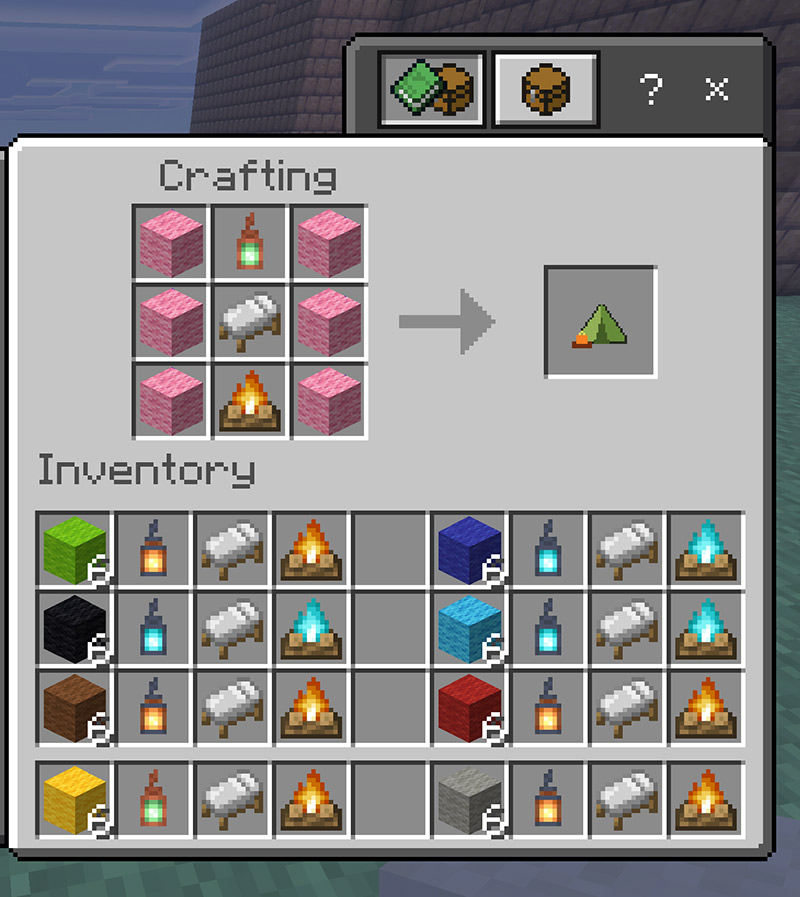
- Place six matching wool blocks in the four corners and the two side-middle slots.
- Place a lantern in the top center, a bed in the center, and a campfire in the bottom center.
- Take the Reusable Campsite Kit. The kit is linked to you and remembers those materials.
| Wool | Lantern | Wool |
|---|---|---|
| Wool | Bed | Wool |
| Wool | Campfire | Wool |
The kit's lore shows the owner, tent canvas color, bed, lantern, and campfire.
- Put the kit in your selected hotbar slot.
- Face the direction you want the tent entrance to open.
- Use the kit on the ground block that should sit under the center of the tent floor.
- The tent, bed, chest, lanterns, and campfire appear in front of you.
- Sleep in the bed and use the chest as ordinary Minecraft blocks.
- Interact with the campfire and choose Pack Up Campsite to take the camp with you.
Keep the kit selected until deployment finishes. If something goes wrong, the add-on rolls the tent back and returns the kit.
See Crafting the Kit and Using the Campsite for the full rules.