Repository navigation
Porter and Bob
Documentation snapshot from README.md at commit
20d7c81. Check the current source for updates.
Beside the HUB stands Porter, a crane-backed robot. Press E to talk. He can:
-
Build a complete app setup from his dock: Web server, Redis, PostgreSQL,
WordPress + MySQL, the Media server suite and the Monitoring dashboard
(both below). Each comes with its workloads, Services, storage and a
generated password (Kubernetes Secret, or an env file for Compose). On
Kubernetes they are applied from
apps/<id>.k8s.yaml; on a Docker engine they run as a Compose project fromapps/<id>.compose.yaml. Edit or add files there. -
Order from app lists: any list in Portainer's app-template format.
catalogs.jsonships with Portainer's official list and two community lists; add more by URL in the conversation (kept in the user folder). Container templates become a Deployment + Service on Kubernetes or adocker runon Docker. Stack templates are skipped. - Manage what he installed: status, go to, logs, restart, remove.
-
Install Portainer itself (optional) and open its console. Put your
Portainer address and an API key in
portainer.jsonand its own template list shows up as "My Portainer server".
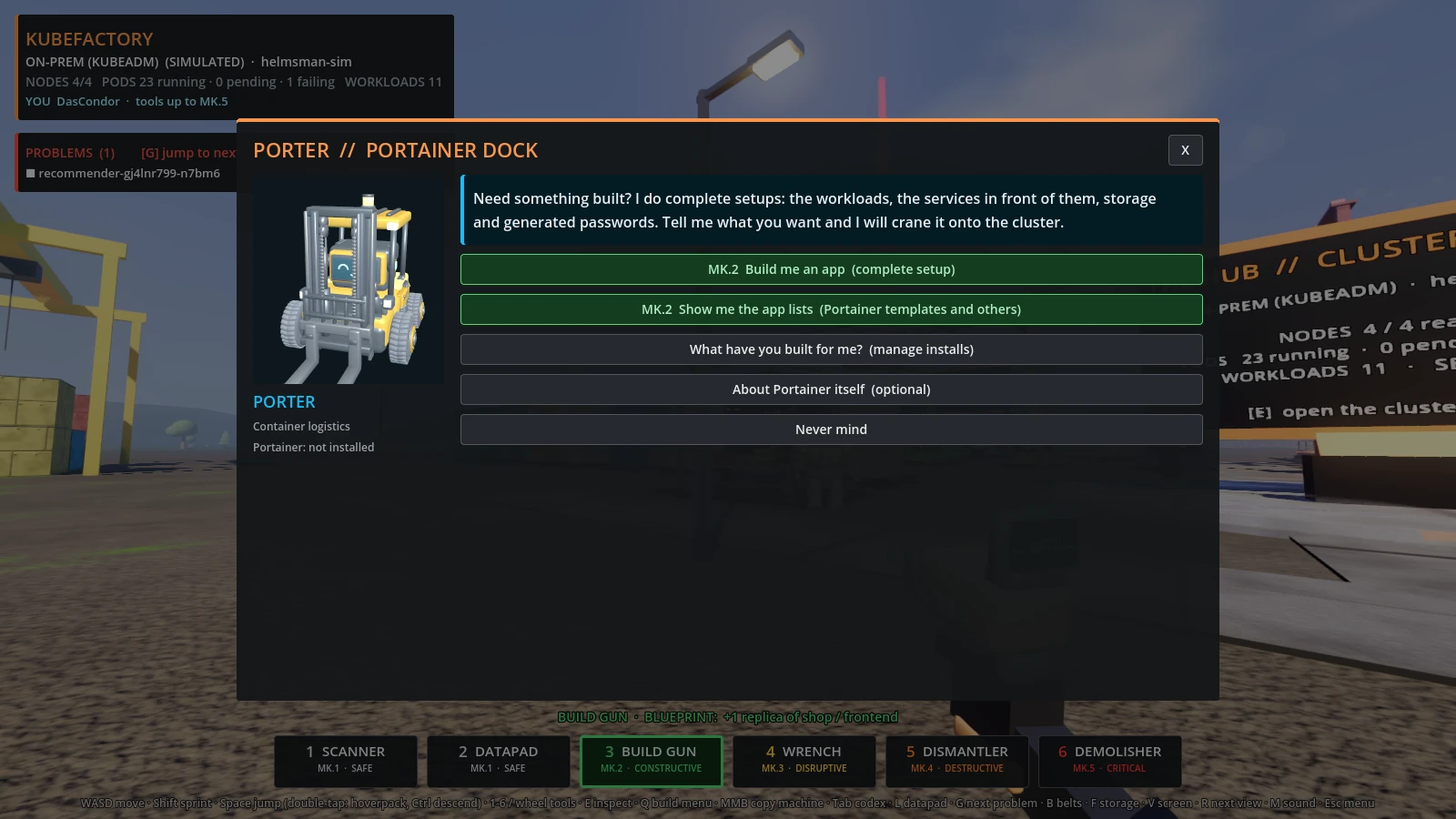
Porter builds complete app setups and installs from app lists.
His three big setups:
| Setup | What he builds |
|---|---|
| Media server: Jellyfin + VPN | the arr stack from request to screen: Seerr (requests) → Radarr (films) / Sonarr (TV) → Prowlarr (indexers) → Deluge, which has no network of its own and sends everything through Gluetun's VPN tunnel → Radarr / Sonarr file it → Jellyfin (watch). Your VPN account goes in apps/vpn.env (Compose) or a Secret vpn (Kubernetes); KubeFactory never reads it |
| Media server suite | Plex (watch), Overseerr (requests), Sonarr / Radarr / Lidarr / Bazarr (TV, films, music, subtitles), Jackett (the indexer proxy they search through) with Prowlarr as the alternative, qBittorrent (download client) and Tautulli (Plex statistics), sharing one media and one downloads volume |
| Monitoring dashboard | Grafana with a ready-made Containers dashboard and a generated admin password, Prometheus, cAdvisor (per-container CPU, memory, network) and node-exporter (the host) |
Jackett needs three things around it, and the suite brings all of them: the
apps that search through it (Sonarr, Radarr, Lidarr), a download client
(qBittorrent) and the shared downloads volume. The comments at the top of
apps/media.compose.yaml walk through wiring them together on first run. The
Kubernetes version is meant for a single-node homelab cluster.
Across the yard from Porter, an old hand in a flat cap keeps a repair stand. The board behind him is the cluster's fix list: the worst problems, live. Press E on Bob (or his stall) for the full list. For every job he gives:
- What is wrong, in plain words, worked out from the pod or node status.
- What he would do about it, and the button for it when there is one.
- Go there (jump to the machine or node sign) and Logs and events.
| On the list | Bob's remedy |
|---|---|
| CrashLoopBackOff, OOMKilled | read the logs; Mk.3 rolling restart (restart container on Docker) |
| ImagePullBackOff, ErrImagePull | fix the image or pull secret: no button, a restart will not help |
| CreateContainerConfigError | create the missing ConfigMap / Secret: no button |
| Error, Evicted, anything unrecognised | Mk.4 rebuild the pod |
| Unschedulable pod | Mk.2 uncordon a cordoned node, if there is one |
| Node NotReady | open the node terminal |
| Node cordoned | Mk.2 uncordon |
| Pod running but restarted 5+ times | a warning to look at before it gets worse |
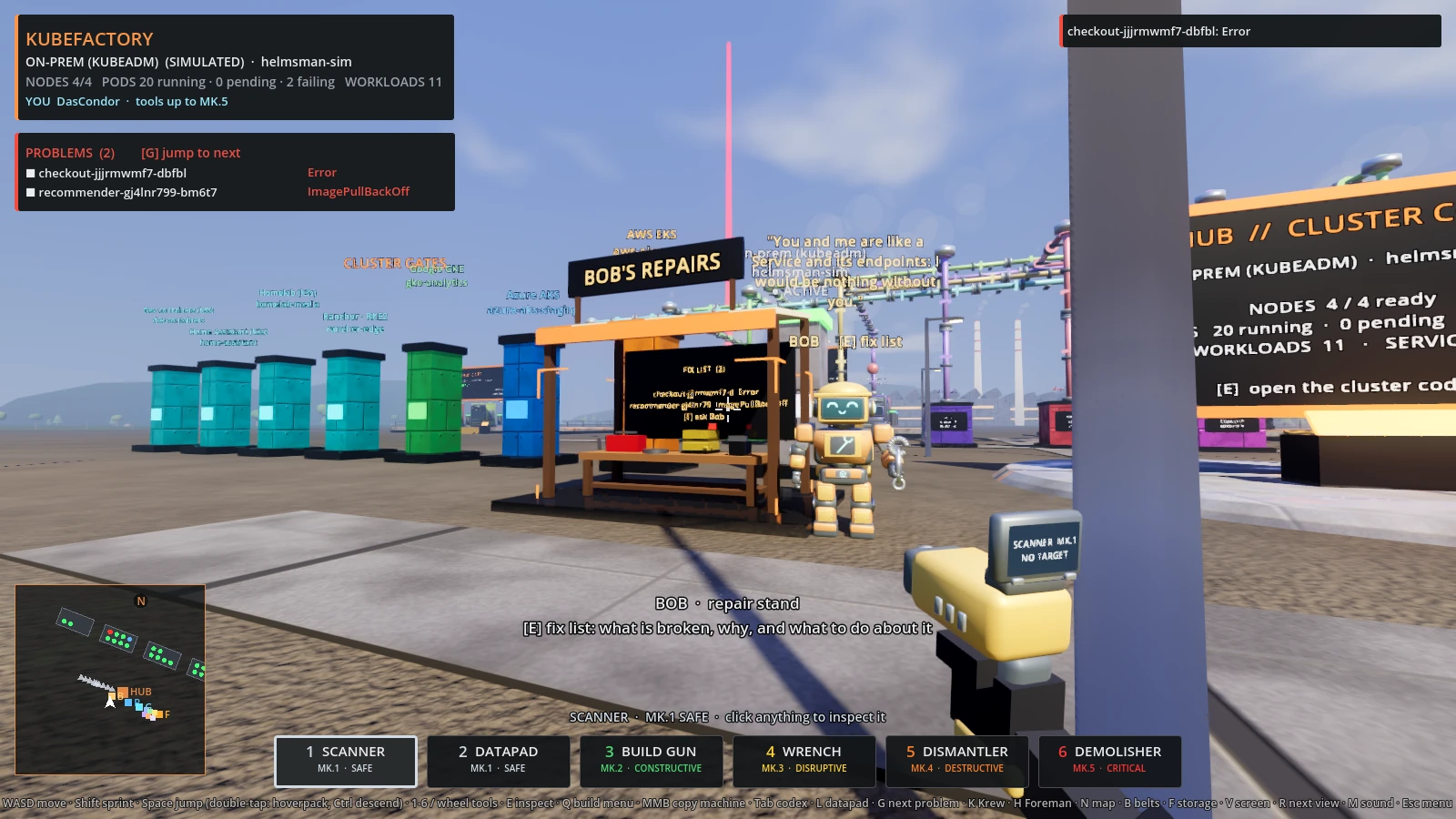
Bob's repair stand: the board lists what is broken, and he has something to say about it.
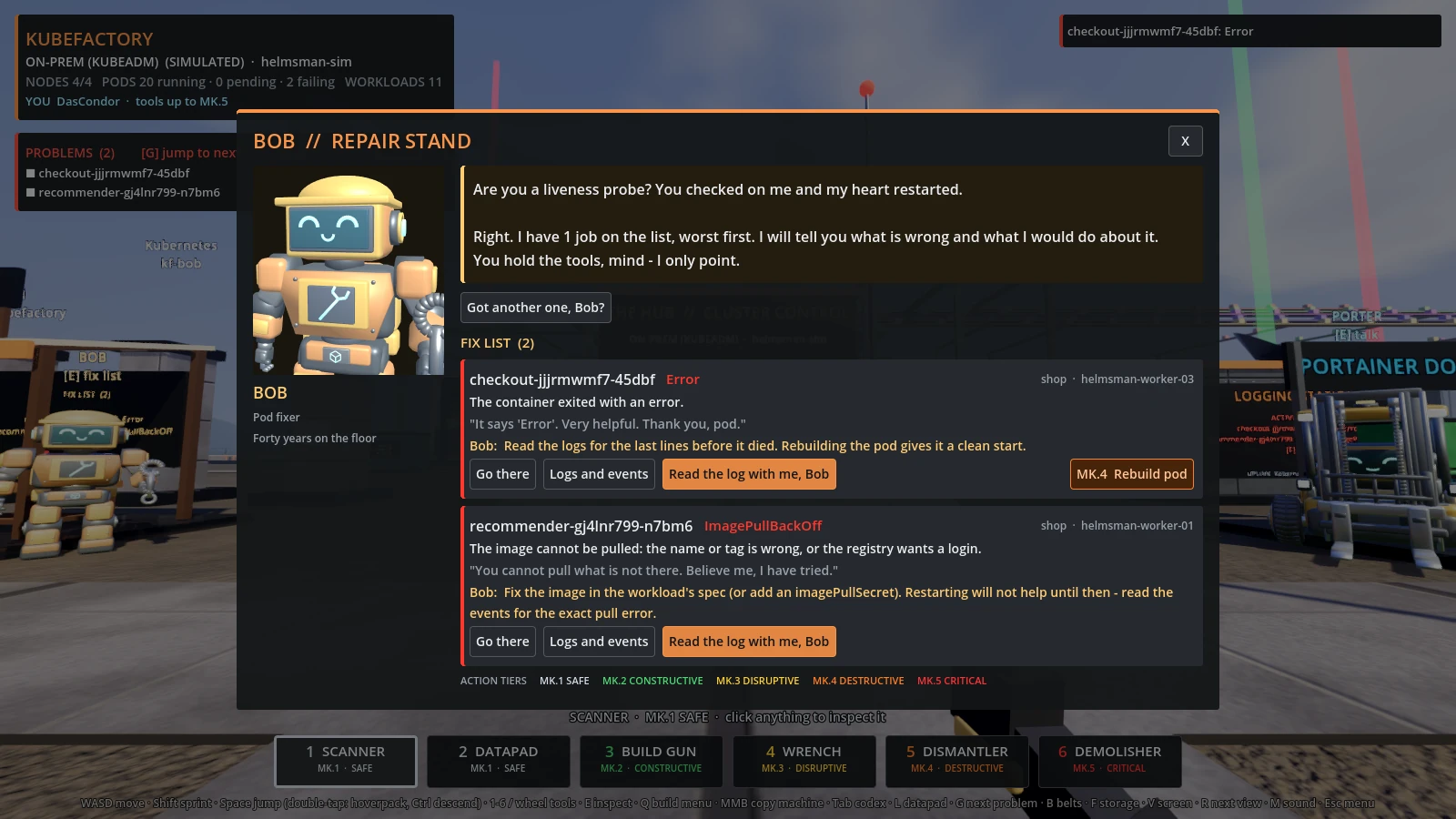
His fix list: what is broken, why, and what to do.
He also has opinions. Walk up to him and he greets you with a zinger about your
cluster or a Kubernetes pick-up line, with a fresh one every few seconds; each
job on the list gets a dry remark of its own, and "Got another one, Bob?" asks
for more. The lines are the BOB_* lists at the top of scripts/kutil.gd.
Each pod on the fix list has Read the log with me, Bob. He fetches the pod's log (the previous, crashed run when there is one) and its events, and opens a case file:
- The verdict: one sentence naming the most likely cause and the line it is on.
- The lines that matter: the log or event line itself, its line number, what it means, and what to do. Each is marked likely cause, strong lead or symptom, and repeats are counted rather than listed.
He knows the common failures: refused connections, DNS names that do not resolve, bad credentials, permissions, expired certificates, missing files, settings, Secrets and tables, out of memory, full disks, wrong architecture or start command, unpullable images, failed mounts and scheduling, probe failures, stack traces, and what exit codes 1, 2, 126, 127, 137, 139 and 143 mean.
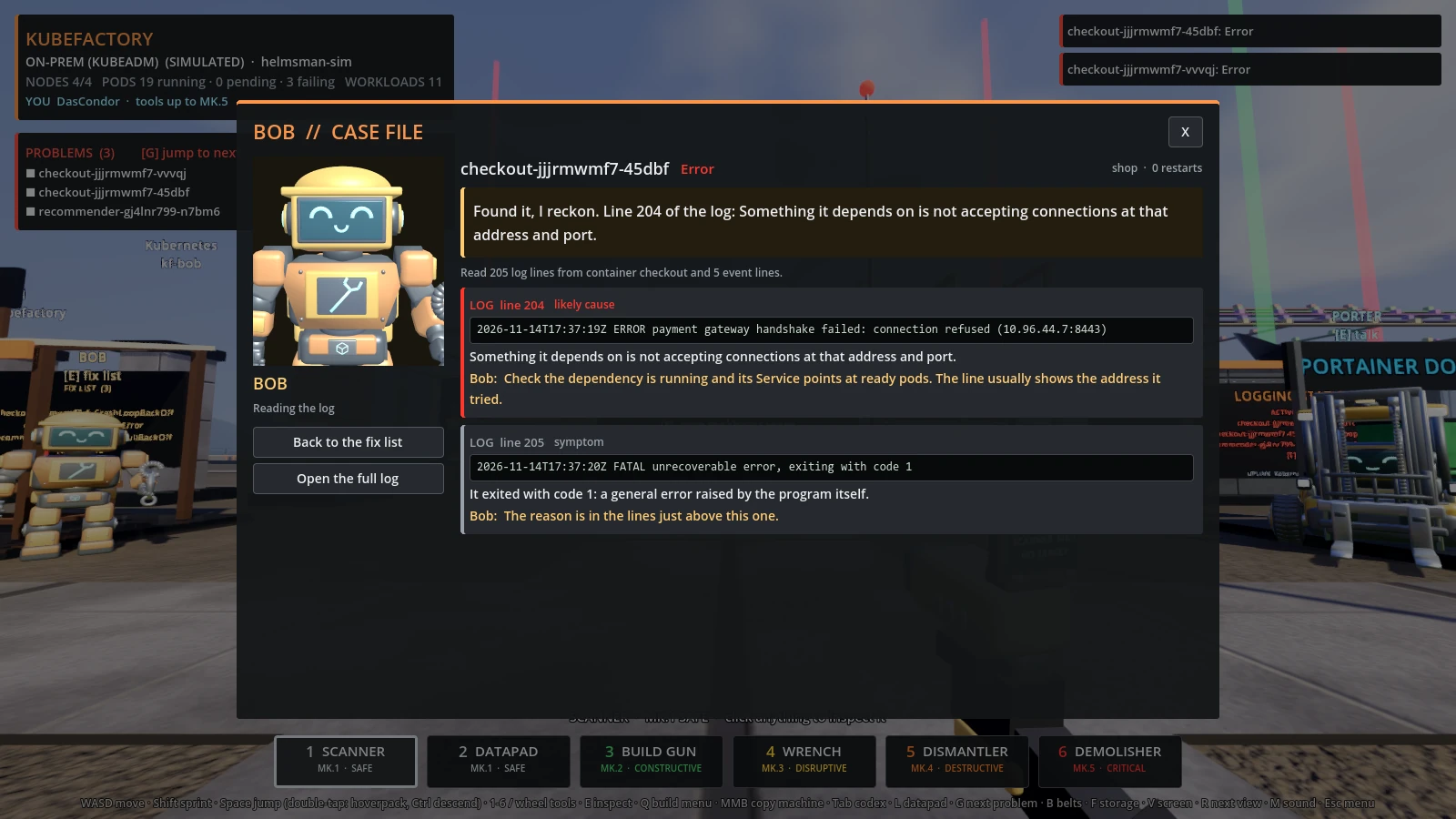
Bob 2.0 reads the log: the line that killed it, what it means, what to do.
Optional settings live in bob.json next to the game (config\bob.json from source). Every key is
optional and the file can be deleted:
| Key | Default | Does |
|---|---|---|
log_review |
true |
false hides the log reading; the fix list stays |
tail |
200 |
log lines read per container (20 to 2000) |
previous |
true |
read the crashed container's log when the pod has restarted |
max_findings |
6 |
how many lines he reports per case |
ignore |
[] |
regexes; matching lines are skipped (noisy health checks, say) |
rules |
[] |
your own rules, checked before his |
A rule of your own teaches him your application's errors:
{"rules": [{"match": "license (expired|invalid)", "weight": 3,
            "means": "The licence file is out of date.",
            "fix": "Renew it and update the app-license Secret."}]}
weight is 3 for a cause, 2 for a strong lead, 1 for a symptom. The built-in
rules are the RULES list in scripts/bob.gd. The original design notes are in
docs/bob-2.0.md.
Bob only points: his buttons are the same tiered actions as your tools, so the
cluster policy and your permissions apply to them exactly as they do elsewhere.
The diagnoses live in diagnose() in scripts/kutil.gd; add a status there to
teach him a new one.