AI Analysis
Pulse Triplet Analysis using AI
- Scene-by-scene evaluation: AI analyzes individual scenes in triplets (previous/current/next) to provide story pulse assessment and grade evaluation.
- Multiple ordering options: Run analysis in manuscript order (Narrative mode) or by subplot order to get different perspectives on narrative scene flow.
Modes: Narrative mode (key 1), Progress mode (key 2), Chronologue mode (key 3)
Command: Scene pulse analysis (manuscript order), Scene pulse analysis (subplot order)
Settings: AI LLM for scene analysis
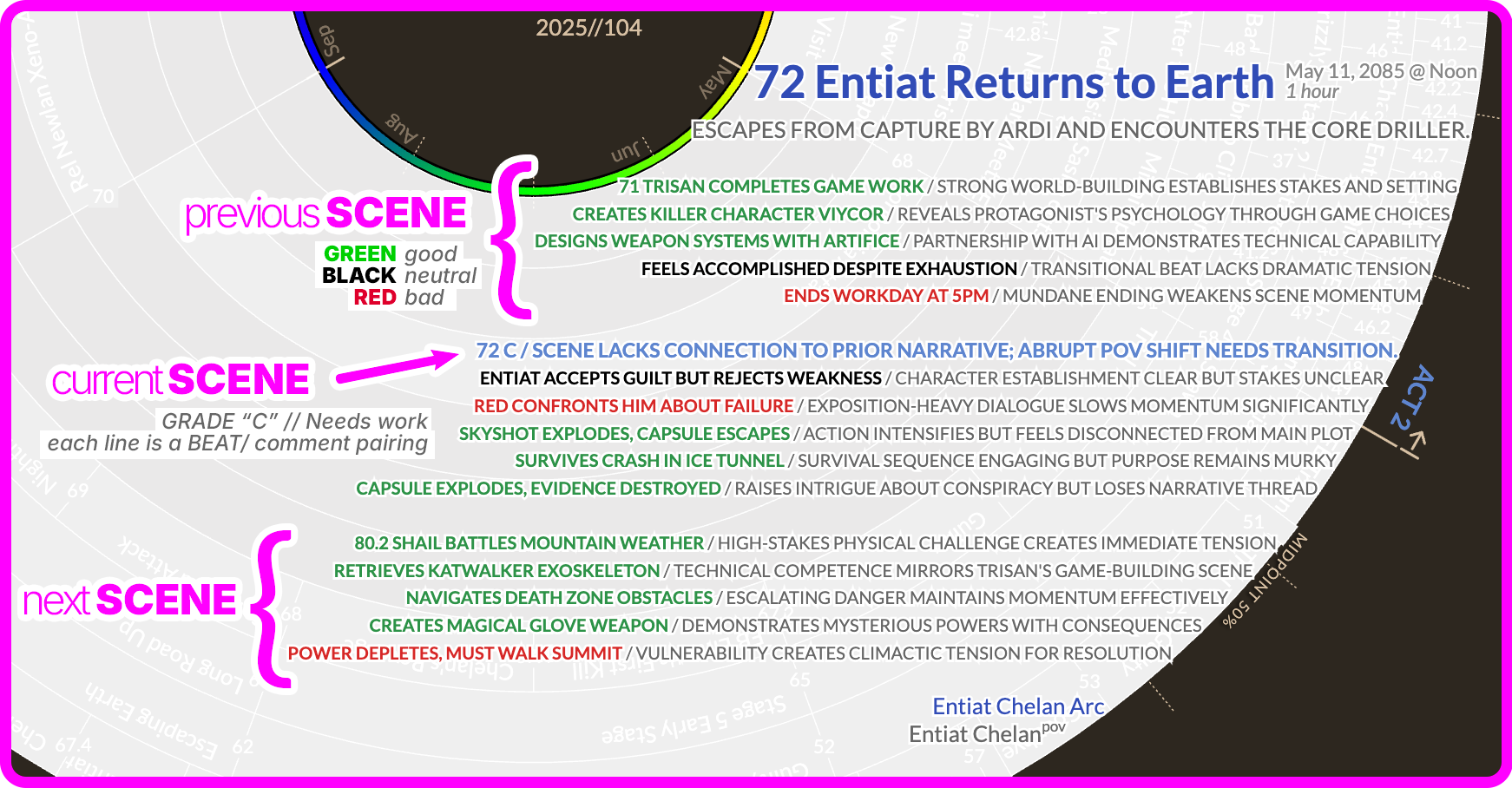
The "Pulse Analysis" feature in Radial Timeline is a powerful tool that reads your current scene along with the previous and next scenes to analyze narrative flow. Because this task is complex, using a Local LLM (via Ollama, LM Studio, etc.) requires a bit of specific configuration to get good results.
The plugin sends three full scenes to the AI at once (Previous + Current + Next) to ensure the analysis is contextually aware.
- The Math: If your scenes average 2,000 words, that is ~6,000 words of input, plus the system instructions.
- Requirement: You must use a model with a context window of at least 8k tokens.
-
Recommendation: Models with 16k or 32k context windows are safer to avoid the text being cut off mid-stream.
- Good choices: Llama 3.1 (128k context), Mistral (32k), or Qwen 2.5.
The plugin requires the AI to output pure, valid JSON. If the AI adds conversational filler (e.g., "Here is the analysis you requested...") or messes up the brackets, the plugin will fail to parse the results.
- Avoid Base Models: Do not use raw "base" models.
-
Use Instruct/Chat Models: Always select the "Instruct" or "Chat" versions of models (e.g.,
llama3.1:8b-instruct), as they are trained to follow formatting rules strictly.
For the best balance of speed and accuracy on consumer hardware (like a MacBook Pro or a PC with a good GPU):
- Llama 3.1 8B: A fantastic all-rounder. Fast, smart enough for narrative analysis, and has a massive context window.
- Mistral 7B / Nemo: Excellent reasoning capabilities and very compliant with instructions.
Note
Larger models (like 70B parameters) will provide analysis comparable to GPT-4 or Claude 3.5 Sonnet but require significant hardware (e.g., Mac Studio with 64GB+ RAM or dual RTX 3090s).
- "JSON Parse Error": This usually means the model tried to "talk" to you instead of just giving the data. Try a different model or ensure you are using an "Instruct" version.
- Incomplete Analysis: If the analysis stops halfway through, your context window might be too small. Check your local server settings (e.g., in Ollama or LM Studio) to ensure the context limit isn't set to a low default like 2048 or 4096.
For users developing custom integrations or troubleshooting local LLM responses, here is the exact JSON schema the plugin expects. The LLM must return only this JSON structure with no additional text.
{
  "previousSceneAnalysis": [
    {
      "scene": "38",
      "title": "Pulse point title",
      "grade": "+",
      "comment": "Editorial comment (max 10 words)"
    }
  ],
  "currentSceneAnalysis": [
    {
      "scene": "39",
      "title": "Overall Scene Grade",
      "grade": "B",
      "comment": "Instructions on how to improve it (max 15 words)"
    },
    {
      "scene": "39",
      "title": "Pulse point title",
      "grade": "+",
      "comment": "Editorial comment (max 10 words)"
    }
  ],
  "nextSceneAnalysis": [
    {
      "scene": "40",
      "title": "Pulse point title",
      "grade": "+",
      "comment": "Editorial comment (max 10 words)"
    }
  ]
}
Field Requirements:
| Field | Type | Required | Description |
|---|---|---|---|
previousSceneAnalysis |
array | No | Analysis of how the previous scene sets up the current scene |
currentSceneAnalysis |
array | Yes | Analysis of the current scene (at least one item required) |
nextSceneAnalysis |
array | No | Analysis of how the next scene builds on the current scene |
Pulse Item Structure:
Each array item must have:
| Field | Type | Values | Notes |
|---|---|---|---|
scene |
string | Scene number | e.g., "24" |
title |
string | Short title or Grade | Brief description or Grade (A/B/C for first item) |
grade |
string |
A, B, C or +, -, ?
|
See grading rules below |
comment |
string | Max 10-15 words | Editorial feedback |
Grading Rules:
-
First item in
currentSceneAnalysis: Must use A, B, or C (overall scene quality grade)-
A= Nearly perfect scene -
B= Good with minor improvements needed -
C= Needs significant work
-
-
All other items (including all
previousSceneAnalysisandnextSceneAnalysis): Must use +, -, or ?-
+= Strong connection/effective element -
-= Weak connection/needs improvement -
?= Neutral/uncertain
-
Important
The response must be pure JSON only—no markdown code fences, no preamble like "Here is the analysis...", no trailing commentary. If the model wraps the JSON in ```json blocks, the plugin will attempt to strip them, but raw JSON is preferred.
Example from Pride & Prejudice
previousSceneAnalysis:
  - 5 Matchmaking Focus + / Establishes the desperation driving Mrs. Bennet's rain scheme.
  - Darcy's Pride + / Sets up the tension for Elizabeth's arrival at Netherfield.
  - Lucas Foil ? / Charlotte's pragmatism contrasts with Elizabeth's muddy trek.
currentSceneAnalysis:
  - 7 A / Excellent pacing; the muddy walk perfectly characterizes Elizabeth.
  - The Entail + / High stakes explain Mrs. Bennet's dangerous scheming.
  - The Rain Scheme + / Pivotal plot device forcing the protagonists into proximity.
  - Elizabeth's Walk + / Physicality defines her independence against social norms.
  - Netherfield Reception + / Sharp contrast between Bingley's warmth and sisters' snobbery.
nextSceneAnalysis:
  - 9 Mrs. Bennet's Visit + / Direct consequence of the illness established in this scene.
  - Social Embarrassment + / Elizabeth's anxiety here is fully realized by mother's behavior.
  - Darcy's Attraction + / His interest in her 'fine eyes' escalates significantly.
The cloud providers (Claude, Gemini, GPT-4) remain the recommended option as they have the highest intelligence and reliably follow the json return formatting.