Repository navigation
Flows sheet
Before you start: read Processes, flows and stocks. It explains absolute and relative flows, which you need to fill in the Value and Unit columns. For the indicator columns (e.g.
Carbon (Mt)), read Indicators.
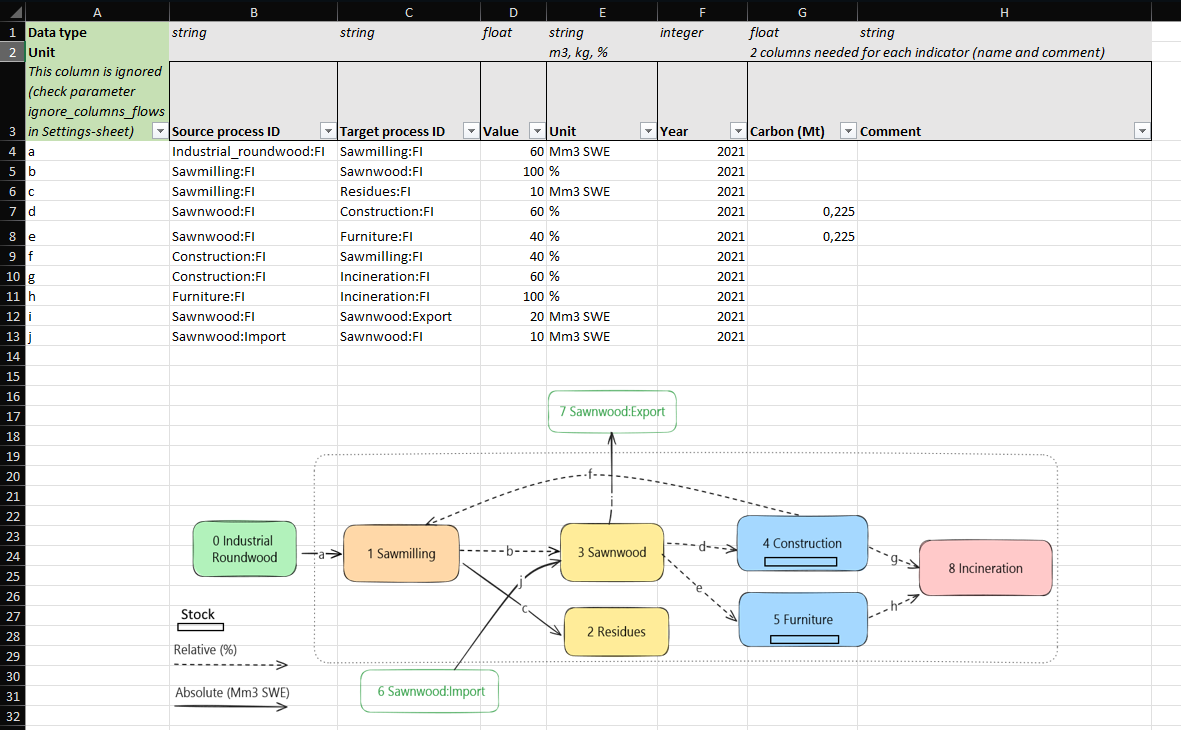
In this sheet you list the flows between processes, one row per flow and year.
- Each year is a separate flow system: only flows with the same year are solved together.
- You do not need data for every year. aiphoria can fill in missing years (see
fill_missing_absolute_flows,fill_missing_relative_flows, andfill_methodin the Settings sheet).
The column order matters. Columns listed in ignore_columns_flows are skipped.
| Column | Name | Description |
|---|---|---|
| A | (ignored) | Free column for your own notes |
| B | Source process ID | Process the flow comes from. Must match a process ID in the Processes sheet. |
| C | Target process ID | Process the flow goes to. Must match a process ID in the Processes sheet. |
| D | Value | The baseline value. Absolute flow: an amount ≥ 0. Relative flow: a share from 0 to 100. |
| E | Unit |
% makes the flow relative; any other text makes it absolute (e.g. Mm3). The unit is a label only: aiphoria does not convert units. |
| F | Year | Year of the flow |
| G |
Indicator (e.g. Carbon (Mt)) |
Conversion factor from the baseline value to the indicator. The header gives the name and, in brackets, the unit of the result. See Indicators. |
| H | Comment | Comment for the indicator in column G, e.g. the source of the factor |
The example file uses Excel formulas to build the process IDs in columns B and C.
Add two more columns for each extra indicator: the conversion factor (header Name (unit)) and a comment. For
example: Carbon (Mt), Comment, Energy (PJ), Comment.
NOTE:
- Indicator columns must always come in pairs (factor, then comment). An odd number stops the run with an error.
- Indicator columns must be the last columns of the sheet. Do not add other columns after them.
- Factors are only needed on flows into stocks for the stock and CO2 results; stock outflows get their values from the stock. Give every flow a factor if you want a complete indicator balance, because empty cells count as zero.
- The relative outflows of a process should add up to 100%.
- Every source and target process ID must exist in the Processes sheet.
- Avoid spaces in names.
Next: Scenarios sheet