Repository navigation
Scenarios and scenario modes
An alternative scenario is the baseline with some flows changed over time, for example "reduce sawmilling residues by 50% between 2025 and 2030". Scenarios let you test how the system reacts to a change, for example how much more carbon is stored in products.
The columns of the Scenarios sheet are listed in Scenarios sheet. This page explains how scenarios work.
- The flow data in the Excel file is the baseline scenario.
- Each row of the Scenarios sheet is one flow modifier: a change to one flow, from a source process to a target process, over a range of years.
- All rows with the same scenario name belong to the same scenario.
For example:
| Scenario | Source process ID | Target process ID | Change in value (delta) | Change type | ... |
|---|---|---|---|---|---|
| Scenario 1 | P1 | P2 | 50 | % | ... |
| Scenario 1 | P1 | P3 | -20 | % | ... |
| Scenario 2 | P0 | P1 | 25 | % | ... |
This creates three scenarios in total: Baseline, Scenario 1 (two changes), and Scenario 2 (one change).
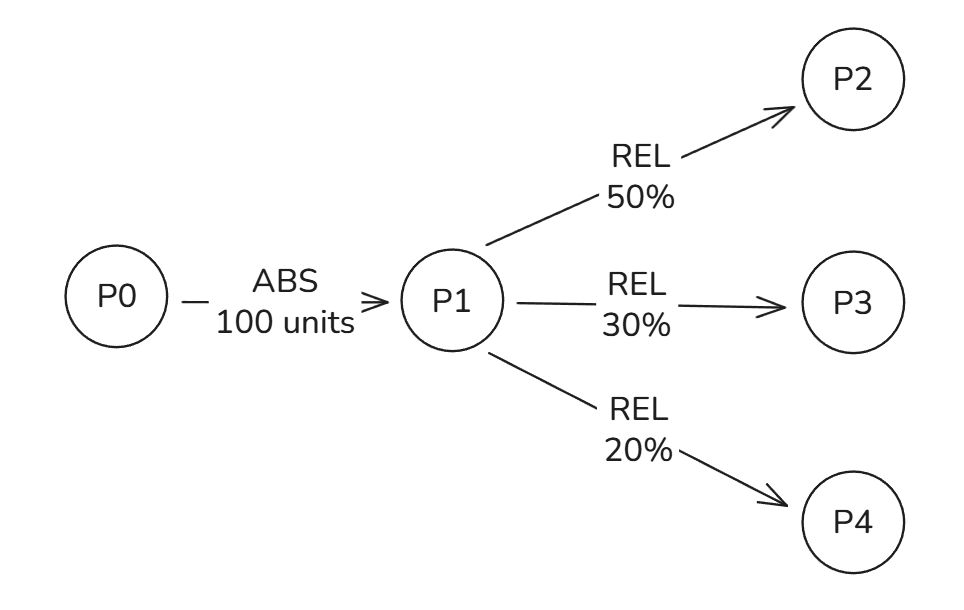
When aiphoria runs:
- It solves the baseline scenario.
- For every alternative scenario, it:
- copies the baseline data,
- applies all flow modifiers of that scenario,
- solves the new scenario.
The baseline is always saved in a folder called Baseline; each alternative scenario gets its own folder.
A flow modifier can change a flow in two ways:
- Change in value (delta): change the flow by an amount, for example −5 units, or by a percentage, for example −50%.
- Target value: reach a given value in the end year.
The function type decides how the change develops between the start and end year: Constant, Linear,
Exponential, or Sigmoid.
What the change means depends on the flow type (see Processes, flows and stocks):
| Flow type | Change in value (delta) | Target value |
|---|---|---|
| Absolute | change the amount, as a value or a % of the flow | the amount to reach in the end year |
| Relative | change the flow share | the share to reach in the end year |
If one outflow of a process changes, something else must change too, or the process no longer balances. For
example, if sawmilling produces fewer residues, the wood must go somewhere else. By default (Apply to targets =
TRUE), aiphoria applies the opposite change to the other outflows of the same source process ("sibling"
outflows). You can choose which sibling outflows take the opposite change in the Target process ID (where the
opposite change is applied) columns. If you leave them empty, all sibling outflows share it.
Rules:
- the source process must be connected to the target process by an outflow;
- the processes that take the opposite change must be outflows of the same source process.
- the sibling flows where opposite change is applied must be same type as source-to-target-flow
Set Apply to targets to FALSE to change only the source-to-target flow and nothing else.
The example file has one alternative scenario, Reduce sawmilling residues by 50%. The flow from Sawmilling:FI to
Residues:FI is changed by −50% from 2025 to 2030, with function type Linear. Because this is an absolute flow,
its value goes down in a straight line from 10 Mm³ in 2025 to 5 Mm³ in 2030.
Sometimes a change asks for more material than the system has, for example increasing a flow beyond what its source
process receives. The scenario mode decides what happens then. Choose it with scenario_type in the
Settings sheet:
| Parameter | Values | Default |
|---|---|---|
scenario_type |
Constrained or Unconstrained
|
Constrained |
-
Changes are applied only if the baseline data can supply them.
-
No virtual flows are created.
-
If a change is not possible, the run stops and aiphoria tells you which row of the Scenarios sheet caused it, and by how much. For example:
Process 'Sawmilling:FI' does not have enough outflows for absolute flows
in year 2030 (total=10.0, required=70.0, missing=-60.0) (row number 2)
For flows given as shares, the message also gives the largest change or target value that is possible.
Use this mode for final results and when you build a scenario towards a target, because every flow in the result comes from your data.
- Changes are always applied.
- If a process cannot supply a change, aiphoria adds virtual flows from a virtual process to fill the gap.
Virtual processes have the prefix
VP_(for exampleVP_Sawmilling:FI). - The same messages are printed, but the run continues and all results and graphs are created.
Use this mode for quick exploration. Look in the Flows sheet of combined_scenario_data.xlsx for flows starting
with VP_: they show where, when, and by how much the scenario goes beyond your data.
Tip: if a constrained run stops, either reduce the change to the maximum reported in the message, or set Apply to targets so that other outflows make room for it.
Next: The scenario file