Cost Management
This lab can become expensive if every profile toggle is enabled. Use cheap-lab first, then selectively enable richer features.
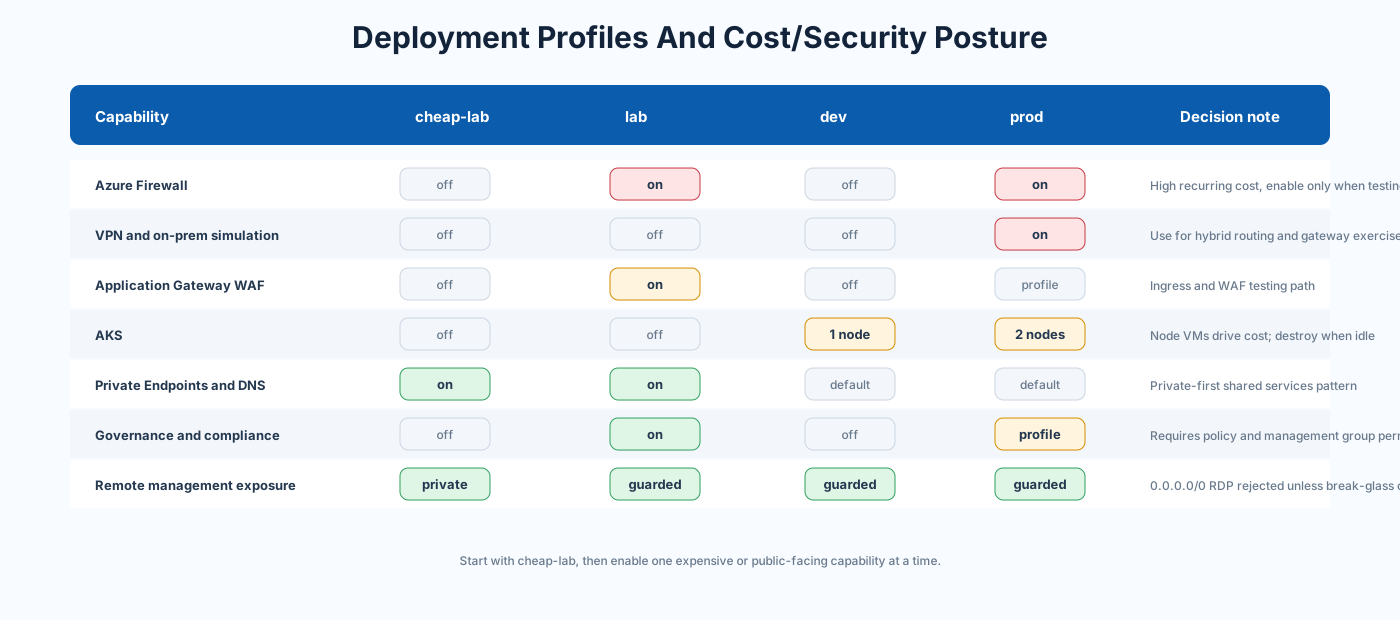
Source:
- environments/cheap-lab.tfvars
- environments/lab.tfvars
- modules/cost-management
- .github/actions/cost-estimate
| Toggle | Resource family | Cost note |
|---|---|---|
deploy_firewall |
Azure Firewall | One of the highest recurring lab costs |
deploy_vpn_gateway |
VPN Gateway | Recurring hourly gateway cost |
deploy_application_gateway |
Application Gateway WAF | Recurring capacity cost |
deploy_nat_gateway |
NAT Gateway | Hourly and data processing cost |
deploy_aks |
AKS node pools | VM node cost even if cluster is idle |
deploy_load_balancer |
Public LB and web VMs | VM and public IP cost |
deploy_onprem_simulation |
Simulated VNet and VPN | Additional gateway/VM resources |
deploy_secondary_dc |
Extra Windows VM | VM and disk cost |
enable_vnet_flow_logs |
Flow logs storage and analytics | Storage and analytics ingestion |
enable_traffic_analytics |
Traffic Analytics | Log Analytics ingestion and analysis cost |
- Start with cheap-lab.tfvars.
- Apply only after reviewing the Terraform plan.
- Enable one expensive service at a time.
- Use GitHub Actions cost estimate before apply.
- Destroy lab environments when not needed.
- Keep production-like topology in a separate profile and state key.
Source: modules/cost-management
Outputs:
budget_idbudget_nameaction_group_idanomaly_alert_id
Source: modules/cost-management/outputs.tf
When deploy_cost_management = true, set real recipients:
cost_alert_emails = ["platform-team@example.com"]The placeholder in examples must be replaced:
cost_alert_emails = ["replace-me@example.com"]Related files:
Action source: .github/actions/cost-estimate
Workflow stage:
- Runs after graph and module version analysis.
- Uses
INFRACOST_API_KEYwhen configured. - Uses
environments/${{ env.ENVIRONMENT }}.tfvars. - Is advisory, so lack of Infracost should not block Terraform validation.
Workflow source: .github/workflows/terraform.yml
Variables:
enable_auto_shutdownenable_scheduled_startstop
Modules:
Recommended:
- Enable auto-shutdown for lab and dev.
- Do not disable cost alerts in rich profiles.
- Destroy unused VPN Gateway, Firewall, AKS, and App Gateway quickly.
Before apply:
- Confirm profile is correct.
- Confirm budget recipients are real.
- Confirm
deploy_firewall,deploy_vpn_gateway, anddeploy_aksare intentional. - Confirm flow logs and Traffic Analytics are needed.
- Confirm Log Analytics daily quota is acceptable.
- Confirm PR plan has been reviewed for add/change/destroy counts.
The safest cost behavior is to treat every rich service as temporary unless the lab exercise specifically needs it. The biggest cost surprises usually come from leaving Firewall, VPN Gateway, Application Gateway, NAT Gateway, AKS nodes, or VM-based workloads running after the learning task is complete.
For shared or recurring use, create a weekly review routine:
- Review active resource groups by profile.
- Check Azure Cost Management forecast.
- Confirm budgets have real recipients.
- Destroy unused profiles.
- Disable flow logs and Traffic Analytics unless actively needed.
- Verify auto-shutdown for lab VMs.