Deployment Profiles
Environment profiles live under environments. The GitHub Actions workflow accepts these choices:
cheap-labdevlabprod
Workflow source: .github/workflows/terraform.yml
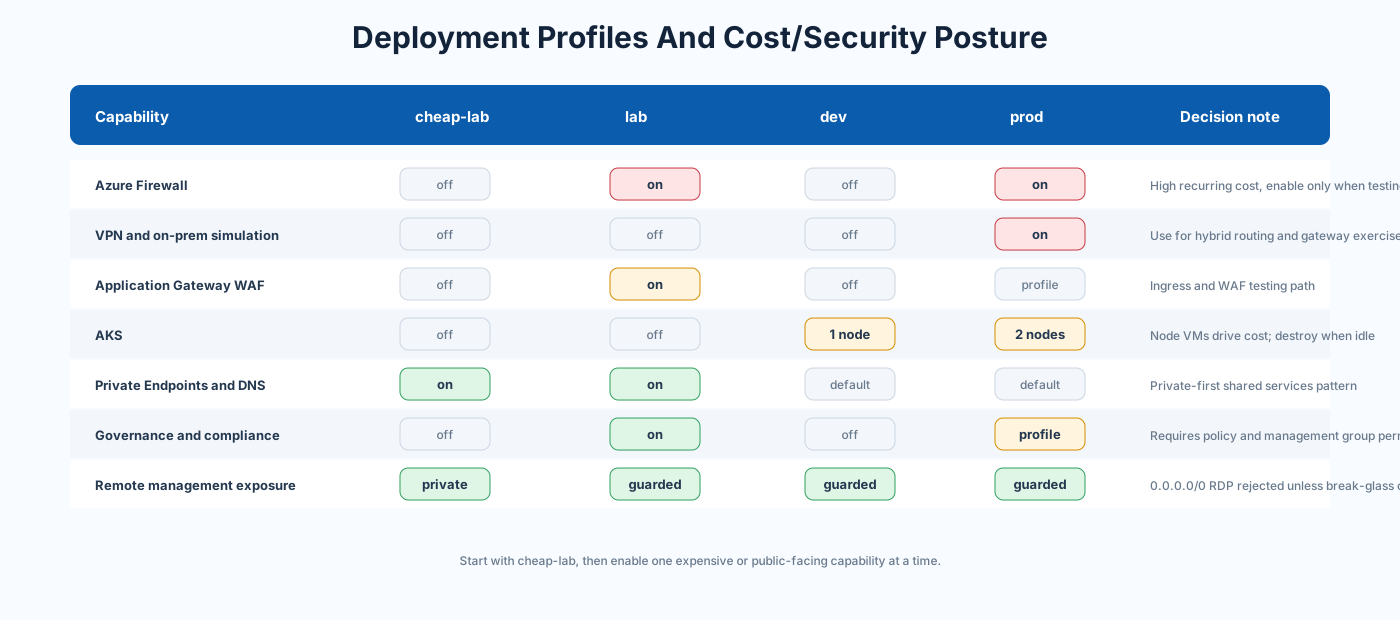
| Profile | Source | Use case | Cost posture | Security posture |
|---|---|---|---|---|
cheap-lab |
cheap-lab.tfvars | First learning deployment and low-cost testing | Lowest | Private-first, no public jumpbox IP, no RDP NAT |
lab |
lab.tfvars | Full feature lab and demos | Medium to high | Richer services, policy, governance, private endpoints |
dev |
dev.tfvars | Development and AKS experiments | Medium | Firewall and VPN off, dev workload and AKS on |
prod |
prod.tfvars | Production-like topology testing | Highest | Firewall, VPN, on-prem simulation, AKS, secondary DC |
Purpose: safe, low-cost learning profile.
Enabled:
- Hub, identity, management, shared, and workload prod topology
- Key Vault
- Storage
- Private DNS zones
- Private Endpoints
- Log Analytics
- Cost management
- Auto-shutdown
Disabled:
- Firewall
- VPN Gateway
- Application Gateway
- NAT Gateway
- Public Load Balancer
- RDP NAT rules
- Workload dev
- On-prem simulation
- Secondary DC
- AKS
- PaaS workload bundle
- Workbooks
- Connection Monitor
- Flow logs and Traffic Analytics
- Azure Policy
- Management groups
- Regulatory compliance
- Custom RBAC
- Scheduled start/stop automation
Important setting:
enable_jumpbox_public_ip   = false
allowed_jumpbox_source_ips = []
Source: environments/cheap-lab.tfvars
Purpose: richer lab profile for architecture demonstrations.
Enabled:
- Firewall
- Application Gateway WAF
- NAT Gateway
- Public Load Balancer
- Workload prod and dev
- Key Vault, Storage, SQL
- Private Endpoints and Private DNS
- App Service, Static Web App, Logic Apps, Event Grid, Service Bus, Cosmos DB
- Log Analytics, Workbooks, Connection Monitor
- Cost management
- Azure Policy
- Management groups
- Custom RBAC
- Regulatory compliance
- Auto-shutdown and scheduled start/stop
Disabled:
- VPN Gateway
- On-prem simulation
- Secondary DC
- AKS
- Container Apps
- Backup
- VNet flow logs and Traffic Analytics
Source: environments/lab.tfvars
Purpose: development profile with low operational cost and AKS testing.
Enabled:
- Workload dev
- AKS
- Auto-shutdown
- Reduced Log Analytics daily quota
Disabled:
- Firewall
- VPN Gateway
- On-prem simulation
- Workload prod
- Secondary DC
Source: environments/dev.tfvars
Purpose: production-like lab topology, not a production certification.
Enabled:
- Firewall
- VPN Gateway
- On-prem simulation
- Workload prod
- AKS
- Secondary DC
- Higher Log Analytics quota
Disabled:
- Workload dev
- Auto-shutdown
Source: environments/prod.tfvars
Use this rule:
| Need | Choose |
|---|---|
| First run, lowest cost, safe defaults | cheap-lab |
| Architecture demo with many services | lab |
| App or AKS development | dev |
| Firewall, VPN, on-prem, HA identity, AKS testing | prod |
- If this is your first deployment, choose
cheap-lab. - If you need to demonstrate governance, public ingress, and PaaS services, choose
lab. - If you need AKS development with lower network cost, choose
dev. - If you need VPN, simulated on-premises, secondary DC, and production-like AKS, choose
prod. - If you only need one feature from a richer profile, start with
cheap-laband enable that one toggle explicitly.
- Use separate state keys per profile:
<environment>.terraform.tfstate. - Use GitHub environments to separate approvals:
cheap-lab,lab,dev,prod, and<environment>-destroy. - Replace placeholder cost emails before enabling budgets.
- Do not reuse
terraform.tfvarsacross profiles without reviewing every toggle. - Validate local overrides against variables.tf.