Operations Runbooks
This page documents repeatable operational procedures for the lab.
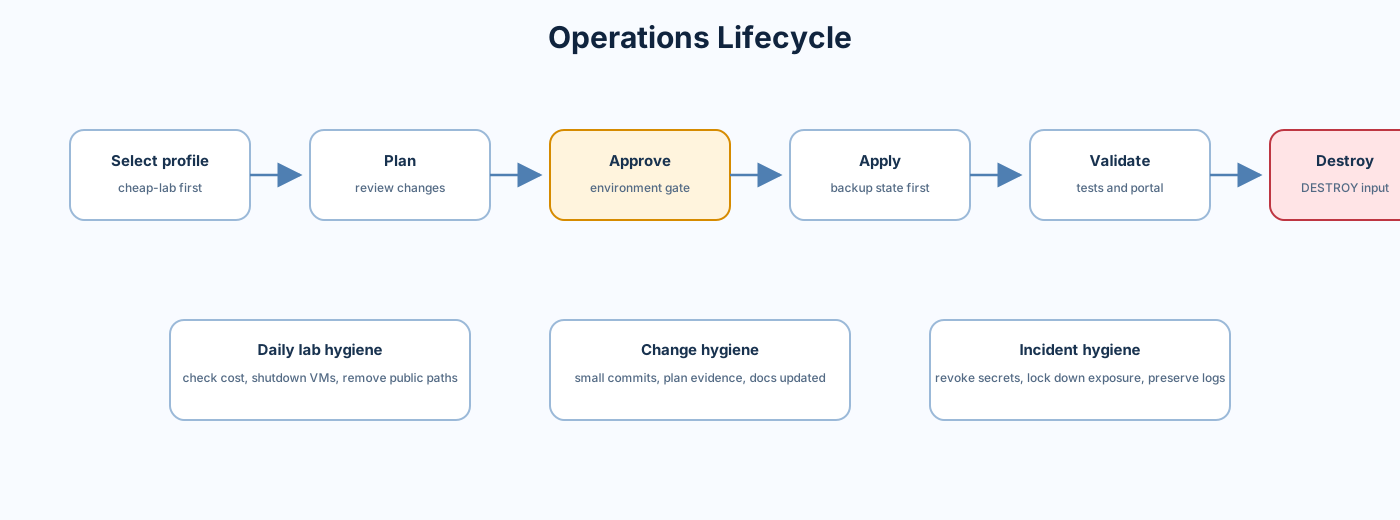
GitHub UI:
- Go to Terraform Pipeline.
- Select
Run workflow. - Choose
environment. - Choose
action = plan. - Run and review the plan summary.
GitHub CLI:
gh workflow run "Terraform Pipeline" --repo Jamonygr/azure-landing-zone-lab -f environment=cheap-lab -f action=planReview:
- Add/change/destroy counts.
- Security scan results.
- OPA policy results.
- Cost estimate.
- Plan artifact.
Only apply after plan review:
gh workflow run "Terraform Pipeline" --repo Jamonygr/azure-landing-zone-lab -f environment=cheap-lab -f action=applyExpected pipeline behavior:
- Reuses plan job output.
- Runs state backup before apply.
- Applies saved plan artifact.
- Generates resource inventory.
- Writes changelog and metrics.
Source:
- .github/actions/apply
- .github/actions/state-backup
- .github/actions/resource-inventory
- .github/actions/changelog
- .github/actions/metrics
Destroy is intentionally guarded:
gh workflow run "Terraform Pipeline" --repo Jamonygr/azure-landing-zone-lab -f environment=cheap-lab -f action=destroy -f destroy_confirm=DESTROYBefore destroy:
- Confirm this is the correct environment.
- Confirm state key is correct.
- Confirm no shared resources are being reused.
- Confirm state backup succeeded.
- Confirm GitHub environment approval is required.
Source:
- Create or update the Microsoft Entra application registration.
- Add federated credential for this repo and branch/environment pattern.
- Update GitHub secrets:
AZURE_CLIENT_IDAZURE_TENANT_IDAZURE_SUBSCRIPTION_ID
- Run
planforcheap-lab. - Confirm Azure login succeeds.
See CI/CD Pipeline and Remote State and Secrets.
- Copy an existing profile under environments.
- Set
environment,location,owner, and toggles. - Add the profile to
workflow_dispatch.inputs.environment.optionsin terraform.yml. - Add GitHub environment protection.
- Run format and validate.
- Run
plan. - Add documentation to Deployment Profiles.
For Firewall, VPN Gateway, Application Gateway, NAT Gateway, or AKS:
- Start from a working plan.
- Enable one toggle.
- Run plan.
- Review cost estimate.
- Review public IP changes.
- Apply only if needed.
- Destroy or disable after the lab exercise.
- Read the failed job summary.
- Check whether failure is format, validate, scan, policy, backend, or Azure authorization.
- If backend failed, verify
TF_STATE_RGandTF_STATE_SA. - If Azure login failed, verify OIDC federated credential subject and repo.
- If OPA failed, inspect the generated plan JSON and policy message.
- If Checkov/tfsec failed, confirm whether the finding is intentional or requires code change.
See Troubleshooting.
When apply fails:
- Stop additional apply attempts until the failure is understood.
- Save the workflow run URL and failed job logs.
- Check whether the failure happened before or after resource creation started.
- Run a fresh plan against the same profile.
- Compare planned changes to the failed apply.
- Fix Terraform, permissions, policy, or Azure quota issue.
- Apply only after the new plan is reviewed.
Do not manually delete Azure resources unless the Terraform state impact is understood.
Use this when an unexpected public IP, RDP rule, public SQL setting, or public storage access is found:
- Treat the issue as active until proven otherwise.
- Disable the exposure through Terraform or Azure emergency action.
- Preserve evidence: plan, Azure setting, timestamp, resource name.
- Rotate credentials if there is any chance of exposure.
- Add or update a regression check.
- Update Security Operations with lessons learned if the process changed.
Run weekly while resources exist:
az consumption usage list --top 20 -o tableReview:
- Firewall, VPN Gateway, App Gateway, NAT Gateway, AKS, SQL, and VM spend.
- Any resource group that should have been destroyed.
- Cost alert recipients and thresholds.
- Whether the lab should be destroyed or moved to
cheap-lab.
For every completed apply:
- Save workflow plan and apply URLs.
- Export resource group, VNet, public IP, private endpoint, and diagnostic setting summaries.
- Capture sanitized portal screenshots only where they add clarity.
- Attach evidence to the relevant GitHub issue or PR.
- Update wiki pages if observed behavior differs from documentation.
Primary diagram path in repo:

Wiki image reference:
The Wiki now stores its own copy under images/azure_architecture_with_icons_v2.png, so update the Wiki image when the repository diagram changes.
Next page: Troubleshooting