Remote State and Secrets
Terraform state and GitHub secrets are high-value assets. Treat them as sensitive even in a lab.
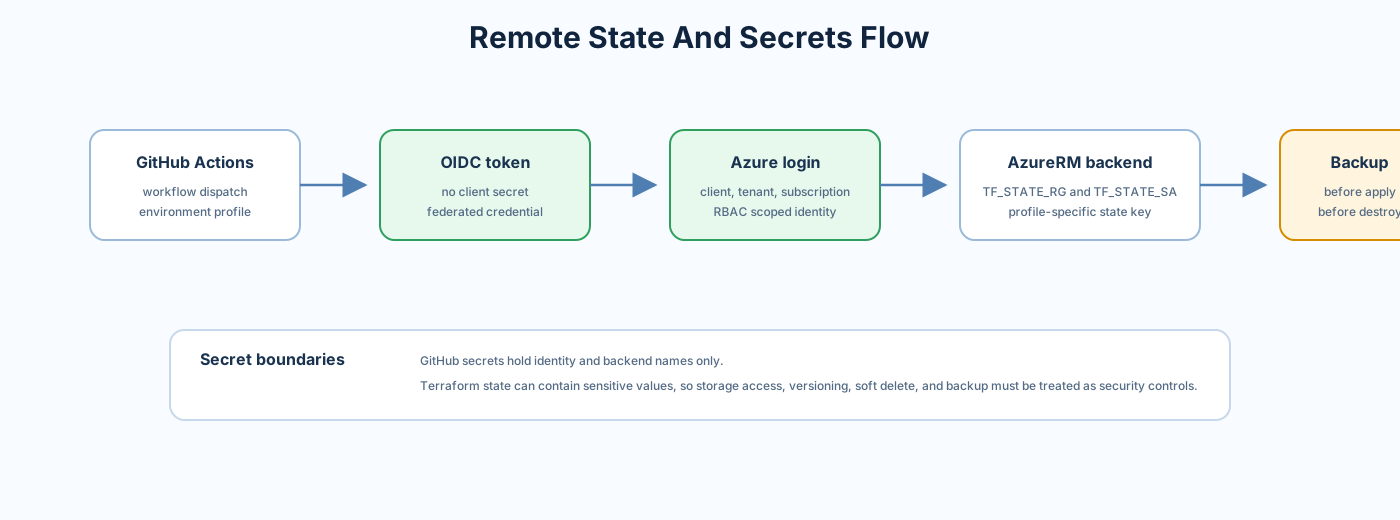
Source:
- backend.tf
- .github/actions/plan
- .github/actions/apply
- .github/actions/destroy
- .github/actions/state-backup
The repo uses the AzureRM backend pattern:
- Storage account holds state.
- Blob container holds tfstate files.
- Each environment uses a separate state key.
- Backend values are supplied in CI.
State key pattern:
<environment>.terraform.tfstate
Examples:
cheap-lab.terraform.tfstatelab.terraform.tfstatedev.terraform.tfstateprod.terraform.tfstate
| Secret | Purpose |
|---|---|
TF_STATE_RG |
Resource group containing the state storage account |
TF_STATE_SA |
State storage account name |
Authentication uses Azure OIDC secrets:
AZURE_CLIENT_IDAZURE_TENANT_IDAZURE_SUBSCRIPTION_ID
The state backup action runs before apply and destroy.
Source: .github/actions/state-backup
Behavior:
- Authenticates with Azure OIDC.
- Creates backup container before copying state.
- Skips first-run backup when the source state does not exist yet.
- Uses Azure RBAC login mode rather than embedding storage keys.
Recommended storage account controls:
- Disable public blob access.
- Require HTTPS.
- Enable versioning.
- Enable soft delete for blobs.
- Enable delete retention.
- Use RBAC rather than account keys where possible.
- Limit storage account network access.
- Consider private endpoint for state storage in production-like setups.
- Monitor state storage access logs.
Do not download, commit, paste, or attach state files to issues. If state must be inspected:
- Use a secure workstation.
- Limit access to the smallest group possible.
- Redact values before sharing observations.
- Prefer resource IDs and field names over raw state snippets.
- Delete local copies after the review.
Never put these in committed files:
- Azure client secrets
- Service principal passwords
- VM admin passwords
- SSH private keys
- Storage account keys
- SAS tokens
- Terraform state
-
.tfplanfiles containing sensitive values -
.terraformlocal provider/cache directories
CI scans:
For local validation without Azure state:
terraform init -backend=false
terraform validate
For a real local plan against remote state, configure backend values carefully and do not commit generated backend config files.
If a secret is committed:
- Revoke the secret immediately.
- Remove it from current code.
- Rotate related credentials.
- Review GitHub secret scan results.
- Consider repository history cleanup only after rotation.
- Review access logs for abuse.
Do not rely on deleting a commit as the only mitigation.