Quick Start
This page gets the lab ready without exposing management ports or spending more than needed.
Local tools:
- Terraform
>= 1.9.0, matching terraform.yml - Azure CLI for local authentication and state setup
- GitHub CLI for workflow dispatch and repository checks
- Go only if running the Terratest suite locally
Azure prerequisites:
- An Azure subscription where you can create resource groups, networking, monitoring, policy assignments, role assignments, and optional management groups.
- A remote Terraform state storage account or a plan to create one.
- A Microsoft Entra application registration with federated credentials for GitHub Actions OIDC.
Repository entry points:
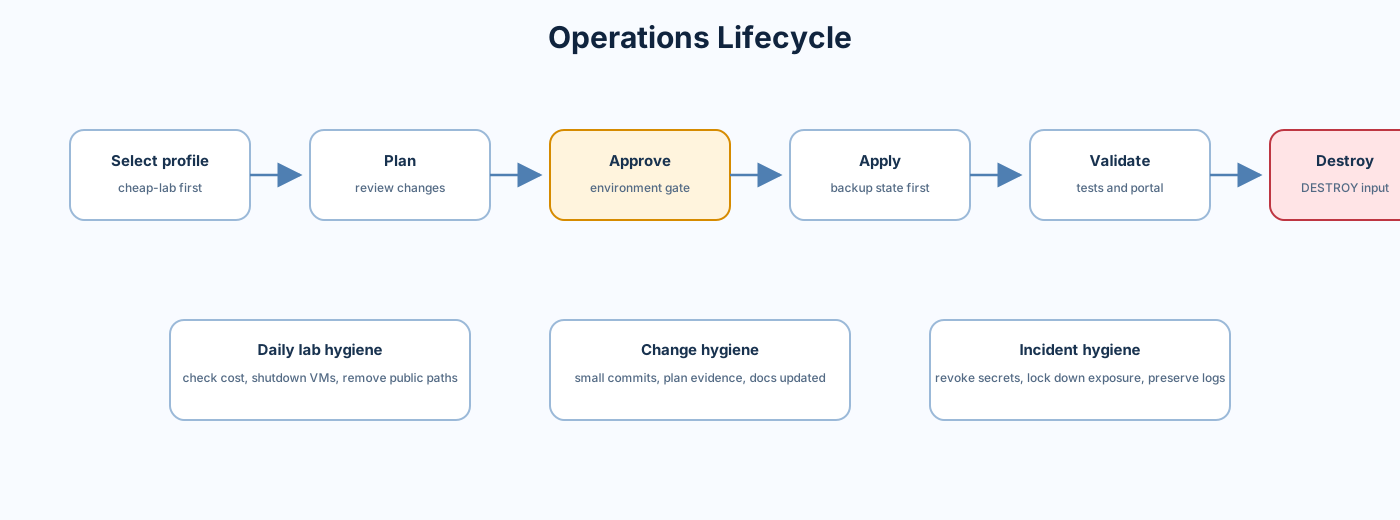
Use cheap-lab first. It keeps the topology realistic but turns off expensive edge and workload services.
See Deployment Profiles for the full profile matrix.
Source file: environments/cheap-lab.tfvars
Cheap lab defaults:
- No Azure Firewall
- No VPN Gateway
- No Application Gateway
- No NAT Gateway
- No public Load Balancer
- No public jumpbox IP
- No RDP NAT rules
- Log Analytics enabled with low quota
- Key Vault and Storage enabled
- SQL disabled by default
- Private DNS and Private Endpoints enabled
- Cost management enabled but requires a real email address
Before applying with cost management enabled, replace:
cost_alert_emails = ["replace-me@example.com"]with a real address.
These commands do not deploy Azure resources:
terraform fmt -check -recursive -diff
terraform init -backend=false
terraform validate -no-color
Run OPA policy checks after generating a plan JSON through the pipeline or locally with Conftest. Policy source:
The main workflow is Terraform Pipeline.
Plan cheap-lab from the GitHub UI:
- Open the workflow.
- Select
Run workflow. - Choose
environment = cheap-lab. - Choose
action = plan. - Leave
destroy_confirmempty.
Equivalent GitHub CLI command:
gh workflow run "Terraform Pipeline" --repo Jamonygr/azure-landing-zone-lab -f environment=cheap-lab -f action=planOnly apply after reviewing the plan output and cost estimate.
gh workflow run "Terraform Pipeline" --repo Jamonygr/azure-landing-zone-lab -f environment=cheap-lab -f action=applyApplies run through the GitHub environment named after the selected profile. Configure environment approval rules in repository settings before using production-like profiles.
Destroy requires the workflow input destroy_confirm = DESTROY.
gh workflow run "Terraform Pipeline" --repo Jamonygr/azure-landing-zone-lab -f environment=cheap-lab -f action=destroy -f destroy_confirm=DESTROYDestroy uses an environment named <environment>-destroy. Add a protection rule to require manual approval.
Use the root outputs in outputs.tf:
hub_vnet_ididentity_vnet_idmanagement_vnet_idlog_analytics_workspace_idshared_services_vnet_idstorage_account_nameworkload_prod_vnet_idworkload_dev_vnet_idaks_cluster_namelb_web_server_ips
Then validate:
- VNets exist in the expected resource groups.
- Hub-spoke peerings exist.
- No public RDP is present unless deliberately enabled.
- Log Analytics workspace receives diagnostics.
- Private Endpoint DNS resolves from peered VNets.
- Cost budget and alerts are configured when cost management is enabled.