Repository navigation
Algorithms
Write algorithms using the pseudocode.js / LaTeX algorithmic grammar. The grammar is bundled; no Pseudocode plugin or external rendering service is required. Choose either wrapper below. They share one renderer, an independent algorithm counter, cross-file references and PDF output.
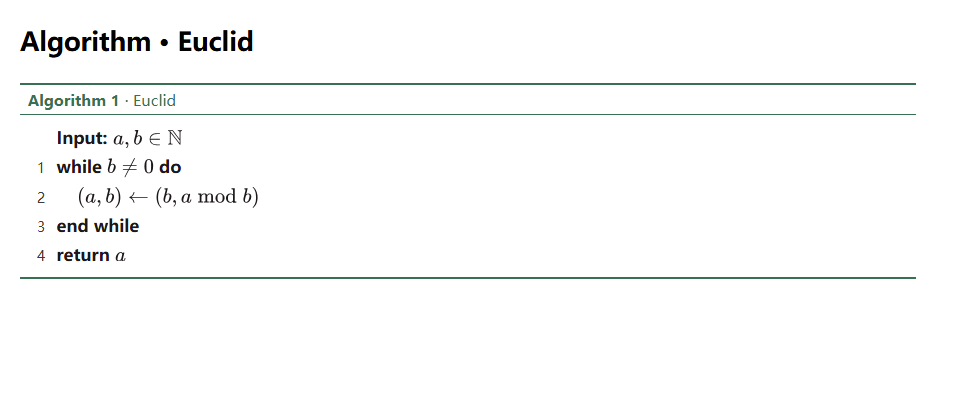
> [!algorithm] Euclid
> \INPUT $a,b\in\mathbb{N}$
> \WHILE{$b\ne 0$}
>   \STATE $(a,b)\gets(b,a\bmod b)$
> \ENDWHILE
> \RETURN $a$

^alg-euclid

See [[#^alg-euclid]].
The callout title becomes the caption; the algorithmic wrapper is implicit. Preserve every > prefix. Foldable [!algorithm]+ and [!algorithm]- retain native Obsidian folding. The body is pseudocode, rather than ordinary Markdown: use $...$ or \(...\) for formulas and \textbf{...} for bold text. A nonempty callout title overrides a caption inside a supplied full environment.
```algorithm
\begin{algorithm}
\caption{Euclid}
\begin{algorithmic}
\INPUT $a,b\in\mathbb{N}$
\WHILE{$b\ne 0$}
  \STATE $(a,b)\gets(b,a\bmod b)$
\ENDWHILE
\RETURN $a$
\end{algorithmic}
\end{algorithm}
```

^alg-euclid

See [[#^alg-euclid]].
Use distinct block IDs when placing both examples in one note. To migrate from the optional Pseudocode plugin, change its pseudo fence to algorithm; existing pseudo blocks remain owned by that plugin. This implements the pseudocode.js grammar, rather than every command from algorithm2e or arbitrary LaTeX packages. Each block contains one algorithmic environment and at most one caption. A bare algorithmic environment or its body is also accepted.
| Purpose | Commands |
|---|---|
| Inputs and outputs |
\INPUT, \OUTPUT, \REQUIRE, \ENSURE
|
| Statements and comments |
\STATE, \RETURN, \PRINT, \COMMENT{...}
|
| Conditionals |
\IF{...}, \ELIF{...} / \ELSIF{...} / \ELSEIF{...}, \ELSE, \ENDIF
|
| Loops |
\FOR{...} / \FORALL{...} … \ENDFOR, \WHILE{...} … \ENDWHILE, \REPEAT … \UNTIL{...}
|
| Functions |
\FUNCTION{name}{args} … \ENDFUNCTION, \PROCEDURE{name}{args} … \ENDPROCEDURE, \CALL{name}{args}
|
| Other controls |
\BREAK, \CONTINUE, \UPON{...} … \ENDUPON
|
| Inline logic |
\AND, \OR, \NOT, \TRUE, \FALSE, \TO, \DOWNTO
|
Commands are case-insensitive, except the usual case-sensitive LaTeX font sizes. Put input/output declarations before the control-flow body. Use the Insert academic environment command and choose Algorithm (callout) or Algorithm (code block) for a ready-to-edit template and unique ID.
- Automatically number algorithms follows the current section/whole-note scope; theorems, equations and figures have separate counters. Book export re-numbers algorithms with the selected chapter scheme and resolves links across selected chapters.
-
Show algorithm line numbers is the master switch for every algorithm, independent of caption numbering. Turning it off removes all line numbers and their gutter, even with
lines=trueor\begin{algorithmic}[1]. With it on,[!algorithm|lines=false]or\begin{algorithmic}[0]disables numbers for one block;lines=true/[1]follows the enabled master switch. Input/output declarations and comments do not consume a line number.[!algorithm|*]suppresses the caption number;[!algorithm|A]supplies a manual number. -
Algorithm reference format defaults to
alg {number}and supports the same placeholders as theorem references. References use[[#^alg-euclid]]or[[Other note#^alg-euclid]]. - Environments → Algorithm changes the rules and the complete caption, including the algorithm title. Body/formula text stays neutral, keywords are bold, and line numbers/comments use muted text. Traditional heavy–thin–heavy rules match the three-line table style.
- Reading view and inactive Live Preview callouts render algorithms. Native editing remains available when entering the source/title; no note text is rewritten. Algorithm rows are excluded from prose KP and first-line indentation.
- Desktop PDF export keeps short algorithms together; blocks exceeding the printable height split between complete rows. HTML snapshots include static formulas and styles. Syntax errors are displayed locally and stop export, avoiding a silently incomplete PDF. Formula layout remains subject to the available page width.