Repository navigation
Mathematical environments ZH
## 连续映射

> [!def] 连续性
> 若每个开集的原像都是开集,则称映射连续。

^def-continuity

> [!thm] 复合映射
> 两个连续映射的复合仍连续。

^thm-composition

根据 [[#^def-continuity]] 可以证明 [[#^thm-composition]]。

> [!proof]
> 逐次取原像即可。
默认显示 Definition 1.1 · 连续性 和 Theorem 1.1 · 复合映射;链接显示 def 1.1、thm 1.1。不同类型默认分别计数。点击引用跳转到目标。
| 环境 | 支持的类型名 | 自动编号 |
|---|---|---|
| 定义 |
def、definition
|
是 |
| 定理 |
thm、theorem
|
是 |
| 引理 |
lem、lemma
|
是 |
| 命题 |
prop、proposition、prp
|
是 |
| 推论 |
cor、corollary
|
是 |
| 断言 |
claim、clm
|
是 |
| 例子 |
example、ex、exa、exm
|
是 |
| 公理 |
axiom、axm
|
是 |
| 假设 |
assumption、asm
|
是 |
| 习题 |
exercise、exr
|
是 |
| 猜想 |
conjecture、cnj
|
是 |
| 假说 |
hypothesis、hyp
|
是 |
| 证明 |
proof、pf
|
否 |
| 注记 |
remark、rem、rmk
|
否 |
| 解答 |
solution、sol
|
否 |
> [!thm]- 标题 为默认折叠,> [!thm]+ 标题 为默认展开。嵌套框每层增加一个 >;导出时展开折叠内容。
手写编号:> [!thm|A.1] 标题。不编号:> [!thm|*] 标题;|- 和空元数据 | 也表示不编号。省略元数据或 |auto 表示自动编号。自动计数避开同一计数范围内已有的相同手写编号。
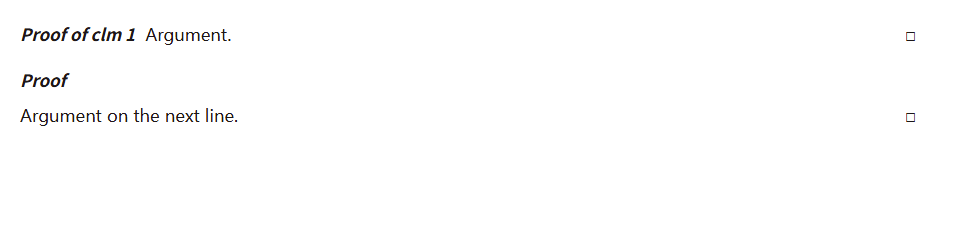
使用 proof 环境书写不编号的证明。起始行不写标题时,斜体 Proof 独占一行,正文从下一行开始。证明末尾自动出现空心方框 □,无需手写结束符号。有自定义标题或引用时可以与首段并排;在起始行后加一个空的 > 行,也可以让正文另起一行。
> [!proof]
> 设 $U$ 为开集。由于 $f$ 和 $g$ 连续,
> $f^{-1}(U)$ 和 $g^{-1}(f^{-1}(U))$ 都是开集。
>
> 因而复合映射 $f \circ g$ 连续。
证明先前声明的 Theorem、Lemma、Claim 等环境时,把对应块引用直接放在标记后:
> [!proof][[第一章#^claim-a]]
> 这里填写证明。
会显示 Proof of clm 1.1,引用可以点击跳转。> [!proof] [[#^thm-a]] 也支持。显示随引用缩写、手写别名和合订本章号变化;引用目标请使用数学环境的块 ID。
使用 remark 环境书写注记。Remark 标题采用当前色板主色的明亮同色系,正文使用普通笔记文字颜色,没有外框、底色或结束方框。
> [!remark]
> 这个论证只用到了开集的原像,适用于一般拓扑空间。
两种环境的正文始终使用普通文字颜色。pf 是 proof 的别名;rem、rmk 是 remark 的别名。可用 > [!proof] 复合映射 添加标题,也支持 +/- 折叠写法、嵌套和多段内容。以列表或独立公式开头时,标题单独占一行;以它们结尾的证明会在最后另起一行显示方框。长证明导出 PDF 时可跨页,方框只出现在整个证明末尾。
## 恒等式

$$
a^2+b^2=c^2
$$

^eq-example

由 [[#^eq-example]] 得到结论。默认仅为全库中被引用的独立 $$...$$ 公式自动编号,未引用的公式不占号。可设为全部编号或关闭自动编号;行内公式不编号。
保留手写 \tag{A};没有手写编号时,\notag / \nonumber 阻止自动编号。一个公式块对应一个自动编号。需要逐行引用时拆成不同块。一个块含多个手写 \tag 时保留原式,不猜测整块引用编号。