Repository navigation
Sync through iCloud
Settings → General → Sync through iCloud (new in 0.6.5, off by default) keeps your settings, jargon list, custom commands and the words pinyin learned the same on all your Macs, through your own iCloud Drive: nothing else to sign in to, and nothing goes through AllInOneIME's servers. It needs iCloud Drive (System Settings → Apple Account → iCloud); without it the switch stays off and says to turn iCloud Drive on there, with a button that opens that pane. Your API keys and passwords can sync too, through iCloud Keychain, but only if you turn that on: see API keys and passwords.
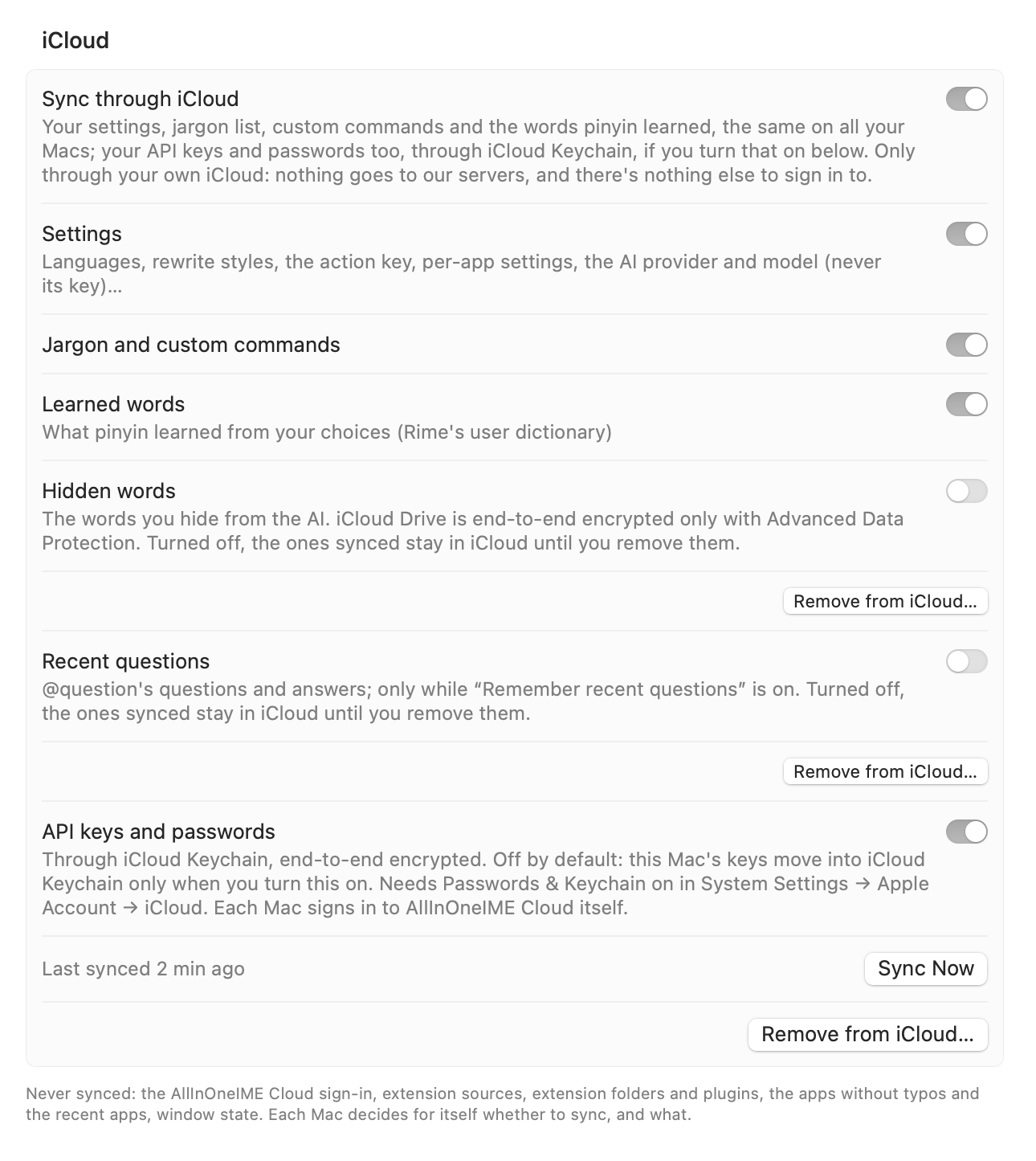
Each part has its own switch under "Sync through iCloud":
| Switch | What syncs | Default |
|---|---|---|
| Settings | The settings in config.json: languages, rewrite styles, the action key, typing out, per-app settings, hiding sensitive information (its switches), the AI provider and model (never a key) … |
On |
| Jargon and custom commands | Your jargon list and customCommands (snippets too) |
On |
| Learned words | What pinyin learned from your choices (Rime's user dictionary, through librime's own user-dictionary sync). Your own Rime files, such as custom phrases, stay on the Mac | On |
| Hidden words | The words you hide from the AI, set in "Also hide these words" (iCloud Drive is end-to-end encrypted only with Advanced Data Protection) | Off |
| Recent questions |
@question's recent questions and answers (while "Remember recent questions" is on) |
Off |
| API keys and passwords | Your API keys and extensions' passwords, through iCloud Keychain, which is always end-to-end encrypted (needs Passwords & Keychain on in System Settings → Apple Account → iCloud) | Off |
In the config: iCloudSync (enabled, settings, jargon, learnedWords, hiddenWords, recentQuestions, keys).
Keys go through iCloud Keychain, never through iCloud Drive. With "API keys and passwords" on (while sync is on), a key saved or replaced on one Mac is there on the others.
- Off by default. Turning on Sync through iCloud alone moves no key: nothing moves until you turn this switch on. With it off, keys stay in the login keychain, as before.
- It needs Passwords & Keychain turned on in System Settings → Apple Account → iCloud. iCloud Keychain is always end-to-end encrypted.
- Turning it on moves this Mac's keys from the login keychain into iCloud Keychain; macOS then no longer asks for your login password for them after an update. Turning it off copies them back into the login keychain and leaves them in iCloud Keychain for your other Macs.
- The AllInOneIME Cloud sign-in never syncs. It stays in each Mac's login keychain: sign in on each Mac.
- Each key still goes only to the host it was saved for.
- When two Macs have different keys, the one saved last wins, by when it was saved, which every copy keeps. The other isn't deleted: it's kept in its Mac's login keychain as a replaced copy (under "AllInOneIME replaced API key", its name ending in "(replaced)"), which is never used. A key that moves into iCloud Keychain keeps one too, in case another Mac's different key arrives over it. There is one replaced copy per key on each Mac: a later one replaces it.
| Remove… on a Mac with "API keys and passwords" | What it removes | The question says |
|---|---|---|
| On | The key on every Mac that syncs keys, and this Mac's replaced copy | "all your Macs" |
| Off | The key and its replaced copy, from this Mac only; the copy in iCloud Keychain stays for your other Macs | "this Mac" |
What Remove… can't reach:
- A Mac with "API keys and passwords" off, or one still on 0.6.4, keeps its own copy, and puts it back if key sync is turned on there later (the question says so too).
- A key that macOS wouldn't let AllInOneIME read without your login password when it was to move stays in that Mac's login keychain until it's next used: if macOS then asks and you allow it, it's used again, even if it was removed on another Mac.
- The AllInOneIME Cloud sign-in: each Mac signs in itself.
- Keys, tokens and passwords never go into iCloud Drive. API keys,
@note's Notion token and extension passwords stay in each Mac's login keychain unless you turn on API keys and passwords, which syncs them through iCloud Keychain. - AWS credentials (in
~/.aws). - Extension sources (they run code: each Mac decides), extension folders and plugins (paths on each Mac).
- Where
@notesaves (notesin the config). Its Notion token is in the keychain, and goes through iCloud Keychain only with "API keys and passwords" on. - The apps without typos and the recent apps, window state.
- The sync switches themselves: each Mac has its own.
Into your iCloud Drive, in the folder AllInOneIME (~/Library/Mobile Documents/com~apple~CloudDocs/AllInOneIME/ on
the Mac), which Apple syncs to your other Macs:
| File | What it holds |
|---|---|
settings.json |
The synced settings, each with when it changed and on which Mac (a random id per Mac); your custom commands, also those that run a program (they still run only when you pick them); the hidden words, if you sync them |
jargon.txt |
Your jargon list |
rime/ |
Each Mac's snapshot of what pinyin learned; nothing else of the Rime folder |
questions.json |
Recent questions and answers, if you sync them (readable only by your user account) |
This Mac's own record of what it synced is in ~/Library/Application Support/AllInOneIME/iCloudSync/state.json. See
also Privacy.
- When the input method starts, about 5 s after you change something, when iCloud brings a change from another Mac (and every 5 minutes), and when you click Sync Now.
- The learned words: when the input method starts, every 30 minutes (after a pause in typing) and on Sync Now.
- The status line under the switch says "Last synced 2 min ago", "Waiting for iCloud…" or the error.
Per setting, the newest change wins. A list (your custom commands, the rewrite styles) is one value, per-app settings go app by app, and removing an app's settings is a change too.
- Turning it on, a Mac takes the settings in iCloud already; its own fill in only what isn't there yet. Its collections are merged instead: recent questions (both lists, newest first, a question once), hidden words, custom commands (by name; iCloud's on a clash) and the jargon list's lines. The same happens when a switch under it is turned on for the first time. A setting you save in Settings while a Mac is turning sync on is kept, and goes to the other Macs.
- Deleting: a custom command or hidden word you take out on one Mac stays out on the others, also after more edits on top. (For the cases where one comes back once, see Known limits.)
- Turning it back on after it was off: what iCloud changed meanwhile comes in (also where this Mac changed it too), what only this Mac changed goes up, and a collection it added to meanwhile is merged, never dropped.
- Recent questions of two Macs are merged. "Clear" on one Mac clears every question asked before it on the others too. Turning "Remember recent questions" off deletes them on that Mac only; turned on again, the other Macs' questions come back to it.
- In Settings: saving a custom command whose name another Mac took meanwhile keeps the editor open and says the name is taken, so your command isn't lost. Editing the hidden words doesn't bring back a word another Mac deleted while the field showed it.
- Turning it off stops syncing and leaves everything as it is, on this Mac and in iCloud.
-
Remove from iCloud… (it asks first) moves the
AllInOneIMEfolder in iCloud Drive to the Trash and turns sync off on this Mac. - Turning off Hidden words or Recent questions leaves what was synced in iCloud: Remove from iCloud… under each of those switches (it asks first) takes them out. Other Macs keep theirs, and one that still syncs them puts its own back.
- "Sync through iCloud" in a sentence turns sync on or off there; which parts sync (hidden words, recent questions and API keys and passwords included) is chosen only in Settings → General. Assistant never touches a key.
- Check for problems checks it: on or off, when it last synced, the last error, iCloud Drive not available, and settings from iCloud not used here. See Settings and Configuration → Assistant.
- Update every Mac that syncs through iCloud: 0.6.4 can't read the custom commands once one is a snippet, and if you then add, edit or delete a custom command on a 0.6.4 Mac, its list replaces the one in iCloud and the snippets are gone from your other Macs too.
- A deleted item can come back once. A custom command or hidden word you deleted comes back once, and deleting it again sticks, when it came from the first Mac to turn sync on and that Mac was asleep while another Mac merged its list in, when it was deleted on a Mac still on 0.6.4, or when a Mac still on 0.6.4 brings it back.
- A value this Mac can't use isn't applied: a provider without a key here, an AWS profile it doesn't have, a value out of range. The status line and Settings → Assistant's Check for problems say which.
- Learned words lag behind: they sync every 30 minutes, after a pause in typing (or on Sync Now), not seconds after a change.
- A Clear made while a Mac doesn't sync the recent questions (or doesn't remember them) is that Mac's alone.
-
Files iCloud hasn't downloaded yet are waited for, never taken as empty. A
settings.jsonthat can't be read is set aside assettings (unreadable …).json, never overwritten. Settings written by a newer version are kept as they are. - Hidden words (iCloud Drive is end-to-end encrypted only with Advanced Data Protection) and Recent questions are off by default.
-
Synced keys aren't seen by older versions: while keys sync,
allinoneime-cliand versions before 0.6.5 don't see them in the keychain. Keys in your shell (ANTHROPIC_API_KEYand the like) still work. - A removed key can come back from a Mac that had key sync off or was still on 0.6.4, or from a Mac where macOS wouldn't let the key move without your login password; see Removing a key.
- A build without the provisioning profile (a development build) keeps keys in the login keychain and can't sync them: the switch's row says so.